


Key Takeaways:
A structured mobile app maintenance checklist ensures long-term performance, security, and user retention after launch.
Regular monitoring, timely bug fixes, and OS compatibility checks prevent major failures and expensive emergency fixes.
Continuous performance optimization, security updates, and device/OS testing keep apps stable and compliant.
Regular design refinements and feature enhancements help meet evolving user expectations and boost engagement.
Allocating 15–20% of initial development cost annually helps manage performance, security, and scalability efficiently.
With expert teams and a structured maintenance approach, JPLoft helps businesses keep apps secure, scalable, and high-performing long term.
Your app may be live, but the real work starts after launch. Performance issues, security risks, OS updates, and changing user expectations can quickly impact your app’s value.
That’s why a structured mobile app maintenance checklist is essential for long-term success. Instead of reacting to crashes, bugs, or poor reviews, a proactive maintenance approach ensures consistent performance, strong security, and a seamless user experience.
Whether you’re managing a simple mobile application or a feature-rich platform, following the right app maintenance checklist helps you identify issues early, optimize functionality, and prepare your app for future growth.
In this blog, we’ll discuss the critical checklist that you need to understand, and should update, or scale your mobile app with confidence.
Why Mobile App Maintenance Is Crucial After Launch?
Launching an app is only the first milestone. To ensure long-term success, regular maintenance is essential. Without proper upkeep, even high-quality apps can face performance issues, security risks, and user drop-offs.
Here’s why maintain a mobile app using a structured approach:
-
Ensures consistent performance: A well-defined mobile app maintenance checklist helps identify performance bottlenecks early, keeping load times fast and functionality smooth.
-
Protects app security and user data: Following a reliable checklist ensures timely security patches, vulnerability fixes, and compliance with data protection standards.
-
Keeps the app compatible with OS updates: An app maintenance checklist for mobile apps helps your app stay compatible with frequent Android and iOS updates, preventing crashes and feature breakdowns.
-
Improves user experience and retention: Regular updates guided by a mobile app maintenance guide help refine UI/UX, fix bugs, and meet evolving user expectations.
-
Reduces long-term development costs: Proactive maintenance minimizes major failures and costly emergency fixes by addressing issues early.
-
Supports scalability and business growth: Using a structured maintenance approach ensures your app can handle growing user traffic and new feature integrations smoothly.
By following a consistent mobile app maintenance strategy, businesses can keep their apps reliable, secure, and competitive well after launch.

Mobile App Maintenance Checklist You Must Follow
A mobile app’s success doesn’t depend only on how well it’s built, but on how well it’s maintained over time. User expectations, operating systems, security standards, and technologies keep evolving, and your app must evolve with them.
This is where a mobile app maintenance checklist becomes the backbone of long-term performance, stability, and growth.
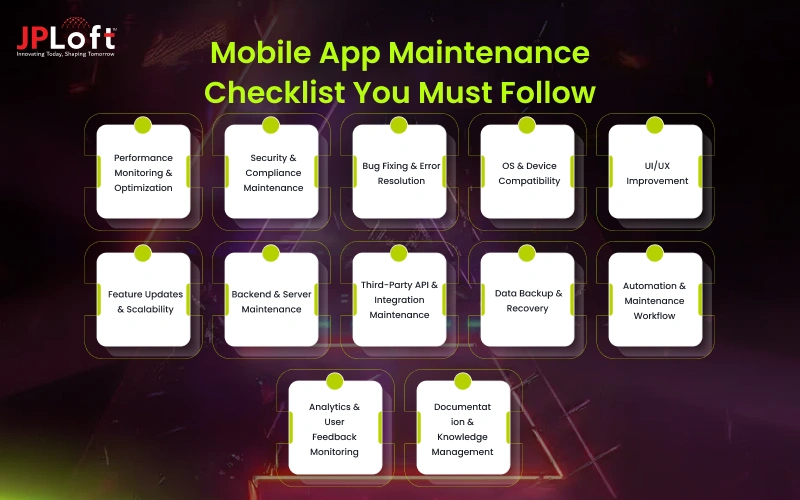
To make this checklist easier to understand, here are the 12 essential mobile app maintenance areas you should never overlook.
1. Performance Monitoring & Optimization
Performance issues are one of the fastest ways to lose users. A reliable app maintenance checklist for mobile apps should always start with performance tracking.
Key points to include:
-
Monitor app load time, response time, and crash rates regularly
-
Track CPU, memory, and battery consumption
-
Identify performance bottlenecks across devices and OS versions
-
Optimize APIs, database queries, and background processes
Using analytics and monitoring tools helps identify hidden issues before users complain. Many teams rely on top app maintenance tools to automate performance tracking and reporting, making this process more efficient and data-driven.
2. Security & Compliance Maintenance
Security is not optional, it’s a continuous responsibility. A robust checklist must prioritize protecting user data and meeting compliance standards.
Checklist items include:
-
Regular security patch updates
-
Vulnerability testing and penetration testing
-
Secure authentication and authorization mechanisms
-
Compliance with app store policies and regional data regulations
Focusing on security audits in app maintenance helps prevent data breaches, legal issues, and loss of user trust. Regular audits ensure your app remains compliant as regulations and platform guidelines change.
3. Bug Fixing & Error Resolution
No app is bug-free, but unresolved bugs can severely impact user experience. A checklist for mobile app maintenance should include a clear bug management process.
Important steps:
-
Monitor crash reports and error logs
-
Prioritize bugs based on severity and user impact
-
Fix critical issues quickly to avoid negative reviews
-
Validate fixes through testing before release
A proactive bug-fixing approach ensures stability and keeps your app store ratings healthy.
4. OS & Device Compatibility
With frequent OS updates and new devices launching every year, compatibility issues are common. A reliable checklist for app maintenance must address this challenge.
Key areas to cover:
-
Test the app on the latest Android and iOS versions
-
Ensure compatibility across different screen sizes and resolutions
-
Fix deprecated API usage
-
Update permissions and system-level integrations
An Android app maintenance checklist focuses on handling device fragmentation, while an iOS checklist ensures smooth performance across Apple’s evolving ecosystem and helps teams effectively maintain your iOS app after updates.
5. UI/UX Improvement
User experience drives app retention. Using a UI/UX design service ensures your app stays modern, intuitive, and engaging.
Checklist items include:
-
Review user feedback and behavior analytics
-
Improve navigation flow and screen layouts
-
Update visual elements to match modern design standards
-
Fix usability issues affecting accessibility
Small UI/UX updates guided by a mobile app maintenance checklist guide can significantly improve engagement and retention without requiring major redevelopment.
6. Feature Updates & Scalability
User needs evolve, and so should your app. Feature enhancement is a key part of an adaptive mobile app maintenance checklist.
This checklist should include:
-
Analyzing feature usage and drop-off points
-
Enhancing existing features based on user demand
-
Adding new functionalities strategically
-
Preparing the app infrastructure for traffic growth
Scalability planning often involves cloud based mobile app maintenance, which allows apps to handle increased users and data without performance degradation.
7. Backend & Server Maintenance
Frontend updates alone are not enough. A complete mobile app maintenance checklist must include backend and server-side upkeep.
Important tasks:
-
Monitor server uptime and response time
-
Optimize databases and server architecture
-
Update backend frameworks and libraries
-
Manage API performance and reliability
Backend maintenance ensures smooth data flow, fast performance, and uninterrupted service availability.
8. Third-Party API & Integration Maintenance
Most modern apps rely on third-party services for payments, maps, analytics, or notifications. A mobile app maintenance checklist should account for these dependencies.
Checklist points:
-
Monitor third-party API performance and changes
-
Update integrations when providers release new versions
-
Replace deprecated or unreliable services
-
Ensure third-party services meet security standards
Neglecting API maintenance can cause unexpected app failures and feature breakdowns, so it’s wise to hire dedicated developers to manage integrations effectively.
9. Data Backup & Recovery
Data loss can be catastrophic for both users and businesses. A structured mobile app compliance maintenance checklist includes backup and recovery planning.
Key considerations:
-
Schedule regular automated backups
-
Secure backup storage
-
Test data recovery processes periodically
-
Plan for disaster recovery scenarios
This ensures business continuity even during technical failures or security incidents.
10. Automation & Maintenance Workflow
Manual maintenance can be time-consuming and error-prone. Modern teams increasingly rely on automation in app maintenance to streamline repetitive tasks.
Checklist items include:
-
Automated testing for performance and compatibility
-
Continuous integration and deployment (CI/CD) pipelines
-
Automated monitoring and alert systems
-
Regular updates to automation scripts and tools
Automation reduces human error and speeds up maintenance cycles, making your maintenance strategy more efficient.
11. Analytics & User Feedback Monitoring
Understanding user behavior and app performance through analytics is essential for continuous improvement.
A mobile app maintenance checklist guide should include:
-
Track user engagement, session duration, and feature usage
-
Monitor app reviews and ratings for feedback
-
Analyze crash and error patterns for recurring issues
-
Use insights to prioritize updates and improvements
Monitoring analytics helps you make data-driven decisions and keeps your app aligned with user expectations.
12. Documentation & Knowledge Management
Proper documentation ensures that maintenance is organized, efficient, and scalable.
Key points include:
-
Maintain detailed records of app updates, bug fixes, and backend changes
-
Document API integrations, libraries, and third-party services
-
Keep a version history of UI/UX changes and feature enhancements
-
Ensure team members can quickly understand and manage the app
A well-documented checklist for app maintenance improves team collaboration, reduces errors, and ensures consistency across updates.
Following a checklist for mobile app maintenance is not a one-time task but an ongoing process. This can help businesses stay proactive rather than reactive, ensuring apps remain secure, high-performing, and user-friendly.
By implementing a complete checklist, you create a sustainable foundation that supports growth, scalability, and long-term success in a highly competitive app market.
Cost of Mobile App Maintenance
Understanding the mobile app maintenance cost is crucial for budgeting and planning a long-term app strategy. Maintenance costs vary depending on factors like app complexity, platform, number of updates, backend infrastructure, and third-party integrations.
Typically, businesses should allocate 15-20% of the initial development cost annually for maintenance.
Regular upkeep ensures performance optimization, security updates, and smooth functionality, ultimately saving significant costs from unexpected failures or urgent fixes.
Let’s break down the cost in detail.
|
Type of Maintenance |
Estimated Cost (Per Year) |
Notes |
|
Performance & Bug Fixes |
$1,000 – $4,000 |
Depends on app size and complexity |
|
Security Updates & Compliance |
$500 – $2,500 |
Critical for data protection |
|
OS & Device Compatibility |
$1,000 – $3,500 |
For Android & iOS updates |
|
Feature Enhancements & UI/UX Updates |
$2,000 – $5,000 |
Based on design and functionality |
|
Backend & Server Maintenance |
$1,500 – $4,000 |
Includes cloud services and API upkeep |
|
Total Annual Cost |
$6,000 – $19,000+ |
Average for small to medium apps |
Investing in maintenance is not just an expense, it’s a way to safeguard your app’s performance, security, and user satisfaction.
A proper checklist ensures every critical aspect is covered, making your app scalable and reliable for the long term.

Why Choose JPLoft as Your Mobile App Maintenance Partner?
Maintaining a mobile app requires more than occasional updates, it demands expertise, timely interventions, and a proactive approach to performance, security, and user experience.
JPLoft’s mobile app maintenance services provide comprehensive, end-to-end support, ensuring that your app stays fast, secure, and highly functional at all times. Our team of dedicated developers and maintenance specialists follows a well-structured and strategic approach, covering every critical aspect of app upkeep.
From routine bug fixes, OS and device compatibility checks, to UI/UX improvements and backend optimization, we ensure that your app remains reliable, user-friendly, and aligned with the latest trends and technology standards.
Choosing JPLoft as your partner guarantees expert-driven guidance, faster issue resolution, and a maintenance process designed to maximize your app’s performance, security, and overall business value.
Final Wrap-Up
A well-maintained mobile app is key to performance, security, and user retention. Following a mobile app maintenance checklist helps businesses proactively address issues, from performance monitoring and bug fixes to security updates, UI/UX improvements, and backend upkeep.
A structured checklist keeps teams organized, ensures consistency, and helps the app adapt to OS updates, device variations, and evolving user expectations. By investing in proper maintenance, businesses can enhance user satisfaction, reduce downtime, and safeguard their app’s long-term success.
Ultimately, a comprehensive checklist guide is a strategic tool that supports scalability, boosts engagement, and maximizes ROI in a competitive app market.
FAQs
A mobile app maintenance checklist is a structured list of tasks to regularly monitor, update, and optimize your app for performance, security, and user experience.
Regular maintenance prevents crashes, security issues, and poor user experience, ensuring your app remains competitive and reliable over time.
A structured checklist helps identify issues proactively, optimize code, fix bugs, update security patches, and enhance UI/UX, resulting in smoother performance and better user retention.
It’s recommended to review your app at least monthly, with major updates scheduled annually, depending on app complexity and user base.
Costs depend on app complexity, platform (iOS/Android), backend infrastructure, feature updates, security measures, and third-party integrations.

Yashwant Sharma is the CTO of JPLoft, with 18+ years of experience in software engineering, solution architecture, and digital innovation. His expertise spans scalable application development, AI-powered systems, RAG solutions, cross-platform development, software maintenance, and emerging mobility technologies such as EV and EV-charging platforms. He works across complex technical environments to help businesses build secure, maintainable, and high-performing digital products for industries including education, fitness, aviation, and healthcare.


Share this blog