


Key Takeaways:
Understanding the handyman app development duration helps set realistic expectations for design, coding, and testing phases.
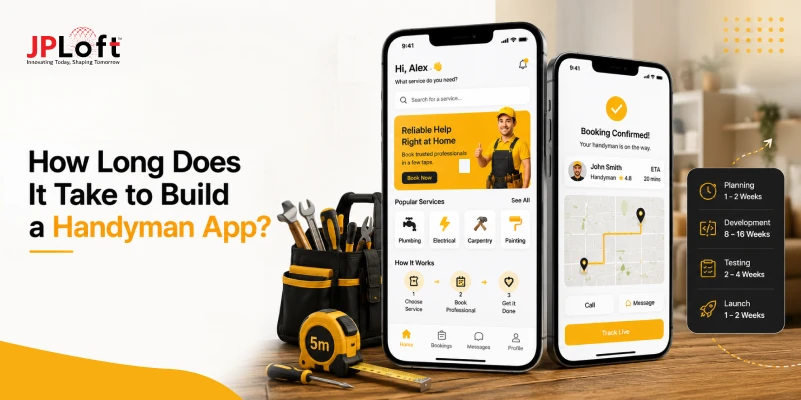
How much time does it take to create a handyman app? Typically, it ranges between 3 to 9+ months, depending on complexity and feature set.
Prioritizing essential features and using efficient development strategies significantly reduces overall project timelines without compromising quality.
Proper planning of UI/UX, backend architecture, and API integrations accelerates app delivery and minimizes rework.
Leveraging AI automation, rapid prototyping, and structured QA ensures faster deployment and better user satisfaction.
With expert guidance from JPLoft, businesses can streamline development, optimize timelines, and launch a robust handyman app confidently.
When making a handyman app, one of the first questions that comes to mind is: “How long does it take to develop a handyman app?”
Overall, the timeline for handyman app development can range from 3 to 9+ months, and it can change as per the project complexity, feature requirements, and many more.
No two projects follow the same path. Some founders race ahead with ready-made solutions and launch in record time, while others invest in custom development to create something unique and high-performing.
The real magic happens when you focus on quality work and earn user trust from day one. Clear planning from day one and the right tech stack can save you weeks.
In this blog on handyman app development timeline, we’ll break down the realistic timelines, key stages, and what actually affects how long your handyman app takes to build.
Key Stages of Handyman App Development
To build a handyman app, you have to follow different steps. And each step takes some of your time. Here’s a breakdown of each phase, what happens in it, and how long it usually takes.
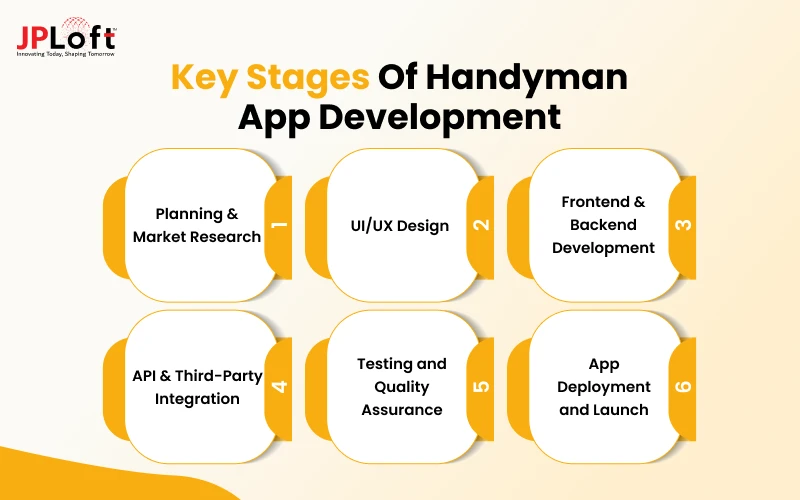
1. Planning & Market Research
This is the foundation stage where you decide the purpose of your app, your target audience, core features, and business model.
If you have a handyman app idea, research the local demand and identify the types of home services customers need most.
You also study competitors such as TaskRabbit or Urban Company and map out user journeys.
Time required: 1–2 weeks
2. UI/UX Design
In this phase, designers create wireframes, prototypes, and the final visual interface for both the customer app and the handyman (Provider) app.
The focus is on making booking, scheduling, and tracking simple and intuitive.
Time required: 2–4 weeks
3. Frontend & Backend Development
This is one of the longest phases of app development. Here, the developers work on the frontend and backend. Frontend covers the screens and user experience that people see and interact with.
Backend handles the server, database, user accounts, booking logic, and an admin panel that powers the entire system.
Time required: 6-10 weeks (longest phase)
4. API & Third-Party Integration
This stage connects the app with external services such as payment gateways (Stripe, Razorpay) and Google Maps for location tracking, SMS/email notifications, and chat systems.
Time required: 2-3 weeks
5. Testing and Quality Assurance
To get the final version of the app, the team thoroughly checks the app for bugs, performance issues, security gaps, and usability problems across different devices and scenarios.
Multiple rounds of app testing ensure everything works smoothly.
Time required: 2–4 weeks
6. App Deployment and Launch
The final stage includes uploading the app to the Google Play Store & the Apple App Store.
After submitting, the stores review the app for quality and policy compliance, which usually takes a few days.
After launch, you should go for app maintenance services to keep the app up to market standards.
Time required: 1 week
So, this is how the overall handyman app development timeline gets affected by every stage. Now, let’s talk about different factors that affect the cost.
How Long Does it Take to Develop a Handyman App?
Founders frequently ask How long does it take to build a handyman app? On average, development takes 3 to 9+ months, depending on feature complexity, team structure, and technical approach.
A typical handyman app goes through multiple phases, including requirements analysis, UI/UX design, architecture planning, backend development, user and provider modules, integrations, and quality assurance testing.
For most startups, a realistic handyman app development timeline falls between 3.5 and 7 months, especially when building a scalable platform with essential handyman app features such as service scheduling, in-app chat, ratings, and secure payments.
Advanced functionalities like real-time tracking, analytics dashboards, or subscription models can add 1 to 2 additional months to the process.
With well-defined requirements and an experienced development team, businesses can confidently launch within the expected 3–9+ month window.
|
Handyman App Type |
Development Time |
|
Basic Handyman App |
3–4 Months |
|
Standard Handyman App |
4–6 Months |
|
Advanced Handyman App |
6–9+ Months |
Factors That Affect Handyman App Development Time
If you want to start an online handyman business, knowing how different factors affect the overall handyman app development time.
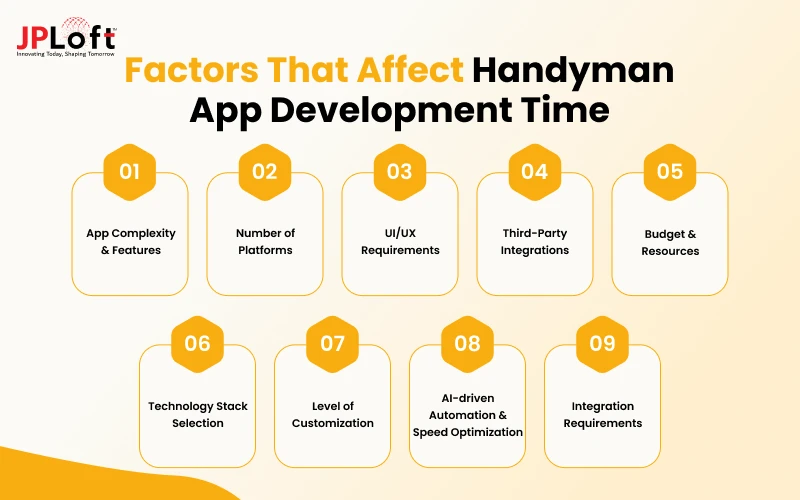
Let’s get to know the factors:
Factor 1: App Complexity & Features
One of the major reasons that affect the overall app development timeline is app complexity.
The more features you add, the longer the development takes. A simple booking & payment system can be built quickly, but advanced options like real-time tracking, in-app chat, AI matching, or multi-service categories require extra coding and testing.
Choosing only the must-have features for the first version helps keep the timeline under control without sacrificing quality.
Factor 2: Number of Platforms
You can launch your handyman platform on:
-
Cross-platform Development
Building for one platform is faster and cheaper. Targeting both usually means either creating two separate native apps or using cross-platform tools, including Flutter.
While cross-platform options save time, they still need careful testing on different devices to ensure smooth performance everywhere.
Factor 3: UI/UX Requirements
Focusing on design is not an option; it is a necessity.
You should start with simple interfaces takes less time, while highly custom, visually rich designs with animations and detailed screens need more effort from designers and developers.
Investing in good UI/UX design may add a few weeks, but it creates an app that feels professional and keeps users coming back.
Factor 4: Third-Party Integrations
Connecting your app to payment, map, SMS, or chat tools is important but can slow things down.
Each integration needs proper testing so nothing breaks later.
Choosing reliable services from the start helps avoid delays. This part often stretches the time to develop a handyman app, especially when multiple tools are added at once.
Factor 5: Budget & Resources
Your budget decides how fast things move. With enough funds, you can hire a bigger team or use better tools and finish sooner.
A tight budget often means slower progress and fewer people working on the project. This directly affects the overall time to develop a handyman app, so planning money alongside features is always smart.
Factor 6: Technology Stack Selection
Your chosen handyman app tech stack affects speed, scalability, and long-term flexibility.
Cross-platform frameworks (Flutter, React Native) reduce timelines, while native builds take longer but offer better performance.
The backend stack (Node.js, Laravel, Django) determines how efficiently APIs, authentication, and real-time features are implemented.
Factor 7: Level of Customization
Going fully custom gives you a unique app but takes more time.
Using pre-built solutions or templates can cut the time to make a handyman app by several weeks. The more you want everything tailored to your exact needs, the longer the build will take.
Finding the right mix of custom and ready features keeps both quality and speed in balance.
Factor 8: AI-driven Automation & Speed Optimization
The role of AI in handyman apps is growing; AI matching, automated pricing, and smart scheduling reduce manual workflows.
AI can actually shorten development efforts by automating tasks like service recommendations or dynamic routing.
However, integrating ML models requires more testing and refinement, slightly increasing specific development phases.
Factor 9: Integration Requirements
Apps needing payment gateways, SMS services, geo-mapping, and review systems require stable API integration for handyman apps, which adds to timelines.
The more third-party dependencies you introduce, the more testing cycles are needed to ensure reliability.
Faulty integrations often cause launch delays, making this step critical in the overall timeline.
How to Reduce the Overall Handyman App Development Time?
Many founders worry about long timelines, but there are practical ways to shorten the time to make a handyman app without cutting quality.
Smart planning, the right choices, and focused execution can help you launch faster and start serving customers sooner.
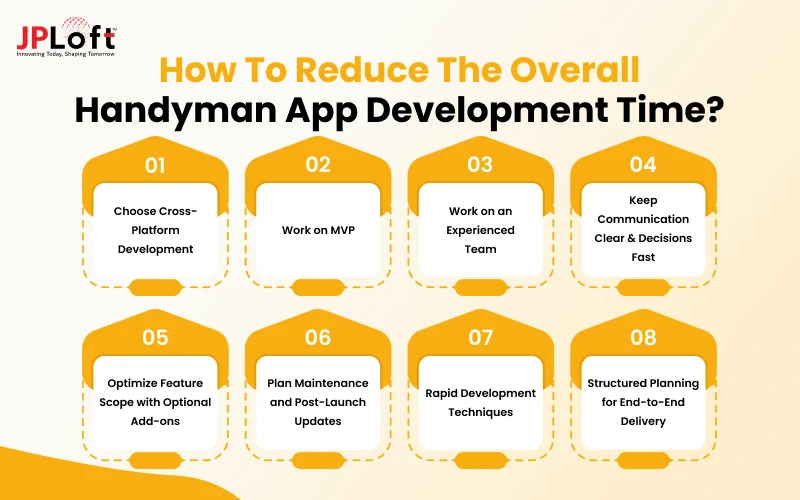
Let’s find out different ways to reduce the overall cost:
A. Choose Cross-Platform Development
Building separate native apps for iOS & Android takes longer. Using tools like Flutter or React native lets you write code once and run it on both platforms.
This method can cut the overall timeline to make a handyman app almost in half and still deliver a smooth experience for users on either device.
B. Work on MVP
MVP means minimum viable product. An MVP can help you test the waters before going big.
You can focus on the core features users actually need; it can be anything from booking to payments and basic profiles.
This approach keeps the first version simple and reduces the development time by several weeks while still giving you a working product to test in the market.
C. Work on an Experienced Team
Where you hire app developers from can affect the overall timeline.
A team that has already built similar service apps knows the common challenges & solutions. They make fewer mistakes, communicate better, and move faster through each stage.
Their knowledge often saves weeks compared to a team learning everything from scratch.
D. Keep Communication Clear & Decisions Fast
Delays often happen when feedback is slow, or requirements keep changing.
You should set clear goals early, give quick approvals, and avoid last-minute feature requests. Smooth communication between you and the team keeps the project moving without unnecessary pauses.
E. Optimize Feature Scope with Optional Add-ons
Incorporating AR in handyman apps selectively enhances user experience without extending the core timeline unnecessarily.
Optional elements like gamification in handyman apps can be added post-MVP to engage users creatively while not delaying launch.
Focusing initially on essential features ensures faster delivery, while advanced add-ons enhance engagement over time.
F. Plan Maintenance and Post-Launch Updates
Following a handyman app maintenance practice helps plan updates, bug fixes, and performance improvements efficiently.
Proper maintenance planning prevents repeated development cycles and reduces the risk of unforeseen delays post-launch.
Scheduling regular updates alongside monitoring user feedback ensures smoother long-term operation and faster adaptation to market needs.
G. Rapid Development Techniques
Using low-code platforms, prebuilt modules, and parallel development accelerates the timeline effectively.
These techniques answer the question: how fast can a handyman app be developed? Without sacrificing core functionalities.
Rapid development enables quicker MVP releases, faster user feedback collection, and informed iterative enhancements.
H. Structured Planning for End-to-End Delivery
Clear documentation, roadmap alignment, and milestone-based workflows help reduce uncertainty during coding and testing stages.
Prioritizing tasks and dependencies ensures the handyman app development duration is optimized without creating bottlenecks.
Following this approach supports a smoother development lifecycle, leading toward a complete timeline to build a handyman app efficiently.
How Can We Help You Build Your Handyman App?
A great handyman app needs more than a few screens and a booking button.
It needs smooth performance, simple navigation, reliable payments, and features that make life easier for both customers and service providers.
That’s where choosing the right handyman app development company like JPLoft can help make a real difference.
At JPLoft, we help businesses turn their handyman app ideas into fully functional digital platforms.
With 16+ years of experience, 1250+ projects delivered, and expertise spanning over 70+ countries, we can create a solution that grows with your business.

Conclusion
At the end of the day, a 3-9+ month development timeline is your strategic runway to get things right.
Whether you need a simple booking system or a complex enterprise platform, execution quality always dictates long-term market success.
You should always start with an MVP to validate core features quickly, avoid costly rework, and adapt to real-world user feedback.
Partnering with the right app architects ensures you eliminate technical delays, protect your project budget, and build an architecture designed for long-term scalability.
You don’t need to launch every feature on day one to win market share; you just need a solid product and a reliable partner to bring it to life.
Got a handyman app concept in mind? Let’s design your launch roadmap and get your project moving today.
FAQs
On average, it takes 3 to 9 months to develop a fully functional handyman app, depending on features, tech stack, and development model.
Adding real-time tracking, AI recommendations, and payment integrations can extend development by several weeks, making timelines closer to 6–9 months.
Factors include feature complexity, tech stack, API integrations, design iterations, QA cycles, and team size or expertise.
Yes, through rapid prototyping, reusable modules, prebuilt frameworks, structured planning, and efficient testing processes.
By breaking down the project into stages, planning, design, development, testing, and deployment, while considering features, integrations, and team efficiency.

Kris Jacobs brings 20+ years of experience in digital product strategy, user-focused design, and solving complex product challenges. She has worked across on-demand services, travel, entertainment, sports, insurance, education, and service marketplaces, including handyman, dog-walking, courier, event-management, and equine platforms. Her focus is on shaping practical, scalable digital experiences that align user needs with business goals and long-term product growth.


Share this blog