


Key Takeaways
Building a Pinterest-like app requires strategic planning, scalable architecture, intuitive design, and user-focused feature integration.
Core features like AI recommendations, boards, secure authentication, and search functionality drive engagement and long-term retention.
Choosing the right tech stack ensures scalability, performance optimization, data protection, and seamless cross-platform compatibility.
Development costs typically range between $20K and $200K+, depending on complexity, features, and infrastructure requirements.
Sustainable monetization combines advertising, affiliate marketing, subscriptions, and e-commerce without disrupting the overall user experience.
Partnering with JPLoft ensures expert guidance, innovative solutions, reliable support, and successful product scalability.
The visual content market is booming, and Pinterest sits right at the center of it with 619 million users and growing.
For investors and entrepreneurs, the timing couldn't be better to enter this space with a fresh, well-built alternative.
This is where the question usually comes: How to build an app like Pinterest?
Developing an app like Pinterest involves planning core features, selecting a scalable tech stack, designing an intuitive UI, and partnering with an experienced development team.
In this blog, we'll break down the complete development process, from core features to cost estimation, so you know exactly what it takes to build your own Pinterest-like platform.
Let’s get to know them:
About the Pinterest App and Related Stats
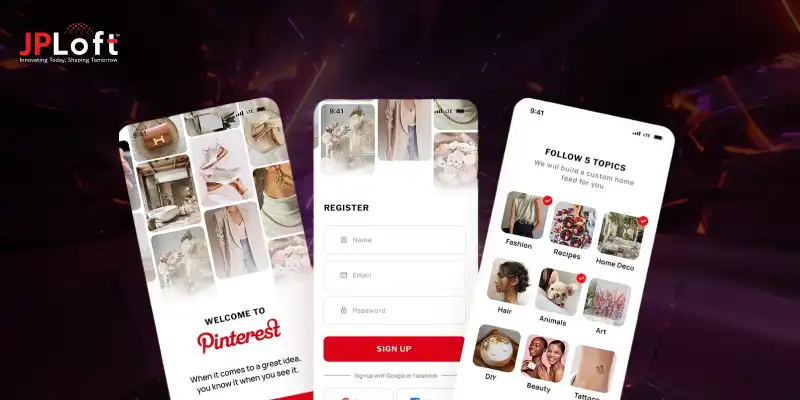
Pinterest is a visual discovery and bookmarking platform that enables users to save ideas, products, and inspirations into curated boards.
From home décor and fashion to recipes and travel plans, the app is designed around visual exploration and future planning.
Unlike traditional networking platforms, Pinterest functions more like a visual search engine, helping users discover content based on intent rather than social connections.
This focused model has allowed it to remain competitive even as users experiment with various Pinterest alternatives across different niches and content formats.
Here are the latest Pinterest statistics reflecting its growth in 2026 and beyond:
-
553 million monthly active users worldwide (2026), showing consistent year-over-year growth.
-
Pinterest reported $4.222 billion in annual revenue for the full year ended December 31, 2025, up ~16% year-over-year.
-
Over 10 billion boards have been created globally, highlighting long-term user retention and content curation behavior.
-
1.5+ billion Pins saved weekly, demonstrating strong engagement and repeat usage patterns.
With numbers like these, it’s clear why Pinterest continues to rank among the best social media apps for visual discovery and commerce-driven engagement.
Why Develop an App Like Pinterest?
Developing an app like Pinterest offers startups and entrepreneurs a chance to tap into the growing demand for visual discovery platforms.
These apps engage users, inspire creativity, and provide multiple monetization opportunities.
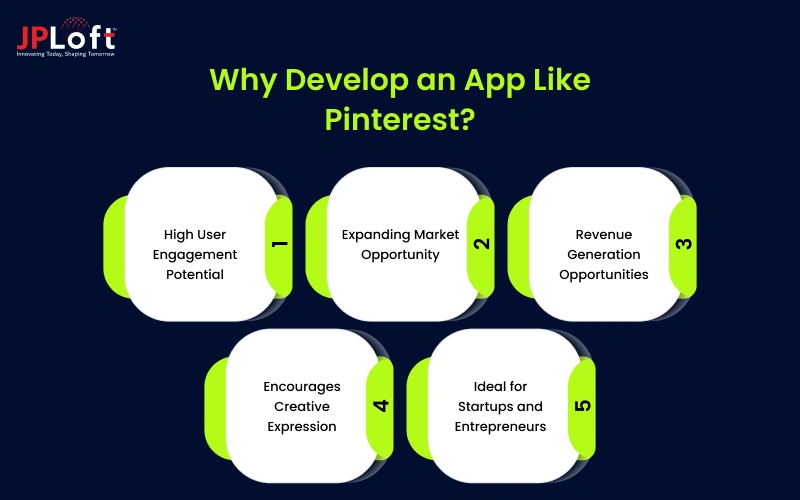
Here are some compelling reasons to consider:
1. High User Engagement Potential
Visual content naturally attracts attention and encourages repeated interaction. By developing a Pinterest-like app, businesses can engage users with personalized boards and recommendations. This increases time spent on the platform while consistently boosting retention rates.
2. Expanding Market Opportunity
The demand for image-first platforms continues to grow globally. Entrepreneurs exploring social media app ideas can leverage this trend to capture niche audiences and capitalize on content discovery. This helps establish a strong presence in an expanding market segment.
3. Revenue Generation Opportunities
Pinterest-style apps allow monetization through ads, affiliate links, and sponsored content. Understanding how to develop a social media app like Pinterest ensures that monetization strategies are integrated early, driving revenue while maintaining a seamless user experience.
4. Encourages Creative Expression
A Pinterest clone app development encourages users to share and save content based on their preferences. This fosters creativity, community engagement, and social sharing, making the app both interactive and sticky for long-term usage.
5. Ideal for Startups and Entrepreneurs
For founders wondering how to start a social media business, building a visually-driven app provides a scalable model. The combination of niche targeting, user engagement, and monetization makes it a viable opportunity for startups entering the social media market.
From high engagement and revenue potential to creative community building, developing a Pinterest-like app offers a strategic advantage for startups and entrepreneurs. It helps them succeed in the competitive social media ecosystem.
Features to Include While Building an App Like Pinterest
When building a Pinterest-like platform, integrating the right social media app features is critical for user engagement and retention. Modern apps require innovation, personalization, and interactive elements to stand out in today’s competitive market.
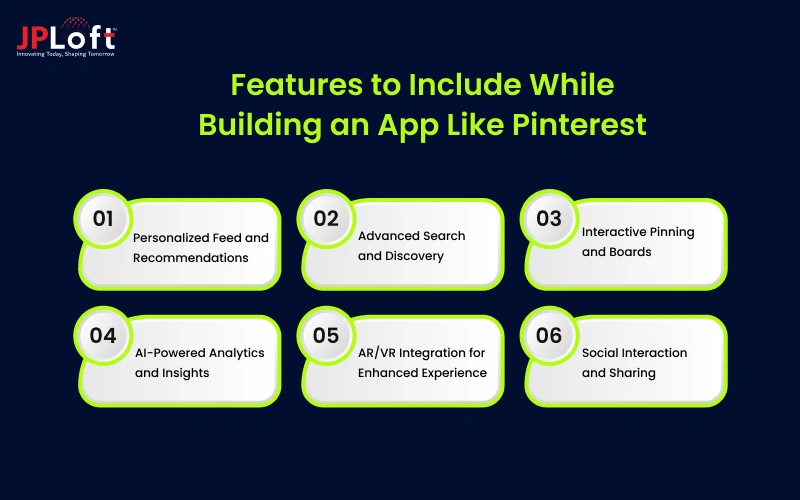
Here are the key features to include in your Pinterest-like app:
[1] Personalized Feed and Recommendations
A personalized feed shows users content aligned with their interests. By leveraging AI algorithms in Pinterest-like app development, the app can recommend relevant Pins tailored to user preferences. This increases session duration, improves engagement, and delivers a highly customized discovery experience.
[2] Advanced Search and Discovery
Robust search functionality allows users to explore content efficiently. Incorporating smart filters, keyword-based queries, and visual search ensures users find desired content quickly. This enhances satisfaction and makes your Pinterest clone app development highly competitive.
[3] Interactive Pinning and Boards
Users should be able to save, organize, and share content into custom boards. This core feature enables creative expression and community engagement, fostering long-term loyalty while providing an interactive platform for social sharing.
[4] AI-Powered Analytics and Insights
Integrating AI in social media provides analytics for user behavior, trending content, and engagement patterns. These insights help app owners optimize feed algorithms, improve recommendations, and offer a data-driven approach to content discovery.
[5] AR/VR Integration for Enhanced Experience
Implementing AR/VR capabilities elevates the user experience, allowing interactive product previews or immersive discovery sessions. Partnering with a reputable AR VR app development company can transform a standard Pinterest-like app into a next-generation visual platform.
[6] Social Interaction and Sharing
Users can like, comment, and share Pins, fostering community engagement. Encouraging social interactions enhances visibility and retention while aligning the app with current social media app development trends in user connectivity and content sharing.
Integrating these features ensures your app is engaging, personalized, and future-ready. Modern tools like AI and AR/VR, coupled with interactive boards and analytics, position a Pinterest-like platform for success in a competitive social media landscape.

How to Build an App Like Pinterest?
Building a visual discovery platform requires strategic planning, scalable architecture, and user-focused design.
If you're exploring how to make an app like Pinterest, the process goes beyond UI duplication. It demands thoughtful execution, modern technology, and continuous optimization.
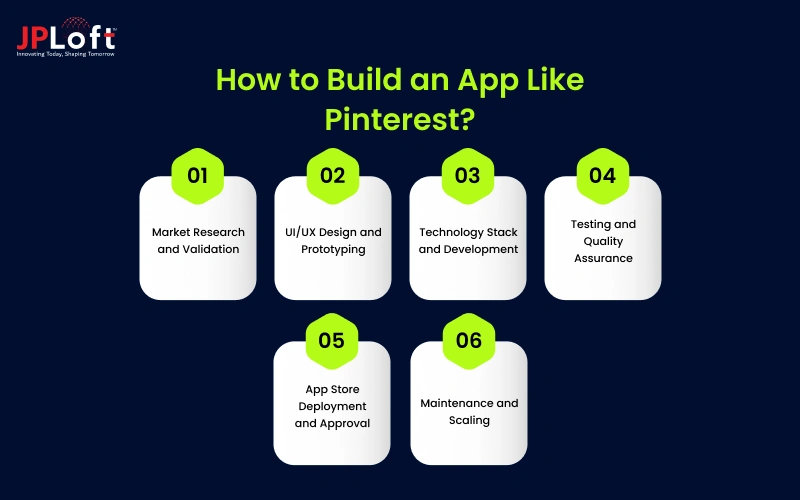
To simplify your journey, here are the essential steps to follow:
Step 1: Market Research and Validation
Conduct thorough market research to understand target users, competitors, and industry gaps before finalizing your Pinterest-like platform strategy roadmap.
► Identify Target Audience
Define user personas based on interests, demographics, and browsing behavior. Understanding audience expectations ensures you align features, monetization models, and engagement strategies effectively. This also shapes the foundation of your plan for how to develop an app like Pinterest successfully.
► Analyze Competitors
Study direct and indirect competitors to evaluate strengths, weaknesses, and feature gaps. This helps differentiate your product, refine value propositions, and discover monetization opportunities. It also validates market demand before investing in full-scale Pinterest like app development.
► Validate Business Model
Test your idea using surveys, MVPs, and feedback loops. If you’re exploring how to create a social media app, early validation minimizes risk and ensures your Pinterest-inspired platform solves real user problems effectively.
Step 2: UI/UX Design and Prototyping
Design intuitive user interfaces and interactive prototypes to ensure seamless navigation, engagement, and visual appeal across devices.
► Wireframing and User Flow
Create wireframes that outline navigation, board creation, and pinning workflows. Learning how to design a social media app with smooth transitions and minimal friction enhances usability and supports scalable product growth from the start.
► Visual Branding
Develop a unique brand identity, including color palette, typography, and imagery style. Distinct visual branding differentiates your platform from competitors while helping users associate your app with creativity and personalized discovery experiences.
► Interactive Prototyping
Build clickable app prototypes to test usability and navigation efficiency. Early feedback refines user journeys, validates engagement mechanics, and prepares your concept for development while reducing redesign costs and accelerating launch timelines.
Step 3: Technology Stack and Development
Choose scalable technologies and begin backend and frontend development aligned with performance and security standards.
► Select Scalable Architecture
Opt for cloud-based infrastructure and modular backend systems to handle growing traffic efficiently. Selecting the right social media app tech stack ensures scalability, security, and performance optimization during heavy user engagement periods.
► Backend and API Development
Develop robust APIs for user authentication, content uploads, search indexing, and real-time notifications. Secure backend frameworks help manage databases efficiently while supporting seamless integration with analytics and third-party services.
► Frontend Implementation
Implement responsive UI components using modern frameworks. A professional mobile app development company can streamline coding standards, optimize performance, and ensure cross-platform compatibility for your Pinterest-style application.
Step 4: Testing and Quality Assurance
Ensure application stability, performance optimization, and security validation before public launch through comprehensive testing procedures.
► Functional Testing
Validate core features such as board creation, search functionality, and content sharing. Following a structured approach to social media app testing ensures a seamless user experience, identifies performance gaps, and eliminates technical glitches before deployment.
► Security and Compliance Testing
Conduct vulnerability assessments, penetration testing, and compliance audits to identify risks early. Strong mobile app security protects user data, maintains platform integrity, ensures regulatory compliance, reduces breach risks, and strengthens long-term user trust.
► Performance Optimization
Test load capacity and server responsiveness under heavy traffic scenarios. Optimizing database queries and caching strategies improves speed and guarantees a seamless experience during peak user activity.
Step 5: App Store Deployment and Approval
Prepare your application for official launch across major platforms while meeting policy and compliance standards.
► App Store Guidelines Compliance
Understanding how to get your social media app approved on the iOS store is essential. Follow Apple’s content, privacy, and design guidelines carefully to prevent rejection and accelerate approval timelines.
► Beta Launch and Feedback
Release a beta version to limited users for real-world feedback. Early insights help identify usability improvements, refine features, and optimize performance before full-scale market launch.
► Marketing and Launch Strategy
Plan pre-launch promotions, influencer partnerships, and content marketing campaigns. Strategic marketing boosts visibility, increases downloads, and establishes credibility during the crucial initial growth phase.
Step 6: Maintenance and Scaling
Post-launch optimization ensures long-term stability, feature upgrades, and continuous platform improvement.
► Continuous Updates
Regular updates improve features, enhance security, and fix emerging bugs. Implementing consistent social media app maintenance keeps your platform secure, optimized, and aligned with evolving user expectations and technological advancements.
► Scaling Infrastructure
Upgrade server capacity and optimize cloud resources to manage growth efficiently. Scalability planning ensures your platform handles increasing traffic without performance degradation or downtime issues.
► Hire the Right Development Team
To sustain growth, many businesses choose to hire mobile app developers experienced in Pinterest clone app development. Expert teams streamline feature enhancements, security upgrades, and long-term scalability planning effectively.
By following these six structured steps, you can confidently navigate how to develop a social media app like Pinterest and transform your idea into a scalable, market-ready product.
What’s the Cost to Create an App Like Pinterest?
The cost to develop an app like Pinterest typically ranges between $20,000 and $200,000+, depending on features, complexity, and development location.
If you’re estimating your Pinterest-like app development cost, the final budget depends on whether you’re building an MVP or a fully scalable platform.
A basic version with essential boards, search, and authentication features may cost around $20K–$50K. A mid-level app with AI-powered recommendations, analytics, and monetization systems can range between $60K–$120K.
For enterprise-grade platforms with AR integrations, advanced personalization, and high-traffic infrastructure, the cost may extend toward $200K+.
Understanding the broader social media app development cost landscape helps founders plan infrastructure, backend scalability, and long-term maintenance budgets effectively.
Additionally, if you're exploring how to develop an app like Pinterest, remember that pricing varies based on tech stack, design complexity, development team expertise, and post-launch maintenance requirements.
In short, the investment scales with ambition, feature depth, and performance expectations.
Pinterest-like App Development Cost Breakdown
|
Development Level |
Estimated Cost Range |
Key Inclusions |
|
Basic (MVP Version) |
$20,000 – $50,000 |
User registration, board creation, image upload, basic search, simple UI, limited backend infrastructure |
|
Mid-Level Application |
$60,000 – $120,000 |
Advanced search, personalized recommendations, analytics dashboard, monetization setup, scalable backend |
|
Advanced / Enterprise Version |
$130,000 – $200,000 |
AI-powered recommendations, AR integrations, real-time notifications, enterprise-grade security, high-traffic cloud infrastructure |
Challenges and Solutions While Creating an App Like Pinterest
Building a visual discovery platform comes with technical, strategic, and operational hurdles.
Understanding common social media app development challenges early helps businesses reduce risks and execute smarter product strategies.
Challenge 1: Intense Market Competition
The visual content market is saturated with established players and emerging platforms.
Without clear differentiation, new apps struggle to gain traction, attract users, and compete effectively in crowded digital ecosystems globally.
Solution:
Focus on niche targeting, unique value propositions, and innovative features.
Strong branding, personalized recommendations, and strategic marketing campaigns can differentiate your platform and support successful Pinterest like app development initiatives.
Challenge 2: Low User Retention and Engagement
Many startups discover that user acquisition is easier than retention.
This is one of the reasons why social media apps fail, as inconsistent engagement and limited personalization reduce user loyalty and long-term platform growth.
Solution:
Integrate AI-driven recommendations, gamification elements, and push notifications.
When planning how to develop an app like Pinterest, prioritize personalized feeds and community interactions to maintain user engagement and consistent retention rates.
Challenge 3: Data Privacy and Security Risks
Handling large volumes of user data increases vulnerability to breaches, hacking attempts, and compliance violations.
Weak infrastructure damages brand trust and discourages users from sharing personal content and preferences.
Solution:
Implement end-to-end encryption, secure APIs, and regular audits to strengthen social media app security.
Robust authentication systems and compliance with global data protection standards safeguard user trust and platform credibility.
Challenge 4: Scalability and Performance Issues
Rapid user growth can overload servers, slow performance, and cause downtime.
Poor infrastructure planning directly impacts usability, engagement metrics, and revenue potential for your Pinterest-style application.
Solution:
Adopt scalable cloud architecture, load balancing, and modular backend systems.
During Pinterest clone app development, planning infrastructure expansion early ensures smooth performance under high traffic conditions and sustained growth.
Challenge 5: Monetization Without Disrupting Experience
Balancing monetization and user experience is complex.
Excessive advertisements or poorly integrated sponsored content frustrate users and reduce satisfaction, leading to churn and negative platform perception.
Solution:
Blend native ads, affiliate integrations, and premium subscriptions seamlessly within the interface.
Strategic monetization planning during how to build an app like Pinterest ensures revenue generation without compromising user satisfaction.
By proactively addressing these obstacles with strategic planning and robust technology, businesses can confidently navigate the risks involved in developing a scalable and successful Pinterest-like platform.
How to Monetize Your Pinterest-Like App?
Monetization is a critical factor when planning long-term scalability and sustainability.
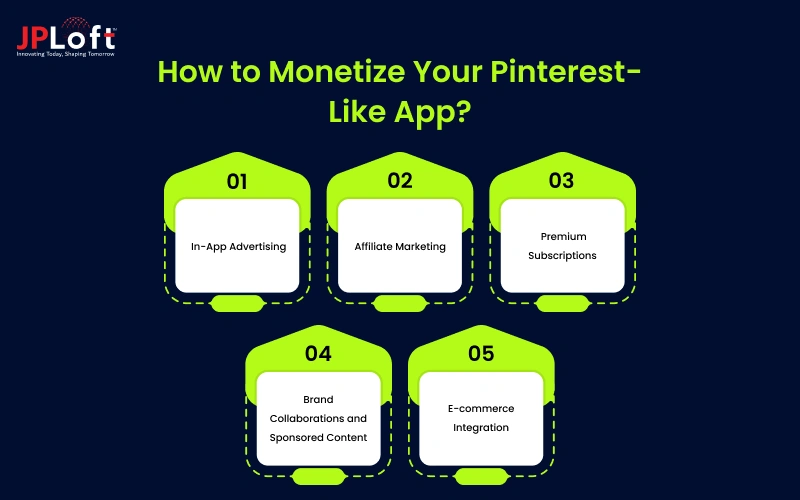
If you're exploring how social media apps make money, integrating diverse revenue streams ensures profitability without compromising user experience.
1. In-App Advertising
Advertising remains one of the most reliable revenue streams.
When planning how to develop a social media app like Pinterest, integrate native ads, display banners, and sponsored Pins seamlessly within feeds to maintain engagement while generating consistent advertising income effectively.
2. Affiliate Marketing
Affiliate partnerships allow your platform to earn commissions from product referrals.
During Pinterest like app development, embedding shoppable Pins with tracked links helps monetize user discovery journeys without overwhelming users with intrusive promotional content.
3. Premium Subscriptions
Offer premium features such as advanced analytics, ad-free browsing, exclusive boards, or enhanced customization options.
Businesses aiming to create a Pinterest-like app can implement subscription tiers to generate predictable recurring revenue while delivering added value.
4. Brand Collaborations and Sponsored Content
Collaborate with brands for influencer campaigns and sponsored collections.
If you plan to make a social media app like Pinterest, strategic brand partnerships enable monetization opportunities while keeping promotional content aligned with user interests and platform aesthetics.
5. E-commerce Integration
Integrating in-app shopping features enhances revenue potential.
While evaluating how to build an app like Pinterest, enabling direct purchases, checkout systems, and product tagging transforms your platform into a commerce-driven visual marketplace.
A balanced monetization strategy combining ads, subscriptions, affiliate models, and e-commerce ensures sustainable revenue growth while maintaining a seamless and engaging user experience.

Why Choose JPLoft for Pinterest-Like App Development?
Building a scalable visual platform requires strategic planning, robust architecture, and industry expertise.
As a trusted social media app development company, JPLoft delivers end-to-end solutions tailored to your business goals and market demands.
Our team specializes in Pinterest like app development, combining intuitive UI/UX design with scalable backend systems to ensure performance and security. From validating your idea to launching and scaling, we follow a structured approach to create a Pinterest-like app that stands out in competitive markets.
We leverage advanced technologies, cloud infrastructure, and AI-driven personalization to help you build an app like Pinterest with enhanced engagement and monetization capabilities.
With dedicated developers, transparent communication, and post-launch support, we ensure your project remains future-ready.
Partner with JPLoft to transform your concept into a high-performing, revenue-generating social platform.
Conclusion
Building a successful visual discovery platform requires a clear strategy, advanced technology, and user-focused innovation.
From planning features and selecting the right tech stack to understanding monetization and scalability, every stage plays a crucial role in long-term success.
If you aim to create a Pinterest-like app, focusing on personalization, seamless navigation, and a strong security infrastructure will help you stand out in a competitive market.
Careful budgeting, smart feature integration, and continuous optimization are essential to ensure sustainable growth.
By partnering with an experienced development team and leveraging modern tools, you can confidently build an app like Pinterest that attracts users, drives engagement, and generates consistent revenue in today’s evolving digital ecosystem.
FAQs
The development timeline typically ranges from 3 to 9 months, depending on feature complexity, UI/UX design, platform selection (iOS, Android, or both), third-party integrations, and scalability requirements.
A Pinterest-like app usually uses React Native or Flutter for frontend development, Node.js or Django for backend, cloud hosting like AWS, and AI-based recommendation engines for personalization.
The cost generally ranges between $20,000 and $200,000+ based on features, development team location, app complexity, custom design, and post-launch maintenance requirements.
Core features include user profiles, boards, image uploads, search functionality, AI-based recommendations, social sharing, messaging, notifications, and secure authentication systems.
How can a Pinterest-like app generate revenue?
Revenue can be generated through in-app advertising, affiliate marketing, premium subscriptions, brand collaborations, sponsored content, and integrated e-commerce features within the platform.

Conor has 10+ years of experience in software development, application engineering, solution design, and UX/UI. He has worked across digital products in restaurant technology, food and grocery delivery, healthcare, media, streaming, and social platforms, bringing both technical and user-experience perspectives to product development. His experience working with large organizations and growth-focused digital products helps businesses translate complex requirements into practical, user-focused solutions.




Share this blog