


Key Takeaways
How often should you update your app depends on its lifecycle stage; early-stage apps need frequent updates, and maintenance-focused updates.
Irregular updates can lead to security risks, poor performance, compatibility issues, declining user retention, and negative app store ratings.
App type, user feedback, performance metrics, security requirements, and automation strategies all influence how often updates should be released.
Post-launch maintenance ensures long-term stability, security, OS compatibility, and helps apps stay competitive as user expectations evolve.
Regular updates improve user trust, engagement, app store rankings, and reduce long-term technical debt, ultimately supporting sustainable business growth.
With proactive monitoring, performance optimization, and platform compliance, JPLoft helps businesses keep their apps reliable, scalable, and future-ready.
Nowadays, launching an app is just the beginning; the real challenge lies in keeping it relevant. Many app owners often ask, How often should you update your app to keep users engaged without overwhelming them?
The truth is, there’s no one-size-fits-all answer. Every app needs a well-planned mobile app update schedule that balances performance, security, and user expectations. Regular updates not only help fix bugs but also ensure your app evolves with changing technologies and customer needs.
Whether you’re running a startup app or managing a large-scale platform, understanding update frequency can directly impact app ratings, retention, and long-term success.
In this blog, we’ll break down what app updates really mean and how to decide the right update frequency for your business.
What Does Updating an App Really Mean?
Updating an app goes far beyond adding new features or changing the design. It’s a continuous process of improvement that keeps your app functional, secure, and user-friendly.
App updates typically focus on:
-
Performance and stability improvements, such as fixing bugs, reducing crashes, and optimizing app speed for a smoother experience
-
Security enhancements, including patching vulnerabilities and strengthening data protection to safeguard user information
-
User experience refinements, like improving navigation, responsiveness, and interface elements to increase engagement and reduce uninstalls
-
Timely updates based on signals, such as OS upgrades, performance issues, or user feedback indicating the need for improvements
-
Rather than being one-time changes, updates ensure your app stays aligned with evolving user expectations, technology standards, and platform requirements.
-
There is no universal update schedule, but updates become necessary when performance declines, security risks emerge, or platform changes affect compatibility.
Ultimately, effective app updates are guided by performance data, user expectations, and platform changes. Updating at the right time helps maintain app reliability, strengthen user trust, and keep your product competitive without disrupting the overall user experience.
Minor updates are usually released every 2–4 weeks, while major updates roll out every 2–3 months based on app complexity and goals.

Factors That Determine App Update Frequency
Many try to decide the answer of the question, how frequently should you update an app? It depends on several practical and strategic factors.
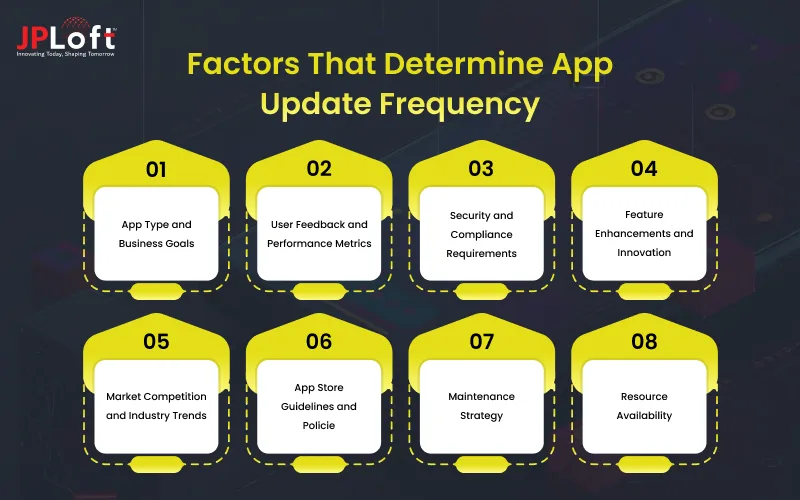
Below are the key elements that influence update decisions:
1] App Type and Business Goals
Different apps serve different purposes. A fintech or healthcare app may require frequent app security updates, while a content-based app might focus more on feature enhancements.
The update frequency should match the app’s functionality, compliance needs, and risk level. Business goals like improving retention, launching new features, or expanding to new markets also influence how often updates are released.
2] User Feedback and Performance Metrics
User reviews, crash reports, and analytics reveal real-world issues. If performance drops or users report bugs, immediate updates become necessary.
Continuous app performance optimization ensures better speed, stability, and user satisfaction.
3] Security and Compliance Requirements
Apps that handle sensitive user data must prioritize security updates. Emerging threats, data protection regulations, and compliance standards may require immediate patches to prevent vulnerabilities.
Regular security updates help protect user trust and reduce legal or reputational risks.
4] Feature Enhancements and Innovation
User expectations evolve over time, making feature updates essential for staying competitive. Introducing new features or improving existing ones should be based on user demand, market trends, and business strategy.
Well-planned feature rollouts keep the app engaging without overwhelming users.
5] Market Competition and Industry Trends
Competitor activity often influences update frequency. If competing apps introduce innovative features or improved experiences, timely updates help maintain relevance.
Staying aligned with industry trends ensures the app does not fall behind in functionality or user experience.
6] App Store Guidelines and Policie
App stores regularly update their policies related to privacy, security, and performance. Apps must adapt to these changes to avoid warnings, limited visibility, or removal from the store.
Regular updates help ensure continued compliance and smoother approval processes.
7] Maintenance Strategy
A structured maintenance strategy defines how often an app is reviewed, tested, and updated. It helps businesses plan updates proactively instead of reacting to issues after they arise.
With a clear strategy in place, updates can be scheduled efficiently while maintaining app quality, performance, and long-term stability.
8] Resource Availability
The availability of development teams, testing resources, and technical support directly affects how frequently updates can be released.
Limited resources may slow update cycles, while a dedicated team enables faster bug fixes, performance improvements, and timely feature releases without compromising quality.
Together, these factors help businesses make informed decisions about when to release app updates and how often changes should be rolled out. Rather than following a fixed schedule, successful apps adapt their update frequency based on performance data, user needs, and technological shifts.
How Often Should You Update Your App Based on App Stage?
One of the most common questions businesses ask after launching an app is: how often should you update your app? The answer is not fixed, because app update frequency depends heavily on the current stage of your app’s lifecycle.
A newly launched app, a fast-growing app, and a mature app all require very different update approaches. Understanding how frequently to update an app at each stage helps you maintain performance, retain users, and avoid unnecessary costs.
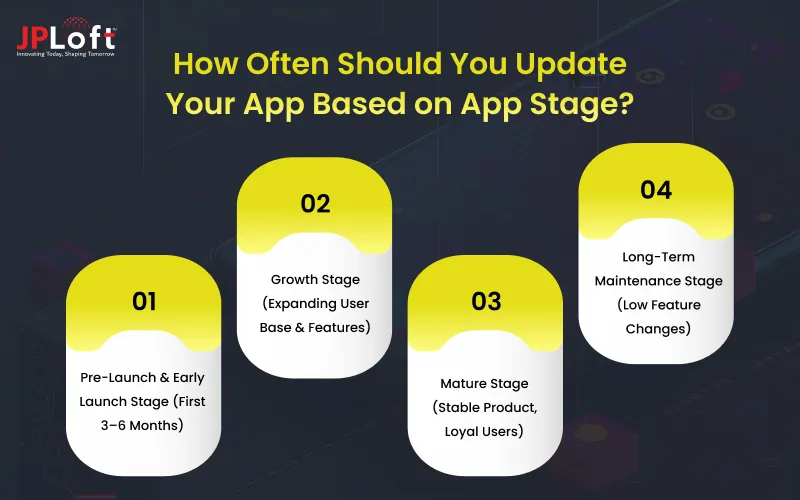
Let’s break it down stage by stage.
1. Pre-Launch & Early Launch Stage (First 3–6 Months)
At this stage, your app is either about to launch or has just entered the market. The primary focus is on stability, usability, and quick feedback implementation.
During early launch, updates should be frequent, sometimes weekly or bi-weekly. This is because real users start interacting with the app in unpredictable ways, bugs that didn’t appear during testing begin to surface, and performance issues and UI gaps become visible.
This is also the phase where planning how to maintain your iOS app alongside Android becomes important, ensuring consistency across platforms from the very beginning.
2. Growth Stage (Expanding User Base & Features)
Once your app gains traction and the user base starts expanding, update cycles should become more structured. For most growing apps, a monthly or bi-monthly release cycle works best.
This allows enough time to develop meaningful features while maintaining stability. Updates during this phase focus on enhancing functionality, delivering user experience improvements in apps, improving performance at scale, and ensuring compatibility with OS updates.
Many teams begin using top app maintenance tools to track crashes, performance issues, and user behavior, helping them decide what to update and when.
3. Mature Stage (Stable Product, Loyal Users)
In the mature stage, your app is stable, well-optimized, and supported by a loyal user base. The goal now is to maintain reliability while introducing only necessary improvements.
Updates are usually released every 6 to 8 weeks unless a critical issue arises. While changes are less frequent, app maintenance and updates remain crucial for OS compatibility, security enhancements, and incremental performance improvements.
This stage is ideal for performing security audits in app maintenance, ensuring that user data stays protected and compliance standards are met.
4. Long-Term Maintenance Stage (Low Feature Changes)
Some apps reach a phase where feature innovation slows down significantly, but the app continues to serve a stable user base. In this stage, updates are typically released on a quarterly basis and are focused on system stability, security patches, and compatibility with new OS versions.
Businesses often revisit the question, how often should you update an app? At this point, the answer lies in consistency rather than speed. Regular maintenance helps explain why maintain a mobile app even when active development has slowed.
Regular updates at this stage also help maintain app store rankings and prevent gradual performance degradation that users may not immediately report. By staying proactive, businesses ensure the app remains reliable, secure, and ready to adapt.
Early-stage apps require rapid updates, growth-stage apps benefit from structured release cycles, and mature apps need consistent but less frequent updates. Aligning app update frequency with each stage ensures long-term performance, user satisfaction, and cost efficiency.
Signs Your App Needs an Update Immediately
Even if your app seems stable, certain signs indicate it’s time to release an update right away. Ignoring these signals can hurt performance, user retention, and overall app reputation.
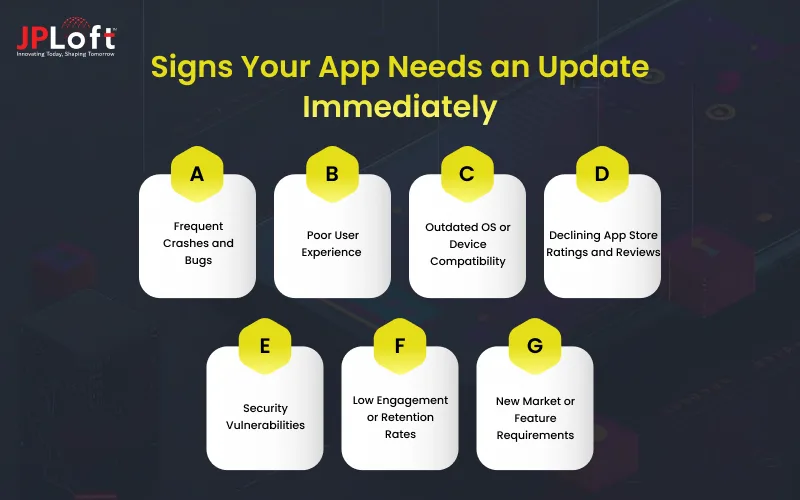
Here’s what to watch out for:
A] Frequent Crashes and Bugs
If your app crashes often or users report repeated bugs, it’s a clear sign that technical issues need urgent attention. Timely bug fixes and app improvements not only prevent frustration but also protect your app’s credibility in the market.
B] Poor User Experience
Users today expect smooth, intuitive interactions. Slow navigation, confusing layouts, or broken features point to the need for user experience improvements in apps. Ignoring UX issues can lead to lower ratings and declining engagement.
C] Outdated OS or Device Compatibility
When your app no longer runs properly on the latest iOS or Android versions, it signals that updates are overdue. Staying current ensures your app is functional for all users and avoids negative reviews or app store rejection.
D] Declining App Store Ratings and Reviews
If ratings drop or feedback becomes increasingly negative, it’s often a sign your app is not meeting user expectations. Updates addressing performance, UX, or features can reverse this trend and improve user satisfaction.
E] Security Vulnerabilities
Apps that lack regular mobile app security updates risk exposing sensitive user data. Updating immediately to patch vulnerabilities is crucial for maintaining trust and compliance with app store standards.
F] Low Engagement or Retention Rates
Analytics showing declining active users or session times may indicate that features are outdated or irrelevant. Updates with new functionalities or performance improvements can help re-engage your audience and reduce churn.
G] New Market or Feature Requirements
Changes in regulations, payment systems, or competitive offerings may require immediate updates. Ensuring your app aligns with industry standards and market expectations is critical for long-term success.
Recognizing these signs early allows you to act before small issues become major problems. Regularly monitoring your app and responding proactively ensures it remains reliable, secure, and engaging for users.
Risks of Not Updating Your App Regularly
Failing to update your app consistently can lead to serious consequences, impacting user experience, security, and business growth.
Many of these issues stem from common app maintenance mistakes to avoid, such as delaying updates, ignoring user feedback, or overlooking security patches.
Here’s what you risk:
-
Increased Security Threats: Apps without regular updates are vulnerable to hacks, data breaches, and malware attacks.
-
Poor User Retention: Users are quick to abandon apps that crash, lag, or fail to meet evolving expectations.
-
Compatibility Issues: Without updates, your app may stop working on new OS versions or devices, limiting your audience.
-
Negative Reviews and Ratings: Outdated apps tend to receive poor feedback, lowering visibility and app store rankings.
-
Revenue Loss: Features or payment systems that are outdated can directly impact in-app purchases, subscriptions, or ad revenue.
-
Technical Debt Accumulation: Ignoring regular updates increases complexity, making future maintenance more difficult and costly.
-
Falling Behind Competitors: Apps that aren’t regularly updated lose relevance and can’t compete with more responsive, modern alternatives.
Addressing these warning signs on time helps maintain app performance and user trust. Proactive updates ensure your app continues to meet user expectations and market standards.
Why Choose JPLoft for App Updates & Maintenance?
Keeping an app reliable, secure, and high-performing requires continuous attention, technical expertise, and a proactive mindset.
JPLoft helps businesses ensure their applications remain stable, scalable, and aligned with evolving user expectations through comprehensive mobile app maintenance services designed for long-term success.
With a structured and preventive approach, experienced developers, and a deep understanding of platform guidelines, we focus on minimizing downtime, improving overall performance, and resolving issues before they impact users.
The team continuously monitors app health, addresses compatibility challenges, and implements timely improvements to keep apps running smoothly across devices and operating systems.
From routine updates and performance optimizations to urgent fixes and security enhancements, we ensure your app delivers a seamless user experience at every stage of its lifecycle.
By prioritizing quality, reliability, and consistency, JPLoft supports your app’s growth while helping you stay competitive in a rapidly evolving digital landscape.
Final Wrap-Up
Understanding how often should you update your app is not just a technical decision, it’s a strategic one that directly impacts user satisfaction, performance, and business growth.
The right update frequency depends on several factors, including your app’s lifecycle stage, user expectations, platform advancements, and overall business goals.
Regular updates play a critical role in maintaining app stability, enhancing user experience, strengthening security, and ensuring compatibility with new devices and operating system updates.
By recognizing update signals early and following a structured, well-planned maintenance approach, businesses can avoid unexpected disruptions, reduce long-term costs, and build stronger user trust.
FAQs
The update frequency depends on the app’s stage. Early-stage apps may need weekly or bi-weekly updates, while mature apps typically require monthly or quarterly updates unless critical issues arise.
Lack of updates can lead to performance issues, security vulnerabilities, compatibility problems, poor user retention, and negative app store reviews.
App update frequency depends on several factors, including the app’s lifecycle stage, user feedback, performance issues, security requirements, platform or OS changes, and evolving business goals.
Post-launch maintenance ensures the app stays secure, compatible with new devices, and aligned with user expectations, preventing long-term technical and business risks.
Apps that are regularly updated tend to receive better reviews, improved ratings, and higher visibility in app stores due to better performance and user satisfaction.

Yashwant Sharma is the CTO of JPLoft, with 18+ years of experience in software engineering, solution architecture, and digital innovation. His expertise spans scalable application development, AI-powered systems, RAG solutions, cross-platform development, software maintenance, and emerging mobility technologies such as EV and EV-charging platforms. He works across complex technical environments to help businesses build secure, maintainable, and high-performing digital products for industries including education, fitness, aviation, and healthcare.


Share this blog