


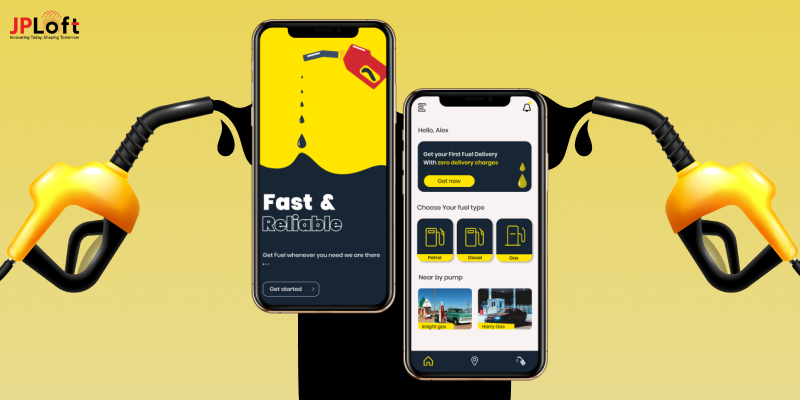
Before starting a fuel delivery app project, it is important to know how long development may take.
Generally, a basic fuel delivery app may take around 3 to 5 months to build, while an advanced solution can take approximately 8 to 12+ months.
The good news is that the development timelines aren’t fixed.
There are several factors that can increase the process without compromising the quality of your fuel delivery app.
If you want to understand the estimated time to build a fuel delivery app or find ways to shorten the development timeline, this guide will give you clear and useful insights to move faster.
Overview of the Fuel Delivery App Market
The fuel delivery app market has experienced significant growth in recent years, due to increasing demand for convenience and efficiency in refueling services.
Mobile fuel delivery systems enable consumers and businesses to receive fuel directly at their location, eliminating the need to visit traditional gas stations.
With that being said, it’s time to explore the fuel delivery app market stats below:
-
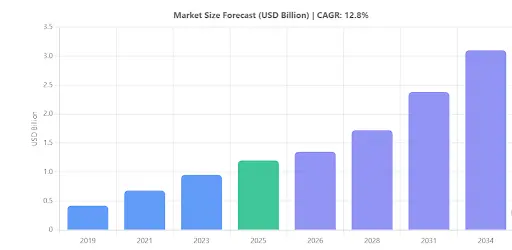
The mobile fuel delivery market is expected to grow to $11.93 billion by 2035, registering a CAGR of 7.4% during the forecast period.
-
Diesel is expected to remain the dominant fuel type with a 62% market share.
-
Around 74% of logistics operators use mobile fuel delivery to reduce downtime, while 66% of fleet owners report improved operational efficiency.
-
Nearly 48% of small fleet operators struggle with regulatory compliance, and 42% of service providers cite rising fuel transportation costs as a major challenge.
-
About 63% of platforms now offer digital fuel tracking, 52% leverage AI-powered route optimization, and 46% support contactless, app-based fuel delivery.
As the industry evolves, more businesses and customers are adopting mobile fuel delivery services for the convenience, efficiency, and flexibility they offer.
Let’s move on to the next section to get the idea about how much it takes to develop a fuel delivery app.
How Much Time Does It Take to Develop a Fuel Delivery App?
The time required to develop a fuel delivery app typically ranges from 3 to 12+ months, and it relies strongly on the complexity of features, design, third-party integrations, and platform (Android, iOS, or both).
In general, the fuel app development timeline is split into three levels: Basic, Mid-level, and Advanced.
Each level changes in terms of utility and user experience, which directly impacts the overall development hours.
Here is a detailed breakdown:
|
App Type |
Estimated Development Time |
Description |
|
Basic Version |
3 - 5 Months |
A simple fuel delivery app with essential features. This is ideal for startups that want to quickly enter the market with limited but functional features. The fuel delivery app development hours for this version are usually around 3-5 months. |
|
Mid-Level Version |
5 - 8 Months |
This version includes all basic features along with additional functionalities. The time to build a fuel delivery app at this stage may require 5-8 months, depending on customization and third-party integrations. |
|
Advanced Version |
8 - 12+ Months |
The advanced version is a fully-featured and scalable solution. The time to create a fuel delivery app with this level of sophistication often takes 8 months, depending on the project scope and technology stack. |
The fuel delivery app time can vary based on several factors, such as design complexity, third-party APIs, backend development, testing cycles, and post-launch support.
If you are wondering how long does it take to develop a fuel delivery app for your business, it is advisable to consult the top-rated mobile development company that can give you a tailored timeline based on your specific needs.
Fuel Delivery App Development Stages & Timeline
Looking to develop a fuel delivery app, it is a step-by-step process, where each stage directly affects the overall fuel delivery app development timeline.
Below is a detailed breakdown of the key stages involved:
|
Development Stage |
Description |
Estimated Time |
|
Research & Requirement Gathering |
Analyze the market, gather project requirements, create app structure, feature list, and user flow. |
2–3 Weeks |
|
UI/UX Design |
Create wireframes, prototypes, and final app designs focusing on user experience and ease of use. |
3–4 Weeks |
|
App Development (Frontend + Backend) |
Develop core functionalities, APIs, admin panel, customer & driver panels, and database. |
8–14 Weeks |
|
Third-Party Integrations |
Integrate payment gateways, GPS tracking, notifications, and other essential tools. |
2–3 Weeks |
|
Testing & Quality Assurance |
Conduct performance testing, fix bugs, and ensure the app is secure and ready for launch. |
3–4 Weeks |
|
Deployment & Launch |
Upload the app to App Store & Play Store, and handle app store compliance and listings. |
1 Week |
1. Research & Requirement Gathering (2–3 weeks)
Every successful fuel delivery app starts with thorough market research.
During this stage, business owners, developers, and stakeholders work together to define the project scope, identify target users, and establish clear business objectives.
They identify the target group, key competitors, market trends, must-have features, and cash. Wireframes, initial ideas, and processes are also covered.
Proper study helps reduce costly mistakes later and sets realistic expectations regarding the estimated time to develop a fuel delivery app.
2. UI/UX Design (3–4 weeks)
UI/UX design is all about making an attractive and user-friendly system.
The design should provide easy access and smooth exchanges for both customers and delivery drivers.
In this stage, designers start wireframing, prototyping, and finishing visual screens. A well-planned design part promises faster development later. Complex designs will stretch the fuel delivery app development hours, so balancing value and simplicity is suggested.
3. App Development (Frontend + Backend) (8–14 weeks)
This is the longest and most technical part, where the real app is written.
The frontend involves building user interfaces, while the server handles data processing, user management, order management, payment processing, and more.
Both iOS and Android versions (or cross-platform) are created here. Depending on your chosen features, the time to build a fuel delivery app can vary greatly.
4. Third-Party Integrations (2–3 weeks)
A key part of making a successful fuel delivery app is integrating GPS tracking alongside essential services like Google Maps, payment gateways, SMS, email alerts, and fleet management systems to deliver a seamless user experience.
These connections can sometimes be difficult due to compatibility or security reasons, slightly increasing the time.
5. Testing & Quality Assurance (3–4 weeks)
Before starting, the app gets intensive testing, including speed testing, user testing, bug fixing, and security checks.
App testing guarantees that the app runs easily, without crashes, security loopholes, or functional mistakes.
A detailed fuel delivery app maintenance checklist is often made at this stage to spot future app maintenance services.
6. Deployment & Launch (1 week)
After successful testing, you can submit your fuel app to the Play Store and launch your fuel app on the App Store to make it available for users across Android and iOS devices.
The launch process includes setting up app store listings, metadata, privacy rules, and beginning marketing materials.
After the launch, you can expect to gather customer comments and begin post-launch help.
Tips to Reduce Fuel Delivery App Development Time
By following these strategies, you can effectively shorten the fuel app development timeline and build a high-quality, efficient app in less time:
Tip 1: Define Clear Requirements & Prioritize Core Features
Clearly outline your app’s requirements before starting the project.
Focus on building a Minimum Viable Product (MVP) with essential app features like user registration, fuel ordering, GPS tracking, and secure payment gateways.
This helps reduce the overall fuel delivery app development timeline by streamlining the initial build.
Tip 2: Adopt Agile Methodology
Break down the project into smaller sprints using Agile practices.
This approach enables continuous feedback, early bug detection, and quick adjustments. By working in iterations, you can efficiently manage tasks and reduce the time to build a fuel delivery app.
Tip 3: Choose Cross-Platform Development
Consider using cross-platform frameworks such as Flutter or React Native.
Developing one codebase for both Android and iOS reduces fuel delivery development cost and time, accelerating the process compared to building separate native apps.
Tip 4: Leverage Ready-Made APIs and SDKs
Utilize pre-built solutions for mapping, notifications, and payment integrations.
Using trusted third-party APIs (like Google Maps for real-time tracking or Stripe for secure payments) can significantly cut down development hours, optimizing the estimated time to develop a fuel delivery app.
Tip 5: Focus on Continuous Testing and Quality Assurance
Implement regular app testing at every stage of development.
This proactive approach helps identify and resolve issues early, minimizing delays and ensuring that the app performs well upon launch.
Tip 6: Partner with Experienced Development Teams
The team behind your app can make all the difference.
A seasoned mobile app development company in USA knows how to avoid common roadblocks, speed up development, and deliver a fuel app that’s built to perform from day one.

How Can JPLoft Reduce Your Fuel Delivery App Development Timeline?
Want to reduce the time to build a fuel delivery app without compromising on quality? JPLoft offers top-notch fuel app development services to bring your idea to reality.
Our experienced team combines Agile development, cross-platform technologies, and proven development practices to help you launch your app faster and more efficiently.
From planning and design to development and deployment, we optimize every stage of the fuel delivery app development process to reduce delays while delivering a secure, scalable, and user-friendly solution.
As a trusted technology partner, we build high-performance fuel delivery apps that are ready to meet evolving customer expectations and market demands.
Want to build the next successful fuel delivery app? Connect with JPLoft for a free consultation and discover how we can help you bring your fuel delivery app to market faster.
Conclusion
Reducing the overall fuel delivery app development time is important for quickly joining the market and finding success.
By prioritizing key features, adopting Agile methods, choosing cross-platform frameworks, and leveraging ready-made APIs, you can greatly shorten the time to develop a fuel delivery app without compromising on quality.
Regular testing and working with experienced developers further ensure that your app is robust, safe, and user-friendly. Following these best practices not only helps you meet project goals but also keeps development costs in check.
In short, with careful planning and smart strategies, you can optimize the estimated time to develop a fuel delivery app and offer a high-performance product that meets customer standards.
Embrace these tips to speed up your development process and stay ahead in the competitive market.
FAQs
The estimated time to develop a fuel delivery app can vary based on complexity. A basic app may take around 3 to 5 months, while a mid-level app can take from 5 to 8 months, and advanced version can take 8 to 12+ months.
Adopting Agile methodologies, building a Minimum Viable Product (MVP) first, using cross-platform frameworks, and leveraging pre-built APIs are effective ways to reduce development time.
Developing a native app for both platforms typically requires more time since separate code bases are needed, while cross-platform development can reduce the overall timeline.
Yes, by prioritizing core features, continuous testing, and following best practices for fuel delivery app development, you can maintain quality while reducing the overall development time.
A shorter development timeline may help reduce initial costs, but long-term maintenance depends on how well the app is built and how regularly it is updated for performance optimization and security.

Savannah is a passionate tech enthusiast with a sharp understanding of client needs across diverse digital domains. With expertise spanning financial platforms, on-demand solutions, and emerging technologies, she brings a unique blend of analytical insight and interpersonal skills, helping businesses decode complexities and make informed decisions in today's rapidly evolving digital world.


Share this blog