


Key Takeaways:
Building a Mubert-like app succeeds when each development step, from audience research to launch, is executed in sequence rather than rushed or skipped.
A Mubert-like app needs core generation features plus licensing and API integration to serve both individual creators and businesses.
Music generation works by converting prompts into structured parameters that guide the AI model's composition.
Skipping custom model training with pre-trained models or APIs is a faster, lower-cost path to launch.
Model choice comes down to a trade-off between cost, control, and output originality.
Sustainable revenue comes from layering multiple monetization models rather than relying on just one.
Every creator wants original music, but hiring composers or buying licenses eats up time and budget fast. That gap is exactly why AI-generated soundtracks are taking over content creation.
Mubert changed the game by using AI to compose royalty-free music in real time, based on mood, genre, and duration. No repeated loops, no licensing headaches, just instant tracks built for the moment.
This growing demand is pushing founders and product teams to develop an AI music app like Mubert of their own. The opportunity is real, but building one takes the right mix of AI models, cloud infrastructure, and licensing clarity.
In this guide, we break down how Mubert works, the features your app needs, the development process, the tech stack, and the cost. By the end, you will know exactly what it takes to build a business-ready AI music app.
Overview of Mubert App
Mubert is an AI-powered music generator app that creates unlimited, royalty-free tracks in real time. Instead of offering pre-recorded songs, it composes original music instantly based on user preferences like mood, genre, and length.
The app has grown in popularity since its inception, with over 1 million downloads on the Play Store and a 4.3-star rating on the App Store.
What makes Mubert different is its real-time generation engine. It does not pull from a fixed music library. Every track is freshly composed, so users never get repeated loops or copyright conflicts.
Here is how the app actually works behind the scenes:
-
User Prompt: The user selects inputs like mood, genre, tempo, or a short text description of the sound they want.
-
Prompt Processing: The app converts these inputs into structured data the AI model can understand and act on.
-
Music Parameters: The system sets key musical parameters such as key, tempo, instrumentation, and track length based on the prompt.
-
AI Model: A trained generative audio model uses these parameters to compose original music layer by layer.
-
Audio Generation: The model renders the composition into a playable audio file in real time.
-
Quality Check: The app runs automated checks to catch glitches, distortion, or copyright similarity before the track is served.
-
Preview: The user gets an instant preview to listen and decide if the track fits their project.
-
Download/Stream: Once approved, the user can stream the track live or export it based on their licensing tier.
This real-time, prompt-based approach is what makes Mubert stand out from traditional stock-music platforms.
Why Build an AI Music App Like Mubert?
The AI music space is no longer a niche experiment. It is a real business opportunity, and founders who move early can capture demand from creators, marketers, and platforms already searching for faster music solutions.
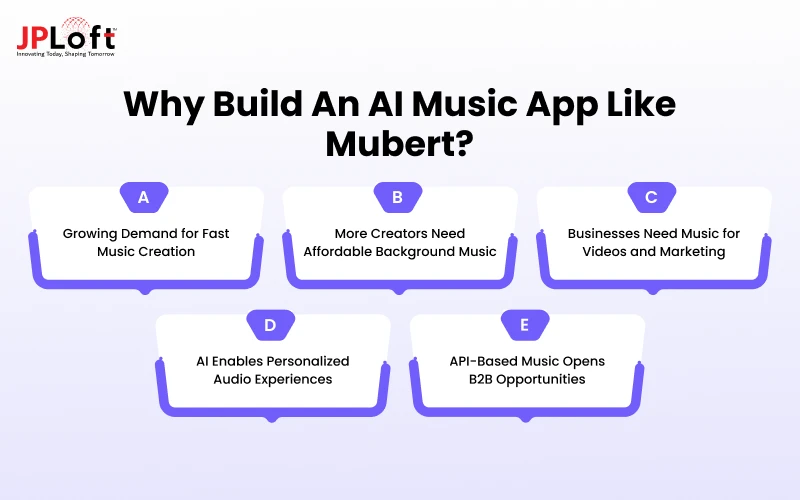
A. Growing Demand for Fast Music Creation
Creators and businesses no longer want to wait days for custom tracks. They need music instantly, matched to their content, without negotiating with composers or waiting on revisions. This urgency is exactly why founders now want to build an AI music app like Mubert.
B. More Creators Need Affordable Background Music
Independent creators, YouTubers, and podcasters often cannot afford licensed music or studio composers. AI in music apps gives them unlimited, royalty-free tracks at a fraction of the cost, making professional-sounding content accessible to smaller creators.
C. Businesses Need Music for Videos and Marketing
Marketing teams constantly need fresh audio for ads, product videos, and social content. Buying stock music repeatedly gets expensive and repetitive. An AI-generated solution gives brands unique, on-demand tracks without recurring licensing costs.
D. AI Enables Personalized Audio Experiences
Modern users expect content tailored to them, and audio is no exception. AI models can generate music that matches a specific mood, pace, or scene, creating a more personalized experience than static, pre-recorded music libraries ever could.
E. API-Based Music Opens B2B Opportunities
Mubert itself powers apps, games, creator tools, AI agents, and live streams through its API, proving the real opportunity goes beyond a single consumer app into a scalable B2B licensing model.
Essential Features for an AI Music App Like Mubert
The AI features for music streaming apps are its backbone. Skipping even one can hurt output quality, user retention, or your app's ability to compete with established players.
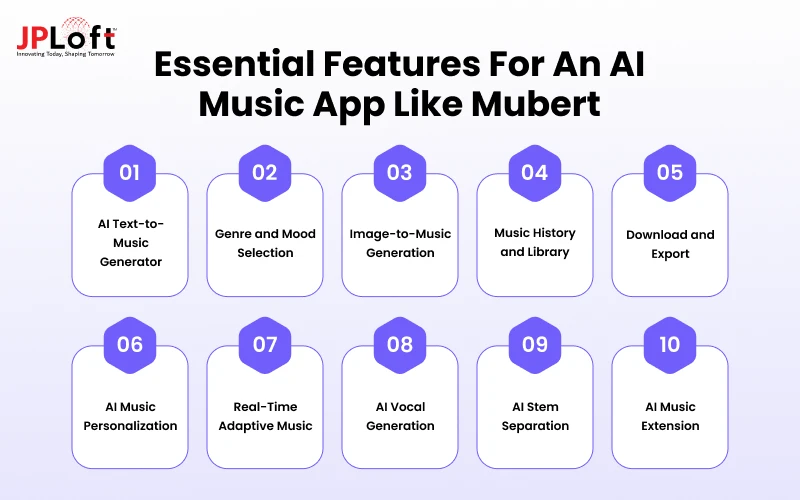
► AI Text-to-Music Generator
This is the core engine. Users type a text prompt describing mood, genre, or scene, and the AI composes an original track instantly, without needing any musical skill.
► Genre and Mood Selection
Users pick from preset genres and moods like upbeat, calm, cinematic, or lo-fi. This narrows the AI's output fast, so tracks match the project's tone without extra prompting.
► Image-to-Music Generation
The AI analyzes an uploaded image and generates music that matches its visual tone. This feature is especially useful for video editors and social content creators working fast.
► Music History and Library
Every generated track gets saved automatically so that users can revisit, reuse, or tweak past compositions. This small feature meaningfully improves retention and daily engagement over time.
► Download and Export
Users need clean export options in multiple formats and quality levels. Without this, even great AI-generated music becomes useless for real-world video, game, or podcast projects.
► AI Music Personalization
The app learns from a user's past choices, like preferred genres or tempo, and personalizes future track suggestions. This makes the experience feel smarter with every use.
► Real-Time Adaptive Music
The AI adjusts a track's mood or intensity live, based on gameplay, video pacing, or streaming context. Teams that make an AI music app like Mubert should treat this as a differentiator.
► AI Vocal Generation
Beyond instrumentals, the app can generate AI vocals or hums to layer over tracks. This adds depth and appeals to creators who want fuller, song-like compositions.
► AI Stem Separation
Users can split a track into individual stems, such as drums, bass, or vocals. This gives creators editing flexibility without needing separate professional audio software.
► AI Music Extension
Instead of generating a fresh track, users can extend an existing one seamlessly. This is useful for looping background music across longer videos, streams, or game levels.
Step-by-Step Process to Develop an AI Music App Like Mubert
Building a successful AI music platform takes more than plugging in a model. Each step below moves you from an initial idea to a scalable, revenue-ready product.
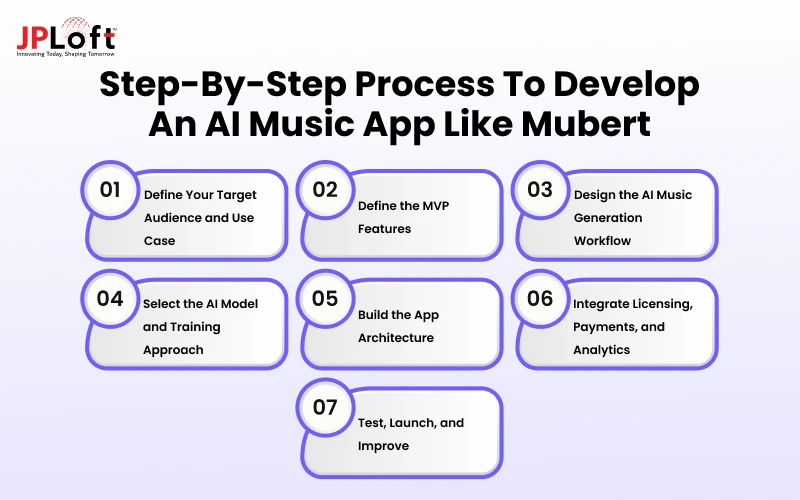
Let us understand what it takes to build a music app in detail.
Step 1: Define Your Target Audience and Use Case
Before writing any code, you need clarity on who will use your app and why they need it.
-
Segment Users by Role and Industry: Identify whether your users are content creators, marketers, game studios, or podcasters. Each segment has different budget expectations, licensing needs, and preferred music styles, shaping your product direction.
-
Competitive and Gap Analysis: Study Mubert, AIVA, and Soundraw to spot pricing gaps, missing features, or weak licensing terms. This research reveals exactly where your app can outperform existing players in the market.
-
User Interviews and Demand Testing: Talk directly to potential users about their current music sourcing pain points. Early demand testing confirms whether people would actually pay for your solution before you build it.
Step 2: Define the MVP Features
Once you understand your users, narrow your music app feature list to what actually proves the core value first.
-
Must-Have vs Nice-to-Have Feature Matrix: Rank every feature idea by user impact and development effort. This matrix keeps your first release lean, so scarce engineering time goes toward features users need immediately.
-
Core User Flows for First Release: Map the exact path from prompt input to downloaded track. A tight, frictionless flow proves your concept faster than a feature-heavy app with too many entry points.
-
Success Metrics and Validation Criteria: Set clear benchmarks like generation speed, retention rate, or conversion percentage before launch. These metrics tell you objectively whether your MVP is ready to scale.
Step 3: Design the AI Music Generation Workflow
This step defines how a simple prompt becomes a finished, playable track inside your app.
-
Prompt Parsing and Parameter Extraction: The system reads user input and extracts structured details like genre, tempo, and mood. Accurate parsing here directly affects how well the final track matches user intent.
-
Parameter-to-Model Mapping and Constraints: Extracted parameters are matched to specific model settings and boundaries. This mapping keeps generated tracks within a usable range and prevents chaotic or unusable audio outputs.
-
Post-Generation Audio Processing and Delivery: After generation, the track passes through mixing, normalization, and quality checks. Teams that want to build an app like Mubert must treat this stage as non-negotiable for consistent output quality.
Step 4: Select the AI Model and Training Approach
This decision shapes your app's cost, timeline, and how original your generated music actually sounds.
-
API-Based vs Open-Source vs Proprietary Options: API access gets you to market fastest, open-source models offer more control, and proprietary training gives full ownership. Each path carries different cost and speed tradeoffs.
-
Fine-Tuning Strategy and Data Requirements: Fine-tuning an existing model on curated, licensed datasets improves output quality and originality. This requires clean training data and clear rights to avoid future legal exposure.
-
Hybrid Architecture and Cost-Time Tradeoffs: Many founders combine a base API model with custom fine-tuning layers. This hybrid approach balances development speed against the cost of full proprietary training.
Step 5: Build the App Architecture
A stable architecture ensures your app performs reliably as generation requests and user numbers grow.
-
Client Layer: Mobile/Web App and SDKs: This layer handles the interface users interact with directly, across mobile, web, and any embedded SDKs offered to partner apps or games.
-
API Gateway, Backend, and AI Orchestration: The backend routes requests, manages user data, and orchestrates calls to the AI model. This layer must handle concurrent requests without slowing down generation speed.
-
Model Serving, Audio Pipeline, Storage, and CDN: Generated tracks move through a serving pipeline, get stored securely, and reach users through a content delivery network for fast, reliable streaming or downloads.
Step 6: Integrate Licensing, Payments, and Analytics
This step protects your business legally while building the revenue systems your app depends on.
-
Music Ownership, Training Data Rights, and Commercial Use: Clearly define who owns generated tracks and confirm your training data is properly licensed. This protects both your business and your users from copyright disputes.
-
Subscriptions, Credits, Downloads, and Refunds: Set up flexible payment options, including subscriptions and pay-per-track credits. Clear refund policies build user trust and reduce support disputes later.
-
Usage Analytics, Copyright Claims, and Compliance: Track how users generate and use music while monitoring for copyright similarity issues. Compliance tooling here protects your platform as usage scales globally.
Step 7: Test, Launch, and Improve
Launching is not the finish line. Continuous app testing and iteration keep your app competitive long-term.
-
Quality, Speed, Load, and Compatibility Testing: Test generation speed under heavy load, audio quality consistency, and performance across devices. This step catches issues before real users ever encounter them.
-
MVP Launch Plan and Go-to-Market Execution: Plan a phased rollout instead of a full public launch. This lets you monitor server load, user behavior, and generation performance under real conditions.
-
Feedback Loops, Iteration Roadmap, and Scaling: Collect ongoing user feedback and build a clear roadmap for feature updates. Founders who develop an application like Mubert successfully treat launch as the starting point, not the end.
How Does the AI Music Generation Technology Work?
Behind every generated track sits a layered AI pipeline that turns plain text into a finished audio file in seconds. Here is how each part of that pipeline works together.
-
The process starts with natural language processing, which reads the user's prompt and converts casual phrases into structured, machine-readable music instructions.
-
From there, the system moves into music parameter extraction, pulling out specific details like genre, mood, tempo, instruments, duration, energy, and overall structure from the parsed prompt.
-
These extracted parameters are then passed to a generative AI model, which composes original musical content layer by layer, based strictly on the selected inputs.
-
Once the track is generated, it goes through audio processing, where loudness, format, and playback quality are checked and adjusted for a clean listening experience.
-
Finally, a personalization engine studies user behavior over time, such as repeated genre choices or skipped tracks, to improve future music recommendations.
This is essentially how most AI music generator apps like Mubert work under the hood, mapping prompt data into musical parameters before rendering the final track.
Mubert itself follows this same core approach, translating text prompts into structured musical parameters before generating a playable composition.
How Much Does It Cost to Build an AI Music App Like Mubert?
The cost of Mubert-like app development ranges from $30,000 to $250,000+. However, the final music streaming app cost depends heavily on AI complexity, feature depth, and infrastructure choices, not just app size.
A basic MVP covers core generation, mood selection, and export, enough to validate demand. A mid-level platform adds personalization, history, and richer parameter controls for a broader user base.
An advanced platform includes real-time adaptive music, vocal generation, stem separation, and heavier cloud infrastructure to support scale. The cost to build an AI music generator app also shifts based on team location, model training approach, and licensing complexity.
Let’s understand better with the help of a table:
|
App Type |
Estimated Cost |
|
Basic AI Music MVP |
$30,000 – $60,000 |
|
Mid-Level Platform |
$60,000 – $120,000 |
|
Advanced AI Music Platform |
$120,000 – $250,000+ |
Overall, AI music app development like Mubert rewards founders who scope features tightly around real user needs instead of building every advanced capability upfront. Starting lean and expanding post-launch keeps budgets predictable while still leaving room to grow into a full-featured product later.
How Does an AI Music App Like Mubert Make Money?
Mubert runs on a multi-tier system that layers free access, paid subscriptions, and API licensing to turn casual users into recurring revenue and businesses into long-term clients.
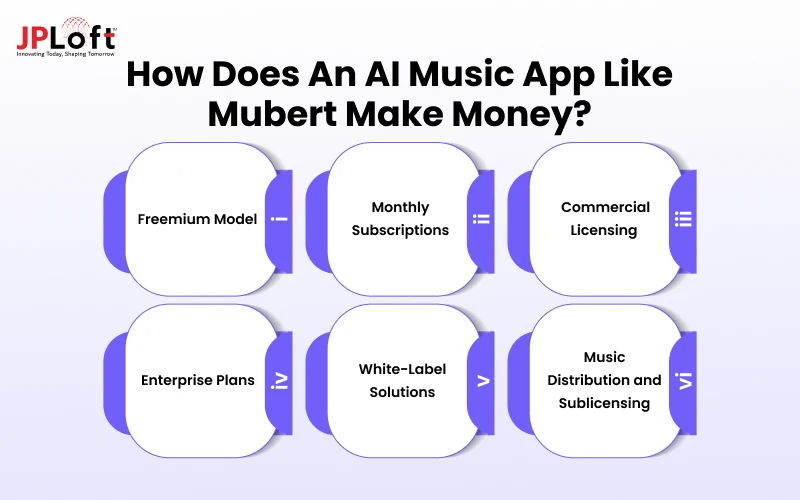
Let us understand the music app monetization models in detail.
A. Freemium Model
Mubert's free Ambassador tier gives users limited monthly track generations with an audible watermark and attribution requirement. This lets people test the AI before upgrading to a paid plan for full access.
B. Monthly Subscriptions
Paid tiers like Creator and Pro unlock more generations, lossless downloads, and no watermark. Founders looking to create an AI music app like Mubert should mirror this tiered pricing to convert free users steadily.
C. Commercial Licensing
Mubert's Pro and Business plans specifically unlock commercial rights, covering ads, e-commerce, and monetized content. Lower tiers stay restricted to personal, non-commercial use, which pushes serious creators toward paid upgrades.
D. Enterprise Plans
The Business tier, priced around $199/month, adds client work, agency use, and in-app or in-game licensing. Larger studios and platforms that make an AI music app like Mubert for high-volume needs typically negotiate custom terms beyond this tier.
E. White-Label Solutions
Mubert's API plans let other apps, games, AI agents, and live-streaming platforms embed its generative music engine directly. This effectively turns Mubert into background infrastructure for products that never carry the Mubert brand.
F. Music Distribution and Sublicensing
Higher API tiers, like the Startup and custom plans, explicitly include sub-licensing and distribution rights. This lets partner platforms resell or redistribute generated tracks, giving Mubert a scalable revenue stream tied directly to partner growth.
Key Challenges in Mubert-Like AI Music App Development
Even with the right features and tech stack, teams face real technical and legal hurdles when building an AI music generator. Addressing these music app development challenges early prevents costly fixes later.
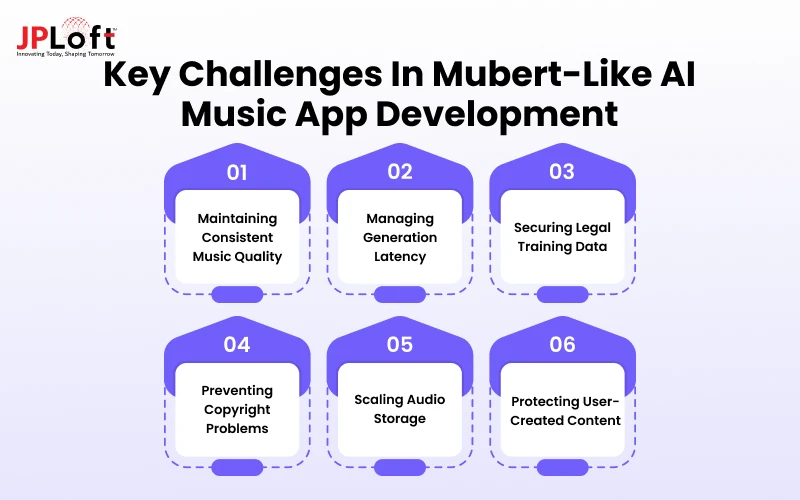
Challenge 1: Maintaining Consistent Music Quality
AI models can produce inconsistent output across sessions, with some tracks sounding polished and professional while others feel flat, repetitive, or off-key. This unpredictability directly affects user trust and the app's overall long-term perceived quality.
Solution: Use continuous model tuning, automated quality-scoring checks, and regular human review cycles to catch weak tracks before any public release.
Challenge 2: Managing Generation Latency
Users expect near-instant results when generating a track, but complex AI models often take several seconds or longer to render full compositions. Slow generation frustrates users, increases drop-off, and hurts retention across the entire platform.
Solution: Optimize inference speed through model compression, efficient caching, and parallel processing to deliver near-instant track generation consistently for every user.
Challenge 3: Securing Legal Training Data
Training a model on unlicensed music creates serious legal exposure for teams that want to build an app like Mubert at real scale. Sourcing clean, properly licensed training data remains one of the biggest hurdles.
Solution: License datasets from verified sources, document usage rights clearly, and avoid any unverified or scraped copyrighted material at all costs.
Challenge 4: Preventing Copyright Problems
Generated tracks can accidentally resemble existing copyrighted songs, especially when models train on broad, uncurated datasets. This risk grows fast and constantly as AI music generator apps like Mubert expand their music libraries over time.
Solution: Run automated similarity checks against existing copyrighted catalogs and flag close matches before releasing any track to all real users.
Challenge 5: Scaling Audio Storage
As users generate more tracks, storage and retrieval costs grow quickly, and slow access speeds can hurt playback performance. Teams pursuing Mubert-like app development must plan scalable infrastructure early to avoid costly future bottlenecks entirely.
Solution: Use cloud storage with compression, tiered access, and smart caching to control costs efficiently as usage grows steadily over time.
Challenge 6: Protecting User-Created Content
Once users generate or customize tracks, the app must prevent unauthorized reuse, theft, or resale by other users or third parties. Any AI audio generation application like Mubert needs safeguards to protect creators and platform trust.
Solution: Apply access controls, digital watermarking, and clear usage licenses to prevent unauthorized content misuse consistently across the entire platform.
Why Choose JPLoft to Build an App Like Mubert?
JPLoft brings hands-on expertise as a trusted provider of music app development services. We help startups and enterprises turn AI music ideas into scalable, revenue-ready products.
Our team handles everything from AI model integration to backend architecture, licensing workflows, and cloud infrastructure, so you avoid the common pitfalls that slow down early-stage founders.
We understand what it takes for Mubert-like app development to succeed commercially, not just technically. From choosing the right AI model to structuring subscription and licensing tiers, our developers focus on real business outcomes, not just working code.
Whether you need an MVP or a full-featured platform, JPLoft combines AI expertise with proven mobile and cloud development experience to deliver an app that performs, scales, and actually makes money.

Conclusion
The opportunity to build an AI music app is no longer experimental; it is a proven, growing market. Mhas shown that real-time, prompt-based music generation solves a genuine problem for creators, marketers, and platforms that need original audio without composers or expensive licensing.
Success in this space depends on getting the fundamentals right: a reliable AI pipeline, clean licensing, scalable infrastructure, and a monetization model that grows with your users.
Founders who want to develop an application like Mubert need to treat quality, speed, and legal clarity as non-negotiable from day one.
The market for AI music generator apps like Mubert will only keep expanding as more industries adopt AI-generated audio. Those who start with a focused MVP, validate demand early, and scale with intention will be best positioned to lead in this space.
FAQs
Core features for a Mubert-like app include AI text-to-music generation, genre and mood selection, download and export options, royalty-free licensing, real-time adaptive music, and API integration for broader business and platform use cases.
It parses text prompts into structured parameters like genre, tempo, and mood, then a generative AI model composes original audio layer by layer based on those inputs.
Yes, you can use pre-trained models or API access instead of custom training. This significantly reduces cost, development time, and the technical complexity of AI music app development like Mubert.
Popular options include open-source models, proprietary generative audio architectures, and API-based solutions from established providers, each offering different trade-offs in cost, control, and originality.
Common models include freemium access, tiered subscriptions, commercial licensing, enterprise plans, and API-based white-label integrations, similar to how Mubert monetizes across free and paid tiers.
License your training data properly, run similarity checks against existing copyrighted works, and clearly define usage rights so any AI audio generation application like Mubert stays legally protected.

Conor has 10+ years of experience in software development, application engineering, solution design, and UX/UI. He has worked across digital products in restaurant technology, food and grocery delivery, healthcare, media, streaming, and social platforms, bringing both technical and user-experience perspectives to product development. His experience working with large organizations and growth-focused digital products helps businesses translate complex requirements into practical, user-focused solutions.


Share this blog