


A great music app can still fail because of one hidden choice: its music API. Users forgive a design issue, but not slow loading, missing songs, or playback that stops at the wrong moment.
This one decision shapes which songs users can find, how fast they play, what you pay as you grow, and how much extra work your developers face later.
Choose well, and your app feels fast and dependable. Choose poorly, and you may face costly rewrites, surprise bills, or licensing trouble.
Yet many teams decide in a hurry, looking only at price or brand name, and later find the cheapest option wasn't the right fit. That is a costly mistake.
In this guide, we will discuss how to choose the right music API, so you can decide with full confidence.
What is a Music API and How Does It Work?
A music API is a ready-made software connection that lets an app request music data or music features from a larger service. Instead of building a huge song library yourself, your app simply asks for what it needs, like songs or playlists.
How Music APIs Connect Applications With Music Services
Think of the API as a waiter in a restaurant. Your app is the guest, the music service is the kitchen, and the API carries orders and answers between them.
-
Request: When a user searches for a song, your app sends a request through the API.
-
Check: Before sharing anything, the service checks a secret key, so only approved apps get access.
-
Search: The service looks through its library and finds matching songs, artists, or playlists. This is why a music API for applications saves your team so much build time.
-
Response: It sends back details such as the title, artist name, cover art, or a playable link.
-
Display: Your app shows the result on the screen within seconds.
Developers do not build a song library from scratch. They connect to an existing one and focus on design and user experience.
What Are the Different Types of Music APIs?
Not every API does the same job. Each type serves a different purpose, so knowing the types first makes it easier to match the right one with your app idea.
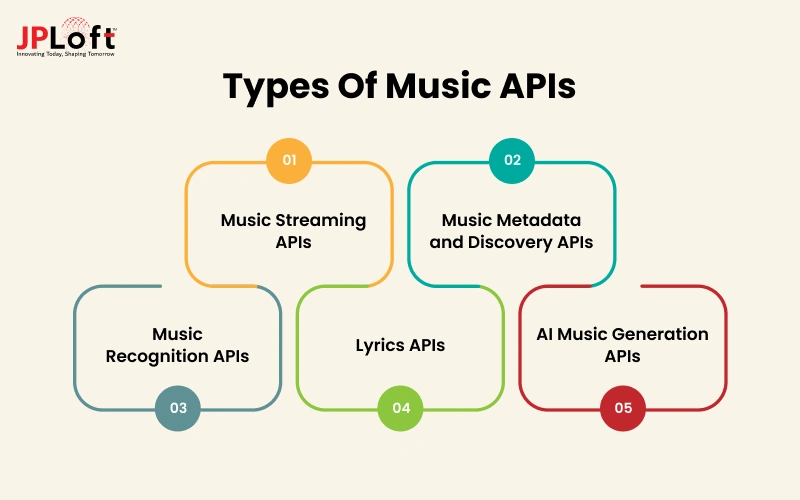
1. Music Streaming APIs
These let your app play full songs and fetch playlists, albums, and artist pages from a licensed library.
A music streaming API suits apps built mainly around listening, such as radio or on-demand players, because it handles playback, licensing, and song delivery on your behalf.
2. Music Metadata and Discovery APIs
These return song details like titles, genres, moods, release dates, and artist information, and they power search, recommendations, and charts inside your app.
They work well for discovery apps and playlist tools, where helping users find new songs matters more than playing the songs themselves.
3. Music Recognition APIs
These listen to a short audio clip through the phone’s microphone and name the song, artist, and album within seconds.
They are a smart add-on for apps that want a fun, interactive feature, like identifying a song playing in a cafe or at a party.
4. Lyrics APIs
These supply song words, translated lyrics, and lines that move in time with the music.
Including this kind of music app API lifts engagement in sing-along, karaoke, and language-learning apps, since users stay longer and return more often when they can easily follow every line.
5. AI Music Generation APIs
Considering AI in music apps helps create brand-new songs, background tracks, or sound effects from a text prompt, without needing a human composer.
They suit apps for content creators, games, and video editing tools, but always check the licensing terms carefully, since commercial rights differ from one provider to another.
How to Choose the Right Music App API?
Picking an API is easier when you follow a clear order. Each step below removes weak options and brings you closer to the one that fits your product, your budget, and your growth plans when building a music streaming app.
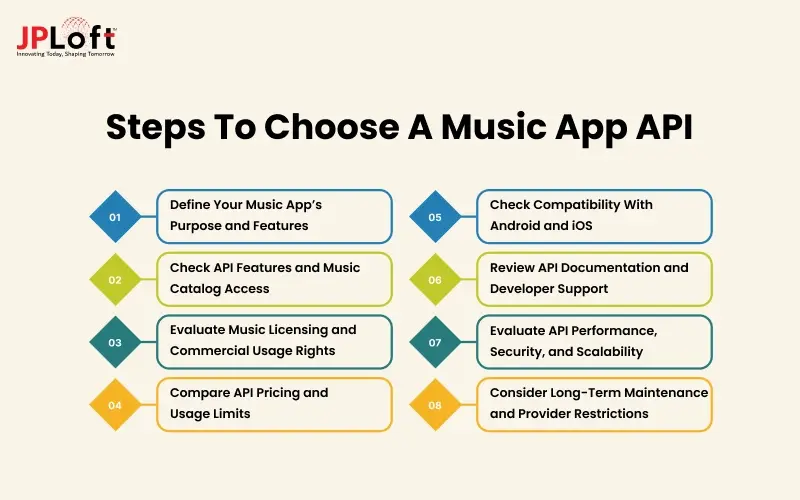
Step 1: Define Your Music App’s Purpose and Features
Start with your goal. The right API for music app projects depends on what your product actually does. Are you building a streaming player, a discovery tool, a karaoke app, or a song-identifying app?
Then turn that goal into a feature list, such as search, playlists, offline play, or lyrics. Each feature needs matching API support, so this list becomes your filter. Any API missing a must-have feature is out.
Step 2: Check API Features and Music Catalog Access
Next, look closely at what the API offers. Check how many songs it holds, how often the library is updated, and whether it covers the genres and regions your users love. Missing songs frustrate users.
Also confirm that it supports search, recommendations, and playback. A big catalog means little without strong tools, so pick the API whose catalog and features match what your users want to find and play.
Step 3: Evaluate Music Licensing and Commercial Usage Rights
Many teams forget this step, and it can become costly. Some APIs only share song details or short previews, while full-song playback needs a proper license. Ask who pays the artists, whether you can run ads or charge subscriptions, and which countries are allowed.
Always read the provider’s terms carefully, and ask for written answers, so you avoid legal trouble after launch. Skipping this check can stop a launch.
Step 4: Compare API Pricing and Usage Limits
Price matters, but only when you look at the full picture and not just the monthly fee. A simple music API comparison should include free limits, extra request costs, and rate limits that could slow your app during busy hours.
Write down your expected monthly usage and check how many calls your app will make as users grow. A cheap plan can turn expensive quickly once traffic rises.
Step 5: Check Compatibility With Android and iOS
Your users will open the app on many phones, so test platform support early. Check whether the provider offers ready SDKs, sample code, and background playback for both systems. Some tools work better on one platform than the other.
This gap often forces teams to rebuild features late in the project. Before you decide, confirm that your chosen music API for Android and iOS apps works smoothly on both.
Step 6: Review API Documentation and Developer Support
Good documentation saves days of effort. Look for clear guides, working code samples, and an up-to-date change log. Then check how developers can reach the provider when problems appear, through chat, email, or a community forum.
Ask other developers about their experience too. Quick, helpful support matters most close to launch. If answers are hard to find during your trial, expect more delays once real users arrive.
Step 7: Evaluate API Performance, Security, and Scalability
A good provider stays fast, safe, and steady under pressure. Test response time during busy hours, and ask about uptime promises. For safety, make sure it uses secure keys, user login checks, and data protection.
A reliable setup for music API integration should also handle sudden growth, such as a viral playlist, without crashing, so your app can serve thousands of new listeners smoothly. Growth should never break your app.
Step 8: Consider Long-Term Maintenance and Provider Restrictions
Think beyond launch day. Providers can change prices, remove features, or close access with little notice, as has happened before with popular platforms. Ask about their update history and plans.
Plan for these risks now, not after they appear. Keep your code flexible so you can switch providers later without rebuilding the whole app. A good choice today should still protect your product years from now.
Popular Music APIs: Features & Use Cases Compared
Once you know the types, the next step is seeing how real options differ. The table below compares seven popular choices, so you can match each one to your app idea before planning any music streaming API integration.
|
API |
Type |
Key Features |
Best Use Case |
|
Spotify Web API |
Catalog and discovery |
Song search, playlists, artist and album data, user library, recommendations |
Playlist, discovery, and social music apps |
|
Apple Music API |
Streaming and catalog |
Large catalog, playlists, user library, playback for subscribers |
Apps built mainly for Apple users |
|
Deezer API |
Catalog and previews |
Charts, genres, artist data, short song previews |
Discovery apps and music preview features |
|
Last.fm API |
Discovery and analytics |
Listening history, similar artists, tags, charts |
Recommendation and listening-habit apps |
|
MusicBrainz API |
Open metadata |
Song, album, and artist details with unique IDs |
Tagging, library cleanup, and accurate song data |
|
ACRCloud API |
Music recognition |
Identifies songs from short audio clips or humming |
Song-identifying and broadcast tracking features |
|
Musixmatch API |
Lyrics |
Lyrics, synced lyrics, translations |
Karaoke, sing-along, and language-learning apps |

How Can JPLoft Help With Music API Integration?
JPLoft is a trusted music app development company with a skilled team that has built streaming, discovery, and audio-based apps for startups and growing brands across the USA, UAE, and beyond.
Not sure how to integrate a music API into an app without delays or errors? Our developers handle the whole process for you.
We help you:
-
Select the API that fits your goals, budget, and licensing needs
-
Connect it smoothly with Android, iOS, and web apps
-
Secure user logins, keys, and data from day one
-
Test speed and stability before launch
-
Support and update your app after release
From planning to launch and beyond, JPLoft works as a partner who cares about your results. Our clear updates keep you informed at every single stage. Share your app idea today, and let our experts turn it into a fast, reliable music app your users will love.
Conclusion
Choosing the right API is not a quick task, but it becomes simple when you follow a clear path. Even if you are still learning how to integrate music streaming API options, the first step is understanding the types, from streaming and discovery to lyrics, recognition, and AI-generated music.
Then match them with your app’s purpose, your users, and your budget. Remember the key checks: catalog size, licensing rights, pricing limits, Android and iOS support, documentation, speed, security, and long-term risks. Each one protects your app from a different problem.
Comparing popular options side by side also shows that no single API is perfect for every product. Start with a small test, measure the results, and then scale up.
A careful choice today saves money, time, and effort tomorrow, and it gives your listeners the smooth, reliable experience they expect.
FAQs
Spotify Web API suits discovery, Apple Music API suits Apple users, and Deezer suits previews. The best choice depends on your catalog, licensing, pricing, and platform needs, so test first.
Many offer free plans or trials with limited requests. Full music streaming usually needs paid access or licensing, so check each provider’s free limits before building your app around them.
Yes. Many apps combine them, such as one for streaming, one for lyrics, and one for recognition. This adds flexibility, but it also adds more cost, testing, and ongoing maintenance.
Yes, for full-song playback. Streaming needs licenses covering artists and rights holders, which some providers handle for you. Metadata and lyrics usually have separate terms, so read each provider’s agreement.
The cost of the best API for music app development depends on the features and platforms. A simple integration costs far less than a complex streaming app. Get a quote after defining your needs, and include monthly API fees.

Conor has 10+ years of experience in software development, application engineering, solution design, and UX/UI. He has worked across digital products in restaurant technology, food and grocery delivery, healthcare, media, streaming, and social platforms, bringing both technical and user-experience perspectives to product development. His experience working with large organizations and growth-focused digital products helps businesses translate complex requirements into practical, user-focused solutions.


Share this blog