


Key Takeaways:
AI chatbot integration requires more than an LLM API. Businesses need the right use case, reliable data, integration architecture, security controls, and ongoing optimisation to turn conversational AI into a valuable app capability.
Choose the right integration approach: API, SDK, custom backend, RAG, or AI agents.
Build a connected architecture: Integrate the LLM with app interfaces, business APIs, knowledge bases, and guardrails.
Prioritise security: Protect user and business data with authentication, access controls, encryption, and AI safeguards.
Track chatbot performance: Measure accuracy, resolution, response time, satisfaction, cost, and conversions.
Users increasingly expect apps to provide instant answers, personalised assistance, and seamless ways to complete tasks.
Modern AI-powered chatbots help businesses meet these expectations by enabling users to get support, find information, manage account-related requests, and interact with business services through natural conversations.
However, integrating an AI chatbot involves far more than connecting an AI model API and adding a chat interface.
Business and app owners need to define clear use cases, assess available data, choose the right AI model and integration approach, design the technical architecture, and establish appropriate security and governance controls.
So, how do you integrate an AI chatbot into an app? The process includes preparing knowledge sources, connecting APIs and business systems, implementing guardrails, and continuously testing and optimising performance.
This guide covers AI chatbot integration approaches, use cases, architecture, costs, ROI, security, and ongoing maintenance needs.
What Is AI Chatbot Integration?
Integrating an AI chatbot is the process of connecting an AI-powered conversational assistant with an existing mobile or web app. It allows users to ask questions, complete tasks, access information, and receive support without leaving the app.
Unlike a standalone chatbot, an integrated solution can connect with APIs, databases, CRM systems, payment gateways, knowledge bases, and support platforms.
The integration typically involves selecting an AI model, connecting business data, building backend workflows, embedding the chatbot interface, and adding security controls. This makes the chatbot a functional part of the app rather than just a messaging feature.
Should Your Business Integrate an AI Chatbot Into Your App?
Every modern business needs to adopt automation at certain stages to ensure their brand aligns with modern-day expectations. But planning for an AI chatbot makes sense when it can address a clear business or customer experience challenge.
The business decision to integrate a chatbot should go beyond following the AI trend and focus on where conversational assistance can create measurable value.
Here are the key factors to be considered when determining whether AI chat integration is the right fit for you or not.
-
Customers need frequent assistance: A chatbot can handle common questions and reduce pressure on support teams.
-
Users struggle with app navigation: Conversational interactions can help users find information or complete tasks faster.
-
Your team manages repetitive workflows: AI can automate routine requests, qualification, recommendations, and status updates.
-
Your app contains valuable data: Connecting the chatbot to approved business data can deliver more relevant responses.
-
You need scalable support: AI can assist users continuously without increasing support capacity at the same rate.
However, chatbot integration may not be worthwhile if your app has limited user interaction, lacks reliable data, or has no clear task that conversational AI can improve.
Business Benefits of AI Chatbot Integration
AI chatbots can do more than answer customer support queries. When integrated with business data and workflows, they can improve operational efficiency, user experience, and business outcomes.
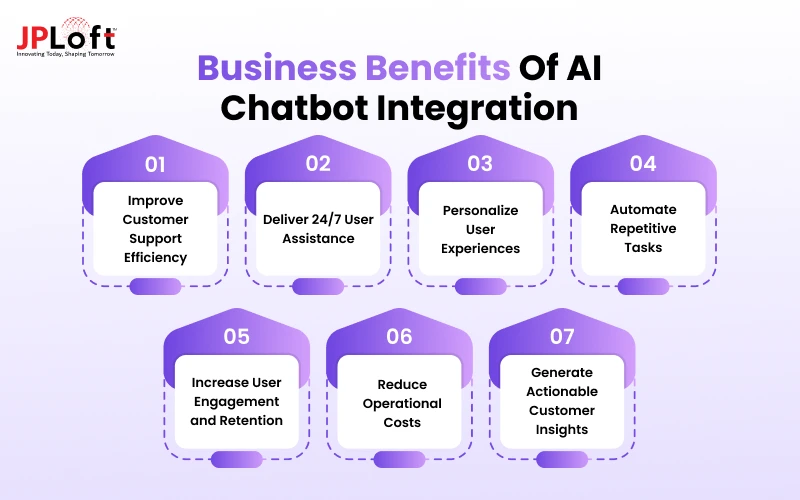
Here are the key benefits of AI chatbots for business that they should be aware of before proceeding with integration.
1. Improve Customer Support Efficiency
AI chatbots can handle common questions, provide instant responses, and resolve routine requests without requiring human intervention. This reduces support workload while allowing agents to focus on complex issues that require human judgment.
2. Deliver 24/7 User Assistance
Unlike human support teams, AI chatbots can assist users at any time. They can answer questions, guide users through features, and provide relevant information across different time zones and outside business hours.
3. Personalize User Experiences
When connected to authorised user data, chatbots can provide context-aware recommendations and responses. This can help businesses create more relevant interactions based on user preferences, activity, purchase history, or account information.
4. Automate Repetitive Tasks
A chatbot can do more than respond to questions. With API and system integrations, it can perform tasks such as checking order status, scheduling appointments, generating information, qualifying leads, or updating records.
5. Increase User Engagement and Retention
Conversational interfaces can make it easier for users to discover features, obtain assistance, and complete tasks. A more responsive in-app experience can encourage users to return and engage with the application more frequently.
6. Reduce Operational Costs
Automating high-volume, repetitive interactions can reduce the amount of manual effort required from customer support and operations teams. As usage grows, businesses can handle more interactions without proportionally increasing their support resources.
7. Generate Actionable Customer Insights
Chatbot conversations can reveal recurring questions, user frustrations, product preferences, and unmet needs. Businesses can analyse these interactions to improve products, customer journeys, support processes, and future AI experiences.
Buy vs Build: Choosing the Right Approach To Integrate AI Chatbot
Businesses can either buy AI chatbot AI business solutions or build a custom AI chatbot around their application and workflows.
The right option depends on your integration requirements, data control, security needs, customisation, scalability, and available development resources.
|
Factor |
Buy/Managed Solution |
Build an AI Chatbot |
|
AI Model |
Uses models supported by the platform |
Select and integrate models based on accuracy, cost, latency, or use case |
|
Data Integration |
Prebuilt connectors and standard APIs |
Custom connections with databases, CRM, ERP, APIs, and internal systems |
|
RAG & Knowledge Base |
Basic document ingestion and retrieval features |
Custom RAG pipeline with embeddings, vector databases, metadata, and retrieval controls |
|
Customisation |
Configuration-based workflows and limited custom logic |
Custom prompts, workflows, tool calling, memory, and business rules |
|
Security & Compliance |
Depends on provider controls and certifications |
Custom authentication, encryption, access controls, audit logs, and compliance architecture |
|
Scalability & Performance |
Infrastructure scaling largely handled by provider |
Custom optimisation for traffic, latency, caching, model routing, and infrastructure |
|
Monitoring & Analytics |
Standard usage and conversation analytics |
Custom tracking for accuracy, latency, token usage, failures, and business KPIs |
|
Development & Maintenance |
Faster deployment with lower engineering effort |
Higher development effort with ongoing AI, infrastructure, and integration maintenance |
|
Best For |
FAQs, support, and standard conversational use cases |
Complex workflows, proprietary data, deep integrations, and AI-driven products |
What Are the Different AI Chatbot Integration Approaches?
The right integration approach depends on your app architecture, AI requirements, data sources, and level of control.
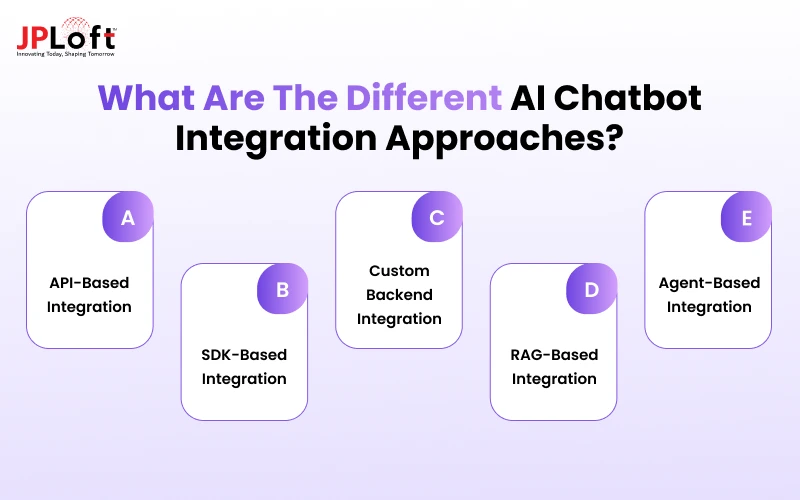
Businesses can start with a simple API connection or use a more customised architecture as chatbot requirements become more complex.
1. API-Based Integration
API-based integration connects your app with an external AI model or chatbot platform through APIs. Such an approach to integrating a chatbot into a mobile app is suitable for applications that need conversational capabilities without building and managing the entire AI infrastructure internally.
2. SDK-Based Integration
An SDK can help developers add chatbot functionality directly into a mobile or web application. Depending on the provider, an SDK may offer chat components, authentication, streaming responses, conversation management, and analytics, reducing development effort.
3. Custom Backend Integration
A custom backend gives businesses greater control over chatbot requests, authentication, business logic, data access, and third-party integrations. It is useful when the chatbot needs to work closely with existing APIs, databases, CRM platforms, or application workflows.
4. RAG-Based Integration
RAG-based integration connects the chatbot to business-specific knowledge sources such as documents, databases, and internal content. The system retrieves relevant information before generating a response, helping the chatbot provide more context-specific and grounded answers.
5. Agent-Based Integration
Agent-based integration extends chatbot capabilities beyond conversation by allowing the AI to interact with external tools and APIs. It can execute tasks such as checking order status, scheduling appointments, creating support tickets, or retrieving account information based on user requests.
Step-by-Step Process to Integrate an AI Chatbot Into Your App
A successful AI chatbot app integration requires a structured process that aligns business objectives with application architecture, data sources, AI capabilities, and security requirements.
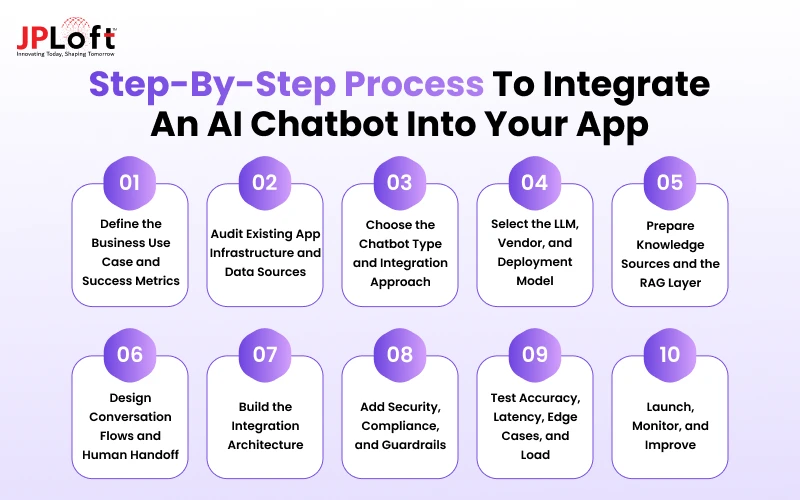
The following steps outline “How to integrate conversational AI into an app or website”:
Step 1. Define the Business Use Case and Success Metrics
Start by identifying the specific business problem the chatbot should solve and define measurable outcomes.
Common objectives include support deflection, lead qualification, onboarding completion, ticket reduction, conversion lift, faster response times, and improved CSAT.
Establishing these goals early helps determine the chatbot's required capabilities and provides clear benchmarks for measuring its performance after launch.
Step 2. Audit Existing App Infrastructure and Data Sources
Review the application's frontend, backend, APIs, authentication, databases, and cloud infrastructure to understand where the chatbot will fit.
Identify the systems and knowledge sources it needs to access, such as CRM, helpdesk, product catalogues, booking engines, FAQs, policies, and user accounts.
This audit also highlights data quality issues, missing APIs, integration dependencies, and security requirements.
Step 3. Choose the Chatbot Type and Integration Approach
The AI chatbot app integration process involves selecting the right chatbot architecture according to the complexity of the intended use case.
Options can include rule-based chatbots, generative AI chatbots, RAG chatbots, build AI agents, or hybrid approaches.
A simple support assistant may only require an LLM API, while a chatbot that retrieves private information or performs multi-step actions may require RAG, tool calling, or agent-based capabilities.
Step 4. Select the LLM, Vendor, and Deployment Model
Choose an AI model and deployment approach based on your application's technical and business requirements.
Options may include OpenAI, Anthropic, Google Gemini, Azure OpenAI, open-source models such as Llama, or private cloud/on-premise deployments.
Evaluate each option based on data sensitivity, cost, latency, compliance, accuracy, scalability, and potential vendor lock-in rather than selecting a model solely on popularity.
Step 5. Prepare Knowledge Sources and the RAG Layer
Most business chatbot use cases do not require full model training before deployment.
They typically need clean knowledge sources, embeddings, a vector database, retrieval rules, and permission-aware access.
Relevant business content can be processed and indexed using technologies such as Pinecone, Qdrant, Weaviate, or FAISS, allowing the chatbot to retrieve relevant information before generating a response.
Step 6. Design Conversation Flows and Human Handoff
Map the main conversation paths, expected user questions, fallback scenarios, and escalation conditions before development.
Define how the chatbot should respond when it lacks sufficient information and when a human should take over.
Sensitive situations such as refund disputes, account issues, complaints, or high-risk requests should have clearly defined escalation workflows.
Step 7. Build the Integration Architecture
Connect the chatbot components through a secure and scalable backend architecture. A typical integration flow is:
App UI → API Gateway/Middleware → LLM Orchestrator → Vector DB/RAG → Business Systems → Guardrails → Analytics Dashboard
The orchestration layer manages conversation context, prompts, model requests, retrieval, tool calling, and business logic, while APIs connect the chatbot with systems required to retrieve information or perform authorised actions.
Step 8. Add Security, Compliance, and Guardrails
Before proceeding further, it is important to align the mobile app security controls into every layer of the chatbot integration.
Implement PII masking, encryption, role-based access control (RBAC), authentication, audit logs, appropriate logging rules, and data retention policies.
Add AI-specific protections such as prompt-injection detection, input validation, output filtering, tool restrictions, and safeguards against unauthorised data access or actions.
Step 9. Test Accuracy, Latency, Edge Cases, and Load
Testing of the AI chatbot before final deployment should cover more than evaluating for standard user questions.
Evaluate the chatbot with ambiguous and incomplete inputs, unsupported requests, sensitive queries, integration failures, and unexpected conversation paths.
Also test fallback behaviour, concurrent users, response latency, API reliability, and system load to ensure the chatbot remains accurate and responsive under realistic usage conditions.
Step 10. Launch, Monitor, and Improve
Deploy the chatbot gradually where possible and monitor its performance using both technical and business metrics.
Track resolution rate, fallback rate, escalation rate, cost per conversation, token usage, hallucination reports, response latency, and conversion impact.
Use these insights and user feedback to continuously improve prompts, retrieval quality, knowledge sources, model selection, conversation flows, and integrations.
What Does a Successful AI Chatbot Integration Architecture Look Like?
A well-designed AI chatbot architecture connects the app interface with the AI model, business data, backend systems, and security controls.
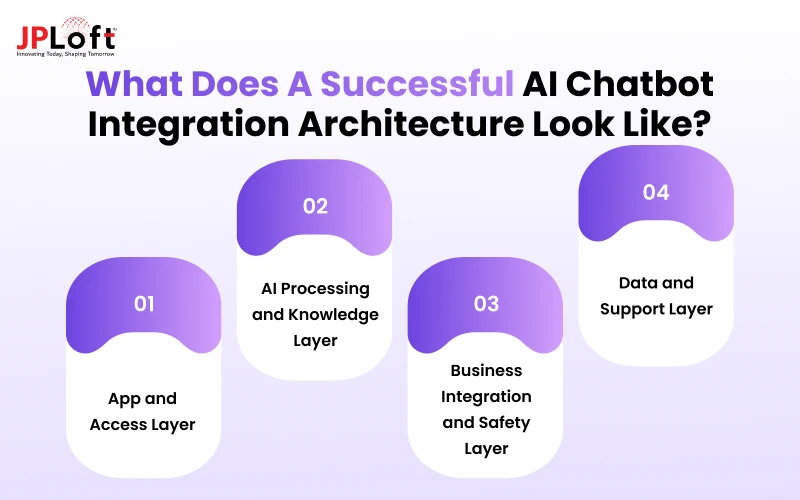
The exact setup varies by use case, but most integrations include the following components:
1. App and Access Layer
The Mobile/Web App hosts the chatbot through a chat interface or native UI. An API gateway routes requests between the application and backend services, while the authentication layer verifies user identity and access permissions.
2. AI Processing and Knowledge Layer
The LLM orchestration layer acts as the central component, managing prompts, conversation context, model requests, and external tool calls. For business-specific responses, a RAG/vector database retrieves relevant information from approved knowledge sources before the LLM generates a response.
3. Business Integration and Safety Layer
The chatbot can connect to business system APIs such as CRM, booking, payment, inventory, or support platforms to retrieve real-time information or perform authorised actions. Guardrails and safety filters validate inputs and outputs, restrict unsafe actions, and help protect sensitive information.
4. Data and Support Layer
A conversation database stores relevant session history and context according to defined retention policies. An analytics dashboard tracks usage, response quality, latency, errors, and other performance metrics. When the chatbot cannot safely resolve a request, the human support dashboard enables agents to review the conversation and take over.
Security and Compliance Considerations When Integrating AI Chatbots
AI chatbot in app integration expands the application's attack surface by connecting users, AI models, knowledge bases, APIs, and business systems.
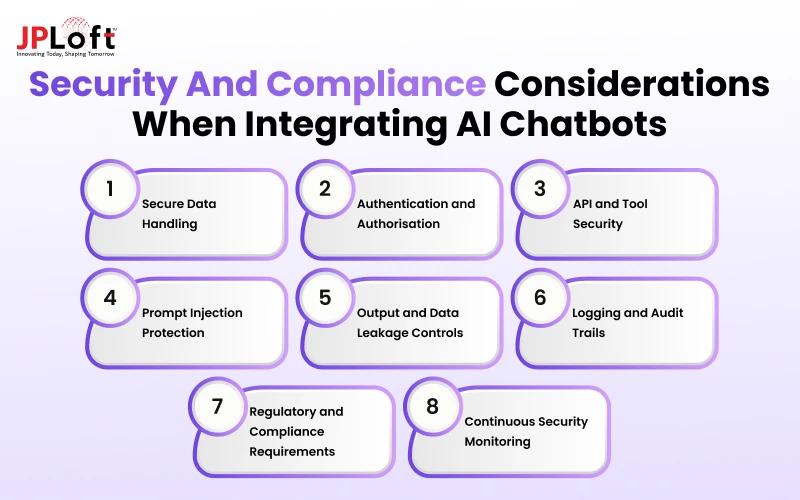
Security and compliance controls should therefore be built into every layer of the integration architecture.
1. Secure Data Handling
Encrypt data in transit using TLS and data at rest using appropriate encryption standards. Apply PII detection and masking before sending sensitive information to the LLM, and define clear policies for data retention, deletion, and conversation storage.
2. Authentication and Authorisation
Use secure authentication mechanisms such as OAuth 2.0 or OpenID Connect and enforce role-based or attribute-based access controls. Permission checks should occur within the backend before the chatbot retrieves protected data or executes any business action.
3. API and Tool Security
Protect connected APIs using scoped access tokens, rate limiting, request validation, and server-side secrets management. Apply allowlists for AI tool calling and validate tool parameters independently rather than trusting LLM-generated requests.
4. Prompt Injection Protection
Treat all user inputs and retrieved content as potentially untrusted. Use input sanitisation, instruction hierarchy, context isolation, and tool-level permissions to prevent malicious prompts from overriding system instructions or accessing restricted resources.
5. Output and Data Leakage Controls
Inspect model responses before returning them to users, particularly when responses contain sensitive or regulated information. Apply output filtering, structured response validation, and PII redaction to reduce accidental exposure of confidential business or customer data.
6. Logging and Audit Trails
Log authentication events, API requests, tool calls, model failures, and security incidents for monitoring and investigation. Avoid storing unnecessary prompts or sensitive conversation data, and apply access controls and retention rules to operational logs.
7. Regulatory and Compliance Requirements
Map chatbot data flows against applicable requirements such as GDPR, HIPAA, CCPA/CPRA, PCI DSS, and SOC 2. Compliance controls should cover data processing, consent, access, retention, third-party vendors, and auditability.
8. Continuous Security Monitoring
Monitor unusual API activity, failed authorisation attempts, abnormal token usage, prompt injection attempts, and unexpected tool execution. Regular security testing and model evaluations help identify new vulnerabilities as the chatbot, integrations, and AI ecosystem change.
How to Reduce Chatbot Hallucinations and Unsafe Responses?
AI hallucinations are a common risk in generative AI systems. They occur when a chatbot generates inaccurate, unsupported, or misleading information.
Such hallucination risks can affect user trust and create operational risks, especially when responses involve business, financial, healthcare, or account-related information.
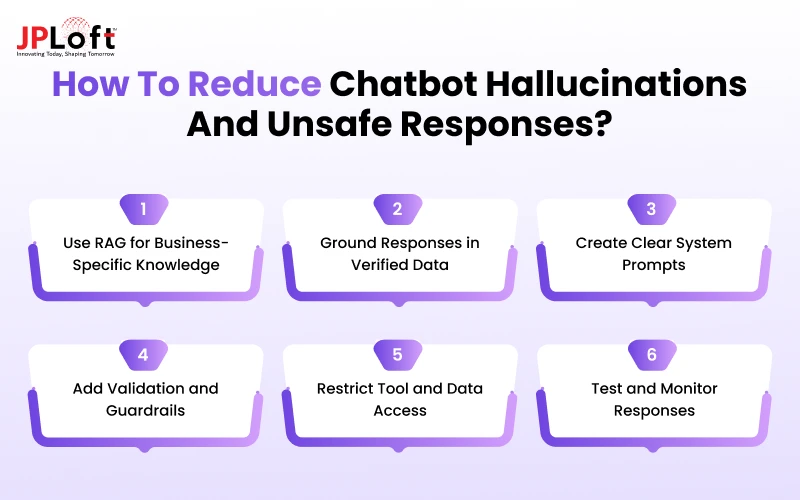
Here are the key practices that can help improve the response reliability of AI chatbot in an app.
1. Use RAG for Business-Specific Knowledge
Connect the chatbot to trusted business data through retrieval-augmented generation (RAG). Instead of relying only on the LLM's pre-trained knowledge, the system retrieves relevant information from approved sources and provides it as context for generating responses.
2. Ground Responses in Verified Data
Define authoritative data sources and use them whenever accurate information is required. For real-time details such as prices, inventory, appointments, account balances, or order status, retrieve information directly from connected APIs or databases instead of allowing the model to generate assumptions.
3. Create Clear System Prompts
Hire AI experts who can help define the chatbot's role, available information, response boundaries, and fallback behaviour through system prompts. Instruct the model to acknowledge when information is unavailable or uncertain rather than generating an answer that is not supported by the available context.
4. Add Validation and Guardrails
Use retrieval scores, structured outputs, business rules, and response validation to identify potentially unreliable answers. For sensitive or high-risk requests, the system can block the response, request additional information, or route the conversation to a human agent.
5. Restrict Tool and Data Access
Give the chatbot access only to the APIs, databases, and tools required for its intended tasks. It is recommended to partner with an experienced AI development company and apply permissions and validation at the backend level so the AI cannot independently access sensitive information or execute unauthorised business operations.
6. Test and Monitor Responses
Test the chatbot using real user questions, edge cases, ambiguous prompts, and adversarial scenarios before launch. After deployment, monitor accuracy, failed retrievals, incorrect tool calls, user feedback, and escalation rates to identify recurring hallucination patterns.
AI Chatbot Integration Cost and Ongoing Expenses
Costs vary significantly based on the existing application's technical readiness. Integrating AI into a well-documented API-first application may require less effort than modernising a legacy system before chatbot integration.
A basic FAQ chatbot requires fewer resources than a RAG-powered or agent-based assistant connected to multiple business systems. However, along with the integration cost, the cost to build an AI chatbot also needs to be considered.
|
AI Chatbot Type |
Key Features |
Estimated Integration Cost |
|
Basic Chatbot Integration |
LLM integration, FAQ handling, basic conversation flows, chat UI |
$15,000–$30,000 |
|
RAG-Powered Chatbot |
Knowledge base, document retrieval, embeddings, vector database, contextual responses |
$30,000–$60,000 |
|
Advanced Chatbot with APIs & Automation |
RAG, API integrations, tool calling, workflow automation, CRM/ERP connectivity |
$60,000–$100,000+ |
|
Enterprise-Grade AI Chatbot |
Multi-system integrations, advanced RAG, AI agents, custom workflows, security, scalability, analytics |
$100,000+ |
Key Factors Affecting Integration Cost
These figures are indicative. The actual cost depends on the existing application architecture, number of integrations, data volume, AI model requirements, and development team location.
-
Chatbot complexity: Rule-based and basic LLM chatbots require less development than RAG or agent-based systems.
-
AI model and usage: Model selection, token consumption, context length, and conversation volume influence recurring API costs.
-
Data and RAG requirements: Document processing, embeddings, vector databases, data pipelines, and retrieval optimisation add development and infrastructure costs.
-
Third-party integrations: Connecting CRM, ERP, payment, booking, or internal systems increases backend development effort.
-
Security and compliance: Encryption, access controls, audit logging, data protection, and industry-specific compliance can increase implementation costs.
-
App architecture: Older or poorly documented applications may require additional backend and API work before chatbot integration.
Ongoing AI Chatbot Expenses
Integration costs are only the initial investment. Businesses should also budget for recurring expenses such as:
-
LLM/API Usage: Costs based on model usage, including input/output tokens and API requests.
-
Cloud Infrastructure and Database Hosting: Expenses for servers, compute resources, application hosting, and database operations.
-
Vector Database and Storage: Costs for storing embeddings and maintaining scalable knowledge retrieval systems.
-
Monitoring and Analytics: Tools and services used to track chatbot performance, usage, errors, and response quality.
-
Security and Compliance Maintenance: Ongoing investment in security updates, audits, access controls, and regulatory requirements.
-
Model Updates and Optimisation: Costs associated with improving prompts, models, configurations, and overall AI performance.
-
Bug Fixes and Technical Support: Resources required to resolve technical issues and maintain reliable chatbot operations.
-
Knowledge Base Updates and RAG Maintenance: Continuous updates to business content, embeddings, retrieval rules, and knowledge sources.
AI Chatbot Integration Needs Across Different Industries
The business case for chatbots varies based on the industry's workflows, customer expectations, data sensitivity, and compliance requirements.
Instead of using the same chatbot across every business, integration should connect the AI with industry-specific data, systems, and processes.
|
Industry |
Common AI Chatbot Integrations |
Key Considerations |
|
Healthcare |
EHR/EMR systems, appointment scheduling, patient portals, medication information |
HIPAA compliance, data privacy, clinical safety, and human escalation |
|
Finance & Banking |
Banking APIs, transaction systems, account services, KYC workflows |
Strong authentication, fraud prevention, financial data protection, and auditability |
|
E-commerce |
Product catalogues, inventory, order management, payment and CRM systems |
Personalisation, real-time inventory, secure transactions, and conversion optimisation |
|
Travel & Hospitality |
Booking engines, hotel systems, flight APIs, payment platforms, CRM |
Real-time availability, booking accuracy, multilingual support, and secure payments |
|
Education |
Learning management systems, course databases, student portals, assessment platforms |
Student privacy, personalised learning, content accuracy, and access controls |
|
Real Estate |
Property databases, CRM, listing platforms, appointment scheduling |
Real-time listings, lead qualification, personalised recommendations, and agent handoff |
|
Retail |
Product databases, inventory, loyalty platforms, CRM, order systems |
Product discovery, personalised recommendations, inventory accuracy, and customer support |
|
Logistics |
Order management, shipment tracking, fleet systems, warehouse APIs |
Real-time tracking, operational accuracy, API reliability, and role-based access |
Apart from the above mentioned industries, several other niche exists where integrating AI chatbtot in mobile app plays a significant role. Such can include AI chatbots for dating apps, handyman apps, entertainment apps and more.
KPIs to Measure Chatbot Integration Success
Launching an AI chatbot is only the first step. Post-launch, it is important to track technical performance, user experience, automation, and business outcomes to determine whether the integration is delivering measurable value.
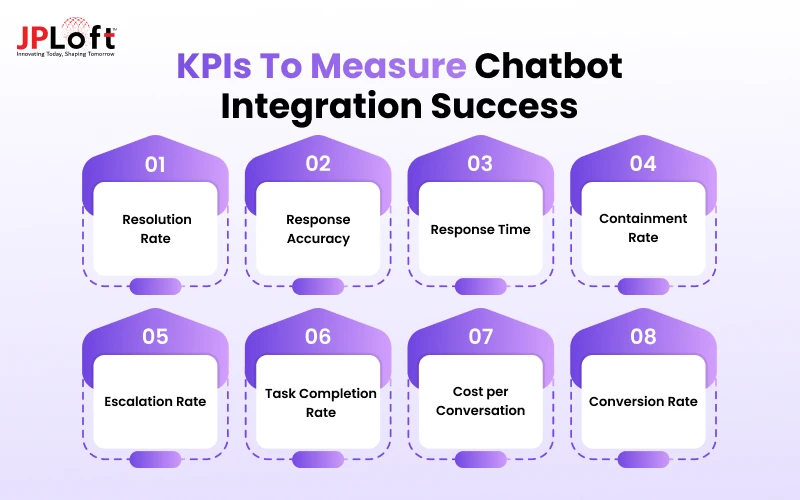
Here are some of the key indicators recommended by an experienced AI development company:
1. Resolution Rate
Measures the percentage of conversations successfully resolved by the chatbot without additional assistance. A higher resolution rate indicates that the chatbot can effectively handle the intended user queries and tasks.
2. Response Accuracy
Tracks how often the chatbot provides relevant, factually correct, and contextually appropriate responses. Monitoring accuracy helps identify hallucinations, poor retrieval, outdated knowledge, and other quality issues.
3. Response Time
Measures how quickly the chatbot processes a request and delivers a response. Lower latency generally creates a smoother conversational experience, particularly for mobile users and real-time task-based interactions.
4. Containment Rate
Shows the percentage of conversations completed without human intervention. This metric helps businesses understand how much of their support workload the chatbot can handle independently.
5. Escalation Rate
Tracks how frequently conversations are transferred to human agents. A high escalation rate may indicate gaps in chatbot knowledge, integrations, conversation design, or its ability to handle complex requests.
6. Task Completion Rate
Measures how successfully users complete chatbot-assisted actions such as booking appointments, tracking orders, finding products, or submitting requests. This is particularly important for action-oriented chatbot integrations.
7. Cost per Conversation
Tracks the average cost of processing each interaction, including LLM usage, infrastructure, storage, and related services. It helps businesses evaluate efficiency and optimise AI spending.
8. Conversion Rate
Measures whether chatbot interactions contribute to desired business outcomes such as purchases, bookings, registrations, or qualified leads. It connects chatbot performance directly to business value.
Common Mistakes to Avoid During AI Chatbot Integration
AI chatbots can fail to deliver expected results when businesses focus on adding the AI feature rather than designing the complete experience around it.
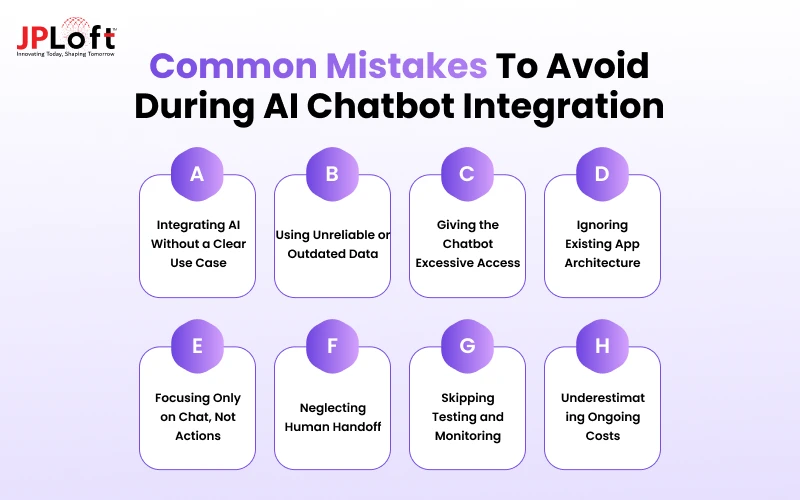
Avoiding common technical and strategic challenges in developing custom AI chatbots can improve reliability, security, adoption, and long-term ROI.
Mistake 1. Integrating AI Without a Clear Use Case
Adding a chatbot simply because competitors use AI can create an expensive feature with limited value. Define the specific user problem, workflow, or business objective the chatbot should address before selecting a technology or development approach.
Mistake 2. Using Unreliable or Outdated Data
An LLM cannot consistently provide accurate business information without access to reliable data. Connecting the chatbot to outdated documents, poorly structured knowledge bases, or unverified sources can lead to inaccurate responses and reduced user trust.
Mistake 3. Giving the Chatbot Excessive Access
Allowing an AI chatbot unrestricted access to databases, APIs, or business tools creates unnecessary security risks. Hire experienced AI developers who can apply least-privilege access and backend authorisation so the chatbot can only retrieve information and perform actions required for its intended use case.
Mistake 4. Ignoring Existing App Architecture
Treating the chatbot as an isolated feature can create integration, performance, and maintenance problems. Assess existing APIs, authentication, databases, infrastructure, and frontend architecture before deciding where the chatbot should fit into the application.
Mistake 5. Focusing Only on Chat, Not Actions
A chatbot that only answers questions may provide limited business value. Where appropriate, integrate APIs and tools that allow users to complete meaningful actions such as booking, purchasing, tracking, scheduling, or submitting requests directly through the conversation.
Mistake 6. Neglecting Human Handoff
AI cannot reliably handle every conversation. Without a clear escalation mechanism, users may become frustrated when the chatbot encounters complex, sensitive, or unsupported requests. Provide seamless transfer to human agents with relevant conversation context.
Mistake 7. Skipping Testing and Monitoring
Testing only common questions does not adequately evaluate an AI chatbot. Test ambiguous prompts, edge cases, incorrect inputs, adversarial requests, tool failures, and high-traffic conditions, then continuously monitor performance after launch.
Mistake 8. Underestimating Ongoing Costs
AI chatbot expenses continue after development through model usage, cloud infrastructure, vector storage, monitoring, integrations, and maintenance. Estimate these recurring costs before launch to create a sustainable chatbot strategy.
Why Partner With JPLoft to Integrate an AI Chatbot in Your App or Website?
AI chatbot integration requires expertise across AI models, backend systems, APIs, data infrastructure, and application development. JPLoft as a trusted AI chatbot development company brings these capabilities together to offer chatbot integration services for businesses planning to integrate chatbots into existing mobile and web applications.
Our team can manage the complete integration journey, from use-case discovery and architecture design to LLM integration, RAG implementation, API connectivity, testing, deployment, and ongoing optimisation.
-
End-to-End Integration: Connect chatbots with apps, APIs, databases, CRM, ERP, and third-party platforms.
-
Advanced AI Expertise: Build solutions using LLMs, RAG, AI agents, vector databases, and tool calling.
-
Secure Architecture: Implement authentication, access controls, encryption, guardrails, and data protection.
-
Scalable Solutions: Design chatbot infrastructure to support growing users, conversations, and business workloads.
-
Post-Launch Support: Continuously monitor, optimise, maintain, and improve chatbot performance.
JPLoft focuses on building AI chatbots that solve practical business problems and integrate seamlessly into existing digital products.
Conclusion
Integrating an AI chatbot into your app can improve customer support, automate repetitive tasks, personalise user experiences, and help users complete actions faster. However, successful integration requires more than connecting an LLM API.
Businesses need the right chatbot approach, reliable data, secure architecture, RAG or API integrations where required, strong guardrails, and continuous performance monitoring.
Start by identifying a clear business use case and defining measurable success metrics. Then choose an integration approach that fits your app architecture, data requirements, security needs, and long-term goals.
With the right technical foundation and ongoing optimisation, an AI chatbot can become a valuable part of your product rather than simply another app feature.
FAQs
Integrating an AI chatbot typically involves selecting an LLM or chatbot platform, creating the chat interface, connecting the app to a backend API, integrating business data or APIs, adding security controls, testing responses, and deploying the chatbot.
AI chatbot integration can cost approximately $15,000 to $100,000+, depending on chatbot complexity, LLM usage, RAG requirements, third-party integrations, security needs, and automation workflows.
There is no single best AI model for every application. The right model depends on factors such as response quality, context requirements, latency, API pricing, privacy, scalability, and the complexity of tasks the chatbot needs to perform.
Yes. An AI chatbot can connect with databases and APIs through a secure backend or orchestration layer. This allows it to retrieve real-time information and perform authorised actions across systems such as CRM, ERP, payment, booking, and order management platforms.
Businesses can reduce inaccurate responses by using RAG with trusted data sources, clear system prompts, response validation, guardrails, restricted tool access, continuous testing, and human escalation for sensitive or uncertain requests.

Rahul Sukhwal is the CEO and Founder of JPLoft, with 18+ years of experience in software engineering, emerging technologies, and digital product development. His expertise spans artificial intelligence, including AI agents, generative AI, LLMs, chatbots, computer vision, and machine learning, as well as blockchain, IoT, AR/VR, mobile, web, and enterprise software. He focuses on applying these technologies to real business challenges across industries such as healthcare, education, mobility, finance, real estate, and on-demand services.


Share this blog