


Key Takeaways:
To develop an app like Notion requires a structured roadmap, starting from market research and feature planning to UI/UX design, development, testing, and post-launch support.
The cost ranges from $15,000 to $60,000+, depending on features, complexity, team size, cross-platform support, and AI integration.
Essential features include block-based editing, customizable pages, real-time collaboration, integrated databases, AI assistance, offline mode, and cross-platform sync.
Recommended technologies include React/Flutter, Node.js/Django, PostgreSQL/MongoDB, AWS/Google Cloud, WebSockets/Firebase, and AI APIs.
Future trends include AI-powered workspaces, no-code/low-code workflows, personalized dashboards, multi-device support, and voice commands for enhanced productivity.
JPLoft is a trusted app development partner that offers end-to-end development, real-time collaboration, AI features, and scalable productivity apps.
What if you could build a single digital workspace that replaces note-taking tools, task managers, and project collaboration apps altogether?
That’s what so many founders today are asking: “How to develop an app like Notion?”
The answer lies in the right strategy, tech stack, and development process to build a powerful, Notion-like productivity platform.
With the rising demand for all-in-one productivity platforms, creating an app like Notion has become a powerful business opportunity for startups and enterprises alike. From customizable pages to databases and real-time collaboration, users now expect smarter, unified workspace experiences.
In this blog, you’ll learn the complete process, features, tech stack, and cost insights you need to know before developing an app.
What is the Notion App: A Quick Overview
If you’re planning to create an app, the first question that comes to mind is, “What is the Notion app, isn’t it?
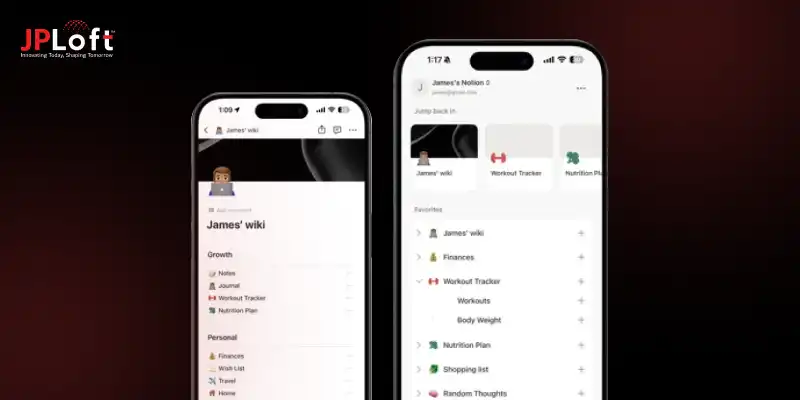
Notion is an all-in-one productivity platform designed to help users write, plan, organize, track tasks, store documents, and collaborate, all in one flexible workspace.
It combines the power of notes, databases, project management tools, wikis, and collaboration features into a single, easy-to-customize system.
Think of Notion as a modular workspace where everything is built using “blocks”, text, tables, toggles, boards, calendars, media, and more.
This flexibility is exactly why so many businesses now want to build a note taking app like Notion with similar customization and real-time collaboration capabilities.
In short, Notion is a versatile, scalable productivity hub loved by individuals, creators, startups, and enterprises alike.

Why Should You Invest in Building an App Like Notion?
Investing in a productivity-focused digital workspace is more relevant now than ever. With businesses shifting to remote work, creators managing multiple projects, and students relying on smart tools, the demand for Notion like app development has skyrocketed.
Here’s why it’s a strong and future-ready investment:
► Massive & Growing User Demand
According to Business Research Insights, the market could climb from $1.44 billion in 2026 to $8.89 billion by 2035. So, millions of users actively search for the best note-taking app like Notion, proving there’s a huge market for flexible and distraction-free productivity tools.
► High Value & Long-Term Scalability
When you make a productivity app like Notion, you’re not just offering a note-taking tool; you’re entering a market that includes project management, documentation, team collaboration, and workflow automation.
► Multi-Segment Audience Coverage
A Notion-like app appeals to students, creators, teams, startups, and enterprises, making it far more scalable than niche apps. This wide audience reach increases long-term growth potential and helps your app succeed in multiple markets simultaneously.
► Cross-Platform Advantage
Many users compare web apps vs mobile apps, but offering both ensures better user experience, higher accessibility, and stronger retention. Supporting all platforms also boosts user trust, since people can switch devices without losing data or workflow continuity.
► Strong Revenue & Monetization Opportunities
All-in-one workspace app development allows monetization through subscriptions, team plans, templates, AI add-ons, and marketplace extensions. With diverse income streams, your app can generate consistent and scalable revenue month after month.
► A Top Category Mobile App
Productivity and workspace apps consistently rank among the best mobile app ideas, making this a smart business move. With rising digital adoption, users are actively seeking tools that simplify work, study, and organization, giving your app a competitive edge.
In simple terms, investing in a Notion-like app means stepping into a high-demand industry with long-term profitability, global appeal, and endless growth potential. It’s one of the most strategic digital products you can build today.
Essential Features of a Note Making App Like Notion
When you plan to make a custom app like Notion, the first thing you need to get right is the features, because they decide how powerful, flexible, and user-friendly your product will be. In fact, features are the real backbone of any workspace platform.
Whether you want to compete with Notion or build a super app for productivity, these core functionalities will shape the entire user experience.
Here's a clear table showcasing the essential features your app must include:
|
Feature |
Description |
|
Block-Based Editor |
Notion’s iconic feature lets users create text, lists, images, tables, toggles, and more in modular blocks. |
|
Customizable Pages |
Allows users to design personal or team workspaces with complete freedom. |
|
Real-Time Collaboration |
Multiple users can edit pages, add comments, and work together instantly. |
|
Integrated Databases |
Smart databases for tasks, projects, content, and workflows. |
|
Task & Project Management |
Kanban boards, calendars, reminders, tagging, and tracking tools. |
|
Cross-Platform Sync |
Ensures a seamless experience across web, mobile, and desktop. |
|
Media & File Embeds |
Supports documents, videos, images, links, and cloud uploads. |
|
Templates Library |
Pre-designed layouts for notes, projects, wikis, and planning. |
|
Search & Organization Tools |
Filters, tags, folders, and instant search for better accessibility. |
|
Advanced User Permissions |
Role-based access control for teams, clients, and collaborators. |
|
Offline Mode |
Users can continue working even without internet connectivity. |
|
AI-Assisted Writing & Organization |
Smart suggestions, auto-formatting, content generation, and summaries. |
A feature-rich structure like this helps you stay competitive and appeal to a wide user base, from students to enterprises. And when you combine these essentials with intuitive design, you’re one step closer to creating a workspace that users truly admire.
How to Develop an App Like Notion: Step-by-Step Process
If you’re wondering “how to develop an app like Notion?” The real answer lies in following a clear, strategic, and well-planned roadmap.
If you want to make a custom app like Notion, the development journey follows structured steps from research to launch.
Here are the quick steps to create an app like Notion:
-
Market Research & Product Vision
-
Feature Planning & App Wireframing
-
UI/UX Design
-
App Prototyping
-
Choosing the Right App Tech Stack
-
Backend, Frontend & API Development
-
Cloud Sync & Real-Time Collaboration Setup
-
Mobile App Testing & QA
-
Deployment & Launch
-
Post-Launch Support, Updates & Scaling
Now, let’s walk through the complete process to develop an app like Notion with a detailed step-by-step explanation.
Step 1: Market Research & Define the Product Vision
Every successful Notion-like app development process begins with understanding user needs, market competition, and defining your core value. This is where you identify whether you want to make a Microsoft app like Notion or build an all-in-one workspace app development platform.
Focus areas include identifying audience expectations, analyzing competitors, spotting feature gaps, planning monetization, and defining a strong Unique Value Proposition (UVP).
This clarity prepares you to create an app like Notion with purpose and precision.
Step 2: Feature Planning & App Wireframing
Once your vision is clear, the next step is app wireframing. Wireframes give you a structural blueprint of your future app. Since the goal is to build an app like Notion, your wireframes must reflect the core experience, block-based editing, databases, templates, notes, and collaboration tools.
This phase helps your developers and designers stay aligned and ensures your product feels seamless from the very beginning.
So, the better your wireframing foundation is, the faster your development team can convert your idea into a functional and intuitive interface.
Step 3: User-Centered UI/UX Design
Design plays a massive role in user satisfaction. To create an app like Notion, your UI/UX must balance minimalism with powerful functionality. Notion’s clean interface sets a high standard, so your design should support smooth navigation, fast loading, easy formatting, and visually calm layouts.
At this stage, you design every screen, from dashboards to note editors, boards, tables, timelines, and more, so your users feel they’re using the best note-taking app like Notion.
Partnering with a professional UI/UX design service at this step ensures your interface feels polished, intuitive, and ready for real-world use.
Step 4: App Prototype Development
Before you start coding, build an interactive prototype. Mobile app prototyping helps validate your design and ensures your user flows make sense.
It’s an essential step if you're aiming to create a clone like Notion but want to add your own improvements. A polished prototype minimizes rework and accelerates development.
This stage also helps your team gather early feedback, ensuring your Notion-like productivity app moves in the right direction before full-scale development begins.
Step 5: Backend, Frontend & API Development
This is where you start coding and make an app like Notion into reality. Frontend development includes building UI components, workspace layout, database views, drag-and-drop features, and advanced editors.
Backend development handles page creation, database architecture, team management, templates, AI features, and real-time synchronization.
This step transforms your concept into a functional product ready to compete with the best note taking apps like Notion.
Step 6: Choose the Right App Tech Stack
Choosing the right tech stack is crucial because a cloud-based mobile solution like Notion requires real-time sync, offline access, and smooth collaboration features. To build an app similar to Notion, your stack must handle heavy data, fast loading, and multi-device usage.
For the frontend, frameworks like React, React Native, or Flutter deliver responsive and clean interfaces. On the backend, Node.js or Django help build secure and scalable server logic.
Cloud platforms such as AWS or Google Cloud ensure reliable hosting, while databases like PostgreSQL or Firebase power fast data storage and retrieval. If you plan to add intelligent features, integrating AI tools supports the growing role of AI in mobile app development.
Step 7: Cloud Sync & Real-Time Collaboration
To build a note-taking app like Notion, you must ensure a flawless sync experience across devices. This requires building real-time capabilities using WebSockets, conflict resolution algorithms, live cursor support, and offline-mode logic.
This combination gives users the freedom to work on any device without losing progress, a key reason why Notion is so powerful.
For building advanced sync systems with reliability and precision, many businesses choose to hire dedicated developers who specialize in real-time architecture and scalable backend systems.
Step 8: App Quality Assurance & Testing
Before launching, you must put the app through extensive mobile app testing. From UI testing to load testing, integration testing, and device compatibility checks, this phase ensures your platform performs smoothly.
This step helps your platform stand strong among competitors and makes sure you’re delivering an app people can trust and rely on.
Thorough testing ultimately reduces post-launch issues, ensuring your Notion-like app delivers a flawless experience from day one.
Step 9: Deployment, Launch & Optimization
Once development and testing are done, submit your iOS app to the App Store, then publish it on the Google Play Store to make your Notion-like app available across all platforms.
Optimize your listings with high-quality screenshots, keywords, and feature highlights so users searching for apps similar to Notion discover your platform easily.
Post-launch analytics help you refine and improve the user experience. Proper deployment and optimization ensure maximum visibility, user adoption, and a successful app launch.
Step 10: Continuous Updates, Scaling & Support
After launch, continue improving the app with advanced features, templates, integrations, and collaboration upgrades. This makes your platform competitive and keeps users engaged.
At this point, your app naturally grows into a powerful Notion-like productivity app, loved by individuals, teams, students, and enterprises.
Regular updates, app maintenance service, and attentive support not only enhance user satisfaction but also help your app stay ahead in the rapidly evolving productivity app market.
Learning how to build an app like Notion involves strong planning, thoughtful design, cloud-first architecture, and real-time collaboration features.
With the right approach, your product can evolve into an innovative, scalable, and user-loved platform that stands among global productivity solutions.
Tech Stack for Developing an App Like Notion
Choosing the right mobile app tech stack is one of the most critical steps to ensure your Notion-like app performs smoothly, scales efficiently, and provides a seamless user experience.
A carefully selected tech stack allows you to develop an app like Notion with real-time collaboration, cloud sync, and AI-powered features.
Here’s a recommended tech stack for building a powerful Notion-like productivity platform:
|
Layer |
Technology Options |
Purpose / Use Case |
|
Frontend |
React, React Native, Flutter |
Build responsive, cross-platform UI for web, Android, and iOS |
|
Backend |
Node.js, Django, Ruby on Rails |
Handle server-side logic, APIs, authentication, and database management |
|
Database |
PostgreSQL, MongoDB, Firebase |
Store structured and unstructured data, support fast queries and real-time sync |
|
Cloud / Hosting |
AWS, Google Cloud, Azure |
Manage hosting, storage, file uploads, and cloud sync across devices |
|
Real-Time Collaboration |
WebSockets, Firebase Realtime Database |
Enable live editing, multi-user collaboration, and offline support |
|
AI & Automation |
OpenAI API, TensorFlow, custom NLP models |
Enhance productivity with AI suggestions, summaries, and smart content organization |
|
Security |
SSL/TLS, OAuth, JWT |
Ensure data protection, secure authentication, and compliance with privacy standards |
Selecting the right tech stack ensures your Notion clone app development is efficient, scalable, and future-ready.
A well-planned combination of frontend, backend, database, and cloud technologies allows you to make an app like Notion that delivers smooth performance and a delightful user experience.
Cost to Develop a Productivity App Like Notion
If you're planning to develop an app like Notion, the first thing that naturally comes to mind is, “What will be the actual mobile app development cost for building a Notion-like productivity platform?”
The answer depends on multiple factors, including features, complexity, team size, and tech stack. On average, the cost to build an app like Notion ranges between $15,000–$60,000+.
The budget increases if you include advanced features like AI assistance, cloud sync, custom databases, or cross-platform development. Still, investing in a Notion-like productivity app offers long-term value and is considered one of the strongest digital product ideas for 2025 and beyond.
|
App Component |
Estimated Cost |
Purpose / Description |
|
Basic Features (notes, editor, folders) |
$5,000 – $12,000 |
Core structure for creating and organizing notes |
|
Advanced Features (databases, templates, custom views) |
$10,000 – $18,000 |
Enhances flexibility and user productivity |
|
Real-Time Collaboration & Cloud Sync |
$8,000 – $15,000 |
Enables live editing, device sync & teamwork |
|
Cross-Platform Development |
$7,000 – $12,000 |
Build for Android, iOS, and Web simultaneously |
|
UI/UX Design |
$3,000 – $7,000 |
Clean interface similar to Notion’s minimal design |
|
AI Assistance / Smart Suggestions |
$5,000 – $10,000+ |
Adds automation, summaries, and content suggestions |
|
Testing & QA |
$2,000 – $5,000 |
Ensures app stability, security & bug-free performance |
|
Deployment & Maintenance |
$1,500 – $5,000/year |
App store submission, updates, and ongoing support |
A well-planned budget helps you build a scalable and competitive app that stands strong in the productivity market. With the right strategy and team, you can create a feature-rich platform that rivals top apps like Notion.
Monetization Models for Apps Like Notion
When you develop a productivity platform, choosing the right mobile app monetization strategy is essential for long-term revenue and sustainability.
Apps like Notion rely on flexible, user-friendly business models that work for both individuals and large teams.
Here are the most effective monetization options you can follow:
A] Freemium Model
This is the most popular method used by productivity apps. Offer essential features like basic note-taking, templates, and storage for free.
Also, it offers some advanced features such as unlimited blocks, collaboration tools, custom databases, and integrations are available on paid plans.
This model attracts a large user base and gradually nurtures them into premium subscribers.
B] Subscription Plans
Monthly or annual subscription tiers help generate predictable revenue. You can offer different pricing levels for students, professionals, and enterprises.
Popular subscription benefits include advanced workspaces, multi-device sync, admin controls, permission settings, AI-powered writing tools, and higher storage limits.
C] Team/Business Workspaces
Notion’s success largely comes from team-based collaboration. Introduce pricing packages for businesses, startups, remote teams, and educational groups.
Features like team dashboards, shared databases, activity logs, and custom workflows offer huge value and justify premium pricing.
D] Marketplace for Templates & Add-ons
You can build a marketplace where creators sell professional templates, automation bundles, dashboards, or workspace layouts.
The platform can take a small commission on each sale, creating an additional revenue stream.
E] Cloud Storage Upgrades
Offering extra storage, advanced version history, and large file uploads as paid upgrades is another profitable method, especially for heavy users.
It also encourages users to switch to higher subscription tiers as their data and collaboration needs grow.
A strong monetization strategy ensures your Notion-like app remains profitable while continuously delivering meaningful value to users. With the right mix of premium features and flexible subscriptions, you can create a sustainable business model built for long-term growth.
Challenges in Developing an App Like Notion
Before you start planning your project, you may wonder: “What are the biggest challenges in developing an app like Notion, and how can I overcome them?”
Here’s the answer broken down into simple, real-world challenges:
- Real-Time Collaboration Complexity- Building live sync, multi-user editing, conflict resolution algorithms, and cross-device updates is highly complex. It requires the right architecture and a strong backend strategy.
- Ensuring Data Security & Privacy- Since users store sensitive notes, documents, and databases, you must protect your platform with a background verification system and strong encryption standards.
- Cross-Platform Performance Issues- Apps like Notion work on Android, iOS, Windows, Mac, and the web. Ensuring equal performance on all platforms requires deep planning and understanding of web and mobile app architecture.
- Building a Scalable Architecture- As your user base grows, your infrastructure must handle millions of notes, files, templates, and collaborative activities without lag.
- Offline Mode & Smart Syncing – Users expect their notes to work even without the internet. Creating an offline-first architecture that auto-syncs in the background without data loss is one of the toughest challenges for productivity apps.
- Maintaining UI/UX Consistency Across Devices – Notion’s interface looks clean and identical across screens. Ensuring the same level of elegance, responsiveness, animations, and uniformity requires strong UI engineering and a pixel-perfect design approach.
Overcoming these challenges requires strategic planning, the right tech team, and continuous optimization. By partnering with the best mobile app development company, you can solve technical bottlenecks faster and build a secure, scalable, and high-performing platform.
With a strong vision, you can confidently create a competitive Notion-like productivity app.
Future Trends to Create an App Like Notion
Wondering what the future of productivity apps looks like? The landscape is changing faster than ever, and the next generation of Notion-like platforms will be smarter, more connected, and far more personalized.
With AI automation, advanced cloud technologies, and global compliance standards evolving every year, the future opens doors to limitless innovation.
Here are the major trends shaping the next generation of Notion-like platforms:
1. Deeper Integrations & API Ecosystems
Users prefer tools that work seamlessly with email providers, cloud storage services, CRM platforms, calendars, and communication apps.
A robust API ecosystem allows third-party developers to build plugins and add-ons, turning your product into a “build a super app” model.
2. Enhanced Data Security & Compliance
With stricter privacy laws, businesses must ensure US compliance in mobile app development, GDPR, HIPAA, and SOC standards.
Advanced encryption, password-less logins, and secure cloud storage will become mandatory features.
3. AI-Powered Workspaces
AI is becoming central to modern productivity tools. With support from the right AI app development service, you can integrate features like AI writing assistants, smart categorization, automated tasks, and predictive suggestions.
These capabilities make workflows faster and help your app stay competitive in the evolving productivity landscape.
4. No-Code & Low-Code Workflows
Users love creating dashboards, mini-apps, and templates without coding.
Offering drag-and-drop builders, automated workflows, and custom views helps your platform compete with modern digital workspace ecosystems.
5. Personalized User Experiences
Future apps will deliver tailored dashboards using machine learning. From smart layout suggestions to usage-based customization, personalization will define user satisfaction.
This ensures every user feels like the app is uniquely designed to match their workflow and preferences.
6. Global Expansion & Wide Device Support
With the demand for flexible work increasing, companies will need cross-platform performance, offline mode, and multi-device sync.
For businesses targeting the U.S. market, it becomes important to hire mobile app developers in the USA who understand local compliance and technical standards.
7. Voice Commands & Smart Search
Voice-based note-taking and AI-powered search filters will boost productivity. Users will expect instant answers, document summaries, and actionable insights.
This trend will make information retrieval faster and help users manage their workspace more efficiently.
The future of Notion-like productivity apps looks promising, driven by smarter AI, better integration, enhanced security, and user-centric customization.

Why Choose JPLoft for Productivity App Development?
If you’re planning to build a powerful, scalable, and feature-rich productivity platform like Notion, JPLoft is the partner you can trust. As a leading mobile app development company in USA, JPLoft delivers custom solutions tailored to performance, security, and user experience.
Whether you need real-time collaboration, cloud sync, AI features, or cross-platform compatibility, our expert developers ensure your app runs flawlessly across all devices.
We also follow a transparent development process, offer flexible hiring models, and provide end-to-end services, from UI/UX design to deployment, upgrades, and long-term maintenance.
With deep expertise in productivity tools, collaboration engines, and modern mobile app technologies, JPLoft helps you launch an app that stands out in the digital workspace industry.
Final Wrap-Up
Building a powerful productivity platform requires strategic planning, the right tech stack, and a clear execution roadmap. From real-time collaboration to AI-driven features, there are many elements that shape the overall success of your product.
With expert guidance and modern development practices, you can create a next-gen workspace app that users will truly love. Whether you're a startup, enterprise, or digital creator, understanding the complete process helps you make better decisions while trying to develop an app like Notion.
With the right team and technology in place, your idea can evolve into a high-performance platform built for the future. By leveraging AI, the latest trends, and user-focused features, your app can stand out and attract a loyal user base.
FAQs
Define core features, plan UI/UX, choose a tech stack, develop a prototype, then move to development, testing, and deployment with cloud sync and offline mode.
The cost usually ranges from $15,000–$60,000+, based on complexity, platform choices, and additional integrations.
Multi-format notes, task management, templates, databases, real-time collaboration, cloud storage, offline access, AI suggestions, and cross-platform support
Most teams use React/Flutter for frontend, Node.js/Django for backend, PostgreSQL/Firebase for databases, and AWS/Google Cloud for hosting, with optional AI tools for automation.
AI automation, personalized dashboards, voice commands, smart search, no-code workflows, advanced integrations, and enhanced security.

Priyanka Sukhwal is the Managing Director and Business Head of JPLoft, a results-driven leader with 10+ years of experience steering technology ventures and business growth. Her strategic acumen and deep understanding of digital markets and on-demand solutions have consistently translated into innovations that help businesses scale, evolve, and lead in competitive landscapes.




Share this blog