


Key Takeaways:
Steps to make a location tracking app like Waze require planning, feature choices, robust development, testing, and scaling.
Core features are navigation, live traffic, user reporting, real-time obstacle updates, and scalable backend systems.
These apps generate revenue through location-based advertising, promoted listings, brand campaigns, and traffic data insights.
Future Waze-like apps will leverage AI, connected vehicles, personalization, and smart city integration to enhance navigation experience.
To develop a location tracking app like Waze ranges from USD 20,000 to USD 100,000 based on complexity and feature scale.
JPLoft offers expertise, scalable technology, strong UX design, and reliable support to build robust Waze-like navigation apps globally.
Thinking to build a GPS navigation app like Waze! But not sure where to start?
Navigation apps have changed how people travel every day. Among them, Waze stands out for its live traffic updates, smart routing, and strong community input.
Businesses now see reasons to make an app like Waze, as it serves drivers, delivery teams, and city commuters.
It combines real-time data, map services, user reports, and a smooth design. Such apps solve real problems like traffic delays, road safety, and fuel waste. From GPS tracking to alerts and user rewards, every detail matters.
Each feature must work fast and stay reliable, even with heavy user activity. So in this blog, we will explain how to create an app like Waze.
Including details about the core steps like defining goals, planning features, integrating map APIs, building real time backend, adding user reporting, testing rigorously, launching, and scaling continuously.
Whether you are a startup or an enterprise, this guide will help you make a platform that users trust and enjoy.
An Overview of Waze App: Navigation & Live Traffic
So, What is Waze app?
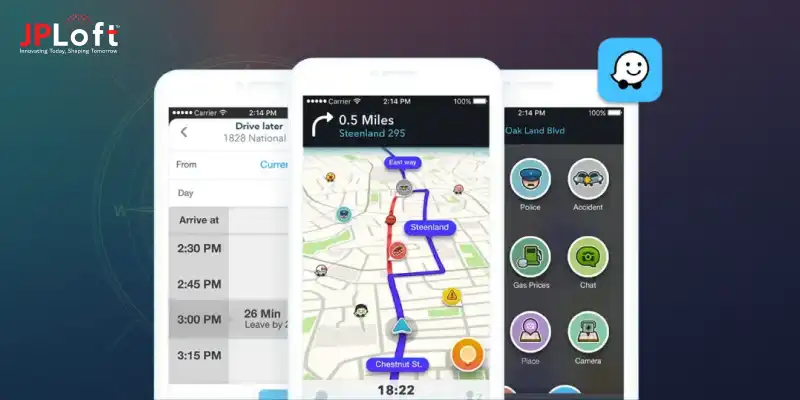
The core concept of Waze is crowdsourced navigation. Unlike regular GPS navigation apps, Waze users contribute to the system in real-time simply by driving with the app open.
As users move along roads, Waze anonymously (with consent) collects data such as speed, location, and traffic flow.
In addition, users can actively report incidents like accidents, traffic jams, police presence, road closures, or hazards.
Waze started in 2006 in Israel as a community-based navigation project, later becoming a global traffic app after Google acquired it in 2013.
Later, Waze expanded its presence in the Dallas-Fort Worth (DFW) metroplex primarily through a two-pronged approach: establishing Connected Citizens Program partnerships with local municipalities to exchange real-time traffic data and leveraging a large, active user base to provide crowdsourced traffic updates.
Working of Waze App
The working of the Waze navigation app can be explained as follows:
-
Data Collection: When a user drives with Waze open, the app collects GPS data such as speed, direction, and location. This data is sent anonymously to Waze’s servers.
-
Crowdsourced Reporting: Users manually report events like traffic jams, accidents, hazards, police presence, or road closures. These reports are instantly shared with nearby users.
-
Traffic Analysis: Waze’s system analyzes data from thousands of users on the same roads. If many users slow down on a specific road, Waze detects congestion automatically.
-
Route Calculation: The app compares multiple possible routes to the destination. It selects the fastest route based on real-time traffic, road conditions, and historical data.
-
Real-Time Updates: As conditions change, Waze continuously updates routes and ETAs. If a faster route becomes available, the app suggests a reroute.
-
Map Updates: Waze map editors and automated systems update road layouts, new streets, and closures. This ensures maps remain accurate and current.
Waze and Related Market Statistics
Below, we have provided recent related market statistics for Waze-like app development:
-
According to WorldPopulationReview, Waze recorded 17.7 million total average monthly traffic across countries in 2025. The USA leads with 4.1 million average monthly users, followed by Turkey with 1.8 million users and Indonesia with 1.1 million users.
-
Market.us states that the global smart navigation apps market reached USD 1.62 billion in 2024 and is projected to hit $5.4 billion by 2034, growing at a 12.8% CAGR.
-
Market.us also estimated that Android holds over 58.3% market share, with consumer electronics dominating at 62.8%. The broader navigation sector generated USD 16.2 billion, led by apps like Google Maps.
-
Grow.jo estimates that Waze generated an approximate annual revenue of USD 76.3 million during the year 2025-26.
Such navigation apps stand out because of their strong community model and live updates. Next, let’s explore reasons to make a navigation app like Waze for a successful business.

Why Make an App Like Waze?
Startups and entrepreneurs planning to create an app like Waze can resolve everyday travel challenges faced by drivers.
Understanding the value behind such apps helps emerging businesses make decisions before starting development.
Here are the key reasons to build a GPS navigation app like Waze:
1. Rising Demand for Real-Time Navigation
People depend on navigation apps for daily travel, deliveries, and commuting.
Traffic conditions change fast. Waze-like apps meet this demand by offering live updates, smarter routes, and time-saving guidance for drivers in busy cities.
2. Multiple Monetization Opportunities
Apps like Waze support several revenue models. These include local ads, promoted locations, and partner listings.
Businesses can generate steady income while offering free navigation features that attract and retain active users.
3. Strong Market for Location-Based Services
Location-based apps continue to grow across industries.
Logistics, ride sharing, and urban transport rely on accurate routing.
When businesses create a live traffic app like Waze, it gives access to this growing market and serves multiple user segments efficiently.
4. High User Engagement and Retention
Real-time alerts, rewards, and community participation keep users engaged.
Drivers return daily because the app adds real value to their travel. High engagement improves retention and supports long-term app growth.
5. User-Powered Data Improves Accuracy
Crowdsourced data makes navigation more reliable. When users share traffic issues and road alerts, the app improves with every report.
To reduce dependence on static data and keep routes accurate throughout the day, make a navigation app like Waze.
6. Smart City and Mobility Integration
Governments and enterprises invest in smart mobility solutions.
A Waze-like app can integrate with traffic systems and urban planning tools.
This creates opportunities for partnerships and long-term scalability in modern cities.
If you develop an app like Waze, it offers strong growth potential, high user engagement, and diverse revenue options. Now we will explore the key features required to make a location tracking app like Waze successful.
Must-Have Features to Include in an App Like Waze
Before we learn how to create an app like Waze, it is important to understand the essentialfeatures that power a navigation app.
These app features ensure accurate routing, real-time updates, user engagement, and a smooth driving experience for every user.
Below is the table for the essential features to create an app like Waze:
|
Component |
Features |
Description |
|
Navigation & Routing |
GPS navigation, turn-by-turn directions, route optimization |
Guides users with accurate directions and selects the fastest route using live traffic and road condition data. |
|
Live Traffic Updates |
Real-time congestion data, speed monitoring |
Detects traffic slowdowns through user movement and updates routes instantly to avoid delays. |
|
User Reporting |
Accident reports, road closures, hazard alerts |
Allows users to share on-road issues, improving accuracy and helping others make better driving decisions. |
|
Map Management |
Map editing, location updates |
Let's users report map errors, add new roads, and keep location data updated and reliable. |
|
Push Notifications |
Traffic alerts, route change notifications |
Sends instant alerts about incidents, delays, and better routes during active navigation. |
|
Community & Gamification |
Points system, user rankings |
Encourages user participation through rewards, badges, and leaderboards for active contributors. |
|
Search & Discovery |
Destination search, nearby places |
Helps users find addresses, fuel stations, parking, and popular locations quickly and easily. |
|
Voice Assistance |
Voice-guided navigation, alerts |
Enables hands-free navigation with clear voice instructions and warnings for safer driving. |
|
Backend & APIs |
Map APIs, traffic data processing |
Supports real-time data handling, route calculations, and smooth app performance at scale. |
|
Analytics & Insights |
User behavior tracking, traffic analytics |
Analyzes usage patterns and traffic trends to improve routing accuracy and app performance. |
Including these top app features can help create a reliable and user-friendly navigation app.
Once the essential features are clear, next we will go through how to make an app like Waze to turn those features into a fully functional navigation platform.
How to Create a Navigation App Like Waze?
To build a navigation app like Waze, you will require clear planning, strong technical choices, and a deep focus on user needs.
Since users depend on such apps daily, every feature must deliver speed, accuracy, and trust.
Below is a step-by-step Waze-like app development guide that thoroughly explains the process:
Step 1: Define the App Concept and Business Goal
Start to build a navigation app like Waze by defining the exact purpose of your navigation app.
Decide whether you want to target daily commuters, logistics companies, ride-sharing drivers, or smart city use cases.
At this stage, outline core goals such as reducing travel time, improving traffic awareness, or supporting safer driving.
You should also finalize the monetization approach before you build a mobile app. This helps shape features, design priorities, and technical scope from the beginning.
Step 2: Research the Market and Competitors
Market research helps you understand user expectations and gaps in existing navigation apps.
Study apps like Waze, Google Maps, and regional traffic apps. Analyze their features, user reviews, strengths, and weaknesses.
Focus on what users like and what frustrates them. Look for missing features, poor usability, or limited local data.
This insight helps you design a product that offers real value and stands out in a crowded market. Clarify what problem your app will solve better than existing solutions.
Step 3: List Core and Advanced Features
Feature planning is a critical step with the best mobile app development company.
Start with must-have features such as GPS navigation, turn-by-turn directions, live traffic updates, and route optimization.
Next, to create a GPS navigation software like Waze, add crowdsourced features like accident reporting, road closures, and hazard alerts.
Consider voice navigation, push notifications, searching for nearby places, and basic user profiles.
Prioritize features carefully. Begin with an MVP that covers core needs, then expand based on user feedback and performance data.
Step 4: Choose the Right Technology Stack
The app tech stack decides performance, scalability, and long-term cost.
For mobile development, choose between native development for Android and iOS or cross-platform frameworks based on budget and timeline.
For maps and navigation, integrate reliable map APIs and location services. The backend must handle real-time data processing, user reports, route calculations, and notifications.
Cloud infrastructure is essential to support traffic spikes during peak hours.
Step 5: Design a Simple and Safe User Interface
UI and UX design play a major role in navigation apps. Drivers need clear visuals and minimal distractions.
The mobile app design should focus on large buttons, readable text, and simple screens.
Keep the map view clean and highlight only essential information. Voice guidance should reduce the need for screen interaction.
Reporting incidents must take only a few taps or voice commands. A well-designed interface improves safety, user satisfaction, and retention.
Step 6: Build the Backend and Real-Time Systems
The backend is the core of a navigation app like Waze. It collects GPS data, processes traffic conditions, validates user reports, and sends updates to active users.
This stage requires careful planning to ensure speed, accuracy, and stability under heavy load.
Real-time processing systems analyze speed data to detect congestion.
Algorithms recalculate routes when traffic changes. User reports go through verification logic before reaching other drivers.
Step 7: Integrate Crowdsourcing and Community Features
Crowdsourcing is what makes apps like Waze powerful. Enable users to report traffic jams, accidents, police alerts, and road hazards easily.
When you make a location tracking app like Waze, ensure reports remain anonymous and validated to maintain trust and data quality.
Add a reward system that encourages participation. Points, badges, and rankings motivate users to contribute regularly.
Community-driven data improve accuracy and build long-term engagement.
Step 8: Test the App Across Real-World Scenarios
Mobile app testing is essential before launch. Navigation apps must perform well in different locations, speeds, and network conditions.
Test GPS accuracy, route suggestions, notifications, and battery usage.
Run load testing to check performance during peak hours. Test both manual and automated reports.
Ensure voice navigation works clearly across devices. Fix bugs early to avoid poor reviews and user drop-off after launch.
Step 9: Launch the App and Monitor Performance
After testing, launch the app on Play Store and iOS Store with clear descriptions and visuals.
Monitor performance closely during early usage. Track crashes, user behavior, and feature adoption.
Collect feedback and analyze data to understand what users value most.
Regular updates help improve stability and add features based on real usage patterns.
Step 10: Scale and Regular Maintenance
Once the app gains users, focus on scaling. Improve backend capacity, refine algorithms, and expand features.
Explore partnerships with local businesses, enterprises, or city authorities.
Over time, add advanced capabilities alongside maintenance, like predictive traffic, smart alerts, and enterprise dashboards.
Continuous maintenance by a renowned mobile app maintenance service provider keeps your navigation app competitive and ready for future mobility needs.
Following the step by step guide to build an app like Waze is a complex but rewarding process. In the next section, we will figure out the cost factors involved in building a navigation app like Waze.
How Much Does it Cost to Build a Navigation App Like Waze?
The cost to develop an app like Waze ranges between USD 20,000 to USD 100,000+.
This app development cost depends on the features, platforms (iOS/Android), backend complexity, and location services you need.
Here is a clear table for the cost to develop an app like Waze:
|
Component |
Estimated Cost (USD) |
Description |
|
Discovery & Planning |
$1,000 – $3,000 |
Research, app specification, user journeys, and feature planning. |
|
UI/UX Design |
$3,000 – $8,000 |
Wireframes, prototypes, and user-friendly interface design. |
|
Core Navigation Features |
$7,000 – $15,000 |
GPS tracking, turn-by-turn directions, and a basic routing engine. |
|
Live Traffic & Routing Backend |
$8,000 – $20,000 |
Real-time traffic processing, route optimization, server logic. |
|
User Reporting Tools |
$4,000 – $10,000 |
Incident reporting, hazard alerts, and community input features. |
|
Search & Place Discovery |
$3,000 – $7,000 |
Location search, points of interest, categories. |
|
Push Notifications & Alerts |
$2,000 – $5,000 |
Real-time alerts for traffic updates and route changes. |
|
Voice Navigation & Assistance |
$3,000 – $7,000 |
Voice guidance and hands-free navigation support. |
|
Map API & Licensing Fees |
$2,000 – $10,000+ |
Map service costs (Google Maps, Mapbox, HERE, etc.) and API usage. |
|
Backend Infrastructure & Cloud |
$5,000 – $15,000 |
Servers, databases, real-time data processing, and scaling. |
|
QA & Testing |
$3,000 – $8,000 |
Functional testing, performance testing across devices. |
|
Deployment & Launch |
$1,000 – $3,000 |
App store submission, launch support, and initial monitoring. |
|
Maintenance & Updates (Yearly) |
$5,000 – $15,000 |
Bug fixes, feature updates, and server maintenance. |
Cost Breakdown Based on App Difficulty
Below is the cost breakdown based on the complexity level of how to create a GPS navigation app like Waze:
1. Basic Version
Development Cost (in USD): $20,000 – $40,000
Features: This version includes essential navigation, GPS tracking, basic routing, and simple traffic updates without advanced community features. Ideal for an MVP (minimum viable product) to test the core mobile app idea and gather early user feedback.
2. Mid-Range App
Development Cost (in USD): $40,000 – $70,000
Features: At this level, you add live traffic data, user reporting, search functions, voice navigation, and push notifications. You also get better backend infrastructure to support more users with smoother performance.
3. Advanced Feature Set
Development Cost (in USD): $70,000 – $100,000+
Features: This range includes all core features like crowdsourced alerts, map editing, analytics dashboard, gamification, and third-party integrations (e.g., map APIs, places API). You also invest in scalable cloud servers, data processing, and ongoing maintenance.
Once the cost to develop an app like Waze is clear, next comes the understanding of how a navigation app like Waze generates revenue and achieves long-term sustainability.
How Does an App Like Waze Make Money?
To recover the investment and make your Waze-like app development a regular source of revenue. It is highly crucial to integrate it with a monetization model.
The right mobile app monetization strategy balances user experience with business goals while creating steady income and long-term user trust.
Here is the list of the most popular monetization models for an app like Waze:
1. Local Search Advertising
Local search advertising allows nearby businesses to promote their locations to active drivers who are already searching for relevant services during their trips.
Making ads highly intent-driven and location-focused.
How It Works
When users search for fuel stations, restaurants, or services, promoted locations appear on the map or in search results based on distance and relevance.
Revenue Source
Businesses pay for impressions, clicks, or visits generated through promoted listings and navigation-driven actions.
2. Promoted Pins on Map
Promoted pins are branded markers placed directly on the navigation map that help businesses increase visibility among drivers passing nearby.
This happens without interrupting the user’s navigation experience or journey flow.
How It Works
Branded pins appear as users drive close to a business location, encouraging quick stops without interrupting the navigation flow.
Revenue Source
Businesses pay for pin placement based on location reach, visibility time, and user interaction levels.
3. Location-Based Partner Ads
Location-based partner ads connect businesses with users based on real-time driving context.
This helps brands reach potential customers when they are physically close and more likely to visit.
How It Works
Ads appear when users approach relevant locations such as cafes, malls, or parking areas.
Revenue Source
Partners pay per click, visit, or action completed through the ad placement.
4. Data Insights for Enterprises
Enterprise data insights monetize anonymized traffic and mobility data by transforming it into valuable reports.
This supports smarter decisions for urban planning, logistics optimization, and business strategy development.
How It Works
Anonymous aggregated data helps analyze congestion patterns and travel behavior.
Revenue Source
Organizations pay for access to reports, dashboards, or custom insights.
5. Premium Subscription Features
Premium subscription features offer enhanced navigation benefits to frequent users who want greater control, fewer distractions, and advanced tools.
This helps improve travel efficiency and overall driving experience.
How It Works
Users pay a monthly or yearly fee to access benefits like ad-free navigation, advanced route customization, offline maps, or priority alerts for traffic and hazards.
Revenue Source
Revenue comes from recurring subscription payments, creating a predictable income stream while serving additional premium features to users.
A well-planned monetization approach ensures long-term success when you make a navigation app like Waze. The next section highlights the development challenges of building a Waze-like navigation app.
Challenges in Building an App Like Waze Navigation
To build an app like Waze, you will also face various challenges.
Understanding these challenges early helps businesses plan better, reduce risks, and deliver a navigation experience.
Below are the most common challenges of how to make an app like Waze and their resolution:
1. Handling Real-Time Traffic Data
Challenge: Managing massive volumes of live traffic data from thousands of active users. While you have to ensure instant route recalculation, minimal latency, system stability, and consistent navigation accuracy during peak traffic hours.
Solution: Use scalable cloud architecture, real-time data streaming tools, load balancing, and optimized routing algorithms to process traffic updates quickly without affecting performance.
2. Ensuring Data Accuracy and Reliability
Challenge: User-submitted reports can be incorrect, outdated, or misleading, which may cause wrong routing decisions, reduced trust, and poor user experience. It highly impacts populated and fast-changing road networks.
Solution: Implement report verification using confidence scores, duplicate detection, AI validation, and multi-user confirmations before updating routes or sharing alerts.
3. Map Data Maintenance and Updates
Challenge: Frequent road changes, new routes, temporary closures, and construction work demand constant map updates. It is required to avoid incorrect navigation guidance and poor routing outcomes for daily users.
Solution: Combine reliable map APIs, scheduled data synchronization, and controlled user edits to ensure maps stay accurate, updated, and usable across regions.
4. Scalability During Peak Usage
Challenge: Traffic spikes during rush hours or major events. This can overload servers, slow route calculations, increase downtime risks, and negatively impact the reliability of real-time navigation for active drivers.
Solution: Implement auto-scaling infrastructure, distributed servers, caching mechanisms, and performance monitoring to maintain stability during periods of high user demand.
5. User Safety and Distraction Control
Challenge: Allowing user interaction for reporting traffic events while driving can distract drivers, increase accident risks, and raise safety concerns for users and regulatory authorities.
Solution: Enable voice-based commands, simplified reporting flows, and hands-free navigation features to minimize distraction and support safer driving behavior.
Addressing these challenges to develop a location tracking app like Waze with the right strategy ensures long-term success. It is equally important to preplan and know how apps like Waze will evolve to shape the future of navigation.
What is the Future of an App Like Waze?
The future to create an app like Waze is shaped by technology, urban mobility needs, and user expectations.
Advancements in AI, smart cities, and connected vehicles will redefine how navigation apps guide, protect, and support drivers worldwide.
1. Deeper AI-Based Traffic Prediction
Future navigation apps will use AI to predict traffic before it happens. By analyzing past patterns, weather, and events, apps like Waze will suggest smarter routes earlier and reduce congestion more effectively.
2. Integration with Smart City Systems
Create a GPS navigation software like Waze that connects with traffic lights, road sensors, and city control systems. This integration will improve route accuracy, support urban planning, and help cities manage traffic flow in real time.
3. Growth of Connected and Autonomous Vehicles
As connected cars increase, navigation apps will share data directly with vehicles. This will improve safety alerts, lane guidance, and speed control, making apps like Waze a core part of future driving systems.
4. Expansion Beyond Private Drivers
Build a GPS navigation app like Waze to serve logistics companies, emergency services, and public transport systems. This expansion opens new use cases and revenue streams while making navigation platforms more valuable for large-scale mobility needs.
5. More Personalized Navigation Experiences
Future apps will adapt routes based on user driving habits, preferred roads, and time priorities. Personalization will help users save time, fuel, and stress while creating a more engaging navigation experience.
Navigation apps will continue to evolve beyond just navigation tools into intelligent mobility platforms as businesses increasingly develop an app like Waze for advanced mobility solutions.
With predictive routing, smart integrations, and a strong privacy focus, these apps will play a key role in improving traffic flow and everyday travel experiences.
Why Choose JPLoft to Build an App Like Waze?
Building a navigation app like Waze needs more than coding skills. It needs clear planning, real-world traffic logic, and strong backend systems.
JPLoft brings deep experience in building location-based and real-time mobile applications that perform seamlessly at large scale.
JPLoft, a renowned mobile app development company in USA, starts every project with a clear, business-focused approach. The team studies your goals, target users, and market needs before shaping the app structure.
This ensures the product solves real problems and delivers long-term value. From GPS tracking to live traffic processing and user reporting, every feature is built with accuracy and speed in mind.
The team focuses on clean design and safe user experience. Navigation screens stay simple and easy to use while driving. Voice guidance and alerts are designed to reduce distraction and improve safety.
On the technical side, JPLoft builds scalable backend systems that handle high user traffic without issues. JPLoft follows strong data handling practices to protect user location data and maintain trust.
With transparent communication, timely delivery, and post-launch support, JPLoft becomes a reliable technology partner for businesses planning to build a powerful navigation app like Waze.
Conclusion
Working with a step-by-step Waze-like app development guide is a strategic investment that blends technology, data, and user experience. From defining the app concept to integrating real-time traffic data and community-driven features, every step plays a key role in building a reliable solution.
Success depends on choosing the right features, scalable technology, and a user-first design approach that prioritizes safety and accuracy. Businesses must also plan for testing, maintenance, and future upgrades to keep the app competitive.
As demand for smart navigation continues to grow, Waze-like app development will remain essential for daily drivers, logistics providers, and smart cities. With the right development partner and a clear roadmap, businesses can turn this complex idea into a powerful mobility platform.
If you build a navigation app like Waze, it not only improves travel efficiency but also creates long-term value through engagement, insights, and scalable revenue opportunities.
FAQs
To build an app like Waze, define clear goals, plan core navigation features, integrate map APIs, build real-time traffic processing, enable user reporting, design a safe interface, test thoroughly, and scale using cloud infrastructure for performance.
An app like Waze offers high user engagement, strong demand, multiple monetization options, and valuable mobility data. It helps users save time while giving businesses opportunities in navigation, logistics, advertising, and smart city solutions.
Important features include GPS navigation, live traffic updates, route optimization, user reporting, voice guidance, push notifications, map updates, searching for nearby places, and a reliable backend for real-time data processing.
Apps like Waze make money through local search ads, promoted pins, branded campaigns, partner listings, and enterprise data insights. These models generate revenue while keeping core navigation features free for users.
The cost to build an app like Waze typically ranges from USD 20,000 to USD 100,000+. Pricing depends on features, platforms, backend complexity, map API usage, testing effort, and scalability requirements.

Priyanka Sukhwal is the Managing Director and Business Head of JPLoft, a results-driven leader with 10+ years of experience steering technology ventures and business growth. Her strategic acumen and deep understanding of digital markets and on-demand solutions have consistently translated into innovations that help businesses scale, evolve, and lead in competitive landscapes.





Share this blog