



Key Takeaways:
Desktop applications continue to deliver strong value due to their high performance, offline accessibility, and higher conversion rates.
The success of a desktop application depends more on feature selection than technology, as they impact usability, stability, and long-term adoption.
Must-have desktop app features include a user-friendly interface, smooth performance, secure data handling, and efficient resource usage.
Advanced features such as AI-driven automation, predictive analytics, and cloud synchronization should be added only when they solve real user problems.
A balanced approach that avoids feature overload helps maintain simplicity, scalability, and cost control throughout the application lifecycle.
Selecting desktop application features based on user workflows and business goals leads to higher engagement and sustainable growth.
Desktop applications continue to play a crucial role, and their presence can be recognized across phases from business software and productivity platforms to finance and design systems.
While web and mobile solutions have grown rapidly, desktop software still stands out for its performance, reliability, and ability to work offline without disruption.
However, building a successful desktop application is not just about choosing the right technology. The real difference comes from selecting the right features of desktop applications that support user workflows, protect data, and ensure smooth performance over time.
Applications that focus only on functionality often struggle with usability, while feature-heavy products can feel complex. Hence, understanding the feature choices can help build a successful desktop application that delivers consistent value and long-term usability.
This blog breaks down the desktop application features that matter the most today. It covers both the core and advanced capabilities that shape reliable desktop applications with practical guidance on selecting the right features for your application.
Desktop Application and Related Stats
The role and significance of desktop applications in the current scenario can be better understood by checking the key industry stats and real-time information.
-
As per reports, the global PC market is projected to reach USD 372.68 billion at a 9% CAGR (approximately). This reflects a strong increase in demand for desktop applications.
-
Desktop applications still hold 30-40% of the web traffic share despite the dominance of the mobile traffic, hence reflecting a potential market share to target for enterprises.
-
The report shows desktop conversion rates stand around 4.3% versus 2.2% on mobile, representing the higher-intent engagement, which is fruitful for business and productivity applications.
-
The application development software market is projected to surge from around $138.4 billion in 2025 to over $620 billion by 2032 at a 24% CAGR.
-
The demand for AI-capable PCs is expected to make up around 31% of the global PC market, reflecting how next-gen hardware drives demand for smarter, heavier-duty desktop apps that can leverage local compute power.
These data reflect the potential of the desktop application in the transforming scenario and the need to plan for the top features for your desktop application.

Must-Have Desktop Application Features
The essential features are not about complexity. But they are about making everyday tasks easier, smoother, and more dependable.
Let’s start with the basic features of desktop applications that every modern product must include.
1. User-Friendly Interface
A clean and easy interface is one of the must have desktop application features. Users should understand how the application works without rigorous training or documentation.
Clear navigation, readable layouts, and consistent design help users stay focused on their work instead of figuring out the software. This is often considered the best feature for a desktop application because it directly affects user satisfaction and daily usage.
A simple interface also reduces errors and support requests, which benefits both users and businesses.
2. Smooth Performance and Stable Operation
Performance plays a major role in how users judge software quality and use it for a longer time. One of the features to have in a desktop application is the ability to run smoothly without freezing or slowing down the system.
Desktop apps often handle heavy tasks like data processing, file management, or calculations. If the app lags or crashes, users lose trust quickly. Stable performance ensures tasks run efficiently, even during long usage sessions, hence boosting the app's productivity.
3. Offline Accessibility
A key feature of desktop applications is offline usage. Most users look for applications that work without a constant internet connection so that their work doesn’t get hampered due to poor internet.
Offlineaccess allows users to continue working during network issues or in restricted environments. Data can sync later when connectivity is restored. This makes offline support one of the essential application features, especially for business tools and utility software.
For many users, this is among the must-have features that separate desktop apps from web-based alternatives.
4. Cross-Platform Compatibility
Modern desktop applications are often used across different operating systems. Cross-platform compatibility allows the software to run smoothly on systems such as Windows, macOS, and Linux, where required.
This ensures a consistent experience for users working across multiple environments. It also helps businesses reduce development gaps and support issues. Cross-platform support remains one of the top features of a desktop app for wider reach and flexibility.
5. Reliable Data Storage and File Management
Another feature in the desktop application feature list is reliable data storage. Users expect their files, records, and application data to stay organized and safe at all times.
A good desktop application stores data locally in a structured way, making it easy to retrieve, edit, and back up. This is especially important for applications used for reporting, design, accounting, or operations.
Efficient data handling improves performance and prevents file corruption. For many business users, this remains one of the key features because data reliability directly affects daily work.
6. Basic Security and User Access Control
Desktop app security is no longer optional. Even at a basic level, strong security features in desktop applications are required to protect user data and system access.
Core security features include login authentication, role-based access, and secure storage of sensitive information. These protections help prevent unauthorized use and reduce the risk of data misuse.
For applications handling financial, personal, or operational data, security becomes a top desktop application feature that users actively look for before adoption.
7. System Resource Optimization
Desktop applications share system resources with other software. Hence, efficient use of memory, CPU, and storage is one of the features to have in a desktop application to ensure smooth multitasking.
Well-optimized applications run efficiently without draining system performance. This improves user confidence and allows the software to run for long hours without causing slowdowns or crashes.
Resource optimization is often viewed as a behind-the-scenes feature, but it plays a major role in user retention. Hence, it is important to hire software developers with relevant experience to ensure better optimization.
8. Error Handling and Crash Recovery
Unexpected errors can occur, but how an application responds matters. Smart error handling and recovery are basic features for a desktop application that protect user data and work progress.
Automatic saving, clear error messages, and quick recovery after crashes reduce frustration. Users feel safer knowing their work will not disappear due to a system issue.
This reliability is one of the must-have desktop application features for professional and enterprise-focused tools.
9. Customizable User Preferences
Modern users expect software to adapt to their working style. Customizable preferences allow users to adjust visual themes, layouts, shortcuts, and notifications based on how they use the application daily.
These options help reduce manual effort and improve comfort during long work sessions. When users feel in control of the interface, engagement improves naturally.
This flexibility is often considered one of the basic features to plan for a desktop application that supports consistent usage and user satisfaction over time.
10. Seamless Operating System Integration
Desktop applications should work smoothly with the operating system instead of feeling disconnected from it. Integration with system features such as file handling, printing, clipboard access, and notifications makes everyday tasks easier.
When software aligns well with OS behavior, users complete actions faster with fewer steps. This level of compatibility is one of the essential features of desktop applications because it improves efficiency while keeping the experience familiar and reliable.
11. Easy Installation and Updates
A smooth installation process creates a positive first impression. Users should be able to install the software quickly without complicated steps or technical confusion.
Regular updates should run in the background and avoid interrupting the user’s work. Clear update notifications and rollback options also help maintain trust. This makes update management a core part of the desktop application features list that supports long-term usability.
Simple installation and updates also reduce dependency on long-term technical support.
12. Scalability for Future Growth
Desktop applications should be built to handle growing demands over time. As user numbers increase or data volumes expand, the software must continue to perform reliably.
A scalable structure allows features to be added and workflows to grow without major performance issues. This makes scalability one of the must have features for desktop applications for businesses planning long-term use and expansion.
Advanced Features of Desktop Application
Once the basic features are in place, the entrepreneurs can plan for advanced capabilities that can deliver higher efficiency, stronger control, and better long-term value.
These advanced features for a desktop application focus on automation, intelligence, and enterprise readiness, which can be planned based on user expectations and app scalability.
Here are some of the advanced features to consider.
1. AI-Powered Automation and Smart Workflows
Automation reduces the need for repetitive manual tasks. Further, desktop applications with smart workflows can automate routine actions, including data sorting, task scheduling, and pattern recognition.
Such automation and workflows improve application accuracy and save time, especially when used for operations, finance, or productivity, making it one of the most impactful advanced features for a desktop application.
2. Advanced Security Controls
As desktop applications handle more sensitive data, basic security is often not enough. Advanced security controls add stronger layers of protection to the system.
Features of desktop applications, including role-based access, biometric authentication, and deeper encryption, help protect data from internal and external threats.
These advanced controls are especially important for applications that are used in areas such as finance, healthcare, or enterprise environments, where data protection is critical.
3. Cloud Synchronization and Real-Time Backup
Cloud synchronization is among the key features of a desktop application that allows applications to keep data updated across environments. Further, real-time backups ensure that user data remains safe even in the case of system failure or hardware issues.
This feature supports flexible work setups and improves data reliability. While offline access remains a core strength of desktop software, cloud syncing adds an extra layer of convenience and safety.
The cloud synchronization of the desktop app can be better planned by partnering with an expert cloud development company.
4. Predictive Analytics and Insightful Reporting
Modern-day desktop applications do more than store data. They help users analyze, understand, and present it as per the situational requirements.
Hence, predictive analytics is among the advanced features that cannot be ignored.
This feature uses historical data to identify patterns, trends, and possible outcomes. Insightful reports support faster and better decisions, especially in applications used for finance, operations, or performance tracking.
5. Plugin-Based or Modular Architecture
The applications are expected to effortlessly adapt to the situational and business requirements with minimal effort. Hence, to support this transformation, planning for modular architecture is one of the advanced features of a desktop application to be focused on.
A modular structure allows desktop applications to grow without affecting the core system. Plugins make it possible to add new features or integrations as needed. This approach improves flexibility and reduces downtime during updates.
It also supports faster customization, making it a practical choice for long-term software products.
6. Cross-Device Data Synchronization
Many users work across multiple devices. Hence, along with the cross-device compatibility, data synchronization is also important to ensure continuity between desktop environments and other connected systems.
Including this feature in the desktop application allows users to resume work without manual transfers or version conflicts. It supports smoother collaboration and improves workflow consistency. While it goes beyond core offline usage, it adds strong value for teams that rely on flexible work setups.
7. Multi-Language Support
Desktop applications with a global user base need to adapt to different languages and regional settings. Multi-language support improves accessibility and user comfort.
Localization features such as language selection, regional formats, and time zones help deliver a consistent experience across markets. This capability becomes important for businesses expanding their reach or serving diverse user groups.
8. Compliance-Ready Architecture
Whether planning to build a mobile app or a desktop app, it is important to follow data compliance and governance standards. A compliance-ready structure helps support regulatory requirements without heavy redesign.
This includes secure data handling, access control, and audit support. Compliance readiness is essential for applications operating in regulated environments, where trust and accountability are critical for adoption.
How to Select Effective Features for Your Desktop Application?
Planning to integrate each of the mentioned features in your desktop application is not an intelligent move to make. Hence, it is important to pick the right features as per your application goals and purpose.
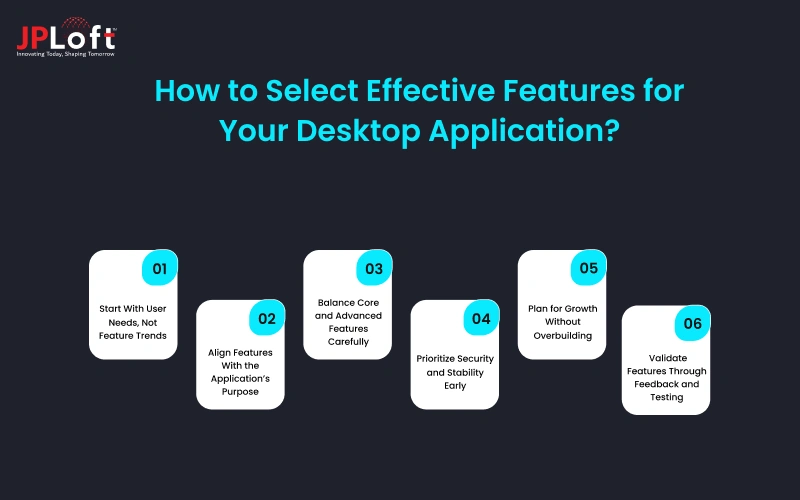
Here are some of the key approaches to consider that can help select the best desktop application features:
A] Start With User Needs, Not Feature Trends
A proper feature selection begins with understanding how users will interact with the application, rather than just following the trends. Such can help understand the problems users are facing, and accordingly, features can be planned.
When features align with real user needs, the product feels practical and easier to use from the first interaction. Such thoughtful planning will also help control the desktop application development cost.
B] Align Features With the Application’s Purpose
Each desktop application serves a specific goal, and its features should support that purpose clearly. Adding unrelated capabilities can confuse users and dilute the core value of the software.
Define the main use case first, then filter out the features to have in a desktop application that directly support it. This keeps the application focused and helps users achieve results without unnecessary complexity.
C] Balance Core and Advanced Features Carefully
A successful and scalable desktop application combines core stability with selective enhancements. Core functionality ensures reliability, while advanced options improve efficiency and flexibility.
Start with basic features for a desktop application and introduce advanced capabilities only when they solve clear problems. This balance reduces development risk and keeps the software easier to manage over time while meeting users’ expectations in real time.
D] Prioritize Security and Stability Early
Whether planning for a basic or advanced desktop app, security and stability must be planned from the beginning. The security features in desktop applications help protect sensitive data and system access.
Every planned feature of your desktop application should contribute to a stable performance. Such stability is important because an unstable app with too many trendy features is of no use.
E] Plan for Growth Without Overbuilding
Future growth should be considered when planning to build a desktop app, but it should not lead to introducing complex features from the beginning. The goal should be to allow expansion without increasing complexity.
The planning ensures finalizing a desktop application feature list that supports new users, data, and workflows, which keeps the application adaptable while remaining efficient.
F] Validate Features Through Feedback and Testing
Before finalizing features for your desktop application, test to confirm whether they truly add value or not. Plan for beta version testing and get feedback from users, and accordingly plan to incorporate or eliminate the features.
Early user input reveals whether features improve workflows or create friction. This step helps refine priorities and ensures the top desktop application feature choices are based on real usage.

How JPLoft Can Help Develop a Feature-Loaded Desktop Application?
Building a successful desktop application requires careful planning, technical precision, and a clear understanding of user expectations. As a trusted desktop application development company, JPLoft focuses on delivering solutions that balance usability, performance, and long-term reliability.
The development process begins with identifying the essential features of a desktop application based on real user workflows. This ensures the software remains practical and easy to use from the start. By prioritizing must-have features first, JPLoft helps businesses avoid unnecessary complexity while creating a strong functional foundation.
Attention is given to performance, stability, and data protection throughout development. Applications are designed to use system resources efficiently and include reliable security features in desktop applications to safeguard sensitive information. Scalability is also considered early, allowing the software to grow as user demands increase.
With ongoing support after deployment, JPLoft ensures the desktop application continues to perform well, adapts to evolving needs, and remains a dependable solution over time.
Conclusion
The adoption of desktop applications is increasing as more businesses are digitalizing their operations and investigating how to manage their operations at both the admin and user ends.
But to ensure that the desktop application performs as per the set expectations, planning for the right feature set is one of the core aspects to be focused on. From usability and performance to security and scalability, a well-balanced feature set forms the foundation of a successful product.
With the right planning, execution, and ongoing support, businesses can plan for desktop applications that meet current needs and adapt to future demands. Further, a feature-focused strategy ultimately leads to better user experiences, stronger performance, and lasting success.
FAQs
The must-have features of a desktop application include a user-friendly interface, smooth and stable performance, offline accessibility, secure data storage, basic security controls, and efficient system resource usage. These features ensure reliability, usability, and long-term adoption.
Desktop applications remain relevant because they offer better performance, higher stability, offline functionality, and stronger system integration. They are especially useful for business, productivity, and data-intensive applications that require consistent performance.
The right features should be selected based on user workflows, business goals, and core use cases. Start with essential features first, then add advanced capabilities only when they clearly improve productivity or efficiency.
Advanced features such as AI-powered automation, predictive analytics, cloud synchronization, and modular architecture can significantly improve efficiency, scalability, and long-term usability when implemented strategically.
Security is a critical part of desktop application development, especially for applications handling sensitive or business data. Features like authentication, access control, data encryption, and compliance-ready architecture help protect data and build user trust.

Savannah is a passionate tech enthusiast with a sharp understanding of client needs across diverse digital domains. With expertise spanning financial platforms, on-demand solutions, and emerging technologies, she brings a unique blend of analytical insight and interpersonal skills, helping businesses decode complexities and make informed decisions in today's rapidly evolving digital world.




Share this blog