


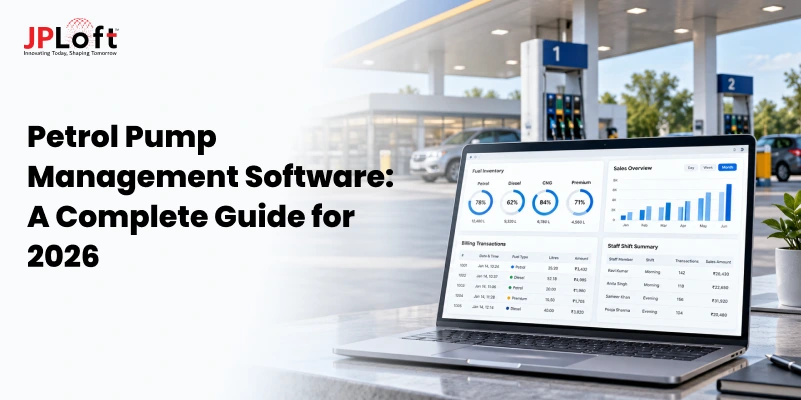
Running a petrol pump business involves more than selling fuel. Owners must manage fuel stock, track daily sales, monitor employees, handle payments, and maintain accurate records.
Managing these activities manually can lead to errors, fuel losses, and delays in daily operations. This is where petrol pump management software can make a difference.
It helps fuel station owners manage daily operations from one platform, reduce manual work, and keep better control over their business.
Whether managing a single petrol pump or multiple locations, the right software can improve accuracy and simplify business management. However, choosing between ready-made software and custom development requires careful planning.
This guide explains the essential features, business benefits, development costs, and steps involved in building a system. It also helps petrol pump owners choose the right development company based on their business needs and future growth plans.
Visit: Fuel Delivery App Development Services
What is Petrol Pump Management Software?
Petrol pump management software is a digital system that helps fuel station owners manage their daily business operations from one platform. It brings fuel inventory, sales, billing, employee shifts, payments, and business reports together in one place.
Instead of maintaining paper records or using different tools, owners can track important activities through a single dashboard.
The software can also monitor fuel levels, record transactions, manage customer accounts, and provide sales reports. It helps petrol pump businesses reduce manual errors, save time, and maintain better control over single or multiple fuel stations.
Essential Features of Petrol Pump Management Software
A petrol pump management system should simplify daily operations and improve business control. The right features help owners manage fuel inventory, sales, employees, payments, and multiple locations with greater accuracy.
1. Fuel Inventory And Tank Monitoring
Fuel inventory management helps petrol pump owners track available stock, fuel purchases, and daily consumption. It provides better visibility into fuel availability and reduces stock-related errors.
When connected to compatible tank monitoring systems, the software can provide fuel level updates and notify owners about low stock.
2. Sales And Billing Management
Sales and billing features help petrol pump owners record fuel transactions, generate invoices, and track daily revenue. This reduces manual calculations and keeps sales records organized.
The system can also maintain transaction histories, support different payment methods, and provide accurate billing information for business reporting purposes.
3. Shift And Employee Management
Managing employee shifts becomes easier when petrol pump owners can assign duties, track attendance, and monitor staff activities through one system.
The software can record shift-wise sales, track cash collections, and maintain employee performance records. This helps managers identify differences and maintain accountability across daily operations.
4. Payment And Accounting Integrations
Payment and accounting integrations help petrol pump businesses manage financial transactions without entering the same information into multiple systems.
By connecting compatible payment gateways and accounting tools, owners can track payments, reconcile transactions, and maintain financial records. This supports accurate bookkeeping and simplifies daily financial reporting.
5. Multi-Outlet Management And Reporting
Businesses operating multiple petrol pumps need a central system to monitor sales, fuel stock, and employee activities across different locations.
A centralized dashboard allows owners to compare outlet performance, review financial reports, and identify operational issues. This makes managing several fuel stations more organized and efficient.
6. Customer And Fleet Management
Customer and fleet management features help petrol pump businesses maintain customer profiles, track fuel purchases, and manage corporate or fleet accounts.
The software can record vehicle-wise fuel consumption, monitor outstanding payments, and manage credit limits. This improves customer account management and makes billing easier for regular business customers.
Also Read: Must-Have Features for Fuel Delivery App in 2026
Custom Petrol Pump Software vs. Ready-Made Solutions
Choosing between custom and ready-made petrol pump software depends on business requirements, budget, and future plans. Both options help manage fuel station operations, but they differ in flexibility, features, integrations, and long-term value.
|
Factors |
Custom Petrol Pump Software |
Ready-Made Solutions |
|
Business Requirements |
Built around the specific needs of a petrol pump business. |
Offers standard features designed for general fuel station operations. |
|
Customization |
Features and workflows can be customized according to business needs. |
Customization is limited to the options provided by the vendor. |
|
Development Cost |
Requires a higher initial investment based on features and complexity. |
Usually has lower upfront costs, with subscription or licensing fees. |
|
Implementation Time |
Takes longer because the software is developed and tested. |
Can be implemented faster with basic setup and configuration. |
|
System Integrations |
Can integrate with compatible fuel dispensers, POS systems, and accounting tools. |
Supports integrations available through the software provider. |
|
Scalability |
Can be expanded to support more outlets, users, and business operations. |
Expansion depends on the vendor's plans and system capabilities. |
|
Software Ownership |
Ownership and source code rights depend on the development agreement. |
The software generally remains owned by the vendor. |
|
Maintenance and Support |
Support and updates depend on the development team's agreement. |
Updates and support are generally managed by the software provider. |
Benefits of Developing Custom Software for Petrol Pumps
Custom software helps petrol pump businesses manage operations according to their specific needs. It offers better control, reduces manual work, improves accuracy, and supports business growth through flexible management tools.
1. Reduce Manual Work and Operational Errors
Custom software automates routine tasks like recording fuel sales, updating stock records, and generating reports. This reduces manual data entry, saves employee time, and helps petrol pump owners maintain more accurate business records.
2. Improve Fuel Stock Accuracy and Control
Tracking fuel stock becomes easier with automated inventory updates and tank monitoring integrations. Owners can compare fuel purchases, sales, and remaining stock to identify differences, reduce losses, and plan fuel orders more effectively.
3. Manage Multiple Petrol Pumps From One Platform
Businesses operating several fuel stations can monitor daily sales, inventory, employees, and financial reports through one dashboard. This makes it easier to compare outlet performance and maintain consistent operations across different business locations.
4. Improve Financial Tracking and Reporting
A custom petrol pump automation software solution can connect sales, payments, and accounting records in one system. Owners can review revenue, track outstanding payments, and generate reports to support better financial decisions.
5. Support Future Business Expansion
Custom software can be designed to support additional fuel stations, employees, and business services as operations grow. New features and integrations can be added when needed, reducing the need to replace the existing system.
How to Choose a Petrol Pump Management Software Development Company?
Choosing the right development partner is important for building software that meets your fuel station's operational needs. A reliable petrol pump management software development company should understand your business, offer suitable technical solutions, and provide long-term support.
Here are the key factors to consider before making a decision.
1. Check Experience in Fuel Industry Software
Look for a company with experience developing fuel management, inventory tracking, or retail management systems. Relevant industry knowledge helps developers understand daily petrol pump operations and business requirements.
2. Review Past Projects and Technical Expertise
Check the company's portfolio, client reviews, and previous software projects. Make sure the development team has experience with the technologies required to build a reliable and scalable management system.
3. Evaluate Integration and Customization Capabilities
Choose a company that can connect your software with compatible fuel dispensers, POS systems, payment gateways, and accounting tools. It should also support custom features based on your operational needs.
4. Discuss Security and Regulatory Requirements
Fuel station software handles important financial and business information. Ask about data encryption, access controls, secure payments, and compliance with applicable industry regulations before starting development.
5. Compare Development Costs and Support Services
Request detailed proposals covering development costs, project timelines, maintenance, and future updates. Compare what each company offers instead of choosing only the lowest price.
Also Read: Fuel Management System Development: Explore Features & Benefits
Petrol Pump Management Software Development Cost
The cost of petrol pump software development typically ranges from $20,000 to $130,000+, depending on business requirements, software complexity, and integrations. A basic system costs less, while advanced solutions with automation and multi-outlet management require higher investment. Understanding these differences helps petrol pump owners plan their development budget more effectively.
Cost Breakdown Based on Software Complexity
|
Software Complexity |
Estimated Cost |
Features Included |
|
Basic Software |
20,000–40,000 |
Fuel inventory tracking, basic billing, sales records, employee management, and simple reports. |
|
Mid-Level Software |
40,000–80,000 |
Automated inventory updates, shift management, accounting integrations, customer accounts, and multi-outlet reporting. |
|
Advanced Software |
80,000–130,000+ |
IoT-based tank monitoring, compatible fuel dispenser integrations, advanced analytics, fleet management, and custom automation. |
Factors Affecting Petrol Pump Management Software Development Cost
Several factors influence the final development budget. Understanding them helps petrol pump owners choose the right features and avoid unnecessary expenses.
-
Software Features and Complexity: Basic inventory and billing features cost less than advanced automation, analytics, and fleet management tools.
-
Number of Petrol Pump Locations: Managing multiple outlets requires centralized dashboards, location-wise reports, and additional data management capabilities.
-
Third-Party Integrations: Connecting fuel dispensers, tank sensors, POS systems, payment gateways, and accounting software increases development effort and testing requirements.
-
UI/UX Design: A simple dashboard costs less than custom interfaces designed for managers, employees, and business owners with different access permissions.
-
Development Team Location: Developer rates vary across countries and regions, affecting the overall project budget.
-
Security and Compliance: Features like data encryption, user access controls, audit logs, and applicable regulatory requirements can increase development costs.
-
Maintenance and Support: Hosting, bug fixes, software updates, security monitoring, and technical support add ongoing expenses after deployment.
Also Read: Fuel Delivery App Development Cost
How to Build a Petrol Pump Management System?
Building a petrol pump management system requires proper planning, the right technology, and a clear understanding of business operations. Following a structured development process helps create software that meets daily needs and supports future growth.
Step 1. Understand Business Requirements
The development process begins by understanding how the petrol pump business operates. This includes reviewing fuel inventory, daily sales, billing, employee shifts, and customer management.
The development team identifies existing challenges, manual tasks, and areas that need improvement. These details help define the software's main purpose and ensure the final solution addresses real business needs without adding unnecessary features or complexity.
Step 2. Identify Essential Software Features
Once business requirements are clear, the next step is selecting features that support daily petrol pump operations. These may include inventory tracking, sales management, billing, employee records, and reporting tools.
Businesses should prioritize essential features before adding advanced capabilities. This approach helps control development costs, reduces unnecessary complexity, and ensures the software provides practical value from the beginning of operations.
Step 3. Plan Software Architecture and Integrations
After finalizing the features, developers plan how different parts of the system will work together. This includes database structure, software architecture, user access, and data storage.
The team also identifies required integrations with fuel dispensers, tank monitoring devices, payment gateways, and accounting systems. Planning these connections early helps avoid compatibility issues and supports reliable data exchange between connected systems.
Step 4. Design the User Interface
The design stage focuses on making the software easy for petrol pump owners, managers, and employees to use. Designers create dashboards and screens based on different user responsibilities.
For example, employees may need simple billing screens, while owners require detailed sales and inventory reports. A clear interface reduces confusion, supports faster daily tasks, and makes employee training easier.
Step 5. Develop the Software
Once the design is approved, developers begin building the software using suitable technologies. They create the database, business functions, dashboards, and required system integrations.
Development usually happens in stages, starting with essential features like fuel inventory and billing. Additional modules are added based on project requirements. This approach allows the team to review progress and address technical issues during development.
Step 6. Test the System and Integrations
Before deployment, the software goes through testing to check whether all features work correctly. The team verifies billing calculations, inventory updates, employee access, and reporting accuracy.
Integrations with external systems are also tested to identify connection or data transfer issues. Security and performance testing help reduce operational risks and ensure the software can handle expected daily transactions reliably.
Step 7. Deploy, Train Staff, and Maintain the Software
After testing, the software is deployed at the petrol pump locations. Existing business records are transferred where required, and employees receive training to use the new system.
The development team monitors performance, resolves technical issues, and provides updates when needed. Regular maintenance helps maintain security, improve software performance, and support additional features as the petrol pump business expands.
Visit: Fuel Delivery App Development Company
Conclusion
Managing a petrol pump business becomes easier when daily operations are handled through one reliable system. From tracking fuel inventory and managing sales to monitoring employees and handling payments, the right software helps owners reduce manual work and improve business efficiency.
However, choosing the right solution requires understanding business needs, essential features, development costs, and future growth plans. While ready-made software may suit basic requirements, custom development offers greater flexibility for businesses with specific operational needs.
Working with an experienced development company can help ensure the software is secure, easy to use, and compatible with existing systems.
Ultimately, investing in the right petrol pump management system is not just about simplifying daily tasks. It is about improving business control, maintaining accurate records, and supporting long-term business growth.
FAQs
Petrol pump management software brings daily fuel station operations into one system. It records fuel sales, tracks inventory, manages employee shifts, and maintains financial records. When connected to compatible devices and business tools, it can update information automatically. Owners can access dashboards to monitor activities, review reports, and make better business decisions.
Essential features include fuel inventory monitoring, sales and billing management, employee shift tracking, payment processing, and financial reporting. The software may also offer customer account management, fleet tracking, and multi-outlet monitoring. Advanced solutions can support automated stock updates, fuel dispenser integrations, and alerts to help owners manage daily business operations more efficiently.
Petrol pump management software development typically costs between $20,000 and $130,000+, depending on project requirements. Basic systems with inventory tracking and billing cost less, while advanced solutions with automation, multiple outlets, and third-party integrations require higher investment. The final budget also depends on software complexity, development team rates, security requirements, and maintenance needs.
Developing petrol pump management software generally takes around 3 to 9 months, depending on features and project complexity. Basic systems may take less time, while advanced solutions with dispenser integrations, automation, and multi-location management require longer development periods. The timeline also depends on design requirements, testing, third-party compatibility, and feedback during development.
Yes, petrol pump software can integrate with existing fuel dispensers if the equipment supports compatible communication protocols, APIs, or integration hardware. These connections can help record fuel dispensing data, track sales, and update inventory. However, compatibility depends on dispenser models, manufacturers, and available technical documentation, which developers must review before implementing the integration.
Yes, petrol pump management software can track fuel inventory in real time when connected to compatible tank monitoring devices and dispensing systems. It can display available stock, record fuel movements, and notify managers about low fuel levels. Without these integrations, inventory updates may depend on manual entries or scheduled data synchronization between systems.
Custom petrol pump software is suitable for businesses requiring specific features, advanced integrations, or centralized management across multiple outlets. Ready-made solutions are generally more affordable initially and faster to implement. The better choice depends on business size, operational requirements, available budget, and future expansion plans. Both options can effectively support everyday fuel station management activities.
Yes, petrol pump management software can manage multiple locations through a centralized dashboard. Owners can monitor fuel inventory, daily sales, employee activities, and financial reports across different outlets. The system can also provide location-wise performance comparisons and access controls, helping businesses maintain consistent operations while reducing the effort required to manage individual fuel stations.
Petrol pump software helps reduce fuel losses by tracking inventory, recording sales, and identifying differences between expected and actual fuel stock. When integrated with tank sensors and dispensers, it can provide more accurate monitoring. Automated reports and alerts help managers identify unusual stock changes, investigate possible leakage or theft, and improve fuel handling practices.
Yes, petrol pump management software can integrate with accounting systems when compatible APIs or supported data exchange methods are available. These integrations help transfer sales records, payment details, expenses, and customer transactions. This reduces repeated data entry, improves financial record accuracy, and makes it easier for owners to manage accounts, reconcile payments, and generate reports.

Kris Jacobs brings 20+ years of experience in digital product strategy, user-focused design, and solving complex product challenges. She has worked across on-demand services, travel, entertainment, sports, insurance, education, and service marketplaces, including handyman, dog-walking, courier, event-management, and equine platforms. Her focus is on shaping practical, scalable digital experiences that align user needs with business goals and long-term product growth.



Share this blog