


Key Takeaways:
Developing an app like Google Pay is about trust, speed, and simplicity, not just payments or features.
The cost to develop an app similar to Google Pay can range from $25,000-$120,000+.
- Google Wallet became Google’s primary payments app in the U.S. after Google Pay was integrated into it in June 2024.
Features like QR payments, P2P transfers, and rewards drive daily usage and long-term retention.
The right development partner helps balance cost, scalability, and reliability for sustainable growth.
People stopped thinking of payments as a separate task. Now it’s part of the moment: splitting a bill, paying a driver, scanning a QR at a café, sending money to family, or tapping at checkout
A digital wallet app like Google Pay works because it feels instant, safe, and almost invisible. But behind that simplicity sits a serious mix of banking rails, security layers, smart UX, and compliance.
If you are planning how to create a digital wallet like Google Pay, you’re not just building a payment screen.
You’re building trust. That means fast onboarding, clean flows, strong fraud controls, and a system that can handle peak loads without breaking.
The good news is you can build it step by step. Start with the core use cases, validate the model, then expand into features like rewards, bill pay, and merchant offers.
Get all the knowledge about the process to create an app like Google Pay, the cost, and more.
Overview of Google Pay
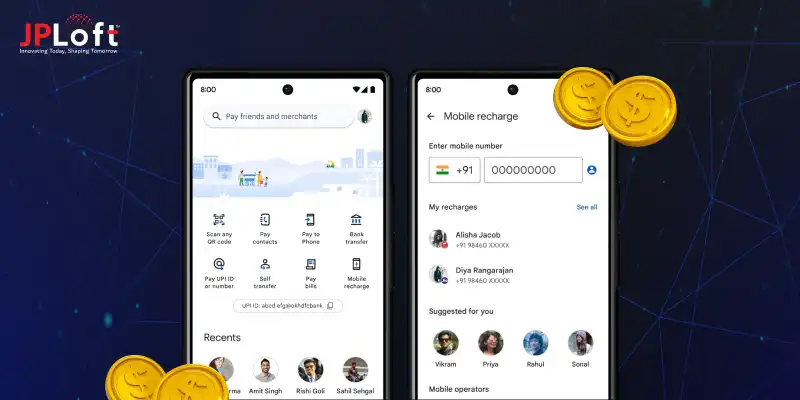
Google Pay, commonly known as GPay, functions today as part of Google Wallet, which became the primary app in the U.S. after the standalone Google Pay app was discontinued in June 2024.
Google Wallet now brings together tap-to-pay, cards, IDs, passes, and payment management in one unified experience, while Google Pay services continue to support online and in-store transactions within this ecosystem.
What makes the experience feel effortless is how speed and security work together. Features like tap-to-pay, QR payments, saved cards, and frictionless checkout flows are designed to minimize steps without compromising safety.
Behind the scenes, advanced tokenization, device-level security, and real-time risk monitoring handle sensitive operations silently, keeping complexity hidden from users.
Convenience adds another layer of value. Users can store payment cards, track transactions, manage loyalty rewards, and access passes without switching between apps or platforms.
For businesses, this streamlined approach directly reduces checkout drop-offs by limiting payments to just one or two actions. That’s why teams exploring how to develop an eWallet app often analyze Google Pay and Google Wallet’s evolution closely.
If your goal is to build an app like Google Pay, the real benchmark lies in fast onboarding, minimal payment steps, strong trust indicators, and reliable performance, even under low-connectivity conditions.
How to Develop an App like Google Pay?
If you’re looking to start an online wallet business, you’re stepping into a space where convenience, trust, and speed matter more than flashy features.
A successful digital wallet feels invisible to users. Payments happen in seconds. Security works quietly in the background. And the app fits naturally into daily life.
To get there, you need a clear roadmap. Not guesswork. Not feature overload. Just the right steps, built in the right order, with business goals and user behavior guiding every decision.
Below is a practical, business-first breakdown of how to do it.
Step 1: Define the Core Use Cases and Market Fit
Before you develop an app like Google Pay, you need clarity on who you’re building for and why they’ll use it. Google Pay didn’t start as everything at once. It focused on simple, fast payments and expanded from there.
Start by identifying your primary use cases.
-
Peer-to-peer transfers?
-
Merchant payments?
-
QR-based payments?
-
Bill payments or subscriptions?
Once you define this, map real user journeys. Think about how users add money, pay, check history, and resolve failed transactions. If you try to create a digital wallet like Google Pay without clear flows, users will feel friction immediately.
What this really means is focus first, scale later. A smaller, well-executed wallet builds trust faster than a bloated one that confuses users.
Step 2: Build a Secure and Compliant Payment Architecture
Security is not a feature here. It’s the foundation. When you make a digital wallet like Google Pay, users expect bank-level protection without ever seeing it.
This step involves choosing the right payment gateways, banking partners, and compliance standards. Tokenization, encryption, device-level authentication, and fraud detection are mandatory. Not optional.
You also need to comply with regional financial regulations, KYC norms, and data protection laws. Skipping this early creates expensive rewrites later.
Here’s the key point: Users don’t care how complex your backend is. They care that payments never fail and money never disappears.
If you want to develop an app like Google Pay that earns long-term trust, your architecture must prioritize reliability, auditability, and security from day one.
Step 3: Design a Simple, Friction-Free User Experience
This is where many digital wallets fail. They work technically, but feel heavy to use. Google Pay succeeds because everything feels obvious.
When you’re planning how to build an app like Google Pay, design every screen with one question in mind. What is the next action the user wants to take?
Onboarding should be fast, Payments should take minimal taps, & Error messages should explain what happened in plain language.
Avoid clutter. Avoid over-explaining. Let the interface guide users naturally.
If you want to create a digital wallet like Google Pay that people use daily, the app must feel lighter than cash and faster than cards. Great UX is not decoration. It directly impacts retention, trust, and transaction volume.
Step 4: Develop, Test, and Scale with Real Usage in Mind
Once the foundation is ready, development begins in phases. You don’t launch everything at once. You launch what matters most, then improve based on real usage.
When you make a digital wallet like Google Pay, app testing is not limited to bugs.
You test transaction speed, load handling, network failures, and edge cases. What happens if the internet drops mid-payment? What if a user switches devices?
After launch, monitor behavior closely.
-
Which features are used daily?
-
Where do users drop off?
-
What causes support tickets?
This feedback loop helps you refine and scale confidently. If your goal is to develop an app like Google Pay for long-term growth, iteration matters more than perfection at launch.
Step 5: Ongoing App Maintenance and Continuous Improvement
Once your app is live, the real work begins. Regular updates, monitoring, and support keep your wallet reliable and trusted.
When planning how to build an app like Google Pay, app maintenance services are not an afterthought. It’s part of the product strategy.
You need to track performance, fix bugs quickly, and stay ahead of security updates and OS changes. Payment apps operate in real time, so even small issues can impact trust.
Continuous maintenance helps you create a digital wallet like Google Pay that stays fast, secure, and compliant as user expectations evolve.
Instead of disruptive overhauls, steady improvements keep growth smooth, predictable, and user-friendly.
Features to Have in a Google Pay–Like App
A successful digital wallet works because it solves everyday payment needs without friction. The right ewallet app features focus on speed, security, and ease of use.
Each feature should reduce effort for users, build trust, and support frequent transactions without confusion.
Below are the core features you should include.
|
Feature |
What It Does |
Why It Matters |
|
User Registration & KYC |
Allows users to sign up and verify their identity securely |
Builds trust, meets compliance, and prevents fraud |
|
Bank & Card Linking |
Connects bank accounts, debit cards, and credit cards |
Enables seamless payments and fund transfers |
|
Peer-to-Peer Payments |
Send and receive money instantly between users |
Drives daily usage and user retention |
|
QR Code Payments |
Scan and pay at merchants quickly |
Supports contactless, fast in-store payments |
|
Transaction History |
Shows detailed payment records |
Helps users track spending and resolve issues |
|
Secure Authentication |
Biometric, PIN, or OTP-based access |
Protects accounts from unauthorized access |
|
Push Notifications |
Alerts for transactions and updates |
Keeps users informed in real time |
|
Bill Payments & Recharges |
Pay utilities, mobile bills, subscriptions |
Increases app stickiness and recurring usage |
|
Rewards & Cashback |
Offers incentives on transactions |
Encourages repeat usage and loyalty |
|
Customer Support |
In-app help and issue resolution |
Builds confidence and long-term trust |
How Much Does it Cost to Develop an App like Google Pay?
When businesses ask about cost, what they really want to know is what they’re paying for.
The Google Pay-like app development cost can range from $25,000 to $120,000+, depending on how complex your wallet is, the regions you target, and the level of security and compliance required.
A basic wallet with core payment features costs far less than a full-scale platform with rewards, analytics, fraud detection, and merchant tools.
The smart approach is to start with a strong MVP, validate usage, then scale features as adoption grows. That way, your budget works with your growth, not against it.
|
App Complexity |
Features Included |
Estimated Cost Range |
|
Basic Wallet App |
User login, KYC, P2P transfers, transaction history |
$25,000 – $40,000 |
|
Mid-Level Wallet App |
QR payments, bill payments, notifications, and security layers |
$40,000 – $70,000 |
|
Advanced Wallet App |
Rewards, merchant tools, analytics, fraud detection |
$70,000 – $120,000+ |
What this really means is flexibility. The ewallet app development cost scales with your ambition, not just your feature list. Build smart, grow steadily, and invest where users see real value.
How GPay-like Like Apps Make Money?
Digital wallets do far more than move money. Behind the simple tap-and-pay experience sits a well-planned e-wallet app monetization model that turns high transaction volume into sustainable revenue.
What this really means is that when you build a digital wallet like Google Pay, monetization is layered quietly into everyday user actions, not forced on users.
Here are the most effective monetization models used by GPay-like apps, explained clearly.
1. Merchant Transaction Fees
This is the core revenue driver. Wallet apps charge merchants a small fee on each successful transaction. Individually, it looks minor, but at scale, it becomes massive.
When you create a digital wallet like GPay, merchant fees work best because users pay nothing, adoption stays high, and revenue grows with usage. High-volume merchants, retail chains, and online platforms make this model extremely reliable.
2. Business Listings and Promotions
Merchants often pay to appear more prominently inside the app. Sponsored listings, featured offers, and promoted deals generate steady income.
If you make a digital wallet like GPay, this model fits naturally. Users discover offers, merchants gain visibility, and the platform earns without interrupting payments or user flow.
3. Premium Merchant Tools
Advanced dashboards, sales analytics, customer insights, automated settlements, and inventory-linked reports are offered as paid add-ons.
This monetization works well once merchant adoption matures. Businesses are willing to pay monthly fees for tools that improve decision-making and operational efficiency.
4. Bill Payments and Utility Commissions
Wallet apps earn commissions from utility providers, telecom companies, and service platforms for processing bill payments.
Electricity, gas, mobile recharges, subscriptions, and broadband payments create predictable, recurring revenue while keeping users active inside the app ecosystem.
5. Financial Services Partnerships
Many wallet apps partner with banks, lenders, and insurers to offer loans, credit lines, or insurance products.
Revenue comes through referral commissions or revenue sharing. This model becomes powerful once the app has transaction history and user trust, enabling data-driven financial offerings.
6. Subscription Plans for Power Users
Some wallets offer premium user plans with benefits like higher transaction limits, faster settlements, exclusive rewards, or priority support.
This works best for frequent users and small businesses who see clear value in paying for convenience and control.
Monetization sets the direction, but execution decides success. This is where an experienced mobile app development company makes the real difference.
How JPLoft Can Help You Develop an App Like GPay?
Building a secure, scalable digital wallet requires more than just features. As an ewallet app development company, JPLoft helps you design, develop, and launch a payment platform that users trust and businesses adopt. Our team focuses on core wallet functionality, regulatory compliance, and performance from day one.
We start by understanding your target market, transaction flows, and growth plans, then translate them into a robust technical architecture. From secure payments and KYC integration to merchant tools and real-time analytics, every component is built for scale.
JPLoft also supports you beyond launch with testing, optimization, and continuous improvements, ensuring your wallet evolves with user expectations and market demands. The result is a GPay-like app that is reliable, compliant, and ready for long-term growth.
Conclusion
Building a digital wallet app like Google Pay is not about copying features. It’s about understanding how people pay, what makes them trust a platform, and how simplicity drives daily usage.
From secure onboarding and seamless payments to scalability and monetization, every decision shapes long-term success. A strong foundation, clean user experience, and compliant architecture matter more than launching fast.
Starting with core use cases and expanding gradually helps reduce risk while keeping users engaged.
With the right development approach and a capable partner, you can create a wallet that feels effortless on the surface while remaining powerful underneath. The goal is simple: make payments invisible, reliable, and part of everyday moments.
FAQs
The timeline depends on scope and complexity. A basic wallet MVP usually takes 3–5 months, while advanced platforms with rewards and merchant tools can take 6–9 months.
Yes. Starting with an MVP is recommended. Core features like P2P payments and QR payments can be launched first, then expanded based on user feedback.
Key security elements include KYC verification, encryption, tokenization, biometric authentication, fraud detection, and compliance with regional financial regulations.
Yes, but it requires region-specific compliance, banking partnerships, and localization. Multi-region support should be planned early in the architecture.
Absolutely. Continuous monitoring, updates, security patches, and performance optimization are critical to maintaining trust and ensuring smooth operations.
No. Google Wallet is the main app for cards, IDs, and passes, while Google Pay services handle payments within the Wallet ecosystem.
The standalone Google Pay app was discontinued in the U.S. on June 4, 2024, with features migrated into Google Wallet.

Savannah Bustos is a technology professional with experience across financial platforms, mobility solutions, and on-demand digital products. Her areas of expertise include FinTech, digital banking, eWallets, lending, BNPL, stock trading, fuel delivery, and taxi-booking platforms. She combines a strong understanding of business requirements with practical technology insight, helping companies evaluate challenges, define product needs, and make informed decisions about scalable digital solutions.


Share this blog