


Key Takeaways:
To build an AI copilot, start by defining the business use case, planning the AI architecture, preparing data, implementing RAG and context management, integrating business tools and security controls, testing performance, and continuously monitoring and optimizing the solution.
AI copilots differ from chatbots and AI agents in their autonomy, context awareness, task execution, and workflow capabilities.
Businesses can use AI copilots across customer support, sales, HR, finance, software development, IT, operations, and project management.
Key technologies behind AI copilots include LLMs, RAG, vector databases, context and memory, tool calling, APIs, workflow automation, and enterprise integrations.
The cost to build a copilot can range from $10,000 to $350,000+, depending on customization, integrations, AI capabilities, security, and infrastructure requirements.
Common challenges in developing AI copilots include data quality, hallucinations, security, complex integrations, action control, and scalability.
Businesses are generating more data and managing more digital workflows than ever, yet employees still spend significant time searching for information, switching between applications, and completing repetitive tasks.
AI copilots address this gap by bringing intelligent assistance directly into everyday business processes.
From analyzing CRM data and summarizing reports to retrieving internal knowledge and triggering approved workflows, an AI copilot for business can support employees across multiple functions.
However, building one requires more than connecting a large language model to a chat interface. Data architecture, RAG, context management, system integrations, security, and workflow automation all influence how effectively a copilot performs.
This guide explains how to build an AI copilot, covering its key components, development process, business use cases, estimated costs, and common challenges.
What is an AI Copilot?
An AI copilot is an intelligent software assistant that works alongside users to support tasks, provide insights, and streamline workflows.
It uses technologies such as large language models (LLMs), natural language processing (NLP), and enterprise data to understand requests and deliver context-aware responses or recommendations.
Unlike a basic chatbot, an AI copilot can work within business applications, connect with CRMs, ERPs, databases, knowledge bases, and other business systems to access approved information, and assist with specific tasks or actions.
Real Life Examples of AI Copilots
Several AI copilots demonstrate how this technology can support different types of users and workflows:
-
Microsoft Copilot: Assists users across Microsoft 365 applications with tasks such as drafting content, summarizing meetings, analyzing information, and generating presentations.
-
GitHub Copilot: Supports developers by suggesting code, explaining existing code, generating functions, and helping with software development tasks.
-
Salesforce Agentforce: Provides AI-powered assistance within CRM workflows, helping sales and service teams work with customer information and automate tasks.
-
Google Gemini for Workspace: Helps users work with documents, emails, spreadsheets, and other Workspace applications using AI-powered assistance.
-
Amazon Q Business: Provides organizations with an AI assistant that can answer questions and surface information from enterprise data and connected business applications.
Key Market Statistics
-
The AI Copilot market size is $21.59 billion in 2026 and is projected to reach $56.43 billion by 2030.
-
One of the popular copilots that is being used today is Microsoft Copilot, which has more than 30 million paid users.
-
In Q1 of fiscal year 2027, Salesforce Agentforce, a copilot built for enterprise operations, reached $1.2 billion in annual recurring revenue, a 205% increase over the same period the previous fiscal year.
-
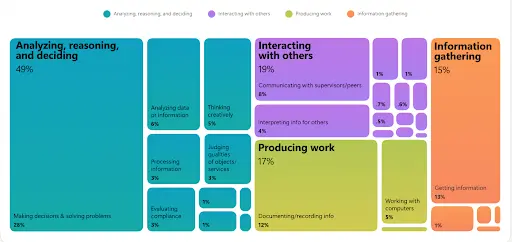
The 2026 Work Trend Index by Microsoft found that 49% of Microsoft 365 Copilot conversations support cognitive work such as analysis, problem-solving, evaluation, and creative thinking.
AI Copilot vs AI Chatbot vs AI Agent?
AI copilots, AI chatbots, and AI agents can all rely on artificial intelligence to interact with users, but they differ in their level of autonomy, purpose, and ability to perform tasks.
Understanding these differences helps businesses choose the right solution for their workflows.
|
Comparison Factor |
AI Copilot |
AI Chatbot |
AI Agent |
|
Primary purpose |
Assists users with tasks, decisions, and workflows |
Answers questions and handles conversations |
Completes tasks and achieves defined goals |
|
Autonomy |
Moderate |
Low |
High |
|
User involvement |
User collaborates with the copilot |
User directs most interactions |
Agent can operate with limited user intervention |
|
Context & data access |
Understands user, task, and business context |
Basic or predefined context |
Uses context, memory, and multiple data sources |
|
System integration |
Connects with business applications and tools |
Limited integrations |
Connects with multiple tools, APIs, and business systems |
|
Task execution |
Performs user-directed actions |
Provides information or basic assistance |
Plans and executes multi-step actions |
|
Decision support |
Provides recommendations and insights |
Limited |
Makes decisions within defined rules and permissions |
|
Workflow capability |
Supports users within existing workflows |
Handles individual interactions |
Can manage and automate complete workflows |
|
Best suited for |
Employee productivity and business workflows |
FAQs, customer support, and basic queries |
Complex automation and goal-driven processes |
|
Example |
Prepares a sales brief using CRM data |
Answers a customer's product question |
Qualifies leads, updates the CRM, and schedules meetings automatically |
Why Businesses Need to Invest in AI Copilots?
This raises a natural question: why invest specifically in AI copilots rather than other AI tools?
Here are the key reasons that justify the need to invest in building AI solutions like copilots.
1. Increases Employee Productivity
AI copilots can handle time-consuming tasks such as summarizing information, drafting content, preparing reports, and retrieving business data. Employees can therefore focus more on strategic work instead of repetitive activities.
2. Reduces Operational Effort
Businesses can use copilots to automate routine processes, including data entry, document processing, customer follow-ups, and internal requests. Integrating these capabilities with existing systems can reduce manual work across departments.
3. Access Business Information Faster
Employees often need information from multiple databases, documents, CRM platforms, and knowledge bases. An AI copilot can provide a single conversational interface for retrieving relevant information from approved sources.
4. Improve Decision Support
AI copilots can analyze large volumes of business information, identify relevant patterns, summarize findings, and provide recommendations. Teams can use these insights to evaluate options faster while retaining human control over final decisions.
5. Deliver Personalized Assistance
Businesses can develop an AI copilot for specific roles, departments, and workflows. A sales copilot, for example, can support lead research and meeting preparation, while a finance copilot can assist with reporting and data analysis.
6. Scale Business Workflows
As organizations grow, manual processes can become difficult to manage consistently. AI copilots can support larger volumes of requests and routine tasks without requiring proportional increases in human effort, making them valuable for scalable business operations.
What Are the Key Components of an AI Copilot?
A production-ready AI copilot combines AI models, enterprise data, retrieval systems, integrations, and governance controls.
These components work together to understand requests, provide grounded responses, and support actions across business workflows.
1. Large Language Model
The LLM serves as the core intelligence layer. It interprets instructions, identifies intent, generates responses, summarizes information, and determines when additional data or tools are required. Model selection depends on accuracy, context length, latency, cost, and deployment needs.
2. RAG and Enterprise Knowledge
Retrieval-augmented generation (RAG) connects the LLM with proprietary business information. Documents and other data are processed, converted into embeddings, and stored in a vector database. Relevant information is retrieved and supplied to the LLM as contextual input.
3. Context and Memory
Context management helps the copilot understand conversations, user roles, tasks, and application state. Memory can retain selected information such as preferences or ongoing tasks while following defined privacy and retention policies.
4. Tool Calling and Workflow Automation
Tool calling enables the copilot to interact with APIs, databases, CRMs, and other applications. An orchestration layer determines which tools to invoke, allowing the copilot to retrieve records, create tasks, or trigger approved workflows.
5. Security and Governance
Authentication, access controls, encryption, audit logs, data isolation, and permission management protect enterprise information. Guardrails and human approval mechanisms can further control sensitive responses and actions.
How to Develop an AI Copilot: Step-By-Step Process
Building an AI copilot involves more than connecting an LLM to a chatbot interface. It requires a structured development approach covering business requirements, data, architecture, integrations, security, and workflow automation.
Each stage should support the specific business workflow the copilot is being built for, rather than follow a one-size-fits-all process.
Here is a step-by-step process for building an enterprise AI copilot.
Step 1. Define the Business Requirements
Start by establishing what the copilot needs to accomplish and who will use it. A clear understanding of business objectives helps determine the required capabilities, data sources, integrations, and success metrics before development begins.
► Identify the Use Case and Goals
Determine the specific workflow, business problem, target users, and expected outcomes. Prioritize use cases where an AI copilot can provide measurable improvements in productivity, decision-making, or operational efficiency.
► Assess Feasibility and Data Requirements
Review available business data, existing systems, integration requirements, security considerations, and technical constraints. This assessment helps determine whether the selected use case is suitable for AI implementation.
Step 2. Plan the AI Copilot Architecture
Once requirements are defined, design the technical foundation that will support the copilot. The architecture should account for model performance, data retrieval, scalability, integrations, security, and future functionality.
► Select the AI Model and Technology Stack
Choose the LLM, development framework, database, vector database, cloud infrastructure, APIs, and other technologies based on accuracy, context requirements, latency, scalability, and cost.
► Design the System Architecture
Define how the LLM, RAG pipeline, memory, orchestration layer, APIs, business tools, databases, and user interface will communicate with one another.
Step 3. Build the Knowledge and Intelligence Layer
A business copilot needs access to reliable information to provide useful and context-aware assistance. This stage prepares enterprise data and establishes the mechanisms through which the AI can retrieve and use it.
► Prepare Enterprise Data
Collect, clean, structure, and organize documents, databases, knowledge bases, and other approved information sources. Address duplicate, outdated, incomplete, or inconsistent data before integrating it with the AI system.
► Implement RAG and Context Management
Create embeddings, configure vector search, and implement retrieval pipelines to provide the LLM with relevant information. Add conversation context and memory mechanisms where required to maintain continuity across interactions.
Step 4. Develop and Integrate the Copilot
With the core intelligence layer in place, develop the user-facing experience and connect the copilot to the systems employees already use. These integrations allow the solution to move from answering questions to supporting real business tasks.
► Build the User Interface
Create a conversational or embedded interface through which users can interact with the copilot. Depending on the use case, this may include chat interfaces, contextual panels, voice interactions, or in-application assistance.
► Connect Business Systems and Tools
Integrate CRMs, ERPs, databases, communication platforms, and other enterprise applications through APIs, connectors, and function calling.
► Implement Workflow Automation
Enable the copilot to perform approved actions such as creating records, generating reports, updating information, or triggering business workflows based on user instructions.
Step 5. Secure and Test the AI Copilot
Enterprise AI systems must be tested for both functional performance and security before they are introduced into production environments. Establish controls that protect sensitive information while ensuring the copilot behaves reliably.
► Implement Security and Governance
Add authentication, role-based access control, encryption, data isolation, audit logging, and permission management to control access to enterprise information and capabilities.
► Add Guardrails and Human Oversight
Use validation rules, tool permissions, approval workflows, and human-in-the-loop controls to manage sensitive responses and high-impact actions.
► Evaluate Performance
Test response accuracy, retrieval quality, hallucination rates, latency, tool execution, security, and task completion using realistic business scenarios and evaluation datasets.
Step 6. Deploy, Monitor, and Improve
Deployment is not the final stage of custom AI copilot development. Continuous monitoring helps businesses identify performance issues, understand user behavior, control operational costs, and improve the copilot as workflows change.
► Deploy to the Production Environment
Launch the copilot within the required cloud, enterprise, or application environment. Configure production infrastructure, access controls, monitoring, and scalability requirements.
► Monitor Performance and Usage
Track response quality, latency, costs, errors, adoption, tool usage, and user feedback to identify areas that require attention.
► Continuously Optimize the Copilot
Update prompts, models, knowledge sources, integrations, workflows, and guardrails based on performance data, user feedback, and changing business requirements.
How Much Does It Cost To Develop An AI Copilot?
The AI copilot development cost ranges from $10,000 to $350,000+, depending on the business requirements, level of customization, AI capabilities, integrations, security requirements, and overall system complexity.
Development timelines can range from 2 to 9+ months, depending on the scope and functionality.
|
AI Copilot Type |
Estimated Cost |
Development Timeline |
Typical Capabilities |
|
Basic AI Copilot |
$10,000 – $45,000 |
2 – 3 months |
Single workflow, basic LLM integration, simple interface, limited data sources |
|
Mid-Level AI Copilot |
$45,000 – $220,000 |
3 – 6 months |
RAG, custom knowledge base, multiple integrations, context management, workflow automation |
|
Advanced/Enterprise AI Copilot |
$220,000 – $350,000+ |
6 – 9+ months |
Advanced reasoning, enterprise RAG, complex integrations, tool calling, security controls, governance, and scalable infrastructure |
What Influences the Cost to Build an AI Copilot?
Several factors significantly impact the final cost of building an AI copilot and should be considered before development even starts to ensure a secure build and execution.
-
AI model selection: Model capabilities, API usage, fine-tuning, and inference requirements can influence ongoing and development costs.
-
Data and RAG requirements: Large or complex knowledge bases require additional data processing, embedding, retrieval, and evaluation infrastructure.
-
System integrations: Connecting CRMs, ERPs, databases, APIs, and internal platforms increases development complexity.
-
Workflow automation: Copilots that execute multi-step tasks require additional orchestration, tool calling, validation, and permission controls.
-
Security and compliance: Enterprise deployments may require advanced authentication, encryption, access controls, audit trails, and governance mechanisms.
-
User interface and channels: Custom web applications, mobile interfaces, voice capabilities, or embedded copilots can add to development effort.
-
Maintenance and optimization: Model updates, infrastructure, monitoring, usage costs, and continuous improvements contribute to the long-term cost.
Therefore, businesses should estimate the investment based on the copilot's required capabilities and architecture, rather than treating development cost as a fixed price.
AI Copilot Use Cases Across Business Functions
AI copilots use cases span a wide range of business functions and can be tailored to specific roles, processes, and operational requirements.
Their capabilities depend on the enterprise data they can access, the context they receive, the systems they connect with, and the actions they are authorized to perform.
Case 1: Customer Support Copilot
A customer support copilot can connect with knowledge bases, product documentation, customer records, and historical support tickets. It can help teams:
-
Retrieve relevant troubleshooting information based on customer queries.
-
Summarize previous conversations and ticket history.
-
Generate context-aware response suggestions for support agents.
-
Classify tickets and route complex cases to the appropriate team.
Through help desk APIs, the copilot can also update ticket details or initiate predefined escalation workflows.
Case 2: Sales and CRM Copilot
A sales copilot can integrate with CRM platforms, email systems, call transcripts, and customer databases to provide account-level assistance. It can:
-
Generate customer and opportunity summaries from CRM records.
-
Identify follow-up opportunities from sales activity.
-
Prepare meeting briefs using customer and account history.
-
Draft personalized emails, proposals, and follow-up messages.
With tool calling, the copilot can create tasks, update CRM records, and trigger approved sales workflows. Partnering with an experienced AI development company can help you better understand how a custom sales and CRM copilot can be leveraged in your operational workflows.
Case 3: HR and Recruiting Copilot
An HR Copilot can provide controlled access to employee policies, onboarding resources, benefits information, and recruitment data. Depending on its integrations and permissions, it can:
-
Answer employee questions using approved internal documentation.
-
Summarize resumes and candidate information for recruiter review.
-
Generate onboarding checklists and role-specific documents.
-
Retrieve relevant information from connected HRMS platforms.
Role-based access controls can restrict sensitive employee information to authorized users.
Case 4: Finance and Reporting Copilot
A finance copilot is one of the core requirements when planning for enterprise AI development. It can connect with approved ERP systems, financial databases, spreadsheets, and reporting platforms to:
-
Answer natural-language questions about financial data.
-
Compare financial periods and generate variance summaries.
-
Identify unusual values that require further review.
-
Assist with budgeting, forecasting, and report generation.
Access controls and validation mechanisms can ensure that sensitive financial information remains protected and high-impact actions require appropriate authorization.
Case 5: Software Development and IT Copilot
A development and IT copilot can integrate with code repositories, issue trackers, technical documentation, CI/CD platforms, and monitoring systems. It can:
-
Generate and explain code based on developer instructions.
-
Analyze bugs, logs, and technical issues.
-
Summarize pull requests, tickets, and incident reports.
-
Retrieve relevant documentation and suggest troubleshooting steps.
Integration with development and IT tools allows the copilot to support workflows without requiring teams to switch between multiple systems.
Case 6: Operations and Project Management Copilot
An operations copilot can connect with project management platforms, calendars, communication tools, and operational databases. It can:
-
Summarize project progress and outstanding tasks.
-
Extract action items from meetings and conversations.
-
Identify delays, dependencies, and workflow bottlenecks.
-
Generate project status reports from connected data.
These applications demonstrate how AI copilots for business workflows can combine enterprise knowledge, contextual intelligence, system integrations, and controlled automation to support different functions.
Challenges of Building an AI Copilot and Their Solutions
Building an AI copilot involves several technical and operational challenges, from maintaining accurate enterprise data to securing sensitive information and managing complex integrations.
Identifying these challenges early and implementing the right solutions can help businesses build a reliable, scalable, and secure copilot.
Challenge 1: Inaccurate or Incomplete Business Data
AI copilots depend on reliable enterprise data to generate relevant responses. Outdated documents, duplicate records, inconsistent formats, and incomplete information can affect retrieval quality and lead to unreliable outputs.
Solution: Establish a structured data pipeline that cleans, validates, and updates enterprise information, and use RAG development services to handle chunking, metadata, embedding, and retrieval strategies that give the LLM relevant context.
Challenge 2: Hallucinations and Unreliable Responses
LLMs can generate responses that sound convincing but contain incorrect information. This becomes particularly risky when a copilot handles financial, legal, healthcare, or operational information.
Solution: Ground responses in verified enterprise sources through RAG, use structured prompts, apply output validation, and provide source references where appropriate. Set confidence thresholds and route uncertain requests to human users.
Challenge 3: Security and Data Privacy
Enterprise copilots may process confidential customer, financial, employee, or operational information. Improper access controls can expose data to unauthorized users or applications.
Solution: Implement authentication, role-based access control, encryption, data isolation, API authorization, audit logging, and permission-aware retrieval. Apply data retention and privacy policies according to the organization's requirements.
Challenge 4: Complex Enterprise Integrations
A copilot may need to interact with multiple systems, including CRMs, ERPs, databases, ticketing platforms, and internal APIs. Differences in data formats, authentication methods, and API capabilities can make integration complex.
Solution: Use a well-defined integration and orchestration layer with APIs, connectors, and function calling. Establish clear tool permissions and validation rules for every action the copilot can perform.
Challenge 5: Controlling AI-Generated Actions
A copilot that can execute actions introduces additional operational risks. An incorrect instruction could result in an unintended CRM update, transaction, notification, or workflow execution.
Solution: Hire AI developers who can define action boundaries and permissions for every tool. Use approval workflows for high-impact operations, validate tool inputs and outputs, and maintain detailed audit logs.
Challenge 6: Performance, Scalability, and Cost
As usage increases, businesses must manage model latency, API consumption, infrastructure requirements, and concurrent requests. Complex RAG pipelines and frequent tool calls can further increase operational costs.
Solution: Monitor model usage, latency, token consumption, retrieval performance, and infrastructure utilization. Use caching, optimized retrieval, appropriate model selection, and scalable cloud infrastructure to balance performance and cost.
Why Partner with JPLoft To Build and Launch an AI Copilot?
JPLoft helps businesses build AI copilots tailored to specific workflows, user requirements, and enterprise systems. Our AI copilot development services cover the complete lifecycle, from use-case discovery and architecture to development, integration, deployment, and continuous optimization.
Our AI experts have experience building copilots using LLMs, RAG, contextual intelligence, tool calling, workflow automation, and enterprise integrations. These capabilities enable copilots to retrieve relevant business information, assist employees, and perform approved actions across connected systems.
We also prioritize enterprise-ready implementation through authentication, access controls, data protection, API security, and governance mechanisms. Businesses can begin with an MVP or proof of concept and scale capabilities as adoption and business requirements evolve.
With 16+ years of industry experience and 1,250+ projects delivered, JPLoft helps businesses develop scalable AI solutions aligned with their workflows and operational goals.
Conclusion
Building an AI copilot can help businesses improve productivity, simplify complex workflows, and make enterprise information easier to access. However, successful implementation requires more than integrating an LLM.
Businesses need reliable data, RAG, contextual intelligence, system integrations, workflow automation, security controls, and continuous performance monitoring. From defining the right use case to deploying and optimizing the solution, every stage influences the copilot's effectiveness and scalability.
A well-designed AI copilot for business can support employees while keeping human oversight at the center of important decisions. With the right technology strategy and development expertise, organizations can create an AI copilot that aligns with their workflows and evolves alongside their business needs.
FAQs
To create an AI copilot, businesses should first define the use case and requirements, assess enterprise data, select the appropriate AI model and technology stack, design the architecture, implement RAG and context management, integrate business systems, enable workflow automation, establish security controls, and thoroughly test the solution before deployment.
The cost to build an AI copilot typically ranges from $10,000 to $350,000+. The final cost depends on factors such as AI model selection, RAG implementation, enterprise integrations, workflow automation, security requirements, and customization.
AI copilot development can take 2 to 9+ months, depending on the solution's complexity. A basic workflow-specific copilot may take a few weeks, while enterprise AI copilot development with advanced reasoning, RAG, multiple integrations, and governance requirements requires more time.
An AI copilot can use large language models, RAG, vector databases, APIs, tool calling, memory systems, orchestration frameworks, and cloud infrastructure. The technology stack depends on the use case, data requirements, integrations, security needs, and scalability goals.
Yes. An AI copilot can integrate with CRMs, ERPs, databases, knowledge bases, communication platforms, project management tools, and other enterprise applications through APIs, connectors, and function calling. These integrations allow the copilot to retrieve business information and perform approved actions.

Rahul Sukhwal is the CEO and Founder of JPLoft, with 18+ years of experience in software engineering, emerging technologies, and digital product development. His expertise spans artificial intelligence, including AI agents, generative AI, LLMs, chatbots, computer vision, and machine learning, as well as blockchain, IoT, AR/VR, mobile, web, and enterprise software. He focuses on applying these technologies to real business challenges across industries such as healthcare, education, mobility, finance, real estate, and on-demand services.



Share this blog