


The global mHealth apps market is on track to hit $86.4 billion by 2034; digital health platforms are scaling at unexpected speeds.
When developing a healthcare application, the primary question isn’t just how to code it; it’s “Does my app actually process Protected Health Information (PHI), and what architectural steps are required to avoid civil fines that can hit over $2 million per year?”
As we are consistently working in this niche, the one line that hits the boardroom meetings is
"HIPAA compliance isn't an extra feature you add at the end; it’s the foundation you build on from Day 1."
In 2026, building a compliant healthcare application needs more than just an idea and a clean design.
It means putting privacy and patient trust at the center of every decision, right from the first line of code.
Explore this guide to understand HIPAA-compliant app development, key security requirements, and what it takes to protect sensitive patient data.
Who Needs a HIPAA-Compliant Mobile App?
Not every health app needs HIPAA.
The ones that do are the ones that touch real patient information for doctors, hospitals, clinics, or anyone with them.
Here’s who that usually includes:
1. Hospitals and Large Healthcare Systems
Any app that manages patient records, appointments, prescriptions, lab results, or internal clinical messages almost always needs full HIPAA safeguards.
2. Doctors and Private Practices
Patient portals, teleconsultation apps, and secure messaging tools fall under HIPAA the moment they start handling medical history, treatment notes, or prescriptions.
3. Telehealth providers
If your app supports video visits, patient messaging, document sharing, or appointment management, and real health information is involved, compliance is required.
4. Pharmacies
Apps that deal with prescriptions, medication history, or patient details need proper protection.
Even simple features like refill reminders or prescription status updates can involve protected health information.
5. Health Insurance Companies
Claims, eligibility checks, coverage details, and member health data all count as protected information.
6. Mental Health Providers
Therapy platforms often store some of the most sensitive data — session notes, diagnoses, and private conversations — so the standards are strict.
7. Diagnostic Labs
Apps that let patients or doctors view test results and reports need HIPAA-level security. Strong access controls and encryption help prevent sensitive medical data from being exposed.
8. Healthcare Software Companies
If you build tools that hospitals or clinics use, and those tools handle patient data, you become a business associate and must meet the same requirements.
9. Medical Device and Connected-Health Companies
Wearables or apps that collect and send patient health data to a care team usually need the same protections.
The deciding factor is never the category of the app.
It’s simply this: Does the app create, receive, store, or share identifiable health information on behalf of a healthcare provider or organization?
If the answer is yes, HIPAA applies.
If the app only helps individuals track their own steps, sleep, or mood with no doctor or clinic involved, it usually stays outside HIPAA.
Understanding PHI and ePHI
Before writing a single line of code to build a healthcare app, you must clearly identify the exact data your system will store, process, or transmit.
Under US regulations, Protected Health Information (PHI) refers to any individually identifiable health data created, used, or maintained by a covered entity or business associate.
When this information is stored or transmitted digitally through servers, APIs, databases, or cloud environments, it becomes Electronic Protected Health Information (ePHI).
PHI goes far beyond medical addresses, phone numbers, IP addresses, biometric identifiers, device serial numbers, and payment details whenever they are linked to a patient’s health status or treatment plan.
During HIPAA-compliant mobile app development, misclassifying user data is one of the most costly architectural mistakes teams make.
If your mobile application simply tracks personal wellness metrics for an individual (like a standard step counter or water log) without interacting with healthcare providers or insurers, that data generally falls outside HIPAA jurisdiction.
However, the moment your app connects a user to a physician, transmits lab results, books medical appointments, or shares vital health data with a covered entity, every byte of that data transitions into ePHI.
Ensuring end-to-end encryption at rest (AES-256) and in transit (TLS 1.3) specifically for ePHI is mandatory to keep your application compliant and fully protected from severe regulatory penalties.
Key HIPAA Requirements for Mobile Apps
If you’re researching how to build a HIPAA- compliant app, compliance needs to be considered throughout the product lifecycle rather than treated as a final security check.
The app should protect PHI at every point where it is collected, stored, accessed, or transmitted.
Key requirements include:
-
PHI Protection: Identify all protected health information (PHI) handled by the app and limit its collection, use, and sharing to legitimate purposes.
-
User Authentication: Implement strong authentication methods to verify users before they can access sensitive health information.
-
Access Controls: Use role-based permissions so users can access only the PHI and features required for their responsibilities.
-
Data Encryption: Encrypt PHI both at rest and in transit to reduce the risk of unauthorized access or exposure.
-
Audit Controls: Maintain detailed logs of important activities involving PHI, including access, changes, and other relevant user actions.
-
Data Integrity: Put safeguards in place to prevent PHI from being improperly changed, deleted, or destroyed.
-
Secure Data Storage: Store sensitive health information in properly protected infrastructure with appropriate security configurations and access restrictions.
-
Secure API Communication: Protect APIs that transmit PHI between the mobile app, backend, databases, and connected healthcare systems.
-
Automatic Session Management: Implement session timeouts and secure logout mechanisms to reduce unauthorized access from unattended devices.
-
Device Security: Consider risks associated with lost or stolen smartphones and avoid unnecessarily storing sensitive PHI directly on the device.
-
Remote Data Protection: Provide mechanisms to revoke sessions or remove locally stored sensitive information when a device is compromised, or access needs to be terminated.
-
Secure Backup & Recovery: Maintain protected backups and recovery procedures so PHI can be restored without compromising its confidentiality or integrity.
-
Business Associate Agreements (BAAs): Sign BAAs with applicable vendors that handle PHI on behalf of the covered entity, such as certain cloud, hosting, communication, or analytics providers.
-
Third-Party Integration Security: Carefully evaluate payment, messaging, cloud, analytics, video, and other integrations before allowing them to interact with PHI.
-
Risk Assessment: Conduct regular risk assessments to identify vulnerabilities in the app, infrastructure, devices, integrations, and internal processes.
-
Security Testing: Perform vulnerability assessments, penetration testing, code reviews, and other appropriate testing to identify security weaknesses before and after launch.
-
Breach Response: Establish procedures for detecting, investigating, containing, and reporting breaches involving unsecured PHI when required.
-
Administrative Safeguards: Define policies for workforce access, security responsibilities, training, incident response, and ongoing compliance management.
-
Physical Safeguards: Protect the systems and facilities where electronic PHI is stored or processed, including servers, workstations, and other relevant infrastructure.
-
Privacy Controls: Ensure the app's data practices align with HIPAA's privacy requirements, including appropriate use and disclosure of PHI.
-
Ongoing Compliance: HIPAA compliance does not end when the app goes live. Regular monitoring, updates, risk assessments, and security reviews are necessary as the app and its technology environment change.
Essential Features of a HIPAA-Compliant App
When developing a HIPAA-compliant app, app security needs to be built into the core product rather than added as a final step.
Along with protecting sensitive health information, the app should give users a simple experience while keeping access, communication, and data handling under control.
-
Secure User Authentication: Use strong login methods such as multi-factor authentication (MFA), secure passwords, and session management to prevent unauthorized users from accessing patient information.
-
Role-Based Access Control: Give users access based on their roles and responsibilities. A doctor, patient, administrator, and support staff should not automatically have access to the same information.
-
End-to-End Data Encryption: Encrypt sensitive health information during transmission and while stored on servers or other systems. This reduces the risk of PHI being exposed if data is intercepted or accessed improperly.
-
Audit Logs: Record important user activities such as logins, PHI access, modifications, and other security-related events. These logs help organizations monitor activity and investigate suspicious behavior.
-
Secure Patient Messaging: Provide a protected channel for communication between patients, doctors, and healthcare staff instead of relying on unsecured messaging methods.
-
Electronic Health Records (EHR) Access: If the app connects with EHR systems, it should securely retrieve and exchange patient information through properly protected APIs and approved integration methods.
-
Secure File & Document Sharing: Allow users to upload and share prescriptions, medical reports, test results, and other documents while controlling who can view or download them.
-
Appointment Management: Patients should be able to schedule, reschedule, and cancel appointments without exposing their personal or medical information to unauthorized users.
-
Consent Management: Give users appropriate control over how their health information is collected, used, or shared, with records of relevant permissions and preferences.
-
Automatic Session Timeout: Automatically end inactive sessions after a defined period to reduce the risk of someone accessing PHI from an unattended device.
-
Remote Access Control: Allow administrators to revoke sessions or disable access when a user account, device, or credential is suspected to be compromised.
-
Secure Push Notifications: Avoid displaying sensitive PHI directly in notifications. Notifications should be designed so that private information is not exposed on a locked device.
-
Data Backup & Recovery: Maintain secure backups and recovery procedures so critical health information can be restored after system failures, security incidents, or data loss.
-
Secure API Integration: Protect APIs connecting the mobile app with databases, healthcare systems, payment services, cloud platforms, and other third-party tools.
-
Security Monitoring: Continuously monitor the application and infrastructure for unusual activity, unauthorized access attempts, vulnerabilities, and other potential security issues.
-
Admin Dashboard: Provide administrators with controlled tools to manage users, permissions, audit records, security events, and other compliance-related activities.
-
Data Retention & Deletion Controls: Define how PHI is retained and handled throughout its lifecycle, including appropriate procedures for data deletion when applicable.
-
Business Associate Integration: When external vendors handle PHI on behalf of a covered entity, the app ecosystem should account for applicable Business Associate Agreements (BAAs) and vendor compliance requirements.
How to Build a HIPAA-Compliant App?
If you want to make a HIPAA-compliant app, you need a clear plan from day one.
Start by confirming whether your app handles protected health information, then design privacy and security into every feature.
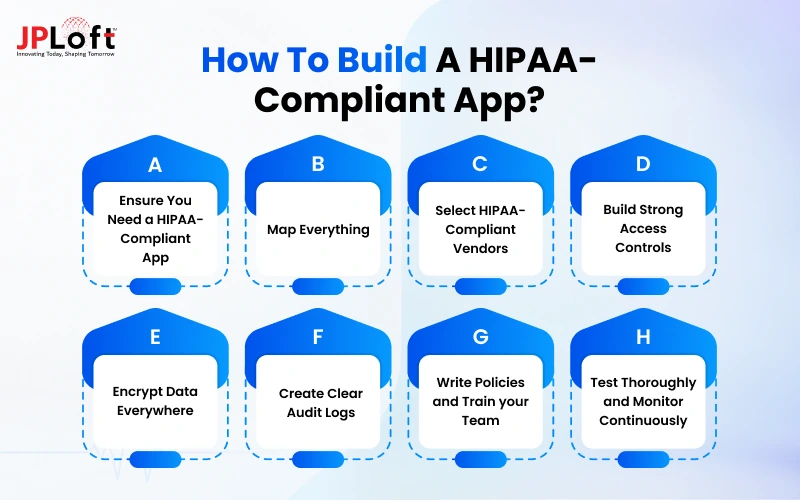
The steps below walk you through exactly what that process looks like in practice:
Step 1: Ensure You Need a HIPAA-Compliant App
Before writing any code, take time to understand whether your app will create, receive, store, or share protected health information on behalf of a doctor, clinic, hospital, or other healthcare organization.
This single decision shapes every technical and legal choice that follows.
If patient data is involved in any meaningful way, treat HIPAA as a core requirement rather than an optional extra.
Skipping this check early often leads to expensive redesigns later.
Step 2: Map Everything
Create a clear picture of how health information moves through your app.
List every feature that touches patient data — registration, login, messaging, file uploads, reports, notifications, third-party tools, and background processes.
Document where the data is collected, where it is stored, who can access it, and where it is shared.
This data-flow map becomes the foundation for risk analysis, encryption decisions, and access controls.
Without it, important gaps are easy to miss.
Step 3: Select HIPAA-Compliant Vendors
Select cloud platforms, databases, messaging services, analytics tools, and other vendors that are willing to sign a Business Associate Agreement.
A signed BAA is legally required before any protected health information can pass through their systems.
Do not rely on marketing claims alone; review their security practices, data storage locations, and compliance history.
Choosing the wrong vendor early can force you to rebuild large parts of the app later.
Step 4: Build Strong Access Controls
Design the app so that only the right people can see the right information at the right time.
Use role-based permissions, unique user accounts, multi-factor authentication, and automatic logouts after periods of inactivity.
Limit access based on job function rather than giving broad permissions by default.
These controls reduce the chance of accidental exposure and help demonstrate that patient data is properly protected.
Review and update permissions regularly as team roles change.
Step 5: Encrypt Data Everywhere
Protect health information both when it is stored on servers or devices and when it travels between the app, backend systems, and third-party services.
Use strong, industry-standard encryption methods and keep encryption keys secure and separate from the data itself.
Encryption is one of the most basic expectations under HIPAA and one of the first things reviewed during audits or investigations.
Make it a default setting rather than an optional feature.
Step 6: Create Clear Audit Logs
Record every important action that involves patient data — who accessed it, when they accessed it, what they viewed or changed, and from which device or location.
These logs must be protected from tampering and kept for the required retention period.
In the event of a security question or investigation, audit logs provide the evidence needed to show what happened.
Build logging into the system from the beginning instead of adding it later as an afterthought.
Step 7: Write Policies and Train your Team
Technical safeguards alone are not enough.
Document clear rules for how patient data should be handled, who is responsible for security, how incidents should be reported, and what steps to take if something goes wrong.
Train every person who works on the app — developers, designers, support staff, and managers — and keep records of that training.
Regular reminders and updates help keep security practices consistent as the team grows.
Step 8: Test Thoroughly and Monitor Continuously
Before launch, run security testing, vulnerability scans, and reviews of access controls and data flows.
After the app goes live, continue monitoring for unusual activity, new risks, and changes in how the system is used.
Compliance is not a one-time project.
It requires ongoing attention, periodic risk assessments, and quick responses when issues appear.
Building this habit early keeps both patients and the organization better protected over time.
HIPAA-Compliant Technology Stack
The app tech stack is one of the top selections you will make when building a HIPAA-compliant healthcare app.
Every technology used in the app should support strong security, reliable performance, and secure handling of sensitive healthcare information.
The table shows commonly used options that teams rely on in 2026 to meet these requirements while keeping development practical and scalable:
|
Layer |
Recommended Options |
Key HIPAA Considerations |
|
Cloud Infrastructure |
AWS, Google Cloud, Microsoft Azure |
Must sign BAA; enable encryption & logging |
|
Database |
Amazon RDS, Azure SQL, Cloud SQL |
Encryption at rest, access controls, backups |
|
Authentication |
AWS Cognito, Auth0, Azure AD B2C |
Multi-factor authentication, role-based access |
|
File Storage |
Amazon S3, Azure Blob, Google Cloud Storage |
Server-side encryption, strict access policies |
|
Messaging & Notifications |
Twilio, AWS SNS, Firebase (with limits) |
BAA required; avoid storing PHI in messages |
|
Analytics & Monitoring |
AWS CloudWatch, Datadog (HIPAA plan), Mixpanel (limited) |
BAA + no PHI in tracking events |
|
API & Backend |
Node.js, Python (Django/FastAPI), Java |
Secure coding practices, input validation |
|
Mobile Framework |
React Native, Flutter, Native iOS/Android |
Secure local storage, certificate pinning |
Security and Data Protection Best Practices
Security should be considered at every stage of HIPAA-compliant mobile app development, from how users log in, how information is stored, transmitted, and accessed.
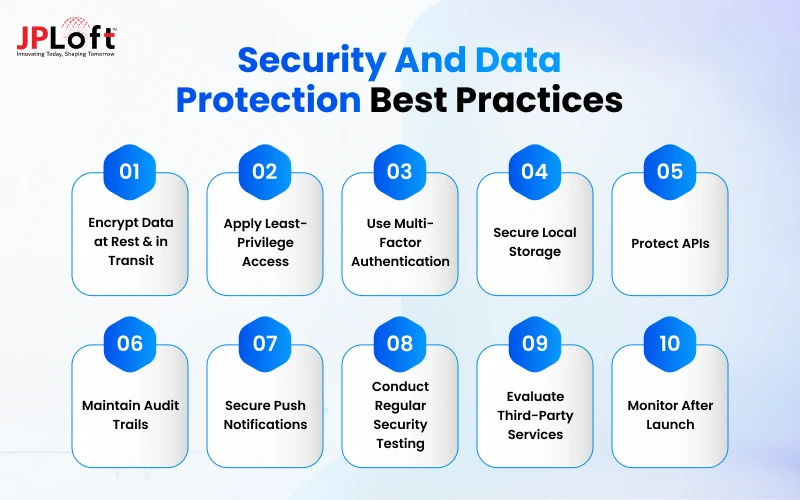
The following practices can help create a safer application and reduce security risks:
1. Encrypt Data at Rest & in Transit
You should use strong encryption to protect personal information when it is stored and whenever it moves between the app, server, APIs, and connected systems.
2. Apply Least-Privilege Access
Give users only the permissions they need for their role. This limits unnecessary access and reduces the impact of compromised accounts.
3. Use Multi-Factor Authentication
Add an additional verification layer beyond passwords to make unauthorized account access more difficult.
4. Secure Local Storage
Avoid keeping unnecessary sensitive information on mobile devices. When local storage is important, use the platform’s secure storage mechanisms.
5. Protect APIs
Secure every API with proper authentication, authorization, input validation, and rate limiting to prevent common backend attacks.
6. Maintain Audit Trails
Record important activities such as logins, access attempts, data changes, and administrative actions to support monitoring and investigation.
7. Secure Push Notifications
Keep notification content minimal and avoid displaying private medical details on a locked device.
8. Conduct Regular Security Testing
You should perform vulnerability assessments, penetration testing, functionality testing, code reviews, and other security checks before and after launch.
9. Evaluate Third-Party Services
Review cloud providers, analytics tools, communication platforms, and other integrations before connecting them to the application.
10. Monitor After Launch
HIPAA-compliant app development does not end when the application goes live.
Regular live security updates, access reviews, vulnerability checks, and risk assessments help maintain protection over time.
The Complete Regulatory & HIPAA Framework for Healthcare Apps
Healthcare apps often need to follow more than just one set of rules.
For teams developing a HIPAA-compliant app, understanding these frameworks early helps shape the right security and compliance strategy.
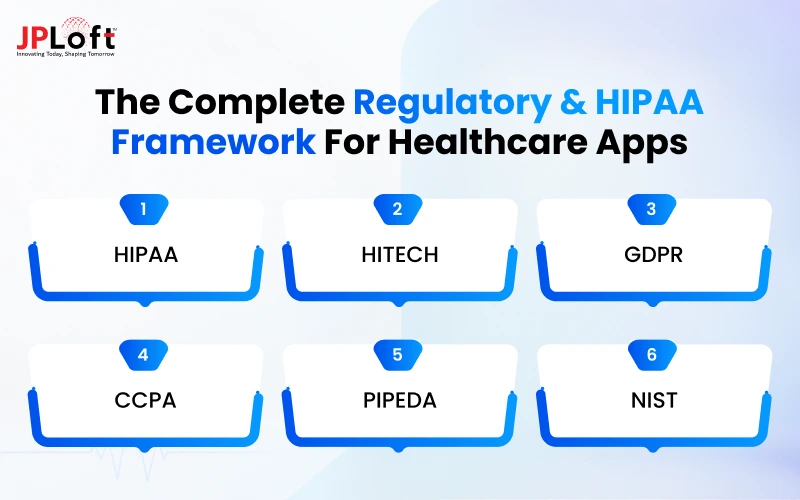
Here’s a clear look at the main regulations teams need to consider for effective app compliance:
1. HIPAA
The primary U.S. law that protects the privacy and security of protected health information.
Any app that creates, receives, stores, or shares PHI for healthcare providers or their partners must meet HIPAA requirements.
2. HITECH
This law works alongside HIPAA and focuses on the security of electronic health records. It also strengthens breach notification rules and increases penalties for non-compliance.
3. GDPR
Europe’s strict data protection regulation. If your app collects or processes personal data from users in the European Union, you must follow GDPR rules on consent, data access, and user rights.
4. CCPA
California’s privacy law that gives residents more control over their personal information.
Apps that collect data from California users need to provide clear notices and honor requests to access or delete data.
5. PIPEDA
Canada’s federal privacy law. If your mHealth app serves Canadian users, it must meet PIPEDA requirements for how personal information is collected, used, and protected.
6. NIST
A set of cybersecurity frameworks and guidelines widely used in the United States.
Many healthcare organizations follow NIST standards to strengthen technical safeguards and risk management practices.
Not every app needs to follow all of these rules.
The ones that apply depend on your target market, the type of data you handle, and whether you work with healthcare providers.
You should find out the right regulations early to help avoid costly changes later.
HIPAA-Compliant App Development Cost in 2026
The HIPAA app development cost in 2026 can range from $40,000 to $250,000+, depending on the app’s complexity, security requirements, platforms, integrations, and development team.
A basic application with secure login, appointments, messaging, and user management will cost less than an advanced healthcare app with EHR integration, telemedicine, AI, remote monitoring, and complex administrative controls.
HIPAA Compliance can also increase app development cost, but that’s worthwhile if it saves you from huge fines.
The team must account for security architecture, encryption, access controls, audit logging, compliant infrastructure, testing, and applicable vendor agreements.
Choosing native or cross-platform development, the number of user roles, and the number of third-party integrations can further affect the budget.
The following table gives a practical estimate based on different app complexity levels:
|
App Type |
Estimated Development Cost |
|
Basic HIPAA-Compliant App |
$40,000 – $70,000 |
|
Medium-Complexity App |
$70,000 – $120,000 |
|
Advanced HIPAA-Compliant App |
$120,000 – $180,000 |
|
Enterprise Healthcare App |
$180,000 – $250,000+ |
Common HIPAA Compliance Challenges & Solutions
Even teams that start with good intentions often run into the same obstacles when building a HIPAA-compliant app.
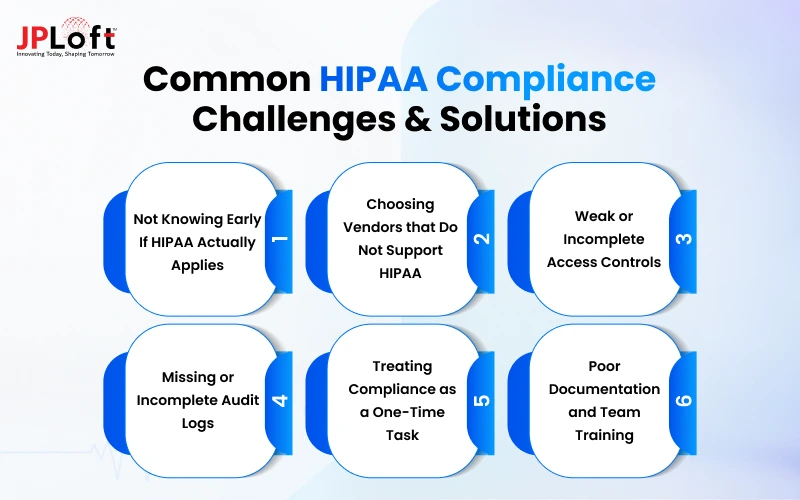
Here are some of the most common HIPAA compliance application development challenges & ways to handle them:
Challenge 1: Not Knowing Early If HIPAA Actually Applies
Many teams build first and only ask compliance questions after development is already underway.
This delay often leads to major redesigns, wasted budget, and missed launch timelines.
Solution: Decide at the planning stage whether your app will handle protected health information for a healthcare provider or organization. This single clarity prevents expensive redesigns later.
Challenge 2: Choosing Vendors that Do Not Support HIPAA
Using regular cloud tools, messaging services, or analytics platforms that refuse to sign a Business Associate Agreement creates immediate legal and security risk.
Once patient data flows through an unsupported vendor, fixing the issue becomes far more complex and costly.
Solution: Only select vendors willing to sign a BAA and carefully review their security practices before integrating them into the app.
Challenge 3: Weak or Incomplete Access Controls
Giving broad permissions or skipping multi-factor authentication makes patient data much easier to expose accidentally or intentionally.
Over time, these gaps become one of the most common reasons for compliance failures.
Solution: Implement role-based access, unique user accounts, multi-factor authentication, and automatic session timeouts from the beginning.
Challenge 4: Missing or Incomplete Audit Logs
Without proper logs, it becomes very difficult to track who accessed what data, when they accessed it, and what actions they took.
This lack of visibility creates serious problems during investigations or audits.
Solution: Build detailed, protected audit logging into the system and review the logs on a regular schedule.
Challenge 5: Treating Compliance as a One-Time Task
Teams often complete security work before launch and then stop monitoring the system afterward.
New features, integrations, and changing threats can quickly create fresh compliance gaps.
Solution: Schedule regular risk assessments, vulnerability testing, and policy reviews so compliance stays current as the app grows.
Challenge 6: Poor Documentation and Team Training
Technical safeguards alone are not enough if the people building and supporting the app do not understand the rules.
Without clear policies and ongoing training, mistakes become far more likely.
Solution: Write clear data-handling policies, train everyone who works on the app, and keep proper records of that training.
Addressing these challenges early keeps the project on track and reduces the chance of costly fixes or compliance issues later.
HIPAA Compliance Checklist
A clear checklist helps teams stay organized during HIPAA compliance application development and reduces the chance of missing critical requirements.
Here are some points to help you while planning, building, and maintaining your HIPAA-compliant healthcare app:
1. Confirm HIPAA Applicability
Decide early whether your app will create, receive, store, or share protected health information for a healthcare provider or organization.
This decision shapes every technical and legal step that follows in the project.
2. Sign Business Associate Agreements
Make sure every vendor that handles patient data is willing to sign a Business Associate Agreement.
Without a signed BAA, using that service for protected health information is not allowed under HIPAA.
3. Implement Strong Access Controls
Limit data access based on user roles and require multi-factor authentication. Unique user IDs, automatic session timeouts, and regular permission reviews help keep patient information properly restricted.
4. Encrypt Data At Rest and In Transit
Protect health information both when it is stored and when it moves between systems. Strong encryption is one of the basic and expected safeguards under the HIPAA Security Rule.
5. Enable Detailed Audit Logging
Record who accessed patient data, when they accessed it, and what actions they performed. These logs must be protected from changes and kept available for review when needed.
6. Complete a Security Risk Analysis
Identify potential risks to patient data, evaluate their impact, and document how each risk will be reduced.
Update this analysis whenever major changes are made to the app or its infrastructure.
7. Create Clear Policies And Train the Team
Write simple rules for how patient data should be handled and train everyone involved in the project.
Keep records of training sessions so you can show that the team understands its responsibilities.
8. Test Security Regularly
Run vulnerability scans, penetration tests, and access reviews before launch and on an ongoing basis.
Continuous app testing in a HIPAA-compliant mobile app development process helps catch new issues before they turn into real problems.
How to Choose a HIPAA-Compliant App Development Company?
Choosing the right development partner is important because HIPAA compliance depends on both technical implementation and the processes used throughout development.
Before hiring a healthcare app development company, evaluate these factors:
-
Healthcare Development Experience: Look for a company that understands healthcare workflows, data privacy, and the technical requirements involved in building healthcare applications.
-
HIPAA Knowledge: Ask how the team approaches authentication, encryption, access controls, audit logs, secure APIs, risk assessments, and other compliance requirements.
-
Technical Expertise: Check whether the developers have experience with cloud infrastructure, mobile technologies, backend development, API integrations, and security testing.
-
Third-Party Integrations: Make sure the company can securely integrate services such as EHR systems, telehealth platforms, payment gateways, messaging tools, and cloud services.
-
Security Testing: A reliable partner should have a clear process for vulnerability testing, penetration testing, code reviews, and fixing security issues before launch.
-
Post-Launch Support: HIPAA compliance requires ongoing monitoring and updates. Choose a team that can provide maintenance, security updates, and regular improvements after deployment.
-
Transparent Development Process: Clear communication, defined milestones, documentation, and regular progress updates help avoid compliance and development gaps.
Why Choose JPLoft?
JPLoft offers healthcare and mobile app development services with a focus on secure architecture, integrations, and scalable application development. Its development team can help businesses plan, build, test, and maintain healthcare applications while addressing the technical requirements associated with HIPAA compliance.
Conclusion
Launching a HIPAA-compliant app in 2026 is less about adding security features at the end and more about making the right decisions from the very beginning.
When patient data is involved, privacy and trust must shape the architecture, vendor choices, access controls, and ongoing monitoring.
Teams that treat compliance as a foundation rather than an afterthought reduce risk, avoid costly redesigns, and create products that healthcare organizations can actually use with confidence.
Whether you are building a telehealth platform, patient portal, or connected health tool, the steps in this guide give a practical path forward.
Make sure your HIPAA-compliant healthcare app is built with the right technology, security practices, and compliance strategy from day one.
FAQs
No. HIPAA applies only when the app creates, receives, stores, or shares protected health information on behalf of a healthcare provider, hospital, clinic, or other covered entity. Simple wellness apps that users manage on their own usually fall outside HIPAA.
Confirm whether your app will handle protected health information for a healthcare organization. This single decision determines whether full HIPAA requirements apply and prevents expensive changes later.
Yes, but only if the provider is willing to sign a Business Associate Agreement and you configure the services correctly with encryption, access controls, and proper logging.
At least once a year, and whenever you add major new features, change vendors, or significantly update the system. Ongoing risk assessment is a core part of staying compliant.
No. Compliance requires continuous monitoring, security testing, policy updates, and team training. New features and changing threats mean the work continues after launch.

Rahul Sukhwal is the CEO and Founder of JPLoft, with 18+ years of experience in software engineering, emerging technologies, and digital product development. His expertise spans artificial intelligence, including AI agents, generative AI, LLMs, chatbots, computer vision, and machine learning, as well as blockchain, IoT, AR/VR, mobile, web, and enterprise software. He focuses on applying these technologies to real business challenges across industries such as healthcare, education, mobility, finance, real estate, and on-demand services.


Share this blog