


Key Takeaways:
Real-time data sync improves visibility, cuts delays, and helps fleets make faster, more accurate operational decisions.
Automated dispatching reduces manual work and assigns the nearest driver, lowering fuel wastage and delivery time.
Shared vehicle and driver profiles prevent data mismatches and keep fuel logs, billing, and scheduling consistent.
Fuel delivery apps integrate with fleet management systems by using secure APIs and telemetry to streamline routing, fueling, and daily fleet workflows.
Integrated billing and analytics reveal inefficiencies, improve cost control, and support smarter fuel budgeting.
Predictive maintenance alerts reduce breakdowns, prevent major repairs, and extend overall fleet lifespan.
JPLoft delivers integration-ready fuel delivery solutions that strengthen visibility, reduce errors, and support scalable fleet operations.
Fuel delivery apps are becoming essential tools for modern logistics, but their real strength appears when they integrate seamlessly with fleet management systems.
For entrepreneurs, this integration unlocks smoother operations, automated fuel ordering, accurate consumption tracking, and a structure that scales without draining resources.
The global fleet management market is expected to exceed $55 billion by 2030, driven by real-time data, telematics, and automation. This isn’t just a trend; it’s a shift toward smarter, more predictable fleet ecosystems, and it creates an opportunity for investors.
Therefore, the question that arises is “How do fuel delivery apps integrate with fleet management systems?”
They communicate through secure APIs, real-time telemetry, and synchronized data pipelines that connect vehicles, drivers, routes, and fueling activity into one unified ecosystem.
This guide walks through how fuel delivery apps connect with fleet systems, the technical flow behind that connection, and why this integration is becoming a cornerstone for businesses aiming to operate faster, cleaner, and more profitably.
What Integration Means for Fuel Delivery Apps and Fleet Systems?
The integration of the fuel delivery apps and fleet systems means that both platforms work as one instead of functioning in separate silos.
When you create a fuel delivery app, it is essential to identify a clear fleet management system and how you can integrate it into your app to gain better performance measures.
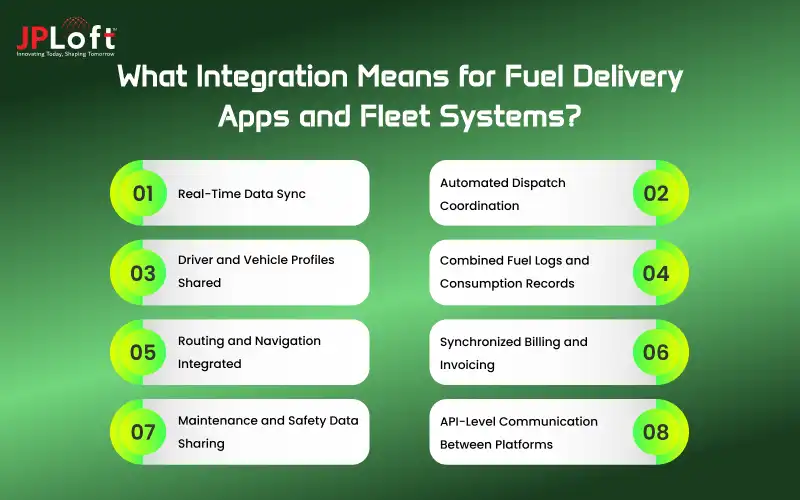
To connect these two elements, each key activity comprises fuel dispatching, ordering, routing, and delivery updates, do flow between the two in real-time.
1. Real-Time Data Sync
This ensures that location, speed, fuel level, progress of delivery, and driver activity are updated constantly across the two platforms.
All of this gives fleet managers a live view into the status of each vehicle, while that same information helps the fuel-delivery app schedule timely refills to avoid delays and adjust instantly to any last-minute changes on the road.
2. Automated Dispatch Coordination
With integration, dispatching becomes fully automated and no longer relies on manual calls or spreadsheets.
If a vehicle needs fuel, the system automatically identifies the closest delivery driver, checks the route load, validates availability, and assigns the job. This saves time, reduces fuel wastage, and ensures the right driver reaches the right vehicle without confusion.
3. Driver and Vehicle Profiles Shared
Both systems keep a single profile for each driver and each vehicle. Information such as license details, shift timings, fuel consumption history, tank size, GPS ID, and compliance status is kept identical across both systems to avoid discrepancies.
This prevents issues like assigning the wrong order to the wrong vehicle or miscalculating fuel usage records.
4. Combined Fuel Logs and Consumption Records
Once fuel is delivered, the details automatically sync into the fleet management dashboard. Liters pumped, delivery timestamps, price per unit, mileage impact, and trip-wise consumption automatically updated.
This does away with the need for manual entry and creates an audit trail that helps in accounting, tax reporting, and performance analysis.
5. Routing and Navigation Integrated
Both platforms interlink to calculate the smartest routes through the analysis of traffic, road conditions, detours, patterns of fuel demand, and priorities of delivery.
If a route changes, the update will be automatically reflected both in the fleet system and the driver’s app. This leads to fewer delays, lower operational costs, and more predictable delivery timelines.
6. Synchronized Billing and Invoicing
Every fuel delivery completed creates an invoice that automatically feeds into the fleet's accounting system.
This includes price breakdowns, taxes, discounts, and vehicle-wise expenses. Integrated billing removes duplicate records, reduces mismatches, and gives accounting teams transparent, real-time financial data.
7. Maintenance and Safety Data Sharing
The information that moves between both systems includes engine diagnostics, sensor alerts, tire pressure levels, idle time, and service reminders.
If one vehicle shows unusual fuel burn or mechanical stress, both the fuel delivery app and the fleet dashboard flag it. It helps companies avoid breakdowns, perform preventive maintenance, and maintain safety compliance.
8. API-Level Communication Between Platforms
Security for APIs, webhooks, and cloud integration layers ensures that communication between the two systems flows continuously without lag.
It sets up a technical foundation wherein they can instantly share data, handle high-volume requests, and be stable at peak operations. This entire workflow of seamless and reliable proceedings is enabled via API integrations.
Well, before you start an online fuel delivery business, it is essential to capture the current trends related to fleet management systems, as it helps in keeping the vehicle movement, evaluating the current fuel demand, and driver activity can be organized in real-time.
Now, as you are ready for the integration of fuel delivery apps with the fleet management systems, let's check out the core components list that you can include in your app, below.
Core Components of a Fuel Delivery App That Connect to Fleet Systems
Now, as you are proceeding to integrate fleet systems with the fuel delivery app, in that case, it's essential to look for components of fuel delivery apps impacted by the fleet systems.
Let’s learn it all in this table.
|
Component |
How It Connects to Fleet Systems (One Line) |
|
User & Driver Authentication |
Syncs verified driver identities with fleet profiles for accurate assignment. |
|
Vehicle & Driver Profiles |
Shares unified vehicle details and usage history to avoid allocation errors. |
|
Real-Time GPS & Telematics |
Sends live location and movement data directly to fleet dashboards. |
|
Fuel Request & Order Module |
Pushes refill requests to fleet scheduling tools for automated planning. |
|
Dispatch & Assignment System |
Aligns job assignments with fleet availability and current routes. |
|
Route Optimization Engine |
Shares optimized routes and re-routing updates with fleet navigation systems. |
|
Delivery Workflow Tracking |
Updates fleet managers with real-time delivery statuses and timestamps. |
|
Fuel Metering & Verification |
Logs exact fuel quantities delivered into fleet consumption records. |
|
Telemetry & Fuel Consumption Logs |
Syncs engine data, fuel burn, and mileage with fleet analytics. |
|
Billing & Invoicing |
Transfers invoices and fuel expenses into fleet accounting systems. |
|
Analytics & Reporting |
Sends performance insights for fleet-wide efficiency monitoring. |
|
Maintenance & Safety Monitoring |
Shares vehicle health alerts and service needs with fleet maintenance tools. |
|
Alerts & Notifications |
Sends route, safety, and delivery alerts to fleet operators instantly. |
|
Fuel Inventory Management |
Updates fleet teams on available fuel levels for scheduling accuracy. |
|
Customer Support Tools |
Syncs driver issues and support tickets with fleet operations. |
|
Admin & Access Control |
Mirrors permissions and roles across fleet management interfaces. |
|
API Integration Layer |
Enables secure, seamless real-time communication between both systems. |
|
Geo-Fencing |
Pushes location rules and alerts to fleet monitoring software. |
|
Offline Sync |
Ensures delivery data auto-updates in the fleet system once the network is restored. |
|
Compliance & Documentation |
Shares digital compliance logs for audits and regulatory checks. |
Proceeding with the components and their integration with the fleet management systems, you should be aware of their impact on any integration.
Well, when it comes to defining the right features or selecting the apt fleet management systems, you might get puzzled. However, with an effective and experienced mobile app development company, you can address this issue.
Now, the question lies in “how an integration actually works?”, Let's check it all out in the following section.
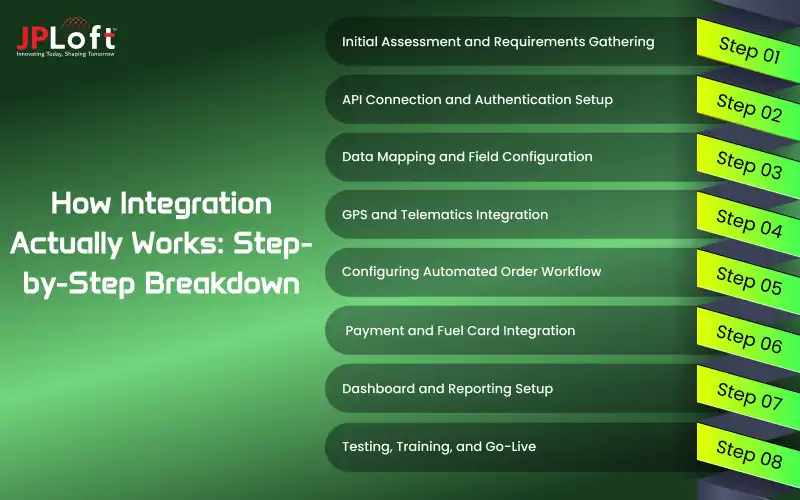
How Integration Actually Works: Step-by-Step Breakdown
When it's about API integration in fuel delivery apps, you should know the actual step-by-step process.
Similarly, for the fleet management integration, you should know the actual process for its integration.
Let's discuss it all below.
Step 1: Initial Assessment and Requirements Gathering
The fleet manager identifies the need for integration of a fuel delivery app with the existing fleet management system. Current pain points are assessed: manual ordering of fuel, lack of real-time visibility, or inefficient refueling.
The team documents specific requirements: the number of vehicles, the type of fuel required, the existing software platforms currently in use, and the desired outcomes from the integration.
Step 2: API Connection and Authentication Setup
The fuel delivery app provider shares API documentation and credentials with the fleet management system administrators.
Both systems establish a secure API connection through authentication protocols such as OAuth 2.0 or JWT tokens to ensure data security. Initial handshake testing verifies that both systems can communicate securely and exchange basic information successfully.
Step 3: Data Mapping and Field Configuration
Technical teams ensure that corresponding data fields are mapped within the fuel delivery app and the fleet management system so that information will flow properly.
The most important data points aligned across both platforms include vehicle identification numbers, fuel tank capacities, GPS coordinates, and fuel types. Custom field mappings are created for unique organizational requirements or specialized fleet data.
Step 4: GPS and Telematics Integration
The fuel delivery application connects with the telematics devices and GPS tracking systems of the fleet to obtain current vehicle location information. GPS tracking in fuel delivery apps can help you to effectively enable the users to access location and even the route to reach the exact customer’s spot.
Geofencing parameters are established to automatically place fuel delivery orders if vehicles enter a specific area or depot. The integration allows the application to track fuel levels through IoT sensors fitted within vehicle tanks, which generate consumption data accurately.
Step 5: Configuring Automated Order Workflow
Business rules and triggers are also put in place that will automate the process of ordering fuel when certain thresholds and conditions are met.
The system will be set up to automatically generate requests for fuel delivery when tank levels fall below certain percentages or volumes. Fleet managers will set up approval workflows, delivery time windows, and priority levels depending on vehicle type or operational needs.
Step 6: Payment and Fuel Card Integration
Now, under this step, the corporate fuel cards or fleet payment accounts would be integrated into the fuel delivery application to provide the necessary transaction processing.
This integration lets the system automatically reconcile fuel purchases with GPS data to validate a proper delivery and reduce potential fraud.
The payment systems will be configured to include various methods such as invoicing, direct billing, or pre-authorized transactions based on the organizational preference.
Step 7: Dashboard and Reporting Setup
A single unified dashboard is configured to show real-time data from both the fuel delivery application and fleet management system on one interface.
Reports are set up to track key metrics such as fuel consumption per vehicle, cost per mile, delivery completion rate, and sustainability metrics. Automated alerts and notifications will be set up for critical events such as failed deliveries, unusual consumption patterns, or budget threshold breaches.
Step 8: Testing, Training, and Go-Live
All integration points, data accuracy, and automated workflows are validated with comprehensive testing using real-world scenarios. Mobile app testing is an important consideration when it comes to evaluating how the integration works well with the app.
Fleet managers, drivers, and administrative staff receive hands-on training in the use of the integrated system and understanding new processes. Successful testing and user acceptance are followed by going live across the entire fleet, with ongoing monitoring and support to ensure seamless operations.
If you are still confused about the benefits, let's learn it all in the following section.
Benefits of Integrating Fuel Delivery Apps with Fleet Management Systems
There are a number of benefits of integrating fuel delivery apps with fleet management systems, such as significant cost savings and fraud prevention.
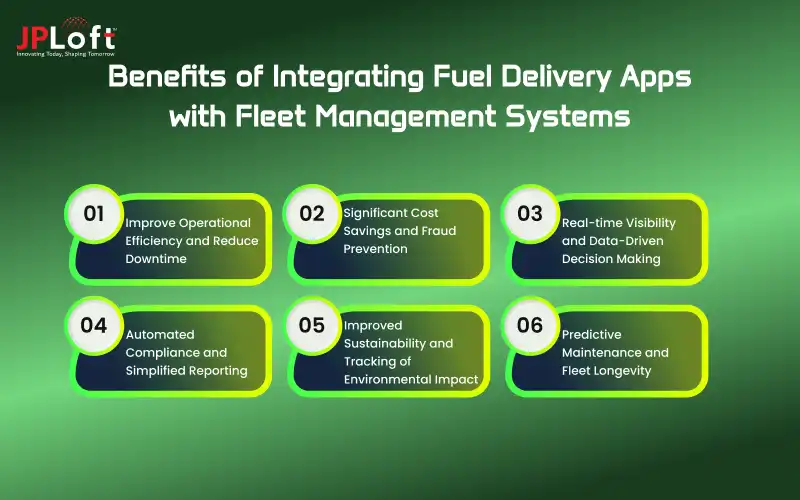
Let's discover the list of benefits below.
A] Improve Operational Efficiency and Reduce Downtime
Integration of fuel delivery eliminates detours to gas stations by drivers, thereby saving time that could be used to keep the vehicle on the designated route.
Automated fuel ordering and on-site delivery ensure that vehicles are refueled at scheduled stops or during overnight parking, minimizing operational interruptions.
This streamlined process also enables fleets to maximize productivity by increasing daily deliveries and ensuring driver work time is optimized, free from fuel-related delays.
B] Significant Cost Savings and Fraud Prevention
The integration provides real-time visibility into fuel consumption patterns to identify inefficiencies, unauthorized use, and potential fuel theft.
Automated reconciliations of fuel card transactions with GPS data assure that each fuel purchase is checked against actual vehicle locations and delivery confirmations.
The app's supplier network offers competitive fuel pricing, enabling fleet managers to track cost per mile metrics to optimize budget allocation and reduce overall fuel expenses.
C] Real-time Visibility and Data-Driven Decision Making
Centralized dashboards display detailed insights into fuel consumption, delivery status, vehicle locations, and performance indicators for the fleet in a single interface.
Managers can track actual fuel levels across their entire fleet in real time, anticipate future needs, and act based on accurate and timely information.
Advanced analytics provide trends, such as excessive idling, routes that are inefficient, or abnormal fuel consumption for certain vehicles. This all allows proactive action toward improving the fleet's effectiveness.
D] Automated Compliance and Simplified Reporting
Integration automates the creation of regulatory compliance reports, like the filing of IFTA taxes, by avoiding manual entry and reducing administrative burdens.
The system keeps all the records of fuel transactions, delivery confirmations, and mileage data digitally in detail for auditable documentation.
Automated reporting saves an enormous amount of administrative time while ensuring accuracy and compliance with federal, state, and environmental regulations.
E] Improved Sustainability and Tracking of Environmental Impact
The integrated system tracks carbon emissions, fuel efficiency metrics, and environmental impact across the entire fleet, contributing to ESG goals.
Fleet managers will also have the ability to monitor their progress against sustainability targets, seek out opportunities to reduce the carbon footprint, and create comprehensive environmental reports for stakeholders.
Access to alternative fuels through the Delivery App will also allow fleets to transition towards greener sources of energy while correctly measuring and reporting their environmental contributions.
F] Predictive Maintenance and Fleet Longevity
Integration with telematics will provide insights into the health of the vehicle, fuel quality, and performance that enable predictive maintenance scheduling before breakdowns can even occur.
The system detects irregularities in fuel consumption that could indicate mechanical issues such as fuel leaks, faulty injectors, or engine problems that call for attention.
The early identification of potential issues means that costly emergency repairs can be avoided, extending vehicle lifespan and ensuring fleet reliability due to proactive maintenance interventions.
Now, as you are ready to integrate the fleet management system with your app. The following section on technical architecture can help you make a solid base. Let’s check it all out below.
Technical Architecture Behind the Integration
When it's about the practical aspect and the pathway to integrate the fleet management system, it is essential to learn and evaluate the fuel delivery app tech stack.
Here, you can check out the complete technical architecture in the table below.
|
Architecture Layer |
Technology/Protocol |
Purpose |
Data Flow |
|
API Layer |
RESTful APIs, GraphQL, JSON/XML |
Primary communication interface between systems |
Fleet System to API Gateway to Fuel Delivery App |
|
Authentication |
OAuth 2.0, JWT, API Keys |
Secure access control and authorization |
Token generation then validation to Access granted |
|
Message Queue |
RabbitMQ, Apache Kafka, AWS SQS |
Asynchronous data processing and reliability |
Order requests to Queue to Processing to Delivery |
|
Telematics Integration |
GPS APIs, MQTT (IoT sensors), OBD-II |
Real-time vehicle location and fuel level monitoring |
Vehicle Sensors to IoT Gateway to Cloud to Fuel App |
|
Database Sync |
PostgreSQL/MongoDB with replication |
Bidirectional data synchronization |
Fleet DB and ETL Middleware and Fuel App DB |
|
WebSocket/Webhook |
WebSocket (real-time), Webhook (events) |
Live tracking updates and event notifications |
Real-time GPS stream / Event triggers to POST callbacks |
|
Payment Integration |
Stripe, PayPal APIs, Fuel Card APIs |
Transaction processing and reconciliation |
Order to Payment Gateway to Verification to Confirmation |
|
Security Layer |
TLS 1.3, AES-256 encryption, RBAC |
Data encryption and access control |
All traffic encrypted in-transit and at-rest |
|
Cloud Infrastructure |
AWS/Azure/GCP, Docker, Kubernetes |
Hosting, scaling, and load balancing |
Load Balancer to App Servers to Database Cluster |
|
Monitoring |
Prometheus, Grafana, ELK Stack |
Performance tracking and error logging |
Metrics collection to Dashboards to Alerts |
Integration Flow: Fleet Management System to API Gateway (Auth) to Message Queue to Fuel Delivery Backend to IoT/Telematics to Vehicle Fleet.
If you are still struggling with the tech stack, you can hire dedicated developers for your app.
Continuing with the tech stack, let's learn about the common challenges that you might face while integrating a fleet management system with the fuel delivery apps.
Common Challenges in Integration and How to Solve Them
To continue with the integration process, it is essential to know the different types of challenges even before they occur as an issue.
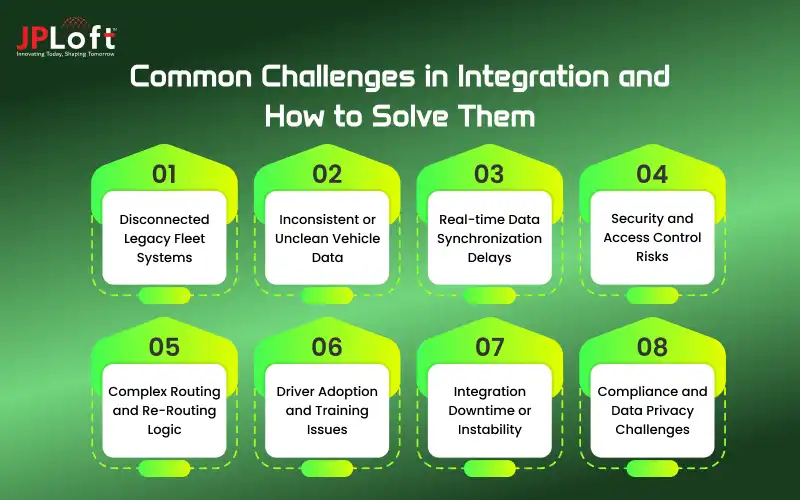
Hence, when it comes to integrating fleet management systems in the fuel delivery apps, the following challenges can be counted and need to be addressed.
1. Disconnected Legacy Fleet Systems
Many fleets still use outdated software lacking APIs or structured data formats, thus making integration slow and prone to errors.
The remedy is to introduce middleware to translate legacy data into modern formats. This allows both systems to communicate without replacing the whole fleet platform.
2. Inconsistent or Unclean Vehicle Data
The problems are usually because the vehicle IDs, driver information, and fuel logs are different on each system. This creates mismatches when they sync. This is also one of the important challenges while building a fuel delivery app.
A universal data model needs to be created, and all of the fields mapped between the two platforms. Once that is completed, everything else moves forward clean, with no duplication.
3. Real-time Data Synchronization Delays
Heavy loads of data from GPS, sensors, and telemetry contribute to slowing down the communications between systems.
Event-driven architecture, optimized endpoints, and message queues help maintain instant updates. This makes sure dispatchers always see accurate vehicle movement and fuel status.
4. Security and Access Control Risks
Different platforms sharing data bring about potential risks such as unauthorized access or even exposure of sensitive information.
All the communications are kept secure by enforcing token-based authentication, OAuth/JWT, role permissions, and encrypted APIs. Audits on a regular basis add another layer.
5. Complex Routing and Re-Routing Logic
When both systems provide route suggestions, that is where conflicts arise. A distinct routing hierarchy, deciding which system is in charge of primary navigation, avoids confusion.
Route updates synchronized via a single integration layer keep drivers and managers on the same page.
6. Driver Adoption and Training Issues
Drivers might find it difficult to adapt to new workflows, new apps, or added steps during fueling.
Easy UX, guided prompts, and quick in-app tutorials make onboarding easier. Pair that with short training sessions, and teams will be set without impacting operations.
7. Integration Downtime or Instability
APIs fail when one system goes down, scales unexpectedly, or is updated.
The integration becomes stable with the addition of monitoring tools, fallback mechanisms, and retry queues. This maintains operational flows smoothly even during brief outages.
8. Compliance and Data Privacy Challenges
Fleet systems handle sensitive information, like location tracking and fuel logs. Compliance with industry standards and regional data laws is paramount.
The majority of these risks are addressed by the use of secure storage, encrypted transmission, and role-limited access.
Till now, we have covered the meaning of integration, along with the core components, steps of integration, benefits, and challenges.
Now, let's switch to the cost and its related factors in the following section.
Cost Factors to Consider When Integrating Fleet Systems with Fuel Delivery Apps
The cost to integrate fleet systems with the fuel delivery apps can cost you from $5000 to $20,000, depending on the complexity of the apps, experience of the developers, and many other factors.
Let's learn about all the factors impacting the fuel delivery app development cost in the following table.
|
Cost Factor |
Description (Short & Clear) |
Estimated Cost Range |
|
API Development & System Integration |
Secure APIs to sync drivers, vehicles, routes, telemetry, fuel logs, and delivery events. |
$2,000 – $6,000 |
|
Middleware / Integration Engine |
Connects different platforms using a unified data layer for clean, conflict-free syncing. |
$1,000 – $4,000 |
|
Telematics & IoT Device Integration |
GPS tracking, fuel sensors, OBD-II data, and real-time hardware inputs. |
$1,000 – $3,500 |
|
Backend Customization |
Adjusting dispatch, routing, billing, safety, or maintenance modules to match fleet systems. |
$800 – $2,500 |
|
Database Sync & Data Mapping |
Aligning IDs, logs, vehicle history, driver profiles, and compliance data. |
$500 – $2,000 |
|
Security & Authentication Layer |
Encryption, RBAC, token-based login, and secure gateways for data protection. |
$500 – $1,500 |
|
Testing & Quality Assurance |
Load, API, integration, security, and real-time accuracy testing. |
$800 – $2,000 |
|
Deployment & Performance Optimization |
Server setup, rollout, monitoring, and optimizing integration performance. |
$400 – $1,500 |
|
Developer Expertise Level |
Senior developers cost more but ensure smoother, faster, secure integration with fewer bugs. |
$1,000 – $3,000 |
|
App Complexity & Custom Requirements |
More modules, advanced routing logic, third-party tools, or heavy telematics increase effort. |
$1,000 – $4,000 |
Power Your Fuel Delivery and Fleet Operations with JPLoft
Powering fuel delivery and fleet operations starts with one simple shift: both systems need to work in sync for the entire workflow to feel faster, clearer, and easier to manage.
When routing, fueling, tracking, and day-to-day decisions move through one connected pipeline, teams waste less time coordinating and spend more time running smoother operations.
This is where a trusted fuel delivery app development company, JPLoft, adds real value. JPLoft builds platforms that link every essential part of your fleet, from dispatch and routing to fueling accuracy and live telemetry, into a single intelligent system.
You get organized workflows, clean data, automated reports, and visibility across every vehicle without juggling multiple dashboards. Drivers receive clearer instructions, managers track updates in real time, and the backend keeps everything stable and secure.
JPLoft focuses on creating a connected fueling ecosystem that cuts operational costs, reduces errors, and gives your business total control over fleet and fuel activities.
Conclusion
Integrating fuel delivery apps with fleet management systems creates one unified workflow that handles routing, fueling, tracking, and operational decisions without manual effort. Both platforms share live data, enabling faster dispatch, accurate fuel logs, safer operations, and stronger cost control.
This integration helps businesses eliminate delays, reduce manual errors, prevent fuel misuse, and improve overall fleet visibility. With automated reports, real-time alerts, predictive maintenance, and synchronized billing, fleet managers get a smarter system that runs more efficiently.
As demand for connected fleet operations grows, this integration becomes essential for any fuel delivery business aiming for long-term performance and scalability.
FAQs
Integration removes manual work, improves real-time visibility, and ensures accurate fuel tracking. Both systems share live data, helping fleets reduce delays, cut fuel wastage, and manage daily operations more efficiently.
Depending on APIs, app complexity, and data volume, integration usually takes 3–6 weeks. Complex routing, telematics, and compliance features may extend timelines for testing and stability.
Data shared includes GPS location, driver IDs, fuel levels, delivery status, billing records, maintenance alerts, and consumption logs. This creates one reliable source of truth for all fleet activities.
Yes, integrated systems analyze traffic, detours, and priorities to update routes instantly. Drivers receive the latest instructions, while managers track changes in real time for better decision-making.
Security is maintained using encryption, OAuth or JWT authentication, role-based access, and secure APIs. These layers protect sensitive data like locations, fuel logs, and payment details.
It cuts fuel wastage, prevents unauthorized fueling, automates dispatching, and improves routing efficiency. Better insights help managers control expenses, reduce downtime, and extend vehicle lifespan with informed decisions.

Savannah is a passionate tech enthusiast with a sharp understanding of client needs across diverse digital domains. With expertise spanning financial platforms, on-demand solutions, and emerging technologies, she brings a unique blend of analytical insight and interpersonal skills, helping businesses decode complexities and make informed decisions in today's rapidly evolving digital world.


Share this blog