


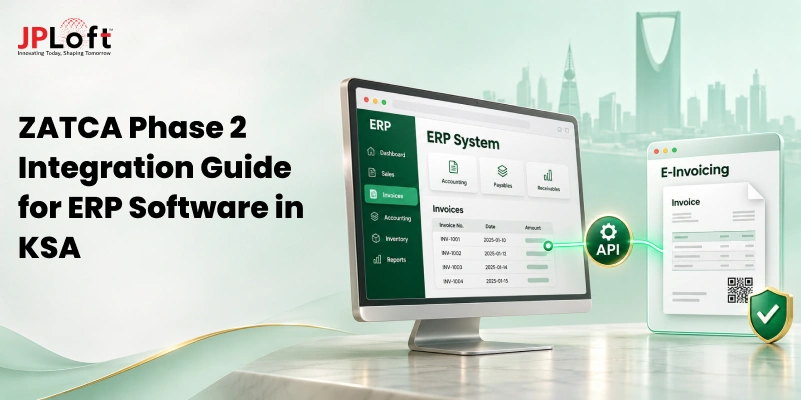
Key Takeaways:
ZATCA Phase 2 integration requires notified Saudi businesses to connect their invoicing systems with FATOORA for clearance and reporting.
Existing ERP and POS systems can integrate with FATOORA through direct APIs, middleware, or custom software modifications.
Technical requirements include UBL 2.1 XML, cryptographic security, invoice hashing, CSID credentials, and compliant QR code generation.
Integration costs vary, with cloud software costing SAR 1,430–4,000 annually and basic ZATCA-compliant ERP integration starting around SAR 1,000.
Common challenges include legacy system compatibility, incorrect invoice data, API failures, certificate management, and multi-branch integration complexity.
Successful implementation requires system assessment, accurate data mapping, API integration, compliance testing, and ongoing monitoring of invoicing workflows.
Is your existing ERP or accounting software ready for ZATCA Phase 2 integration, or could outdated systems put your business at risk of non-compliance?
For businesses in Saudi Arabia, ZATCA Phase 2 e-invoicing goes beyond generating digital invoices. It requires connecting enterprise software with the FATOORA platform, meeting specific technical standards, and managing invoice clearance and reporting through secure API communication.
However, integrating these requirements into existing ERP, POS, or custom enterprise systems is not always straightforward. Legacy software limitations, inconsistent invoice data, security requirements, and complex business workflows can create implementation challenges, particularly for companies operating across multiple branches.
The good news is that businesses do not necessarily need to replace their existing software. With the right integration approach, they can adapt their current systems to meet ZATCA requirements while maintaining operational continuity.
This guide covers the technical requirements, step-by-step integration process, implementation costs, common challenges, and practical solutions for successful ZATCA Phase 2 integration.
What is ZATCA Phase 2 E-Invoicing?
ZATCA Phase 2 e-invoicing, also known as the Integration Phase, is the second stage of Saudi Arabia's electronic invoicing system, FATOORA.
Implemented in waves starting January 1, 2023, it requires taxpayers notified by ZATCA to integrate their electronic invoicing solutions with ZATCA's FATOORA platform.
Unlike Phase 1, which focuses on generating and storing electronic invoices, Phase 2 introduces additional technical requirements for invoice formats, mandatory data fields, cryptographic security, and system integration.
|
Phase 1: Generation |
Phase 2: Integration |
|
Focuses on generating and storing electronic invoices. |
Requires integration with ZATCA's FATOORA platform. |
|
Requires a compliant e-invoicing solution. |
Introduces additional technical and business requirements. |
|
Includes mandatory invoice data and QR codes. |
Requires specific invoice formats, additional data fields, and API-based communication. |
Which Businesses Need to Comply with Phase 2?
Phase 2 applies to taxpayers covered by ZATCA's e-invoicing regulations and selected through a phased rollout. ZATCA determines the target groups based on VAT-subject revenue criteria and notifies affected taxpayers at least six months before their integration deadline.
For example, the 25th integration wave covers taxpayers whose revenues subject to VAT exceeded SAR 187,500 during 2022, 2023, 2024, or 2025. ZATCA has set February 1, 2027, as the integration deadline for this wave.
Businesses should check their official ZATCA notifications and assess whether their existing ERP, accounting, or invoicing software is ready for Phase 2 integration.
How Does ZATCA Phase 2 Integration Work with Custom Enterprise Software?
ZATCA Phase 2 integration connects a business's existing enterprise software, such as an ERP, accounting, billing, or POS system, with the FATOORA platform through APIs.
This connection allows businesses to generate electronic invoices in the required format and submit them to ZATCA for clearance or reporting.
The integration requires the enterprise software to support ZATCA's technical specifications, including structured invoice data, security features, and the required communication processes.
Businesses can achieve this by modifying their existing software or adding an integration layer that connects their invoicing system with FATOORA.
Key Requirements for ZATCA Phase 2 Integration
To support Phase 2 e-invoicing, custom enterprise software must meet several technical and operational requirements:
-
UBL 2.1 XML Format: Generate invoices in the structured XML format specified by ZATCA.
-
FATOORA API Connectivity: Connect the invoicing solution with ZATCA's platform to submit invoices and receive validation responses.
-
Digital Security Features: Implement cryptographic stamping, invoice hashing, and the required security credentials, including the Cryptographic Stamp Identifier (CSID).
-
Invoice Identification: Generate unique identifiers (UUIDs) and maintain the required invoice sequence and previous-invoice hash.
-
QR Code Generation: Generate QR codes that follow ZATCA's specifications for the applicable invoice type.
-
Arabic Invoice Requirements: Ensure that the human-readable invoice contains the mandatory information in Arabic. Bilingual invoices may also include English.
The invoicing solution must also complete ZATCA's onboarding process before it can submit invoices through the production APIs.
How Does the Invoice Integration Workflow Work?
The integration follows a defined process from invoice creation to submission:
- Invoice Generation: The enterprise software creates an invoice using transaction and customer data.
-
Data Formatting and Validation: The system maps invoice details to ZATCA's required fields and generates the compliant invoice format.
-
Security Processing: The system applies the required security features, including cryptographic stamping and QR code generation, according to the invoice type.
-
Submission to FATOORA: The system sends the invoice through the relevant API for clearance or reporting.
-
Response Handling: The system processes ZATCA's response, updates the invoice status, and stores the relevant records.
What Are the Steps to Integrate ZATCA Phase 2 into Existing Enterprise Software?
Integrating ZATCA Phase 2 into existing enterprise software requires businesses to prepare their current systems for structured invoice generation, secure data processing, and communication with the FATOORA platform.
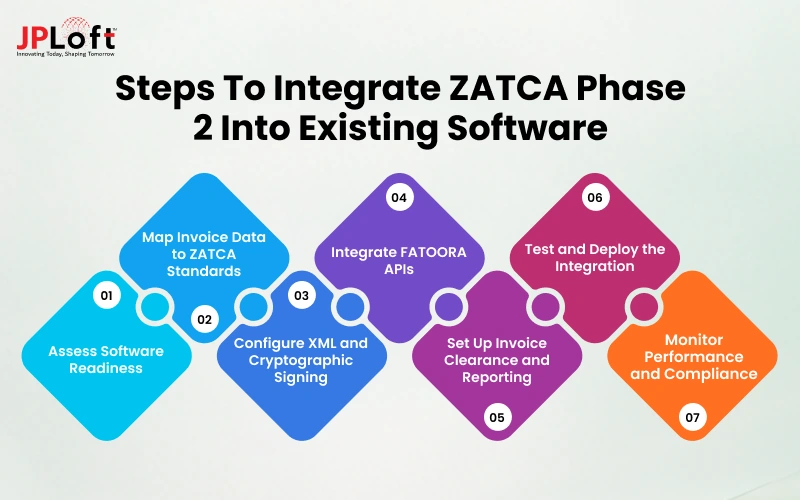
The process involves assessing existing software, aligning invoice data with ZATCA specifications, configuring the required security features, and testing the integration before deployment.
Step 1: Assess Existing Enterprise Software and Integration Readiness
Start by reviewing the existing ERP, accounting, billing, or POS system to understand how it currently generates, processes, and stores invoices.
Evaluate the following areas:
-
Invoice generation: Check whether the system captures all required invoice details, tax information, and transaction records.
-
System compatibility: Determine whether the existing software supports XML generation and API-based communication.
-
Data management: Review how invoice records are stored and shared across departments and branches.
-
Integration requirements: Identify whether the system needs custom modifications, middleware, or a software upgrade.
Step 2: Map Invoice Data to ZATCA Requirements
Map the existing invoice fields to ZATCA's electronic invoice data dictionary and XML specifications. This ensures that information stored in the enterprise software can be converted into the required invoice structure without missing mandatory information.
Focus on mapping these data fields:
-
Seller and buyer details: Include applicable VAT registration numbers and business information.
-
Invoice identification: Map invoice numbers, issue dates, and transaction references.
-
Product or service details: Include descriptions, quantities, and applicable unit prices.
-
Tax information: Map taxable amounts, VAT rates, discounts, and calculated tax amounts.
-
Invoice types: Account for standard invoices, simplified invoices, credit notes, and debit notes, while ensuring the required invoice information is available in Arabic.
Step 3: Configure XML Invoice Generation and Cryptographic Signing
Configure the enterprise software to generate electronic invoices in the required UBL 2.1 XML format. The system must also support the applicable security and invoice-identification features according to ZATCA's Security Features Implementation Standards.
Key configurations include:
-
XML invoice generation: Convert transaction data into ZATCA-compliant structured invoice files.
-
Invoice hashing and cryptographic stamping: Generate the required invoice hash and apply the applicable cryptographic security mechanisms.
-
Invoice identification: Assign a unique UUID to each invoice and maintain the Invoice Counter (ICV).
-
Previous Invoice Hash (PIH): Maintain the required link to the previous invoice hash to support invoice integrity.
-
QR code generation: Create QR codes according to ZATCA's specifications for the relevant invoice type.
Step 4: Connect Enterprise Software with FATOORA APIs
Establish secure communication between the enterprise software and FATOORA using the relevant APIs. This also involves completing the required onboarding process for the Electronic Generation Solution (EGS) unit.
The process includes:
-
Prepare the CSR: Generate a Certificate Signing Request for the applicable EGS unit.
-
Complete onboarding: Generate a One-Time Password (OTP) through the FATOORA portal and submit the CSR with the OTP through the Compliance CSID API to obtain the Compliance CSID.
-
Perform compliance checks: Submit the required test invoices and complete the applicable checks.
-
Obtain production credentials: Complete the required process to obtain the Production CSID.
-
Configure API communication: Set up the relevant endpoints, authentication, and response handling.
Step 5: Implement Invoice Clearance and Reporting Workflows
Configure separate submission workflows for standard and simplified tax invoices because ZATCA follows different processing requirements for each type.
Standard Tax Invoice Clearance
-
Invoice submission: Send the standard tax invoice to FATOORA through the clearance API before issuing it to the buyer.
-
Response processing: Receive and process ZATCA's validation and clearance response, including handling rejected submissions.
-
Buyer delivery: Share the cleared invoice with the buyer and retain the relevant clearance records.
Simplified Tax Invoice Reporting
-
Invoice generation: Generate and issue the simplified tax invoice.
-
Invoice reporting: Submit it to FATOORA through the reporting API within 24 hours of issuance.
-
Response tracking: Record the submission response and update the invoice status, including identifying reporting errors and managing failed submissions.
Step 6: Test the Integration and Deploy It in Production
Test the complete integration using ZATCA's Integration Sandbox and Compliance and Enablement Toolbox SDK before moving to the production environment. Verify that the invoicing workflows function correctly before configuring production credentials and conducting end-to-end tests.
Cover the following testing areas:
-
XML validation: Check invoice structure, mandatory fields, and data accuracy.
-
Tax calculations: Verify VAT rates, taxable amounts, and invoice totals.
-
Security validation: Check cryptographic features, invoice hashes, and QR code generation.
-
API connectivity: Test authentication, standard invoice clearance, simplified invoice reporting, and applicable credit and debit notes.
-
Error handling and compliance checks: Test rejected invoices, invalid data, communication failures, and the applicable ZATCA validation requirements. Successful SDK validation does not constitute official ZATCA approval.
Step 7: Monitor Integration Performance and Maintain Compliance
Continue monitoring the integration after deployment to ensure that invoice processing remains reliable and aligned with applicable ZATCA requirements.
Focus on these maintenance activities:
-
API monitoring: Track connectivity, response times, and communication errors.
-
Invoice tracking: Monitor submitted, cleared, reported, and rejected invoice statuses.
-
Credential management: Secure cryptographic keys and monitor certificate validity.
-
System maintenance: Address software issues and update integrations when ZATCA revises its technical specifications.
-
Record management: Maintain invoice records, submission responses, and error logs for reference and audit purposes.
How Much Does ZATCA Phase 2 E-Invoicing Integration Cost?
ZATCA Phase 2 integration costs in Saudi Arabia vary based on the selected e-invoicing solution, existing ZATCA-compliant ERP, and customization requirements.
Ready-made cloud software may cost SAR 1,430–4,000 annually, while basic custom ERP/POS integration may cost SAR 1,000–5,000 or more. Complex enterprise integrations generally require a custom quotation.
ZATCA does not charge businesses for FATOORA registration or API connectivity. The actual expenses come from software subscriptions, system integration, implementation, and maintenance.
|
Integration Approach |
Estimated Cost (SAR) |
Billing Model |
Best For |
|
FATOORA Registration |
Free (SAR 0) |
Government service |
Eligible taxpayers onboarding their invoicing systems |
|
Ready-Made Cloud Software |
1,430–4,000/year |
Annual subscription |
Small businesses using standard invoicing workflows |
|
Middleware / API Connectors |
1,800–9,600/year |
Monthly or annual subscription |
Businesses connecting existing software through supported APIs |
|
Basic ERP / POS Integration |
1,000–5,000+ |
One-time implementation fee |
Businesses with compatible ERP or POS systems requiring limited customization |
|
Complex Custom ERP Integration |
Custom quotation |
Project-based fee + ongoing support |
Enterprises with legacy software, multiple systems, or complex invoicing workflows |
Businesses planning to develop or replace their ERP systems should also evaluate the broader ERP software development cost, as this is separate from ZATCA-specific integration expenses.
What Factors Affect ZATCA Phase 2 Integration Costs?
Several factors influence the overall cost of integrating ZATCA e-invoicing into existing enterprise software:
-
ERP Compatibility: Systems with built-in ZATCA support require less customization than legacy applications.
-
Integration Approach: Cloud software, API connectors, and custom middleware involve different development and licensing costs.
-
Business Scale: Multiple branches, invoicing systems, and EGS units increase implementation complexity.
-
Customization Requirements: Complex billing workflows, data mapping, and ERP modifications require additional development.
-
Maintenance and Support: Software updates, technical support, and monitoring contribute to recurring expenses.
Businesses should evaluate their existing software and operational requirements before selecting an integration approach. This helps determine whether a ready-made solution is sufficient or custom ZATCA Phase 2 integration is necessary.
What Technical Components Are Required for ZATCA Phase 2 Integration?
Integrating ZATCA Phase 2 into custom enterprise software requires a combination of invoice formatting standards, secure authentication, data validation, and API connectivity.
Each component supports a specific part of the e-invoicing software process in Saudi Arabia, from generating compliant invoices to submitting them through FATOORA and processing ZATCA's responses.
The following table outlines the main technical components and their functions:
|
Technical Component |
Purpose in ZATCA Phase 2 Integration |
|
UBL 2.1 XML Format |
Structure invoice information in a standardized XML format that follows ZATCA's implementation requirements. |
|
FATOORA Integration (APIs) |
Enable enterprise software to submit standard tax invoices for clearance and simplified tax invoices for reporting through the applicable ZATCA API endpoints. |
|
CSR and CSID |
Support the onboarding and identification of an Electronic Generation Solution (EGS) unit. The CSID is the cryptographic credential issued through ZATCA's onboarding process. |
|
Cryptographic Stamping and Hashing |
Help verify invoice authenticity and protect data integrity through the required cryptographic security features. |
|
UUID and Invoice Counter (ICV) |
Provides unique invoice identification and maintains the required invoice counter. The Previous Invoice Hash (PIH) helps maintain the invoice hash chain. |
|
QR Code Generation |
Generate QR codes containing the required information according to the applicable invoice type and ZATCA specifications. |
|
Compliance SDK and Integration Sandbox |
Support local invoice and QR validation, onboarding tests, and test submissions before production deployment. |
These components must be configured according to ZATCA's technical specifications and integrated with the enterprise software's invoicing workflows. Businesses should also maintain secure invoice records and API responses for auditing and troubleshooting.
What Challenges Can Businesses Face During ZATCA e-Invoicing Integration Phase 2?
Phase 2 integration into existing enterprise software can involve more than connecting the system to FATOORA APIs.
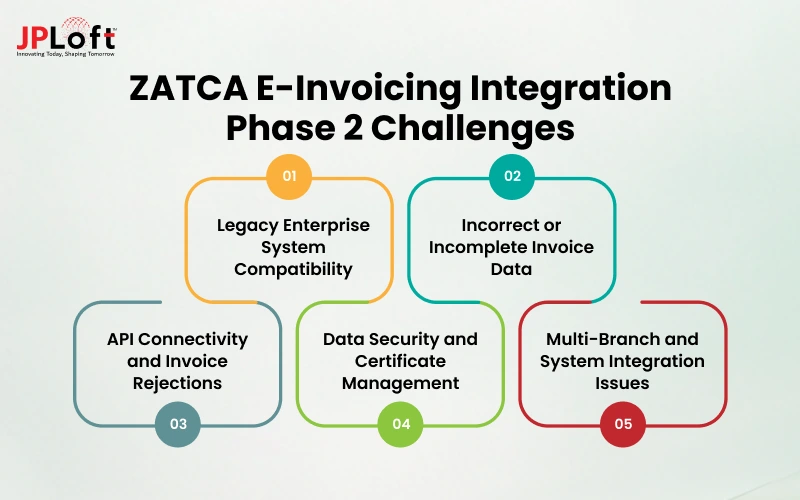
Businesses may need to update legacy workflows, correct invoice data, configure security features, and manage communication between multiple systems. Here are some common challenges and ways to address them:
1. Compatibility with Legacy Enterprise Systems
Older ERP, accounting, and billing systems may not support ZATCA's required XML formats, API communication, or security specifications. Businesses may need custom modifications or an additional integration layer to connect these systems without disrupting existing operations.
Solution: Upgrade the existing software or implement a dedicated integration layer to support ZATCA requirements without replacing the entire system.
2. Incorrect or Incomplete Invoice Data
Missing VAT details, incorrect customer information, inconsistent tax calculations, or incomplete invoice fields can cause validation failures. Businesses must ensure that data from different enterprise systems follows ZATCA's invoice requirements.
Solution: Implement automated data validation and mapping rules to detect missing fields, tax errors, and incorrect invoice information before submission.
3. API Connectivity and Invoice Rejections
Network interruptions, API timeouts, invalid submissions, and authentication issues can prevent successful invoice processing. The software must handle error responses, retry eligible submissions, and maintain accurate invoice statuses.
Solution: Build error-handling mechanisms, controlled retry processes, and real-time status monitoring to manage failed requests and prevent duplicate submissions.
4. Cryptographic Security and Certificate Management
Incorrect security configurations, compromised private keys, or expired cryptographic credentials can affect invoice validation and submission. Businesses need to manage certificates, access permissions, and cryptographic keys securely.
Solution: Follow secure key-management practices, protect sensitive credentials, and monitor certificate validity.
5. Multi-Branch and System Integration Complexity
Businesses operating across multiple branches or using separate ERP, POS, and accounting systems may face difficulties maintaining consistent invoice data, numbering, and reporting workflows across their operations.
Solution: Establish centralized integration rules while maintaining the required invoice counters, credentials, and workflows for each applicable EGS unit.
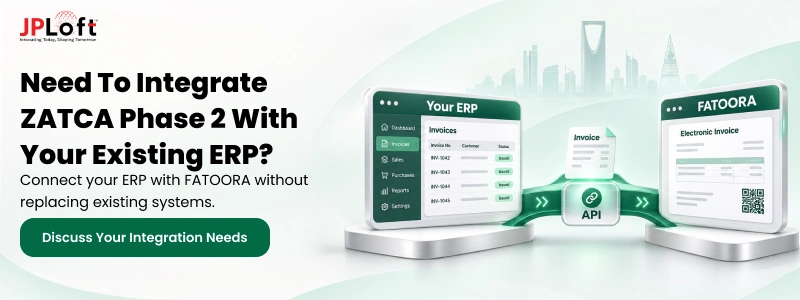
How Can JPLoft Help Integrate ZATCA Phase 2 into Custom Enterprise Software?
ZATCA E-Invoicing Integration Phase 2 requires enterprise software that can support structured invoice generation, secure data processing, and reliable communication with external platforms. JPLoft helps businesses develop, customize, and integrate enterprise software to address these technical and operational requirements.
As a custom software development company in Saudi Arabia, JPLoft can support businesses with:
-
Custom Enterprise Software Development: Develop or modify existing enterprise applications to support business-specific invoicing workflows and ZATCA-related requirements.
-
ERP and Accounting System Integration: Connect ERP, accounting, billing, and POS platforms to maintain consistent invoice data and support FATOORA integration across business operations.
-
API and Third-Party Integration: Develop secure ZATCA API integrations for invoice clearance, reporting, and response handling.
-
Software Modernization: Upgrade legacy systems to support XML invoice generation, cryptographic security, and modern API connectivity.
-
Testing and Ongoing Maintenance: Test ZATCA e-invoicing workflows, troubleshoot integration issues, and maintain system compatibility with updated technical requirements.
With expertise in custom ERP development, enterprise software integration, and software maintenance, JPLoft can help businesses implement reliable ZATCA Phase 2 integration while maintaining their existing enterprise workflows.
Conclusion
Integrating ZATCA Phase 2 into custom enterprise software requires more than connecting an invoicing system to FATOORA. Businesses must ensure accurate invoice data, compliant XML generation, secure processing, and reliable API communication.
A well-planned integration can help maintain compliant invoicing workflows while reducing manual effort and disruptions to daily operations. It also allows businesses to retain their existing ERP infrastructure while adapting to ZATCA's technical requirements.
By assessing system compatibility, selecting the right integration approach, and maintaining reliable invoice processing, businesses in Saudi Arabia can support regulatory compliance without unnecessary changes to their existing operations.
FAQs
their e-invoicing systems with the FATOORA platform. It introduces structured XML invoices, cryptographic security, and mandatory clearance or reporting workflows.
VAT-registered businesses selected by ZATCA must implement Phase 2 according to their assigned integration wave. ZATCA notifies affected taxpayers at least six months before their deadline. Businesses should check official notifications to confirm their compliance dates.
Yes. Existing ERP, accounting, billing, and POS systems can be integrated with ZATCA Phase 2 through API connectivity, software customization, or middleware. Depending on system compatibility, businesses may achieve compliance without replacing their existing software.
Invoice clearance applies to standard tax invoices, which must receive ZATCA clearance before issuance to buyers. Invoice reporting applies to simplified tax invoices, which businesses issue first and report through FATOORA within 24 hours.
Businesses need an e-invoicing system supporting UBL 2.1 XML, FATOORA API connectivity, cryptographic stamping, invoice hashing, and CSID credentials. The system must also manage UUIDs, invoice counters, previous-invoice hashes, and applicable QR code requirements.
Cloud e-invoicing software Saudi Arabia may cost SAR 1,430–4,000 annually, while basic ERP/POS integration may cost SAR 1,000–5,000 or more. Complex enterprise integrations require custom quotations based on software compatibility, development scope, and maintenance needs.

Priyanka Sukhwal is the Managing Director and Business Head of JPLoft, with 10+ years of experience in technology, digital product strategy, and business growth. She has worked closely with businesses building mobile applications, custom software, marketplaces, and on-demand platforms across mobility, automotive, consumer services, and startup ecosystems. At JPLoft, she focuses on understanding business models, identifying product opportunities, and helping companies plan digital solutions that can scale with changing market needs.




Share this blog