


Ready to build an ERP system? Your first question is probably about the ERP development cost.
In 2026, there is no single price. The ERP development cost can range from $30,000 to $500,000+, depending on the business size, features, number of users, integrations, technology stack, and development approach.
A small business with simple needs will spend less. A large company that wants automation, analytics, and multi-location support will spend more.
The good news? Knowing the ERP development cost early helps you plan a smart budget and avoid surprise expenses.
In this guide, we'll cover:
-
Typical ERP price ranges
-
Factors that affect cost
-
Easy ways to keep your project on budget
Let's get started!
ERP Software Development Cost at a Glance
The overall ERP software development cost starts with $30,000 to $500,000+. Here is a quick breakdown to help you plan your budget.
- Basic ERP ($30,000 to $60,000): Suits small businesses that need core modules like accounting, inventory, and sales with quick setup.
- Mid-Level ERP ($60,000 to $150,000): Fits growing companies that need more modules, integrations, and moderate customization across several departments.
- Advanced ERP ($150,000 to $300,000): Built for larger operations needing deep customization, advanced reporting, automation, and complex workflows across teams.
- Enterprise ERP ($300,000 to $500,000+): Designed for large organizations with multiple locations, heavy integrations, strict security, and customized, scalable systems.
Timelines also grow with scope, from 3 months to a year or more. Remember to add 15 to 20% of the build cost each year for support and updates.
Here is a general estimate based on ERP complexity:
|
ERP Type |
Estimated Cost (In USD) |
Development Time |
|
Basic ERP |
30,000–60,000 |
3–5 months |
|
Mid-Level ERP |
60,000–150,000 |
5–8 months |
|
Advanced ERP |
150,000–300,000 |
8–12 months |
|
Enterprise ERP |
300,000–500,000+ |
12–18+ months |
These figures are broad estimates. The actual cost can change significantly based on the scope and technical requirements.
What Is ERP Software Development?
ERP software development is the process of designing, building, and launching a custom Enterprise Resource Planning system that fits your business.
Instead of using separate tools for each department, you get one platform where everyone works with the same data.
It works like a single dashboard for your business, giving every team the same real-time information.
A typical ERP can include:
-
Finance and accounting
-
Inventory management
-
Human resource management
-
Payroll
-
Sales management
-
Customer management
-
Procurement
-
Supply chain management
-
Project management
-
Manufacturing
-
Reporting and analytics
-
Document management
Businesses can choose the modules they need and expand the platform as their operations grow.
A custom ERP is built around your workflows, not the other way around. You choose the modules you need, such as inventory, accounting, procurement, or HR. You can also add integrations, automation, and analytics.
The result? Less manual work, fewer errors, and faster decisions.
Whether you run a growing startup or a large enterprise, ERP software development helps you stay organized and ready to scale.
Factors That Affect ERP Software Development Cost
The custom ERP development cost is never a fixed number. The same factors also influence software development costs across different projects.
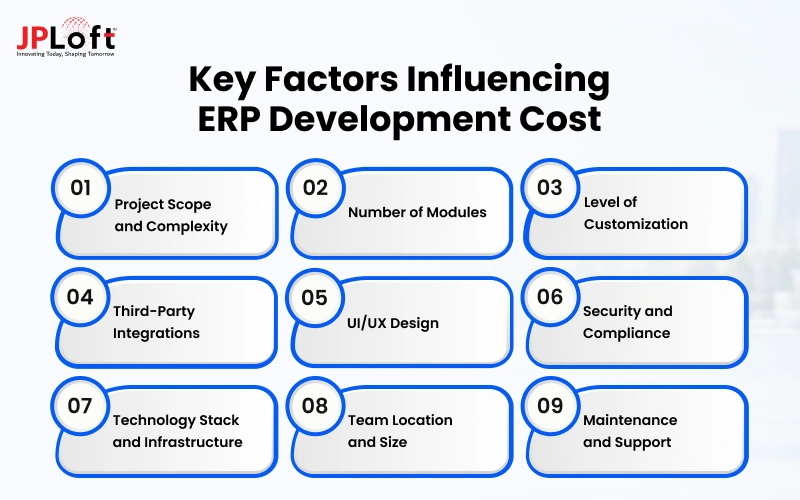
When understanding how much does ERP cost? Here are the key factors that decide your final price:
Factor 1. Project Scope and Complexity
The size of your project is the biggest cost driver. A simple ERP with a few core modules takes less time to design and build, so it costs less.
A large system with many modules, complex workflows, and custom rules needs more planning, coding, and testing.
The more your business needs the ERP to do, the more effort it takes. That is why defining your scope clearly before development begins can save you both time and money.
Factor 2. Number of Modules
Every module you add, such as finance, inventory, HR, procurement, or CRM, increases the work involved.
Each one needs its own design, logic, database structure, and testing. Modules also need to share data smoothly with each other, which adds more effort.
If you are on a tight budget, start with the modules your team uses every day and add the rest in later phases. This phased approach keeps your first release affordable and manageable.
Factor 3. Level of Customization
Off-the-shelf features cost less, but most businesses need some customization. Custom workflows, approval rules, dashboards, and reports built around your exact processes require more development hours.
The deeper the customization, the higher the average cost of an ERP system. However, a well-customized ERP removes manual work and fits your team perfectly.
Focus on customizing the areas that give you the biggest benefit, and use standard features everywhere else to keep your ERP system cost under control.
Factor 4. Third-Party Integrations
Your ERP rarely works alone. It often needs to connect with payment gateways, CRMs, e-commerce platforms, banking tools, or older legacy software.
Each integration needs careful setup, data mapping, and testing to make sure information flows correctly. Legacy systems can be especially tricky because they may lack modern APIs.
The more tools you connect, the more time developers spend, which raises the overall ERP software price. Plan only the integrations that truly support your daily operations.
Factor 5. UI/UX Design
A clean, easy-to-use interface helps your team adopt the ERP faster. Basic template-based design costs less, while custom UI/UX with user research, wireframes, and prototypes costs more.
Good UI/UX design reduces training time, cuts down mistakes, and makes daily work smoother and faster.
Since ERP users spend hours inside the system every single day, investing in a simple and intuitive layout often pays off through better productivity and higher user satisfaction over time.
Factor 6. Security and Compliance
ERP systems store sensitive data like financial records, employee details, and customer information, so strong security is essential.
Features such as role-based access, data encryption, audit logs, and secure backups add development effort.
If your industry follows regulations like GDPR or HIPAA, compliance checks and extra safeguards increase the cost further.
Building security in from the start is almost always cheaper than fixing a breach later, which can also damage customer trust.
Factor 7. Technology Stack and Infrastructure
The technology you choose affects both build time and long-term cost. Your frontend, backend, database, and cloud platform all play a role.
Cloud hosting on AWS, Azure, or Google Cloud adds monthly fees that grow with usage and storage. Scalable, well-supported technologies may cost more upfront, but they prevent expensive rewrites later.
Choose a stack based on your growth plans, expected users, budget, and team expertise, rather than simply following trends.
Factor 8. Team Location and Size
Who builds your ERP matters as much as what you build.
Hourly rates vary widely by region, with teams in the US or UK usually charging more than teams in India or Eastern Europe.
The size and skill of the team also change the price. A full team typically includes a project manager, designers, developers, and testers.
Compare proposals carefully, and look at experience and quality, not just the lowest quote. Understanding the cost of software development can also help you compare team options more effectively.
Factor 9. Maintenance and Support
The cost of ERP software for small businesses does not end at launch. Your ERP needs regular software maintenance for bug fixes, security patches, performance updates, and user support to keep running smoothly.
As your business grows, you may also add new modules or features. A good rule is to budget around 15 to 20% of the initial development cost every year.
Planning for this early helps you avoid budget surprises and keeps your system reliable and secure for years.
Different Types of Pricing Models For ERP
Many businesses start by asking: How much does an ERP system cost? The honest answer is that it depends on how you choose to pay.
The cost of implementing an ERP system changes with the pricing model, the level of flexibility you need, and how clearly your requirements are defined.
Here are the most common options, along with when to choose each one:
Type 1. Fixed Price Model
You agree on the scope, timeline, and total ERP system costs before work begins.
This works best when your requirements are clear and unlikely to change, such as an MVP or a small ERP with a few core modules.
You can expect predictable budgets and defined deliverables.
The trade-off is flexibility, because any change usually needs a new estimate, which can add time and extra charges.
Who is it for: Small businesses and startups with a clear scope and a fixed budget.
Cost: Typically $30,000 to $80,000 for a basic ERP, depending on modules and features.
Type 2. Time and Material Model
You pay for the actual hours and resources used. This suits projects where requirements may evolve, or where you want to test and refine features along the way.
It can also work well for software product development projects where requirements change during the build.
You can expect high flexibility and full visibility, including a clear ERP implementation cost breakdown by role, hours, and tasks.
Just keep an eye on progress, since the final enterprise resource planning pricing can grow if the scope keeps expanding.
Who is it for: Mid-sized businesses with changing requirements or phased development.
Cost: Usually $25 to $150 per hour, depending on team location and experience.
Type 3. Dedicated Team Model
You hire a full team that works only on your ERP for a monthly fee.
Choose this for large, long-term projects that need continuous development, upgrades, and support.
You can expect close collaboration, deep product knowledge, and steady progress.
Because the fee is regular and predictable, the cost of ERP implementation is easier to plan over time, though it works best when you have enough ongoing work to keep the team busy.
Who is it for: Large businesses and enterprises with long-term, complex ERP needs.
Cost: Roughly $8,000 to $40,000+ per month, based on team size and skills.
Type 4. Subscription-Based Model
Instead of a large upfront investment, you pay a recurring monthly or yearly fee per user or per module.
This is a good fit for growing businesses that want a quick start and lower initial spending. Cloud ERP software pricing usually includes hosting, updates, and basic support.
Expect less customization than a fully custom build, and remember that costs rise as you add users and features over the years.
Who is it for: Growing businesses that want a fast, low-cost start with standard features.
Cost: Around $50 to $300 per user per month, depending on the plan and modules.
Type 5. Hybrid or Milestone-Based Model
This combines fixed pricing for defined phases with flexible pricing for the rest.
For example, you might pay a set price for core modules and use time and materials for custom features later.
It suits businesses that want budget control without losing room to adapt. Expect payments tied to milestones, which keeps both sides accountable and makes progress easy to track.
Who is it for: Businesses that want budget control but may add custom features later.
Cost: Usually $80,000 to $250,000+, split across milestones and flexible work.
How to Reduce Your ERP Software Development Cost in 2026?
Keeping the enterprise resource planning software price under control doesn’t mean cutting corners.
With smart planning and better decisions, you can build a reliable ERP and still stay within budget.
Here are practical tips to help you save:
1. Define Requirements Clearly
You should document your goal, workflows, and must-have software features before development even begins.
Clear requirements reduce rework, prevent scope creep, and help developers give accurate estimates.
Every change made midway adds time and cost, so spending a little extra effort on planning upfront saves a lot of money later.
2. Start With An MVP
Launch with only the core modules your team needs every day, such as inventory, sales, or accounting.
This lets you test the system with real users, avoid paying for unused features, and add more modules later as your budget and business needs grow.
3. Use Reusable Components and Open-Source Tools
Reusing proven components, frameworks, and open-source technologies saves development time and licensing fees.
It can also reduce common software development challenges related to time, resources, and technical complexity.
Pick well-supported tools with strong communities, so you get reliable performance without building everything from scratch.
This is an easy way to save money without cutting quality.
4. Choose the Right Team and Location
Hourly rates vary widely across regions.
Software development companies in Eastern Europe or Asia often charge less than those in the US or UK while delivering comparable quality.
Compare proposals carefully, check portfolios and reviews, and choose a partner with proven ERP experience, not just the lowest quote.
5. Go Cloud-Based
Cloud hosting removes the need to buy and maintain servers.
You pay only for the storage and computing power you use, and you can scale up as your business grows.
It also reduces IT overhead, making it a smart option for budget-conscious businesses.
Why Choose JPLoft For Your ERP Software Development?
Looking for the right partner to build your ERP? As an experienced ERP software development company, JPLoft helps businesses turn their operational challenges into smart, scalable systems.
Our team works closely with you from the very first step. We understand your workflows, define your requirements, and design an ERP that fits the way your business actually runs. Then we handle development, testing, deployment, and ongoing support, so you don't have to worry about the technical details.
Here is what you can expect:
-
Custom ERP solutions built around your goals
-
Secure, scalable, and easy-to-use systems
-
Transparent communication at every stage
-
Reliable post-launch maintenance
Ready to simplify your operations? Let's build an ERP that helps your business grow.
Conclusion
Building an ERP is a big step, but with the right plan, it becomes a smart investment.
Your final budget depends on the modules you need, the integrations you add, the number of users, and the team you choose.
Start with a clear scope, launch with an MVP, and grow the system as your business grows. Remember to plan for regular support and updates after launch, so your ERP stays secure and reliable.
A well-built ERP means less manual work, fewer errors, and faster decisions.
Ready to get started? As an experienced company, JPLoft can help you plan, design, and build a scalable ERP that fits your business. Let's turn your idea into reality.
FAQs
The Enterprise resource planning software price usually starts around $30,000 for a basic system and can go beyond $500,000 for large enterprise platforms. The final price depends on your modules, integrations, users, customization, and the development approach you choose.
Key factors include project scope, number of modules, level of customization, third-party integrations, UI/UX design, and security needs. The technology stack, team location, and ongoing maintenance also play a role, so the more complex your needs, the higher the cost.
It depends on complexity. A basic ERP typically takes 3 to 5 months, a mid-level system 5 to 8 months, and an advanced one 8 to 12 months. Large enterprise ERPs can take 12 to 18 months or more.
Start with an MVP that covers only your core modules, and define your requirements clearly before development begins. Use standard features instead of heavy customization, and choose open-source tools, a cloud-based setup, and an experienced team that fits your budget.
Yes. Your ERP needs regular bug fixes, security patches, updates, and user support. A good rule is to set aside 15 to 20% of the initial development cost every year to keep the system secure, reliable, and ready to grow.

Rahul Sukhwal is the CEO and Founder of JPLoft, with 18+ years of experience in software engineering, emerging technologies, and digital product development. His expertise spans artificial intelligence, including AI agents, generative AI, LLMs, chatbots, computer vision, and machine learning, as well as blockchain, IoT, AR/VR, mobile, web, and enterprise software. He focuses on applying these technologies to real business challenges across industries such as healthcare, education, mobility, finance, real estate, and on-demand services.


Share this blog