


Key Takeaways
Learn how to develop an app like Citymapper by starting with market research, choosing accurate transit data, finalizing features, building strong routing logic, and testing real routes.
A powerful backend improves routing accuracy and keeps travel suggestions fast and reliable.
Offline maps, accessibility filters, and disruption alerts increase trust and daily retention.
Using GTFS, micromobility, weather, and traffic data creates more accurate UK-focused navigation.
Subscriptions, ads, and ticketing links offer stable revenue opportunities.
Launching in one UK city first helps refine routing, UI, and performance before scaling.
JPLoft delivers high-quality transit apps with expert routing engines and multi-city integration support.
The UK’s urban mobility scene is shifting fast, with millions relying on real-time navigation apps to move through packed cities every day.
If you’ve been wondering how to develop an app like Citymapper, the answer starts with understanding what makes it so dependable: accurate data, clean routing logic, and a design that simplifies complex journeys.
Commuters want instant comparisons across buses, tubes, trams, trains, cycling, and walking, all on one screen.
Along with this, they expect the routes to adjust the moment something changes. To build an app that matches this level of reliability, you need the right mix of transit data sources, a powerful backend, and thoughtful feature planning.
In this guide, we’ll break down everything from features to tech stack, cost, and development steps so you can build a Citymapper-style app built for the UK market.
Let’s walk you through how it all comes together.
What is Citymapper, and Related Market Stats
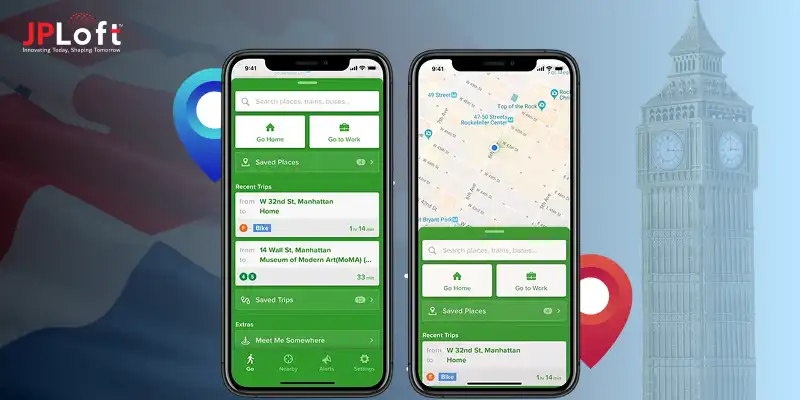
Citymapper is a smart urban mobility app that helps users move through major cities with ease.
It integrates, in one simple interface, real-time transit data, walking routes, cycling paths, options for ride-hailing, and live disruption alerts.
People use it to find the fastest, cheapest, or most convenient ways to travel across the city, without guessing or switching between multiple apps.
With the Citymapper app, you can instantly compare diversified travel options in real-time across all transport modes. It's an easy navigation for the city with turn-by-turn directions for all the public transportation, walking, cycling, and scooter trips.
Let’s evaluate the following stats for more.
-
Citymapper reports over 50 million users globally, and the city operates in 100+ cities worldwide. Additionally, the app supports multiple transport modes that include public transit, walking, cycling, ride-hail, etc, which makes it a complete urban mobility app.
-
For the smart navigation apps, the market is projected to grow from about USD 1.62 billion in 2024 to roughly USD 5.4 billion by 2034, which states a CAGR of 12.8%.
-
Based on the latest market intelligence, the global travel navigation app market size was valued at $8.4 billion in 2024 and is forecasted to hit $25.7 billion by 2033, that is growing at a CAGR of 13.2%.
-
The navigation system market size is estimated at USD 48.75 billion in 2025, and is expected to reach USD 77.94 billion by 2030, that is growing at a CAGR of 9.84% during the forecasted period of 2025 to 2030.
Continuing with the stats, now, let's focus on the key features that you can proceed with to build an app like Citymapper in the following section.
Key Features You Need to Build an App like Citymapper
The key features that you can include in an app like Citymapper are real-time data, offline maps, disruption alerts, AI-powered personalization, and integration with different transport options.
You should note that to build a strong app like Citymapper, it's significant to include the different types of features.
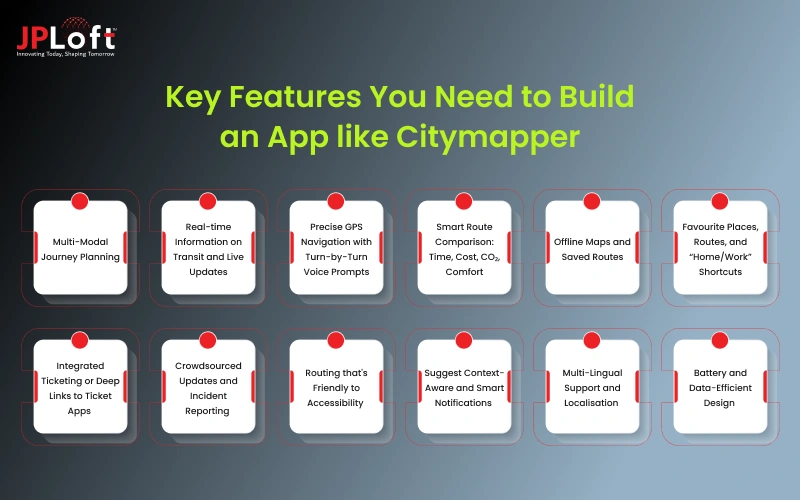
Let’s discover all the features in this section, briefly.
1. Multi-Modal Journey Planning
Allow users to combine bus, metro, tram, train, walking, cycling, and ride-hailing within one route. The app shall suggest the fastest, cheapest, and most convenient options considering live conditions.
2. Real-time Information on Transit and Live Updates
Show real-time departure times, delays, cancellations, and platform changes from local transit APIs or open data sources. This turns your app into a "must-use" tool for daily commuters, not just first-time visitors.
3. Precise GPS Navigation with Turn-by-Turn Voice Prompts
Clearly give the walking directions to stops, interchange points, and final destinations. Turn-by-turn navigation creates confidence for users, even when traveling in unfamiliar areas, and reduces missed connections.
4. Smart Route Comparison: Time, Cost, CO₂, Comfort
Let users also compare routes based on time, ticket cost, walking distance, and even estimated carbon emissions. Extra context makes the app feel intelligent, rather than just functional.
5. Offline Maps and Saved Routes
Allow users to save key routes, stops, and maps for offline use. This is extremely important in underground metros, rural areas, or any place with patchy mobile networks.
6. Favourite Places, Routes, and “Home/Work” Shortcuts
Allow users to pin frequent destinations and routes, such as home, office, gym, or station. One-tap access reduces friction, keeping your app in their daily routine.
7. Integrated Ticketing or Deep Links to Ticket Apps
In more advanced versions, support in-app ticket purchase or at least smooth handoff to official ticketing apps. This closes the loop from planning to paying to riding.
8. Crowdsourced Updates and Incident Reporting
Provide users with the means to report disruption, crowded trains, lift breakdowns, or closed exits. Crowdsourcing keeps the data fresh and creates a community feeling.
9. Routing that's Friendly to Accessibility
Provide step-free routes, lift and ramp information, low-floor buses, and options to minimize walking. This information is quite essential for people with disabilities, elderly users, or parents who use strollers.
10. Suggest Context-Aware and Smart Notifications
Send subtle notifications on the last train of the night, on earlier buses when the weather is bad, or during disruptions on saved routes. Timing and relevance make notifications feel helpful, not spammy.
11. Multi-Lingual Support and Localisation
For global or tourist-heavy cities, support multiple languages and local conventions: time formats, station naming, and currency. This makes the app usable for locals and visitors alike.
12. Battery and Data-Efficient Design
Optimise usage of GPS, background updates, and loading maps so that the app doesn't suck the battery or burn through mobile data. People keep commuting apps installed for the long run only if they behave correctly.
Step-by-Step Process to Develop an App like Citymapper
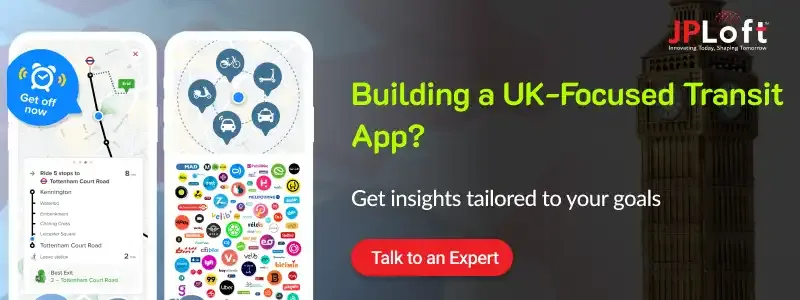
To answer the question “how to develop an app like Citymapper in the UK?” you should know the right process and strategies.
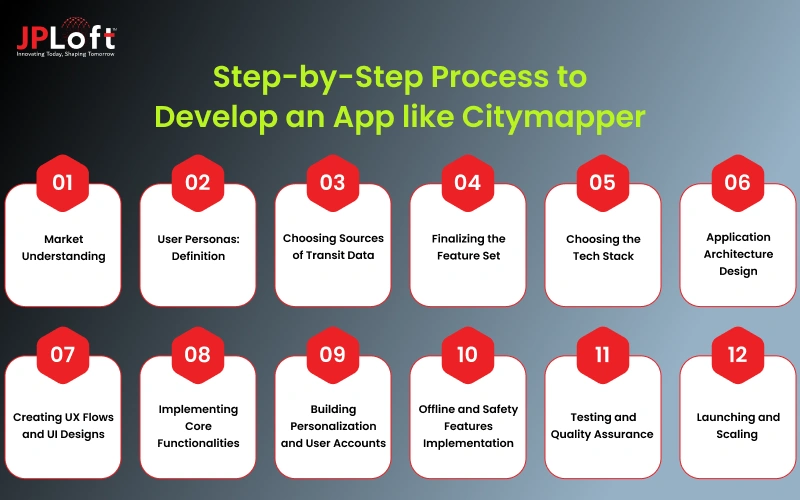
Let’s examine it all, below.
Step 1: Market Understanding
It's important to learn and know about the current market. Here, the market study should be about Citymapper, the needs of the users, the competitive market, and even what the current trends say.
► Analyze commuter behavior
Study how people travel daily, the routes they prefer, and the pain points they face. This helps you to understand what exactly travelers expect from a transit navigation app.
► Identify lacunae in existing applications
Look at apps like Citymapper, Google Maps, and Moovit. Find weaknesses in their accuracy, UX, route variety, or local data so your solution offers something meaningfully better.
Step2: User Personas: Definition
The user personas act as an important factor that helps to understand the semi-fictional profiles of target users, based on research, that represent different customer types, demographics, goals, and even the pain points.
► Map Core User Groups
Identify who will rely on your app: daily commuters, students, tourists, gig workers, or riders with accessibility needs. Each one uses transport differently.
► Understand their Travel Patterns
Document peak-hour habits, preferred transport modes, accessibility requirements, and common frustrations. These insights will drive everything from routing to notifications.
Step 3: Choosing Sources of Transit Data
You need to select the diversified sources of transit data, select the target cities, and even the type of users that you want to target. This all comes under planning, and how you can effectively
► Select target launch cities
Choose cities where public transit agencies provide reliable open data. Starting in a data-rich city makes real-time accuracy so much easier.
► Get Transit Feeds and APIs
Gather GTFS, GTFS-RT, operator-specific APIs, and micromobility data. This encompasses buses, metros, trams, intercity trains, scooters, and ride-hailing.
Step 4: Finalizing the Feature Set
You should finalize the feature set, depending on the requirements of the app. Such as the user wants a voice integration system in the app, you need to include the tech stack depending on the type of features that you select for your app.
► Define Your MVP
Include essentials: multimodal routing, real-time arrivals, alerts, saved places, and map navigation. This makes your app useful from day one.
► Plan Advanced Features of the Future
More advanced features, like offline mode, ticketing, crowdsourced reports, and CO₂ tracking, can be kept for future updates after receiving user feedback.
Step 5: Choosing the Tech Stack
Selecting the right mobile app tech stack comprises of strategic evaluation of the project’s unique requirements. Let’s check out the tech stack requirements here.
► App Development Approach Selection
Choose between native (Swift/Kotlin) or cross-platform (Flutter/React Native). Cross-platform offers faster development for both iOS and Android. Create an app like Citymapper, whose tech stack should support the selection of complete features.
► Choose Backend Technologies
Build a backend that is able to ingest and process huge transit datasets quickly. For accurate routing, speed, reliability, and caching are crucial.
Step 6: Application Architecture Design
Now, you should define the architecture design of your app. The architectural design should comprise a blend of functionality, aesthetics, and technical feasibility. It's all about integrating core elements like space planning, form, materials, lighting, etc. Let’s learn more here.
► Define System Components
Plan the interaction between the routing engine, maps, user profiles, notifications, and real-time data. Clean architecture empowers both performance and scalability.
To build a GPS Software app like Citymapper, the architecture for your app should be clear and definite. It is one of the crucial landscapes that you should analyse and plan. Here, you can hire dedicated developers for this process and finalize the architectural design.
► Plan for Data Flow and Caching
Transit data is always changing, so implement smart caching that refreshes often and quickly without using too much bandwidth or battery.
Now, you should plan for the data flow, how the complete process will work, and how the users can proceed with your app.
Step 7: Creating UX Flows and UI Designs
Mobile app design is all about the first impression that you make on the users when they open the app for the very first time. Let’s know about the design, in-depth, here.
► Build Intuitive User Flows
Design simple journeys such as moving from search to route options to navigation. When the flow feels natural, users get what they need without slowing down.
► Design a Clear, Readable UI
Use color-coded lines, well-spaced typography, and clean map visuals that help users instantly comprehend very complex multimodal routes. To develop an app like Citymapper in the UK, you should be very clear about the UI/UX segment.
Step 8: Implementing Core Functionalities
You can implement core functionalities and features such as answering questions, text generation, and composition. Here, you can include the text summaries and more.
► Integrate Maps and a Routing Engine
Integrate a map provider and implement multi-modal routing logic. Your engine should make changes in instances of delay, closure, and preference of the user. Adopting core functionalities and features plays a critical role when it comes to citymacitymapper-likeevelopment.
► Add Real-Time Updates or Alerts
Integrate live transit feeds of delays, disruptions, next arrivals, and platform changes. This is the core value users depend on. The real-time updates act as a useful feature to enhance the user experience and enable them to get instant updates related to location or even direction.
Step 9: Building Personalization and User Accounts
Now, one of the important factors is building personalization and user accounts that will be the attractive point and make the users feel that the app was invented for them.
► Enable User Profiles and Preferences
Allow the saving of home, work, favorite locations, route shortcuts, and mode preferences. This will enhance daily usage because of personalized routing. To build a navigation app like Citymapper, you can connect with the best AI app development company.
► Offer Accessibility and Custom Filters
Allow users to select step-free routes, with fewer transfers, or involve minimal walking, or bike-friendly paths. Tailored options will make the application more inclusive for users. You should create an app like Citymapper, which offers custom filters as per the user’s needs.
Step 10: Offline and Safety Features Implementation
Now, it's significant to include offline and safety features. It is one of the crucial factors that will be helpful in building the complete users' trust in the app. Hence, you should build a clone like Citymapper by adopting prompt security models.
► Add Offline Mode
Allow the user to download routes and maps of areas that have weak signals, such as underground networks. This builds reliability. The easier you make it for users to use the app effectively, the more they will be interested in your app.
Including the offline mode is one of the essential parameters when you consider to develop an app like Citymapper in the UK. It's all about helping users to access the location even in rural areas or regions that do not have an internet connection.
► Include Safety and Disruption Tools
With features like last-train alerts, weather-safe routes, and incident updates, the convenience for commuters increases manifold.
It is crucial to include the prompt safety methods and secure network communication, such as HTTPS/TLS, implementing certificate pinning, and the use of secure sockets, including SSLSocket.
Step 11: Testing and Quality Assurance
The mobile app testing is one of the crucial phenomena to note. The testing begins with the process of Citymapper-like app development. Additionally, you should perform field and performance testing successfully.
► Perform Field and Performance Testing
Test real routes, validate GPS accuracy, and tap into seamless performance across devices. Real-world trials catch issues simulations miss. You can make a GPS tracker app like Citymapper efficiently if you consider the testing process seriously.
► Improve and Refine Routing Logic
Use analytics and user feedback to polish route suggestions, improve UI behaviors, and tighten notification timing. Testing and quality assurance are also about continuously improving every aspect of the Citymapper app. Identifying the current techniques for refining the routing logic.
Step 12: Launching and Scaling
Now, it's time to launch the app in this diversified, competitive industry. You should decide on the type of platforms. Here, you can decide to submit an iOS app to the App Store or launch an app on the Play Store.
► Release an MVP and Gather Feedback
Launch in one city first; track live usage, reviews, and crash logs to find what needs to be improved upon immediately. Before launching your complete app and taking the risk, you can build an MVP for your platform.
► Scale to More Cities and Add Features
Once stable, expand your city list and introduce advanced features such as ticketing, CO₂ insights, and crowdsourced reports. Furthermore, to develop a GPS software app like Citymapper, you must explore more cities and countries and attract a wide group of users.
Continuing with the steps to build an app like Citymapper, let's consider the complete cost structure in the following section.
How Much Does it Cost to Create an App like Citymapper?
The cost to make an app like Citymapper $25,000 to $150,000+. This cost varies due to several reasons, such as the complexity of features, the design of an app, the tech stack, and many other factors.
The price goes up when you add live transit feeds, map integrations, offline mode, accessibility routing, and predictive alerts.
Costs also differ based on several cities you want to support, the quality of your UI/UX, and whether you go native or cross-platform.
If you include ticketing integration, CO₂ tracking, or crowdsourced updates, premium capabilities like that may drive the total investment even higher due to the complexity of the backend and further data maintenance. Let’s check out the complete breakdown of mobile app development costs below.
|
Cost Factor |
Description |
Estimated Cost Range |
|
App Complexity (Basic – Advanced) |
Basic apps cover simple routing; advanced apps include multi-modal travel, real-time data, and predictive routing. |
$25,000 – $150,000+ |
|
Design (UI/UX + User Flows) |
Includes wireframes, navigation structure, map layout, color coding, and accessibility design. Better UX requires more time and custom assets. |
$4,000 – $20,000 |
|
Frontend Development |
Building core screens: search, route options, navigation, maps, alerts, saved places, and settings. Cross-platform reduces cost; native is higher. |
$10,000 – $50,000 |
|
Backend Development |
Handles routing logic, real-time data ingestion, caching, alerts, user profiles, analytics, and scalability. Most expensive technical layer. |
$12,000 – $60,000+ |
|
API Integrations (Maps + Transit Data) |
Integrations with Mapbox/Google, GTFS, GTFS-RT, micromobility, weather, traffic, and ticketing APIs. Costs depend on the number of data sources. |
$5,000 – $30,000 |
|
Real-Time Data Infrastructure |
Setting up servers, queues, and caching layers that update arrival times, delays, and disruptions instantly. |
$8,000 – $40,000 |
|
Advanced Features (Premium) |
Includes offline mode, CO₂ tracking, predictive routing, crowdsourced reports, and ticketing. These significantly increase effort. |
$10,000 – $45,000 |
|
Testing & Quality Assurance |
Device testing, GPS accuracy checks, route validation, field testing, and performance tuning. |
$3,000 – $15,000 |
|
Project Management & Launch Prep |
Covers planning, sprint management, app store publishing, compliance, and ongoing coordination. |
$2,500 – $10,000 |
Create an app like Citymapper, under your budget, after evaluating the custom factors that might differ as per your project niche.
After determining the cost, let’s get ahead with the monetization strategies in the following section.
How Citymapper-like Apps Make Money?
The mobile app monetization strategies that you can include in the app, like Citymapper, are a premium subscription plan, in-app advertising, partnerships in transit, branded routes, and in-app ticketing.
Here is the list of the monetization strategies to consider.
1. In-App Advertising (Non-Intrusive Ads)
You can show subtle, location-aware ads for transport services, restaurants, or events on the user's route. Ads should never block navigation or disrupt the journey experience.
If designed well, they create recurring revenue without hurting engagement.
2. Premium Subscription Plan
Include in the monetization strategy a paid tier that would unlock other features such as offline maps, CO₂ insights, smarter rerouting, crowd-level predictions, or ad-free usage.
Day-to-day commuters usually pay for convenience and reliability. Subscriptions create stable monthly revenue.
3. Partnerships with Transit Agencies
Integrate real-time data, ticket links, or in-app promotions in collaboration with bus, metro, train, or micromobility operators.
Provide transit agencies with more visibility while making your mark through API partnerships or shared revenue. This works especially well in cities that have fragmented transport systems.
4. In-App Ticketing or Deep-Linked Ticket Purchases
Enable users to purchase bus or train tickets directly from the app, or seamlessly transfer them to official ticketing portals.
You get paid a commission on every transaction while users enjoy a unified “plan + pay + travel” experience. This reduces friction and increases daily usage.
5. Branded Routes or Partner Spots
Brands can sponsor routes, suggest travel modes, or even advertise services available at the stations and hubs.
For instance, a bike-sharing company can promote cycling routes during rush hours. These micro-promotions feel useful when they match user intent.
Considering the monetization strategies, now let's switch to another resource crucial to developing an app like Citymapper in the UK, in the following section.
Timeline to Build a Citymapper-Inspired Mobility App
The timeline to create a Citymapper-like app varies from 6 months to 12 months. This timeline varies due to many factors, such as research and planning, feature finalization, design, location of the developers, expertise of the developers, and much more.
Let's evaluate the complete breakdown of the timeline in the table given below.
|
Development Phase |
What Happens in This Phase |
Estimated Timeline |
|
1. Research & Planning |
Market study, user persona creation, city selection, data source validation. |
2–4 weeks |
|
2. Feature Finalization & Architecture |
Define MVP features, prepare app architecture, data flow, and system components. |
2–3 weeks |
|
3. UI/UX Design |
Wireframes, user flows, map layout, color coding, and full interface design. |
3–5 weeks |
|
4. Frontend Development |
Develop screens for search, routing, navigation, maps, alerts, and user settings. |
4–8 weeks |
|
5. Backend Development |
Build routing logic, real-time data ingestion, caching layers, alertsan system, and user profiles. |
6–12 weeks |
|
6. API & Real-Time Data Integrations |
Integrate GTFS, GTFS-RT, map APIs, micromobility, and ticketing systems (if needed). |
3–6 weeks |
|
7. Testing & Optimization |
Functional testing, GPS accuracy checks, performance tests, field and trials with real routes. |
3–6 weeks |
|
8. Launch Preparation & Deployment |
App store setup, compliance, analytics integration, and final debugging. |
1–2 weeks |
Why Choose JPLoft to Build An App like Citymapper?
Creating an app like Citymapper takes far more than basic navigation features, and that’s where partnering with JPLoft makes a real difference.
You’re not just building another map; you’re creating a platform that handles real-time transit data, multi-modal routing, map intelligence, and a smooth commuter experience every single day.
JPLoft brings the engineering depth, design clarity, and backend expertise needed to make that happen. As a leading Mobile app development company in the UK, JPLoft builds apps that feel fast, accurate, and dependable in busy urban environments.
We work closely with you from day one and perform research, feature planning, UI/UX, routing logic, data integrations, and multi-city scaling. Every part of your app is engineered to match the complexity of real commuter behavior, not just ideal scenarios.
With JPLoft, you get a team that understands transit systems, solves technical challenges early, and builds an app people rely on morning and night.

Conclusion
Creating an app like Citymapper isn’t just about maps and directions. It’s about understanding how people move, what slows them down, and what they expect from a daily travel companion. When you combine strong routing logic, clean UI, reliable real-time data, and thoughtful features like offline mode or accessibility routing, the experience becomes genuinely useful.
The real win comes from launching smart, learning from actual commuter behavior, and improving fast. With a clear plan and the right development team, you can build a mobility app that feels accurate, dependable, and genuinely built for everyday travel in the UK.
FAQs
The cost typically ranges from $25,000 to $150,000+, based on routing complexity, design quality, integrations, real-time data systems, and the number of cities you plan to support at launch.
Most teams need 6 to 12 months. The timeline depends on research, feature selection, UI/UX design, backend development, real-time transit API integrations, and multi-city testing.
Start with market research, analyze commuter behavior, and define user personas. Choose accurate transit data sources, finalize the feature set, build a strong routing engine, design a clean UI, and test real routes before launch.
Flutter or React Native for the frontend, plus a backend using Node.js, Python, or Go. Mapbox or Google Maps, GTFS/GTFS-RT feeds, and cloud infrastructure complete the core tech stack.
Yes. You’ll need transit APIs, GTFS feeds, GTFS-RT for live updates, micromobility data, traffic data, and sometimes weather APIs to improve routing accuracy and predictions.
You can. Ads, subscription plans, premium routing features, ticketing integrations, and transit partnerships are reliable ways to generate early and long-term revenue.

Priyanka Sukhwal is the Managing Director and Business Head of JPLoft, with 10+ years of experience in technology, digital product strategy, and business growth. She has worked closely with businesses building mobile applications, custom software, marketplaces, and on-demand platforms across mobility, automotive, consumer services, and startup ecosystems. At JPLoft, she focuses on understanding business models, identifying product opportunities, and helping companies plan digital solutions that can scale with changing market needs.




Share this blog