



Key Takeaways
To build an app like Patient Access, you require structured planning, NHS integration, and strong data security compliance measures.
Clear monetisation models such as subscriptions and in-app purchases ensure steady revenue for healthcare platforms.
Regulatory compliance, data protection, and system integration are major challenges in healthcare app development.
The cost to build an app like Patient Access depend on feature complexity, security standards, and integrations, while ranging from £25,000 to £250,000+ ($35,000 to $350,000+).
Essential features include appointment booking, e-prescriptions, medical records access, secure messaging, and admin controls.
Healthcare in the United Kingdom is becoming more digital. Many patients now prefer to book GP (General Practitioner) appointments, order repeat prescriptions, and view medical records through mobile apps. Platforms like Patient Access have made this process simple and convenient for its users.
If you plan to build an app like Patient Access, you must understand both user needs and the NHS (National Health Service) guidelines of the UK. Today, patients expect secure access, easy navigation, and quick response times.
Clinics and GP practices need safe data handling and smooth system integration. Building such an app is not just about design. However, it requires strong planning, the right technology, and compliance with the UK healthcare rules.
In this blog, we explain how to make an app like Patient Access, key features, costs, and challenges involved in developing such an app for the UK market.
Overview of Patient Access App
Patient Access is a digital healthcare platform used in the United Kingdom that connects patients with their GP practices. It allows users to book appointments, order prescriptions, and view parts of their medical records online.
Patients can also check test results, view allergies, and update personal details when their GP practice enables these services. However, the app works with NHS login in England to secure and protect patient data.
The app was launched in 2004 by EMIS Health initially and updated in 2019 while gathering 3.4M appointments and 9.7M prescriptions in the first 6 months. Since then, it has secured over 1M downloads on the Play Store with an average rating of 4.7 among the 682K total reviews.
How does the App Work?
Most importantly, you must first understand how the platform works in real use. Below is a simple step-by-step flow:
-
Patients create an account and verify their identity using the NHS login for secure access.
-
The user connects the app to their registered GP practice to access available services.
-
Patient checks available slots and books face-to-face or virtual consultations.
-
The general practitioner confirms the appointment, and confirmation/reminders are sent.
-
Next, the GP updates consultation notes, prescriptions, and test recommendations in the system.
-
Patients view test results, allergies, prescriptions, and complete payment if required.
-
User returns anytime to access medical history, book follow-ups, and continue care through the same account.
Understanding this workflow is essential if you want to create an app like Patient Access for the market.
Benefits to Create an App Like Patient Access
To develop an app like Patient Access, you must understand the real business and healthcare benefits it can offer. Such apps improve patient access, reduce pressure on the clinics, and create better communication between doctors and patients.
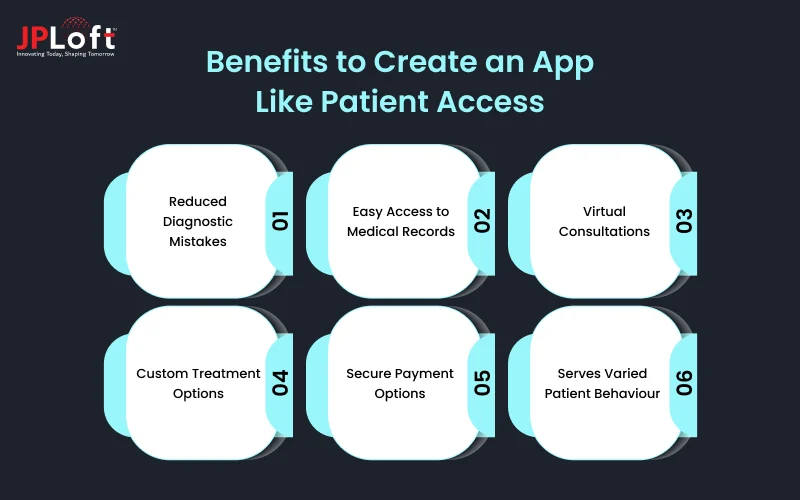
Below are the key benefits explained.
1. Reduced Diagnostic Mistakes
Doctors can view patient history, test results, and previous prescriptions in one place. This reduces the chance of missing important information. Clear digital records help doctors make informed decisions and avoid errors caused by incomplete or unclear paper records.
2. Easy Access to Medical Records
If you consider Patient Access clone app development, patients can see their test reports, allergies, and treatment history anytime. This improves transparency and trust. Easy access also helps patients share accurate information during emergencies or when visiting another healthcare provider.
3. Virtual Consultations
Businesses can enable video or remote consultations. This reduces clinic crowding and saves travel time for patients. It is useful for follow-ups, minor health issues, and elderly patients who may find it difficult to visit clinics in person.
4. Custom Treatment Options
Through Patient Access-like apps, healthcare providers can track patient history and suggest treatment based on past data. Doctors can adjust medicines, review progress, and send follow-up advice. This creates a more personalised care experience instead of a one-size-fits-all approach.
5. Secure Payment Options
You can integrate secure online payment systems for private consultations or additional services. Safe payment gateways protect financial data and reduce manual billing work. Patients can pay quickly without visiting the clinic reception.
6. Serves Varied Patient Behaviour
When businesses create an app like Patient Access, they can serve different types of patients. Some prefer booking online, others prefer messaging, and some need reminders. A well-designed app supports all these needs and improves overall patient satisfaction while reducing staff workload.
Core Features of an App Like Patient Access
The Patient Access app features are specialised across panels for efficient healthcare delivery.
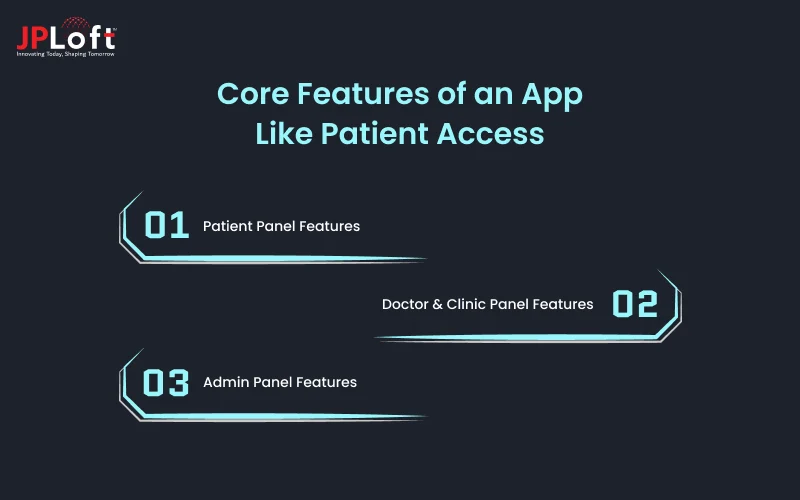
Here is a concise list of mobile app features specific to different panels.
[1] Patient Panel Features
The patient panel focuses on ease of access and simple healthcare management. Let’s discuss the features related to it.
► Appointment Booking
To build a healthcare app like Patient Access, appointment booking should display real-time GP availability clearly. Users must choose date, time, and consultation type without facing technical issues.
Instant confirmations and automated reminders reduce missed appointments and unnecessary phone calls to clinics. This improves schedule planning and allows medical staff to manage daily workloads more efficiently.
► Prescription Ordering
Repeat prescription requests should follow a simple and guided process within the application. Patients can select approved medicines and submit requests directly to their registered GP practice.
After approval, they can choose a preferred pharmacy for collection or home delivery services. Thus, this reduces paperwork, shortens waiting time, and lowers the administrative burden on clinic staff.
► Medical Records View
Patients should securely access important parts of their medical history through the app. This may include allergies, previous diagnoses, ongoing treatments, and consultation summaries.
Clear record visibility improves patient awareness and encourages better health management decisions. Hence, it helps when visiting another healthcare provider or during urgent medical situations.
► Video Consultations
Video consultations should support stable and secure remote appointments. Patients must join sessions easily without downloading multiple external applications or tools.
Remote consultations are useful for follow-ups and minor health concerns. They save travel time and improve access for elderly, rural, or busy patients.
► AI-Powered Symptom Checker
AI-powered symptom checker guides users through structured health-related questions before booking appointments. Patients can describe symptoms and receive general advice on possible next steps.
Moreover, AI in healthcare helps users decide whether urgent care is required or a GP visit is sufficient. It also reduces unnecessary appointments and improves overall clinic resource management.
[2] Doctor & Clinic Panel Features
This panel is designed to support medical professionals in handling consultations and patient data efficiently. Let us have a look at the features to use.
► Appointment Review
Doctors should have a clear dashboard to review upcoming appointments in advance. The system must display patient details, visit reasons, and records together.
This allows better preparation before consultations and reduces the time spent searching for information. It also helps clinics manage daily patient flow in a structured manner.
► Schedule Management
Clinics need tools to manage doctor availability and working hours easily. Staff should update time slots, block leaves, and adjust schedules without difficulty.
Accurate schedule control prevents double bookings and confusion among patients. It also ensures smooth coordination between doctors, nurses, and administrative staff.
► Video Consults
If you plan to develop an app like Patient Access, doctors must access secure video consultation tools directly. The system should support stable connections and easy session management.
Integrated video features remove dependency on external platforms and protect patient data. This supports efficient remote care while maintaining proper clinical documentation standards.
► E-Prescriptions
Doctors should generate electronic prescriptions directly from the consultation panel. The system must store medication history and reduce risks linked to unclear handwriting.
Digital prescriptions speed up pharmacy processing and improve tracking of prescribed medicines. They also support safer and more organised medication management for patients.
► Records Access
Healthcare providers must access complete patient records during consultations without delay. This includes allergies, past treatments, lab reports, and previous doctor notes.
Quick record access supports informed clinical decisions and reduces diagnostic mistakes. It also ensures continuity of care across different appointments and healthcare providers.
[3] Admin Panel Features
The admin panel controls the overall system operations and data governance. Here are the features to be integrated.
► User Verification
Admins must verify the identity of patients and healthcare professionals during registration. The system should include secure checks to confirm personal and professional details.
Proper verification reduces misuse of the platform and protects sensitive medical information. It also ensures that only authorised users access healthcare services within the system.
► Access Controls
The admin panel should include role-based access settings for different users. Patients, doctors, and staff must only view information relevant to their responsibilities.
Strong access controls reduce the risk of data misuse or accidental exposure. This is essential when managing confidential healthcare information in the UK.
► Analytics Dashboard
Admins should have access to a dashboard that shows appointments, prescriptions, and user activity. The data must be presented in a clear and readable format.
These insights help clinics understand service demand and improve operational planning. So, if you plan for Patient Access like app development, analytics support better decisions.
► Revenue Tracking
The system should track payments made for private consultations or additional services. Admins must monitor completed transactions, pending payments, and refunds.
Accurate revenue tracking reduces accounting errors and improves financial transparency. Moreover, it supports better budgeting and planning for healthcare providers.
► Compliance Reports
Admins need tools to generate compliance reports based on UK healthcare regulations. Reports should document data handling, access logs, and service records.
Maintaining proper documentation supports audits and regulatory checks. Hence, this becomes important when you build a healthcare app like Patient Access for the UK market.
How to Develop an App Like Patient Access?
If you wish to know how to develop an app like Patient Access, this section is for you.
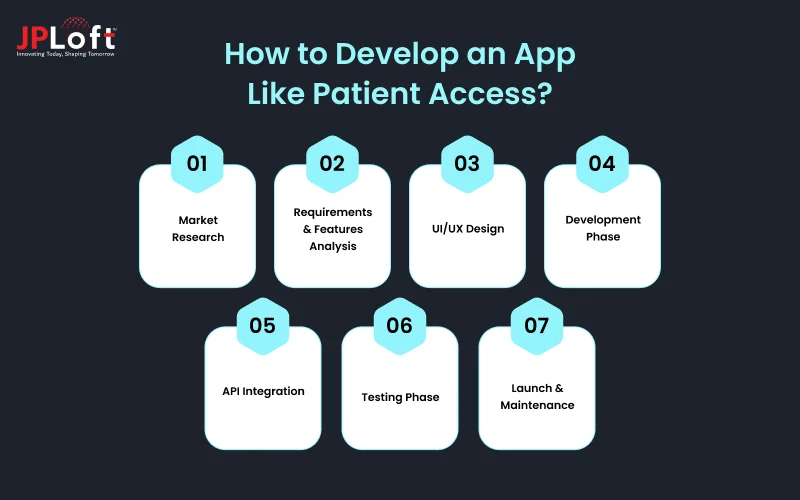
Below are key steps based on real healthcare app practices that UK businesses should follow.
Step 1: Market Research
Before development begins, proper research helps reduce risk and align the product with real healthcare needs.
→ Competitor Benchmarking
Study existing UK healthcare apps such as Patient Access that offer GP booking, prescriptions, and record access. Analyse their strengths, limitations, pricing models, and user reviews to identify service gaps. It supports better positioning when you create an app like Patient Access.
→ Target Audience Profiling
Identify who will use the app, including patients, general practitioners, and private clinics. Understand their age groups, digital comfort level, and common healthcare challenges. Clear audience profiling ensures feature decisions are practical and improve user adoption.
→ Cost & Monetization Study
Estimate the Patient Access app development cost, infrastructure expenses, compliance costs, and long-term maintenance budgets. Study revenue options such as private consultations, subscription plans, or service partnerships. Hence, a clear financial plan prevents budget overruns.
Step 2: Requirements & Features Analysis
Clear planning avoids confusion during development and keeps the project aligned with healthcare regulations.
→ Core Feature Prioritisation
List all required features and rank them based on healthcare impact and urgency. Focus first on appointments, prescriptions, records access, and secure communication. However, prioritisation reduces development delays and ensures essential services are delivered first.
→ User Journey Mapping
Define how patients, doctors, and admins will move through the system step by step. Map actions like booking appointments, sending messages, and issuing prescriptions. Moreover, clear user journeys reduce confusion during development.
→ Technical Specs
Define technical requirements such as hosting environment, database structure, encryption standards, and system scalability. Include NHS login compatibility and secure authentication protocols. Thus, proper documentation prevents technical misunderstandings.
Step 3: UI/UX Design
A healthcare app like Patient Access must be simple, structured, and accessible for all users.
→ Wireframing
Create basic screen layouts showing feature placement and navigation flow. App wireframes focus on structure without adding final visual design elements. This step allows quick adjustments before coding begins and reduces design errors later.
→ Prototyping
Develop clickable app prototypes to simulate real app interaction. This allows stakeholders to test booking flows, messaging, and dashboard navigation. However, early feedback helps correct usability issues and saves redevelopment time.
→ Design System Development
Create consistent mobile app design rules for fonts, buttons, colours, and layout spacing. The system ensures uniform appearance across patient, doctor, and admin panels. Moreover, consistency improves usability and brand recognition and simplifies future updates.
Step 4: Development Phase
This stage converts planning and design into a functional healthcare platform.
→ Frontend Development
Consider the top frameworks for app development to develop the user interface. Ensure smooth navigation, responsive design, and accessibility standards. However, the frontend directly impacts user experience, thus clean development reduces app crashes and loading issues.
→ Backend Development
Build the server-side system to manage appointments, prescriptions, records, and user data securely. Ensure strong database structure and encrypted data storage. A stable backend ensures real-time updates and supports secure healthcare data handling.
→ Authentication & Core Logic
Implement secure login systems, including NHS login compatibility and multi-factor authentication. Develop core logic for booking rules, prescription approvals, and access permissions. Hence, strong authentication protects sensitive data, and proper logic ensures system reliability.
Step 5: API Integration
Healthcare apps like Patient Access rely on secure system connections for real-time data exchange.
→ Healthcare System APIs
Integrate GP practice systems and NHS services through approved APIs. Ensure secure data transfer for appointments, prescriptions, and medical records. Accurate integration avoids duplicate entries and ensures reliable healthcare service delivery.
→ Third-Party Services
Connect secure payment gateways, video consultation tools, and notification services. Each integration must follow UK data protection requirements. Reliable third-party tools enhance functionality, and they must not compromise patient data security.
→ Data Synchronisation
Ensure real-time synchronisation between app databases and healthcare systems. Updates to appointments or prescriptions should reflect instantly. Proper synchronisation prevents data mismatches and supports accurate medical information access.
Step 6: Testing Phase
Healthcare apps like Patient Access must undergo strict mobile app testing before public release.
→ Functional Testing
Test all features, including booking, messaging, prescriptions, and record access. Confirm that each function performs as planned without errors. This ensures system reliability while reducing user complaints after launch.
→ Security Testing
Conduct vulnerability assessments and penetration testing to identify risks. Verify encryption, authentication, and data storage security. Security testing protects patient information, which is critical when you make an app like Patient Access.
→ User Acceptance Testing
Allow real users to test the system, such as clinic staff and selected patients. Gather feedback on usability and workflow efficiency. This helps identify practical issues to ensure the app meets real healthcare needs.
Step 7: Launch & Maintenance
After development and testing, proper deployment and app maintenance services ensure long-term success.
→ App Deployment
Submit the app on App Store and publish the app on the Play Store with proper configuration and server setup. Ensure hosting infrastructure supports the expected user load. Careful deployment reduces downtime risks and provides stable system performance.
→ User Onboarding
Provide simple guides and support materials for patients and clinics. Offer training sessions for GP staff if required. Good onboarding improves adoption rates while reducing support queries.
→ Ongoing Support & Updates
Monitor system performance and release regular updates to fix bugs and maintain compliance. Address new healthcare regulations and technical improvements. Continuous support ensures reliability and strengthens trust with healthcare partners.
Cost to Build an App Like Patient Access
The cost to build an app like Patient Access varies depending on several factors, and they are important to consider. An average development cost ranges from £25,000 to £250,000+ ($35,000 to $350,000+).
Below, we discuss the mobile app development cost in UK based on the type of business idea you have.
|
App Type |
Features to Use |
Estimated Cost (in pounds) |
Project Duration |
|
Basic MVP |
User registration, Basic scheduling, Basic notifications |
25,000 - 90,000 |
3 to 5 months |
|
Mid-Level App |
Basic EHR/EMR access, E-prescribing, Basic analytics |
90,000 - 150,000 |
6 to 8 months |
|
Advanced App |
AI/ML remote monitoring, Full EHR integration, high security |
150,000 - 250,000+ |
9 to 12+ months |
Though you can begin the development process after hiring healthcare app developers in UK. Still, there are several factors that affect the overall costs, and these are discussed below.
-
Feature Complexity - More advanced features increase development time and total cost.
-
Platform Choice - Multiple platforms require a higher budget and an extended development effort.
-
NHS & GP System Integration - Secure healthcare integrations require additional technical development resources.
-
Security & Compliance Requirements - Strong data protection measures increase development and testing expenses.
-
Development Team Location - The cost to hire mobile app developers in UK varies by team experience and expertise.
Challenges to Develop an App Like Patient Access & Its Solutions
When businesses plan to develop a healthcare app like Patient Access, they must handle technical, regulatory, and operational challenges carefully. A trusted healthcare app development company can easily help businesses in this process.
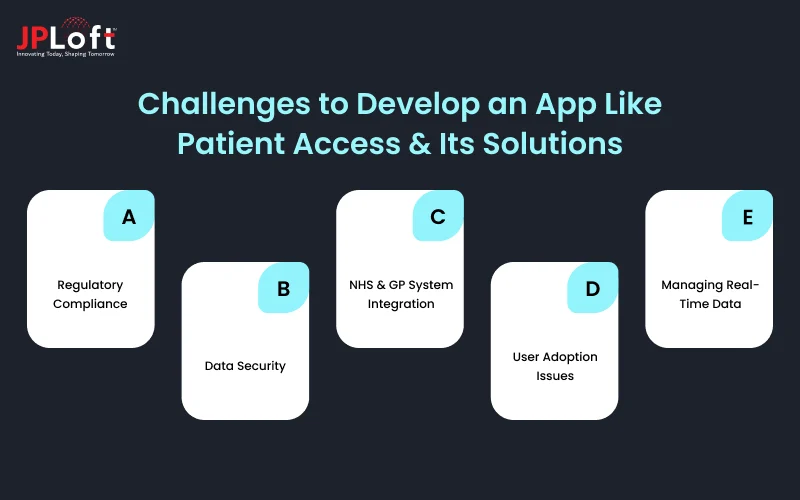
Below are key challenges and their practical solutions.
[A] Regulatory Compliance
Challenge: When you create a healthcare app, compliance with GDPR, UK Data Protection Act, and NHS Digital standards becomes mandatory. Such apps must manage patient consent, secure identity verification, and proper medical data handling. Missing any regulatory requirement can delay launch and create legal risks.
Solutions: Engage legal and compliance experts during the planning stage. Moreover, document data flow, implement role-based access, maintain audit logs, and follow proper medical data handling.
[B] Data Security
Challenge: Healthcare platforms store medical records, prescriptions, and personal identification details. This makes them attractive targets for cyber attacks, phishing attempts, and data breaches. Even a small vulnerability can damage reputation and patient access.
Solution: Use encryption, secure cloud services, and multi-factor authentication. Conduct regular security audits, penetration testing, real-time monitoring, and proactive security planning.
[C] NHS & GP System Integration
Challenge: GP systems may use different technical structures and data standards. Moreover, integrating appointment systems, prescription databases, and NHS login requires secure APIs and proper authorisation processes.
Solution: Plan integrations during early development instead of post-development. Hire mobile app developers familiar with NHS API frameworks while conducting staged testing.
[D] User Adoption Issues
Challenge: Not all patients are comfortable using digital healthcare platforms. Elderly users or people with limited technical knowledge may struggle with registration, login, or booking steps.
Solution: Design a simple navigation with clear instructions and minimal steps. Moreover, use readable fonts and guided flows while providing onboarding tutorials.
[E] Managing Real-Time Data
Challenge: Appointment slots, prescription approvals, and record updates must reflect instantly across systems. Delays or mismatched data can create confusion between patients and clinics. In healthcare, incorrect data timing may affect service quality.
Solution: Build a stable backend architecture with reliable data synchronisation processes. Use secure APIs and automatic refresh mechanisms to monitor server performance continuously.
How Do Apps Like Patient Access Make Money?
While developing a healthcare app like Patient Access involves high upfront costs, its revenue potential far exceeds the initial investment.
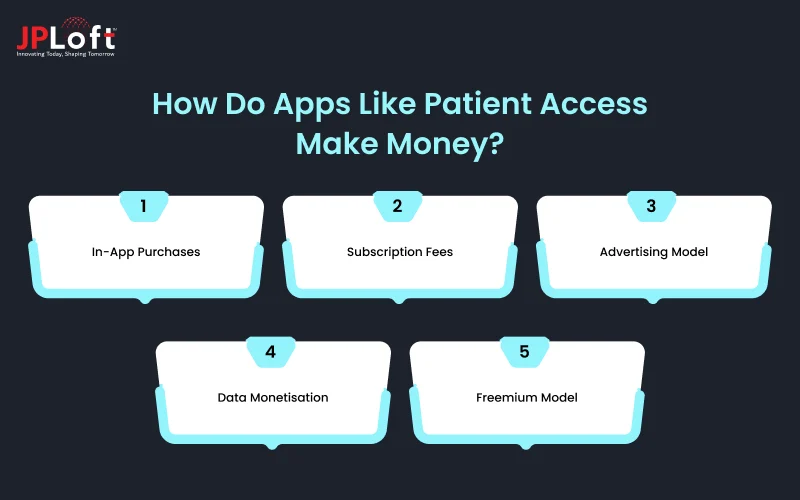
Here are the app monetisation models of Patient Access-like platforms.
1. In-App Purchases
Healthcare apps can generate revenue by offering paid services within the platform. These may include private GP consultations, specialist appointments, digital health certificates, or priority access for faster scheduling.
However, when businesses create an app like Patient Access, in-app purchases create flexible income streams. Users pay only for additional services beyond standard NHS-connected features.
2. Subscription Fees
A subscription model allows users or clinics to pay monthly or yearly charges. This may include premium support, unlimited consultants, advanced analytics, or enhanced features.
Subscription fees provide predictable and recurring revenue for the platform. Moreover, this model supports long-term financial planning and ongoing service improvement.
3. Advertising Model
Healthcare apps may display limited and relevant advertisements from pharmacies, insurance providers, or wellness brands. These ads must follow strict UK healthcare advertising and data protection regulations.
Advertising generates revenue without directly charging patients for basic services. However, it should not interrupt user experience or compromise trust.
4. Data Monetisation
Aggregated healthcare data can provide insights for research institutions or healthcare partners. Personal identification must always be removed to comply with UK data protection laws.
If businesses develop an app like Patient Access, data usage must remain ethical and transparent. Moreover, proper consent and legal compliance are essential for this model.
5. Freemium Model
The freemium model offers basic features at no cost to attract users. Advanced tools such as priority consultations or detailed reports are available through paid upgrades.
This approach increases user adoption while creating upgrade opportunities. Moreover, it balances accessibility with revenue generation for healthcare platforms.
Why Choose JPLoft to Build an App Like Patient Access?
If you plan to build an app like Patient Access, choosing an experienced mobile app development company in UK is critical. JPLoft has practical experience in building secure, scalable, and regulation-focused healthcare applications for global clients.
We understand UK healthcare standards, including GDPR compliance, secure data handling, and structured system integration. Our team focuses on clear planning, simple user interface design, and strong backend architecture.
From NHS login integration to GP system connectivity, we follow a structured development approach to reduce risks and delays. We also provide detailed testing, security checks, and ongoing maintenance support.
JPLoft works closely with businesses to understand their healthcare model and revenue goals. Whether you need an MVP or a full-featured platform, our custom solutions align with UK healthcare requirements and long-term growth plans.
Conclusion
Building a digital healthcare platform in the UK requires more than basic development. If you plan to build a Patient Access-like app, you must focus on secure data handling, NHS integration, clear workflows, and a simple user experience.
From appointment booking and e-prescriptions to admin controls and compliance reporting, every feature must support both patients and clinics efficiently.
Understanding development steps, cost factors, revenue models, and regulatory challenges helps reduce risk and improve long-term success. Careful planning, proper testing, and ongoing updates are essential to maintain trust and system reliability.
With the right technical approach and healthcare knowledge, businesses can avail a Patient Access clone app development that improves access to care, supports GP practices, and meets UK healthcare standards in 2026 and beyond.
FAQs
To make an app like Patient Access easily, follow a structured process including market research, clear feature planning, simple UI/UX design, secure development, thorough testing, and continuous maintenance to ensure compliance, performance, and long-term reliability.
Apps like Patient Access can earn through in-app purchases, subscription plans, advertising, freemium upgrades, and anonymised data insights. Private consultations, priority bookings, and premium support features create a steady income.
Common challenges include regulatory compliance, NHS integration, data security risks, real-time data synchronisation, and user adoption issues. Healthcare apps must handle sensitive information carefully.
The Patient Access app development cost usually ranges between £25,000 and £250,000+, depending on feature complexity, security requirements, integrations, and platform choice.
Essential features include appointment booking, e-prescriptions, medical record access, secure messaging, video consultations, user verification, role-based access controls, analytics dashboard, and secure payment integration. These features ensure smooth communication between patients, doctors, and administrators.

Priyanka Sukhwal is the Managing Director and Business Head of JPLoft, with 10+ years of experience in technology, digital product strategy, and business growth. She has worked closely with businesses building mobile applications, custom software, marketplaces, and on-demand platforms across mobility, automotive, consumer services, and startup ecosystems. At JPLoft, she focuses on understanding business models, identifying product opportunities, and helping companies plan digital solutions that can scale with changing market needs.



Share this blog