


Key Takeaways
Building a handyman app like Jobber requires understanding service workflows, customer needs, and scalable technology architecture for sustainable growth.
Essential features such as scheduling, invoicing, CRM, notifications, and payments streamline operations while improving efficiency for technicians and service businesses.
A structured development process, including research, UI/UX design, technology selection, development, and testing, ensures a reliable and scalable application.
Choosing the right tech stack and cloud integrations enables real-time updates, secure data management, and seamless communication across users.
Development costs range from $20K to $220K+, depending on features, integrations, design complexity, scalability requirements, and maintenance needs.
Partnering with JPLoft ensures strategic planning, robust architecture, and future-ready solutions that support long-term business expansion.
The on-demand home services market is booming, and platforms like Jobber have transformed how service professionals manage scheduling, invoicing, and customer communication.
If you're wondering how to develop an app like Jobber?, you’re not alone. Entrepreneurs and service businesses alike are exploring ways to build an app like Jobber to streamline operations, improve service delivery, and scale revenue more efficiently.
However, success isn’t just about replicating existing features. To stand out in a competitive market, businesses must focus on building a solution that delivers real operational value while addressing the unique needs of modern service businesses.
To achieve this, start by mapping service workflows and developing a scalable platform with scheduling, invoicing, CRM, and real-time tracking capabilities on a secure cloud infrastructure.
Prioritizing intuitive UI/UX, automation, and seamless integrations ensures a smooth experience for both service providers and customers.
With the right technology foundation and product strategy, this guide to build an app like Jobber will walk you through everything.
From development approach to cost considerations, so you can confidently plan your handyman app.
Overview of Jobber App
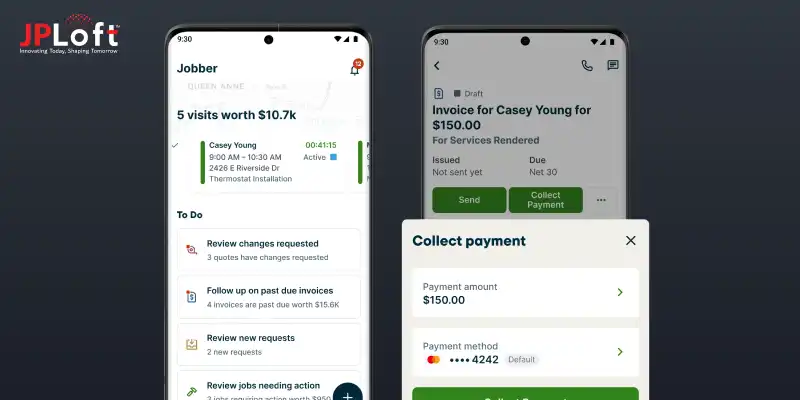
Jobber is a leading field service management platform that helps home service businesses streamline scheduling, invoicing, and customer communication from a single dashboard.
Trusted by professionals worldwide, it simplifies end-to-end service operations, making it easier for handymen to manage jobs and grow revenue.
Jobber’s intuitive interface and powerful backend tools make it one of the top handyman apps in the market today, inspiring many entrepreneurs to create a Jobber clone.
1. Key Data Stats and Insights
Below are the latest verified market stats highlighting the rapid growth and digital transformation of the home services and field service management sectors.
-
The global on-demand home services market is estimated at USD 6.79 billion in 2026 and is expected to grow to USD 11.78 billion by 2035 at a CAGR of ~14.8%.
-
The broader field service management app market is projected to grow from USD 6.14 billion in 2026 to USD 13.79 billion by 2034, with a CAGR above 10%.
-
Over 87% of consumers now use smartphones to access home services, driving increased reliance on mobile platforms for bookings and service management.
-
North America alone accounts for roughly 35% of global on-demand handyman app revenue, with strong growth across other regions too.
These figures highlight the rapid expansion of this sector and why many businesses are focusing on handyman market statistics to plan new services.
The rising demand for user-friendly, scalable service apps sets the stage for innovative entrants and makes the space increasingly competitive.
2. How Does an App Like Jobber Work?
An app like Jobber centralizes field operations, customer management, and payments into one streamlined system. It connects service providers, office staff, and customers in real time.
Here’s how businesses typically make an app like Jobber function efficiently:
-
Customers book services via app or web portal.
-
Admin assigns jobs to available technicians.
-
Automated scheduling and route optimization reduce delays.
-
Technicians update job status on-site.
-
Invoices are generated instantly after job completion.
-
Payments are processed securely within the app.
This structured workflow explains why many businesses aim to build an app like Jobber to simplify operations and boost productivity.
Benefits of Investing in an App Like Jobber
Investing in a field service platform is no longer optional, it’s a growth strategy. Businesses looking to develop an app like Jobber gain operational efficiency, higher customer retention, and scalable revenue opportunities.
Here are the key benefits of investing in an app like Jobber:
1. Streamlined Business Operations
A centralized system automates scheduling, dispatching, invoicing, and follow-ups, reducing manual errors and administrative workload.
When you build an app like Jobber, you create structured workflows that increase technician productivity and improve overall operational efficiency significantly.
2. Improved Customer Experience
Real-time booking, instant confirmations, automated reminders, and digital payments enhance customer satisfaction.
Businesses that create a Jobber clone can offer transparency and faster service delivery, building long-term trust and encouraging repeat bookings from homeowners consistently.
3. Scalable Revenue Growth
Digital service apps allow businesses to manage more jobs without increasing overhead proportionally.
Companies that develop a Jobber clone can expand geographically, onboard additional service providers, and introduce premium features to unlock multiple revenue streams.
4. Data-Driven Decision Making
Integrated dashboards provide insights into job completion rates, technician performance, and revenue trends.
When you make an app like Jobber, you gain access to actionable analytics that support strategic planning and optimize long-term business performance effectively.
5. Competitive Market Positioning
Partnering with a reliable mobile app development company ensures your solution includes modern features and scalable architecture.
Businesses that understand how to develop an app like Jobber? position themselves as technology-driven leaders in the competitive home services market.
Ultimately, investing in a Jobber-style platform empowers service businesses to operate smarter, grow faster, and deliver consistent value.
Features to Include in an App Like Jobber
To succeed in today’s competitive service market, your platform must include essential handyman app features that simplify operations and improve customer engagement.
If you’re planning how to create an app like Jobber, feature selection will directly impact scalability and usability.
These are the key features every business should consider to create a Jobber clone successfully:
► Smart Job Scheduling & Dispatch
An intelligent scheduling system assigns jobs based on availability, location, and skillset.
This reduces travel time, prevents double bookings, and improves workforce efficiency, ensuring seamless coordination between office administrators and field technicians daily.
► Customer Booking & Management
Customers should easily book services, track appointments, and receive updates.
A centralized CRM stores contact details, service history, and preferences, enabling personalized communication and better relationship management for long-term business growth opportunities.
► Real-Time Notifications
Automated SMS, push notifications, and email alerts keep customers and technicians informed about booking confirmations, schedule changes, and job completion updates.
This functionality is essential when businesses make a Jobber clone, as it reduces no-shows while improving transparency throughout the entire service workflow consistently.
► In-App Estimates & Invoicing
Digital estimates and automated invoice generation streamline billing processes.
Technicians can create quotes on-site, convert them into invoices instantly, and accept digital signatures, significantly improving payment turnaround times and minimizing administrative delays.
► Secure Payment Integration
Multiple payment gateway integrations allow customers to pay through cards, wallets, or bank transfers.
Secure transactions build trust, reduce cash handling risks, and support businesses planning to create a Jobber clone by ensuring seamless financial tracking for both service providers and owners.
► Analytics & Reporting Dashboard
Comprehensive dashboards provide insights into revenue, technician productivity, customer retention, and service performance.
These analytics help businesses make data-driven decisions, optimize pricing strategies, and identify opportunities for sustainable expansion effectively.
When you make an app like Jobber, choosing the right feature set determines long-term scalability and competitive advantage in the growing home services market.
Step-by-Step Process to Develop an App Like Jobber
Developing a Jobber-style platform requires careful planning, design, and execution.
Understanding each stage ensures that your app delivers a seamless experience for both service providers and customers.
These are the steps to make an app like Jobber successfully from concept to launch:
Step 1: Market Research & Requirement Analysis
Before starting, define your target audience, service scope, and competitor landscape to ensure your app addresses real user needs effectively when planning to create an app like Jobber.
► Identify Target Users
Research service providers and homeowners to understand pain points and preferences, helping you design features that provide maximum operational efficiency and convenience.
► Competitor Benchmarking
Analyze top apps to identify gaps and strengths. This evaluation informs feature prioritization, pricing strategy, and opportunities for differentiation in your app.
► Requirement Documentation
Document essential features, tech requirements, and workflow processes. A clear roadmap ensures your team follows structured development, aligning with business goals and user expectations.
Step 2: UI/UX Design & Prototype
User-friendly interfaces and smooth navigation improve engagement and adoption rates, key factors for how to design a handyman app successfully.
► Wireframing
Create visual blueprints for each screen to map user flows, ensuring intuitive navigation and minimal friction during booking, service tracking, and payment processes.
► High-Fidelity Mockups
Design visually appealing, branded screens using consistent color schemes, typography, and icons. This step bridges the gap between conceptual wireframes and functional app screens.
► UI/UX Design Services Integration
Partnering with experienced UI/UX design services helps ensure your app is accessible, responsive, and meets modern usability standards for both mobile and tablet users.
Step 3: Choosing the Technology Stack
Selecting the right handyman app tech stack is critical for scalability, speed, and security when businesses make a Jobber clone for the home services industry.
► Frontend Technologies
Use React Native or Flutter for cross-platform compatibility. A responsive, fast interface enhances user experience while keeping development time and costs optimized.
► Backend Technologies
Leverage Node.js or Django for robust backend operations. Secure databases like PostgreSQL or Firebase ensure real-time data updates and safe user data management.
► Cloud & API Integrations
Integrate cloud services and payment APIs for real-time updates, push notifications, and secure payment processing, enabling a seamless operational workflow for all users.
Step 4: Development & Coding
This phase involves actual coding based on documented requirements, UI/UX designs, and the chosen tech stack to develop an app like Jobber efficiently.
► Frontend Development
Develop app interfaces for customers, technicians, and admins. Ensure compatibility across devices while implementing user-friendly features like booking, scheduling, and notifications.
► Backend Development
Build servers, databases, and APIs to manage jobs, user data, and transactions. Implement business logic that supports real-time updates, invoicing, and analytics dashboards.
► Hire Mobile App Developers
Businesses should hire mobile app developers with experience in service-based platforms. Their expertise accelerates coding, ensures bug-free development, and maintains feature consistency.
Step 5: Testing & Quality Assurance
Thorough testing guarantees reliability, performance, and user satisfaction. Handyman app testing validates all functionalities before launch.
► Functional Testing
Ensure all app features work as intended, including booking, notifications, invoicing, and payments. Functional integrity is an essential step when businesses develop a Jobber clone, for maintaining user trust and operational efficiency.
► Performance Testing
Test app speed, scalability, and response times under various network conditions, ensuring a smooth experience even during peak usage periods for technicians and customers.
► Bug Fixing & QA
Fix errors identified during testing. Continuous QA ensures the app maintenance services framework is robust, minimizing post-launch issues and enhancing long-term reliability.
Step 6: Deployment & Maintenance
After launch, continuous support and updates are crucial for user retention and business growth in Jobber like app development.
► App Deployment
Publish on Google Play and Apple App Store, ensuring compliance with guidelines, optimized app descriptions, and metadata to maximize visibility and downloads.
► Handyman App Maintenance
Regular updates and monitoring are required. Handyman app maintenance ensures new features, security patches, and bug fixes are implemented efficiently without disrupting users.
► Feedback & Iteration
Collect user feedback post-launch. Iteratively enhance functionality and performance to meet evolving market needs, driving engagement, loyalty, and long-term app success.
By following these steps to make an app like Jobber carefully, businesses can build a scalable, user-friendly platform that is well-positioned for growth in the competitive home services market.
How Much Does it Cost to Create an App Like Jobber?
The cost to develop an app like Jobber typically ranges from $20K to $220K+, depending on features, platform, design complexity, and development resources.
If you’re wondering what is the cost to develop an app like Jobber?, understanding the Jobber like app development cost breakdown helps businesses plan budgets and avoid unexpected expenses.
Cost Breakdown Table
|
Component |
Estimated Cost Range |
Description |
|
UI/UX Design |
$3,000 – $20,000 |
Designing intuitive screens, interactive flows, and visually appealing layouts for both mobile and tablet users. |
|
Backend Development |
$10,000 – $70,000 |
Building servers, APIs, databases, and admin dashboards to manage scheduling, invoicing, and user data securely. |
|
Frontend Development |
$8,000 – $60,000 |
Developing mobile interfaces for customers, technicians, and admins with cross-platform compatibility using Flutter or React Native. |
|
Testing & QA |
$2,000 – $15,000 |
Performing functional, performance, and security testing to ensure smooth operation and reduce post-launch errors. |
|
Deployment & Maintenance |
$2,000 – $30,000 |
Launching on app stores, updates, bug fixes, and app maintenance services for long-term stability. |
|
Third-Party Integrations |
$1,000 – $25,000 |
Integrating payment gateways, GPS tracking, notifications, and other APIs for full operational functionality. |
The final cost to build a handyman app depends heavily on customization, choice of platform, and the expertise of the development team.
Businesses aiming to develop a Jobber clone should factor in ongoing maintenance and future upgrades, ensuring the app scales efficiently and stays competitive in the dynamic home services market.
By planning accurately, you can make informed decisions on features, design, and technology while staying within your budget.
How Jobber-Like Apps Make Money?
Jobber-like apps generate revenue through multiple streams, making them attractive investments for service businesses.
Entrepreneurs seeking to make an app like Jobber can leverage these strategies to ensure profitability and scalability.
These are the app monetization strategies commonly employed in Jobber like app development:
1. Subscription Plans
Offering tiered subscription models to service providers ensures predictable revenue.
Businesses can pay monthly or annually for access to premium features, advanced reporting, and priority support, helping companies develop a Jobber clone efficiently.
2. Service Booking Commissions
Platforms can charge a small commission or service fee per completed job.
This percentage-based model creates continuous income and incentivizes app providers to optimize service quality and job allocation dynamically.
3. In-App Advertising
Handyman apps can display relevant ads, sponsored listings, or promotional banners within the app.
These monetization channels generate revenue while maintaining user engagement, encouraging businesses to make an app like Jobber with ad integrations.
4. Featured Listings & Promotions
Service providers pay extra to appear at the top of search results or highlight promotions.
This strategy increases visibility, helps professionals attract more customers, and generates an additional income stream for the platform.
5. Premium Add-Ons & Integrations
Offering optional add-ons such as advanced analytics, AI-based scheduling, or third-party tool integrations allows users to customize their experience.
Businesses can charge for these features as part of developing an app like Jobber strategy.
Jobber-like apps succeed financially by combining recurring subscriptions, commissions, advertising, and premium services, ensuring sustainable growth and profitability in the competitive handyman market.
Trends to Leverage in Jobber Clone App Development
To stay competitive, businesses must embrace the top handyman app trends. Modern apps need innovation, automation, and intelligence to meet evolving customer expectations effectively.
These are trends one must follow when planning how to develop an app like Jobber:
A. AI-Powered Scheduling
Integrating artificial intelligence improves job allocation, reduces idle time, and predicts technician availability.
Leveraging the role of AI in handyman apps ensures operational efficiency while providing users with a seamless, smart service experience consistently.
B. Voice-Activated Assistance
Voice commands simplify booking, job tracking, and payment processes.
Platforms collaborating with an AI app development company can implement voice-based features to enhance user convenience and accessibility across mobile devices efficiently.
C. IoT & Smart Device Integration
IoT integration allows real-time monitoring of tools and home devices during service visits.
Incorporating smart technology improves service accuracy, accountability, and customer trust while enhancing overall Jobber like app development innovation.
D. On-Demand Service Model
Users increasingly expect instant booking and quick response times.
Handyman apps following this trend offer same-day scheduling, live tracking, and rapid payment options, driving engagement and platform adoption effectively.
E. Enhanced Security & Payments
Secure payment gateways, two-factor authentication, and encrypted data storage are now standard.
Apps incorporating these features gain user trust and meet regulatory compliance while enhancing long-term business credibility.
By leveraging these trends, businesses can create future-ready Jobber clones that optimize performance, increase engagement, and maintain a competitive edge in the home services market.
How JPLoft Can Help You With the Jobber Clone App?
Creating a successful Jobber clone requires technical expertise, strategic planning, and seamless execution.
At JPLoft, we act as your trusted handyman app development company, guiding you through every stage of development.
Our team helps businesses develop an app like Jobber by designing intuitive interfaces, integrating essential features, and choosing the right tech stack for scalability.
With experience in Jobber like app development, we ensure timely delivery, quality assurance, and post-launch support.
From UI/UX design to secure payment gateways and advanced analytics, we tailor solutions to meet your unique business requirements. This helps you achieve higher efficiency, customer satisfaction, and sustainable growth in the competitive home services market.
Partnering with JPLoft ensures your Jobber clone isn’t just functional but strategically designed to maximize revenue and long-term success.
Conclusion
Building a Jobber-style platform opens new avenues for service businesses to enhance operations and customer engagement.
By leveraging expertise from a professional team, you can build an app like Jobber that is scalable, efficient, and user-friendly.
Understanding key features, costs, monetization strategies, and emerging trends is essential when planning how to create an app like Jobber.
A well-executed app ensures operational efficiency, superior customer experience, and sustainable business growth, making it a smart investment in today’s competitive home services market.
With the right strategy, your Jobber clone can become a leading platform that transforms field service management.
FAQs
Development typically takes 4–6 months for an MVP and up to 9 months for a fully-featured Jobber clone, including design, development, and testing.
Key features include smart scheduling, customer management, real-time notifications, invoicing, secure payments, analytics dashboards, and technician tracking for streamlined operations.
Costs range from $20K to $220K+ depending on features, platform, design complexity, integrations, and ongoing maintenance requirements.
Yes, AI can optimize scheduling, provide predictive analytics, and enable voice-assisted commands, enhancing efficiency and user experience in your Jobber-like app.
Yes. Partnering with a professional team ensures expert UI/UX, secure architecture, testing, and timely delivery, critical for building a successful Jobber clone.

Kris Jacobs brings 20+ years of experience solving complex digital product challenges through strategic thinking and user-centric design. With deep exposure to on-demand services, entertainment, travel, and interactive platforms, she collaborates across teams to shape scalable, engaging solutions that align business goals with intuitive user experiences across evolving digital landscapes.


Share this blog