


Key Takeaways
The aviation software market is growing rapidly, increasing the demand for intuitive and reliable UI/UX design in safety-critical systems.
Thoughtful aviation software UI/UX design improves operational safety, productivity, compliance, and long-term business value.
Strong foundational components like dashboards, navigation, alerts, and data hierarchy ensure clarity in complex aviation environments.
A structured design process from research and wireframing to testing and compliance review ensures reliable and user-focused systems.
UI/UX design costs for aviation software vary based on complexity, user roles, and research depth, typically ranging from $5,000 to $50,000+.
Aviation software plays a critical role in managing some of the most important and safety-sensitive operations in the world. From flight planning and crew management systems to maintenance tracking and airport control platforms, these solutions handle real-time data where accuracy and speed are essential.
In such an environment, even a small mistake can have serious consequences. That is why aviation software UI/UX design is not just about how the system looks. It is about clarity, speed, and accuracy.
When pilots, engineers, or operations teams use a system, they need to understand information instantly. The interface must reduce confusion, lower mental load, and guide users clearly during high-pressure situations.
Poor design can slow decisions. Good design improves safety, efficiency, and performance.
In this blog, we will explain how to design an aviation software, why it matters, and how a thoughtful design approach can help you build reliable systems.
Overview of the Aviation Software Market
The global aviation software market is growing fast as airlines, airports, and service providers invest in technology to improve safety and boost efficiency. However, the global market size is expected to reach $16.93 billion by 2030 at a CAGR of 7.5%.
Regionally, North America remains the largest market for aviation software today. However, the Asia-Pacific region is growing fastest as air travel expands in countries like China and India.
Beyond general aviation platforms, specific segments such as airline operations management, crew management systems, and air traffic management software are also expanding quickly.
This rapid growth shows that aviation companies are increasingly relying on software solutions. Therefore, the demand for intuitive, reliable, and well-designed user interfaces has never been higher.
Importance of UI/UX Design for Aviation Software
Aviation software manages critical operations where accuracy, speed, and clarity are essential. A well-planned UI/UX design for aviation software ensures systems are easy to use, safe to operate, and reliable under pressure.
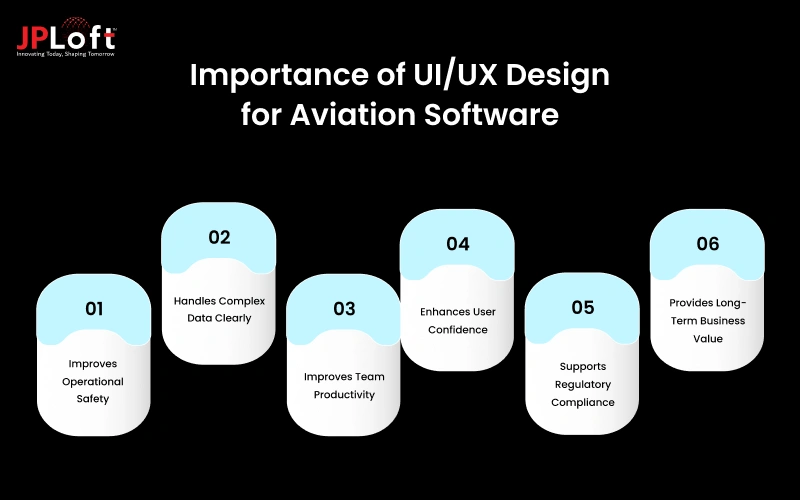
Below are the key reasons why thoughtful design is essential for aviation businesses.
1. Improves Operational Safety
In aviation, safety is always the top priority. Clear layouts and structured screens help users read information quickly without confusion. Aviation software UI/UX design reduces the risk of wrong inputs by guiding users with alerts, confirmations, and smart workflows.
When pilots, engineers, and operations teams understand data instantly, they make better decisions. This directly lowers operational risks and improves overall system reliability.
2. Handles Complex Data Clearly
Aviation systems manage large volumes of data, including flight details, weather updates, crew schedules, and aircraft status. Aviation software UI design organizes this information into clean dashboards and structured views.
Instead of overwhelming users, the interface highlights what matters most. Clear charts, readable text, and logical navigation make complex information easier to understand, helping teams act faster and more accurately.
3. Improves Team Productivity
A well-designed system allows teams to complete tasks without delays. UI/UX design for aviation software removes unnecessary steps and simplifies navigation. When users do not struggle to find information, workflows become smoother.
This saves time across maintenance, flight operations, and management teams. Higher productivity leads to better operational performance and reduces overall operational costs for aviation businesses.
4. Enhances User Confidence
Users perform better when they trust the software they use. Aviation software UI/UX design builds confidence by offering consistency, clarity, and predictable actions. When screens behave as expected, users feel more comfortable during critical situations.
This confidence is important in high-pressure environments where quick and correct decisions matter. A reliable interface supports calm and controlled operations.
5. Supports Regulatory Compliance
The aviation industry follows strict safety and operational standards. Aviation software UI design helps ensure that systems align with these guidelines. Clear instructions, proper data visibility, and structured workflows support compliance requirements.
Well-designed interfaces also make documentation and reporting easier. This reduces the risk of non-compliance and helps businesses maintain industry standards without added complexity.
6. Provides Long-Term Business Value
Investing in strong custom aviation software design delivers long-term benefits. It reduces errors, lowers training costs, and improves system adoption. Efficient interfaces support smoother operations and better resource management.
Over time, this leads to cost savings and improved service quality. For aviation businesses, thoughtful design is not just a visual upgrade but a strategic business decision.

Basic Components of Aviation Software UI/UX Design
Aviation software must be built carefully to support safe, smooth, and accurate operations.
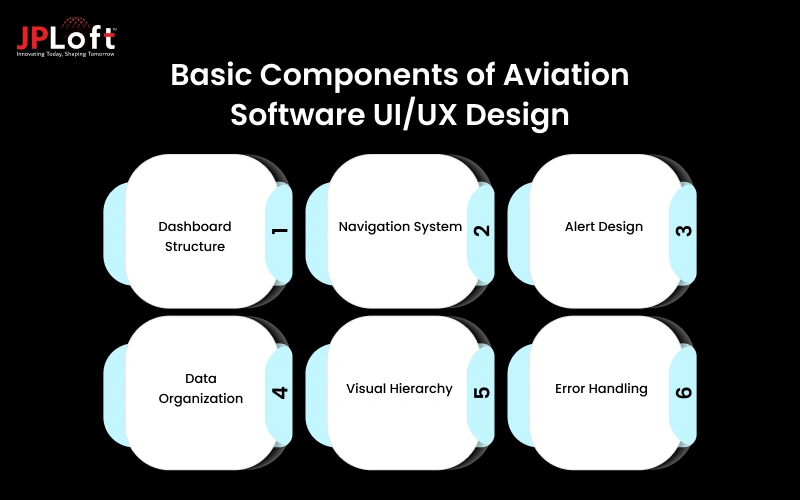
The following basic components form the foundation of a reliable aviation interface system.
[1] Dashboard Structure
The dashboard acts as the central view of the entire system. It should present flight status, aircraft health, schedules, and alerts in a clear format. Important information must appear first, while secondary details remain easy to access.
A clean dashboard allows teams to monitor operations instantly and react faster during high-pressure situations. Online aviation software design ensures dashboards remain structured and distraction free.
[2] Navigation System
Navigation should be simple and predictable across all screens. Users must move between sections without searching for options. Menus, tabs, and buttons should follow a consistent layout to avoid confusion.
When navigation is clear, teams save time and reduce frustration. A well-planned structure supports better workflow efficiency and improves overall usability for aviation staff working under tight timelines.
[3] Alert Design
Alerts must immediately capture attention without overwhelming users. Messages related to delays, technical issues, or errors should be easy to read and understand. Proper placement, clear wording, and logical priority levels are important.
Good aviation software UI/UX design ensures alerts guide users toward the right action. Effective alert systems reduce risk, support faster responses, and maintain smooth operational control.
[4] Data Organization
Aviation systems handle large amounts of information daily. Flight records, maintenance details, crew schedules, and operational reports must be arranged logically. Grouping related data together helps users find information quickly.
Structured screens prevent overload and confusion. Hire software developers to improve readability and ensure that important operational data is always accessible when teams need it most.
[5] Visual Hierarchy
Visual hierarchy directs user attention to the most critical information first. Size, spacing, and layout should highlight priority data without hiding supporting details.
When important elements stand out clearly, decision-making becomes faster and more accurate. Well-implemented online aviation software design reduces mental effort and helps teams stay focused during time-sensitive operations.
[6] Error Handling
Error handling should prevent incorrect actions before they happen. Clear validation messages, confirmation prompts, and simple explanations help users correct mistakes quickly. Instead of showing technical language, the system should guide users toward solutions.
Proper aviation software UI design minimizes disruptions and protects workflow stability. This strengthens reliability and builds trust among aviation professionals who depend on the software daily.
Steps to Design an Aviation Software
Designing aviation software requires a structured and careful approach because these systems support critical operations where accuracy and reliability are essential.
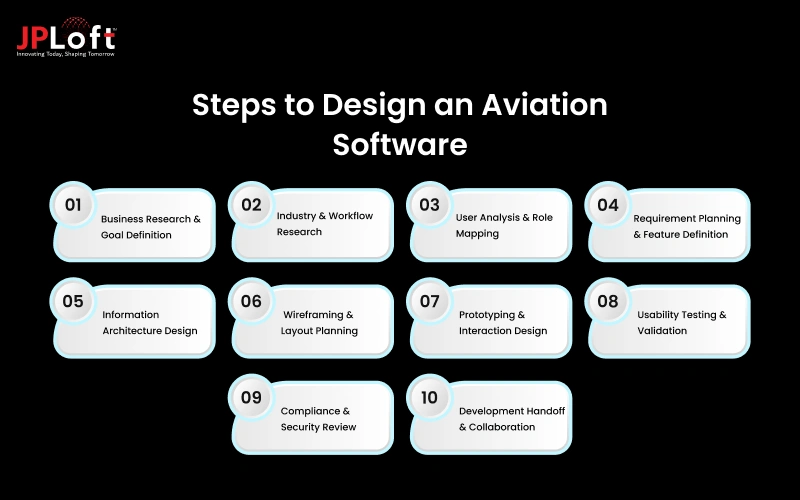
Here is a guide to design an aviation software discussed in detail.
Step 1: Business Research & Goal Definition
To build a successful aviation software, clarity is a must. Before starting design, it is important to understand why the software is being built. Each objective shapes the design direction.
During this phase, teams identify business challenges, operational gaps, and performance expectations. Stakeholders share their long-term vision and define measurable outcomes. Clear documentation helps avoid confusion later.
Strong aviation software UI/UX design starts by aligning user interface decisions with business strategy. When design supports operational goals, the final system delivers measurable value instead of just visual improvement.
Step 2: Industry & Workflow Research
Aviation operations are complex. Workflows vary across airlines, airports, cargo services, and private aviation companies. Understanding these workflows is critical.
Design teams study how information flows between departments. They analyze how flight schedules are managed and how alerts are handled. This deep understanding helps avoid unrealistic design assumptions.
A practical approach for UI/UX of an aviation software is based on real-world usage, not guesswork. When workflows are clearly mapped, the system feels natural to users and fits seamlessly into daily operations.
Step 3: User Analysis & Role Mapping
Aviation software is rarely used by one type of user. Pilots, engineers, ground staff, operations managers, and executives may all interact with the same system. However, their needs are different.
User analysis identifies these roles and defines their priorities. For example, a pilot may need quick access to flight data, while a maintenance engineer focuses on aircraft health reports.
Effective online aviation software design ensures that each user role gets a clear and relevant interface. Role-based dashboards and access control improve efficiency and reduce unnecessary complexity.
Step 4: Requirement Planning & Feature Definition
Once business goals and user needs are clear, the next step is defining system features. This includes identifying core modules such as flight tracking, maintenance logs, crew scheduling, reporting tools, and alert systems.
Feature planning should focus on usability, not just functionality. Adding too many aviation software features without structure can overwhelm users.
A thoughtful aviation software UX design process organizes features logically. It ensures that important actions are easy to access while secondary options remain available without cluttering the interface.
Step 5: Information Architecture Design
Information architecture defines how data is structured inside the system. Aviation software handles large volumes of information, and poor organization can lead to confusion.
This step involves grouping related data, defining navigation paths, and creating a logical screen hierarchy. Clear structure improves usability and supports faster decision-making.
Well-planned aviation software UI/UX design makes complex systems feel simple. When users can easily find what they need, productivity improves, and operational risks decrease.
Step 6: Wireframing & Layout Planning
Wireframes are basic screen layouts that focus on structure rather than visuals. They show where menus, buttons, data panels, and alerts will appear.
Wireframing helps teams test usability early. It allows stakeholders to review layout decisions before development begins. This reduces costly changes later.
In aviation software UX design, wireframes play a critical role in ensuring clarity and task efficiency. They help designers focus on functionality before adding visual styling.
Step 7: Prototyping & Interaction Design
After wireframes are approved, interactive prototypes are created. Prototypes allow users to click through screens and experience the system flow.
This stage tests navigation, button placement, and task completion paths. It identifies usability issues before the software is fully built.
A structured custom aviation software design process includes prototyping to validate real user behavior. Early feedback ensures smoother workflows and reduces development risks.
Step 8: Usability Testing & Validation
Testing is one of the most important stages. Real users interact with the prototype or beta version of the software. Their feedback reveals confusion points and workflow gaps.
Testing may include task-based scenarios where users perform real operational activities. Designers observe how easily users complete these tasks.
Continuous testing strengthens aviation software interface design by ensuring the interface works effectively under realistic conditions. It helps refine layouts, simplify actions, and improve clarity.
Step 9: Compliance & Security Review
Aviation software must meet strict regulatory standards. Compliance checks ensure that reporting systems, data handling, and operational processes align with industry guidelines.
Security is equally important. Aviation platforms handle sensitive operational and passenger data. Design decisions must support secure workflows and controlled access.
A responsible aviation software UX design approach integrates compliance and security into the interface structure. Clear data visibility and structured processes help businesses maintain regulatory confidence.
Step 10: Development Handoff & Collaboration
Once the design is finalized, it is handed over to the development team. Clear documentation, design guidelines, and interaction details ensure smooth implementation.
Design and development teams must collaborate closely. Any technical limitations should be addressed early to maintain usability standards.
Strong aviation software UI/UX design does not end with visuals. It continues through collaboration to ensure the final product matches the approved design vision.
Cost to Design an Aviation Software
The cost to design aviation software depends on complexity, number of screens, user roles, and design research required. However, the average cost for UI/UX of an aviation software ranges from $5000 to $50,000+. Moreover, you can consider choosing professional UI/UX design services to lead the competitive aviation market.
Below is a table that helps you understand the pricing for UI/UX design clearly:
|
Design Type |
Description |
Estimated Cost (in USD) |
|
Basic Design |
Basic concept and UI layouts |
5000 - 15,000 |
|
Intermediate Design |
Detailed workflows, interactive prototypes, and usability testing |
15,000 - 25,000 |
|
Advanced Design |
Deep UX research, multiple user roles, and adaptive layouts |
25,000 - 50,000+ |
However, understanding the cost of designing will help decide the cost to develop aviation software. Moreover, investing appropriately in UI/UX design ensures usability, reduces operational errors, and improves adoption of complex aviation software.
Design Led Success Stories in Aviation Software: Case Studies
Are you looking for inspiration to design your aviation software?
Well, here are some case studies highlighting how a design-led approach helped aviation organizations modernize workflows and enhance system efficiency.
1. Aeroitalia
To support Aeroitalia’s expansion, including the London Heathrow route, they deployed cloud-based solutions that integrated with baggage, check-in, and control systems. The result was a flexible, efficient platform that supported operational growth and seamless system performance.
2. Arkia Airlines
Arika Airlines modernizes key operational systems by deploying departure control and weight & balance solutions. The software’s flexible architecture and intuitive design made it simple for staff to adopt quickly. However, it helps Arika support growth and expand routes to enhance profitability.
3. Poprad-Tatry Airport
Poprad-Tartry International Airport modernized its operations using a departure control system and a weight & balance system solution. These systems replaced manual processes, provided secure information exchange across departments, and delivered accurate handling of flight data. Thus, improving operational speed and reliability.
4. Milan Airport
At Milan airports, the main ground handler faced a bottleneck using outdated handheld systems. The turnaround management system streamlined ground operations by centralizing flight tasks. However, the result was a flexible, efficient platform that supported operational growth and seamless system performance.
Tips to Enhance the Aviation Software UI/UX Design
Aviation software must balance complexity with clarity while supporting safety, speed, and operational efficiency. However, several relevant strategies can enhance the UI/UX of aviation software.
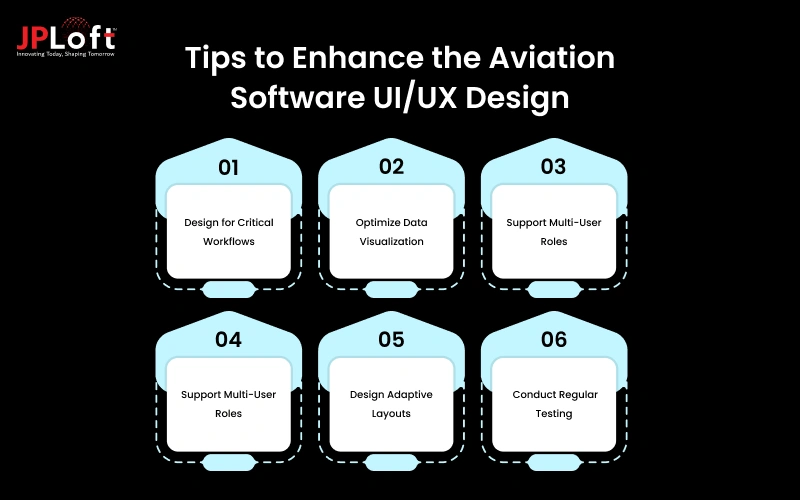
Below are a few tips discussed in brief:
[A] Design for Critical Workflows
Aviation platforms support time-sensitive and high-risk operations. The interface should guide users step-wise through essential workflows without confusion. Clear action buttons, logical task sequences, and visible status indicators help reduce operational errors. However, every critical process must feel structured and easy to complete efficiently.
[B] Optimize Data Visualization
Aviation systems handle large volumes of operational data. Presenting this information clearly is essential for quick decision-making. Moreover, use structured dashboards, meaningful icons, and prioritized data placement to improve comprehension. Avoid overwhelming users with excessive metrics and focus instead on clarity, hierarchy, and actionable insights.
[C] Support Multi-User Roles
Different aviation professionals interact with the system in unique ways. Pilots, maintenance teams, and operations managers require tailored interfaces. Designing customized views based on user roles ensures each user accesses only relevant tools and data. Thus, improving efficiency while minimizing distractions and unnecessary interface complexity.
[D] Use Readable Design
Readable design is critical in high-pressure aviation environments. Use clear typography, appropriate font sizes, and sufficient spacing between elements. Maintain strong visual contrast to ensure visibility in different lighting conditions. Hence, a clean and legible interface helps users process information quickly and make confident operational decisions.
[E] Design Adaptive Layouts
Aviation software may run on desktops, tablets, and specialized devices. Adaptive layouts ensure the interface adjusts smoothly to different screen sizes and resolutions. Flexible grid systems and scalable components maintain usability across platforms. Therefore, allowing users to access essential features without compromising clarity or functionality.
[F] Conduct Regular Testing
Continuous testing ensures the interface performs reliably in real-world aviation scenarios. Gather feedback from actual users to identify usability gaps and workflow challenges. Iterative improvements based on testing results help maintain efficiency, safety, and user satisfaction while keeping the software aligned with operational demands.

Why Design Your Aviation Software with JPLoft?
Designing aviation software requires precision, performance, and a strong understanding of operational workflows. JPLoft is an experienced aviation software development company that combines advanced design practices with modern technologies to deliver scalable solutions.
The team uses powerful frontend frameworks like Flutter, React, and Next.js to build responsive and high-performance interfaces across devices.
However, for strong backend development, technologies such as Node.js, Python, and .NET Core ensure secure and efficient system architecture.
By using cloud platforms including AWS, Microsoft Azure, and Google Cloud, JPLoft creates aviation systems that offer high availability and seamless data management. The integration of AI and Data Analytics further enhances predictive maintenance, operational monitoring, and real-time decision-making.
Moreover, with a strong focus on security, DevOps practices, and compliance standards, JPLoft ensures aviation software is safe, scalable, and future-ready. Thus, helping businesses improve efficiency, reduce risk, and drive long-term digital growth.
Conclusion
Aviation software plays a vital role in managing complex and safety-critical operations across airlines, airports, and service providers. As the industry continues to grow, the need for clear, reliable, and user-focused interfaces becomes even more important.
Thoughtful aviation software UI/UX design improves safety, simplifies complex data, enhances team productivity, and supports regulatory compliance. From structured dashboards and logical navigation to role-based access and adaptive layouts, every design decision directly impacts operational efficiency.
A systematic design approach that includes research, wireframing, prototyping, testing, and compliance review ensures the final system performs effectively in real-world conditions.
The cost to design aviation software typically ranges from $5,000 to $50,000 or more, depending on complexity and scope, making proper planning essential.
Investing wisely in UI/UX design reduces long-term operational risks and training costs. With the right strategy and technology partner, aviation businesses can build intuitive, secure, and future-ready systems that support sustainable growth.
FAQs
UI/UX design is important because aviation software supports safety-critical operations. Moreover, clear screens, structured workflows, and simple navigation help users understand information quickly.
A well-designed aviation software includes a clear dashboard, simple navigation, structured data organization, effective alert systems, strong visual hierarchy, and proper error handling.
You can improve aviation software interface design by focusing on critical workflows, organizing data clearly, supporting different user roles, using readable layouts, creating adaptive screen designs, and conducting regular usability testing.
The design timeline depends on project complexity. However, a basic design may take 2-3 weeks, whereas it can take longer for an advanced design, from 10 to 12 weeks.
The cost to design aviation software usually ranges from $5,000 to $50,000+. The final price depends on the number of screens, user roles, research needs, and overall system complexity.

Meet Yashwant, the CTO of JPLoft. With 18+ years of industry experience, he brings deep technical expertise and visionary leadership to complex digital challenges. From scalable software architectures to emerging technology implementations, Yashwant drives innovation that empowers businesses across diverse industries to build future-ready, secure, and high-performing digital solutions.





Share this blog