


Key Takeaways:
Customers judge a restaurant app on convenience, speed, accurate information, transparent pricing, and reliable fulfillment.
Easy navigation, accurate digital menus, secure payments, and live order tracking shape the experience, and each depends on solid integration with the POS and the kitchen.
Complicated checkouts, hidden fees, delayed orders, and weak support are the most common reasons customers stop using an app.
Expectations differ by restaurant type, dining occasion, and customer history, so feature priorities should differ too.
A focused first release with ordering, payments, and order tracking works better than a crowded one. Loyalty, personalization, and dine-in features can follow.
Surveys, reviews, and checkout analytics show which gaps to fix after launch.
A restaurant app can have an attractive design, appealing food images, and dozens of features. None of that matters when a customer finds unexpected charges at checkout, learns after paying that an item is unavailable, or waits for a delayed order without any updates.
Customers judge an app by how easily they get what they want and how reliably the restaurant delivers it. For restaurant owners and startups planning an app, that changes the brief. The goal is an app that stays accurate and dependable under real order volume, not only one that looks good in a demo.
Many of these expectations are decided behind the screen: menu and inventory sync, POS integration, payment handling, and kitchen-to-app status updates. That is why working with an experienced restaurant app development company matters. It helps you plan the technical foundation along with the interface.
This guide covers 12 customer experiences that matter, the frustrations that drive users away, and what to prioritize first. Each experience includes a build note on what it takes to deliver it.
What Do Customers Expect From a Restaurant Mobile App in 2026?
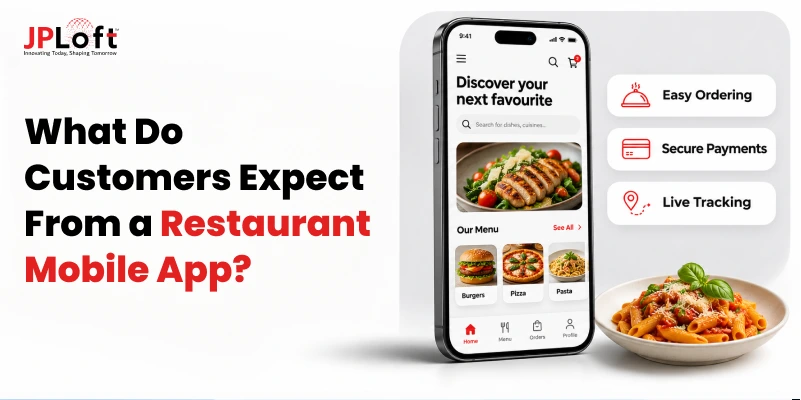
Customers open a restaurant app with a specific task in mind: find the menu, place an order, check on it, or book a table. Their expectations fall into six areas.
-
Easy Navigation: A user-friendly interface that helps customers browse menus, find information, and place orders without confusion.
-
Accurate Information: Updated menus, revised prices, item availability, and reliable restaurant details.
-
Convenient Ordering and Payments: A smooth ordering process with minimal checkout steps and secure payment options.
-
Flexible Dining Options: Convenient choices for delivery, pickup, and table reservations based on individual preferences.
-
Reliable Order Updates: Timely notifications, accurate order statuses, and dependable pickup or delivery estimates.
-
Personalized Experiences: Relevant rewards, tailored offers, and easy reordering of favorite meals.
An August 2026 U.S. study by Ipsos found that order accuracy, food quality, and correct serving temperature were the three most important aspects of mobile ordering at quick-service and fast-casual restaurants.
An app cannot cook the food, but it can protect accuracy. Live menu and inventory sync, careful handling of modifiers, and a direct connection to the kitchen all reduce order errors before they happen.
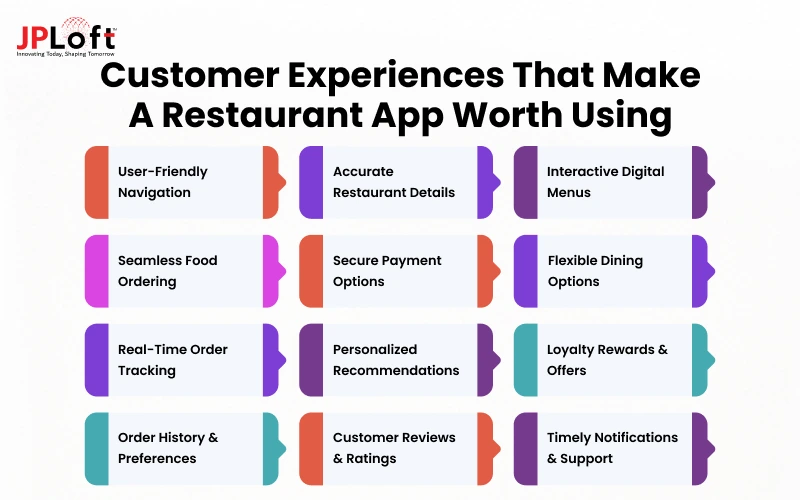
12 Customer Experiences That Make a Restaurant App Worth Using
Meeting customer expectations requires more than adding features. Each part of the experience, from browsing the menu to receiving an order, needs to work reliably.
The following 12 experiences explain what customers value and what restaurants need to consider when building them.
1. Simple, User-Friendly Design and Easy Navigation
A restaurant app should make the next action obvious, whether someone wants to browse dishes, find a branch, reorder lunch, or reserve a table.
Clear labels, readable text, familiar controls, and quick-loading screens matter more than decorative animations. A first-time visitor should find the menu easily, while a regular should reach saved favorites without searching.
Accessible contrast, screen-reader support, and buttons that are easy to tap help more customers complete their tasks comfortably.
How to Get It Right: Design the home screen around the three most common tasks (menu, reorder, order status) and test it against accessibility standards such as WCAG before launch.
2. Accurate Restaurant Information and Nearby Locations
Before visiting or ordering, customers want to be sure they have the right restaurant. They need accurate addresses, opening hours, contact details, directions, and the services each branch offers.
Multi-location restaurants should show location-specific menus and pickup availability instead of generic information.
Holiday hours, temporary closures, and ordering cutoff times matter just as much. An app that shows a branch as open after its kitchen has stopped accepting orders wastes the customer’s time and erodes trust quickly.
How to Get It Right: Manage hours, closures, and cutoff times per location from one admin dashboard, and use geolocation to suggest the nearest branch.
3. Digital Menus With Photos, Prices, and Customization
Customers should know exactly what they are buying before adding it to the basket. A useful digital menu has logical categories, realistic food photos, clear descriptions, current prices, and visible item availability.
Options for changing toppings, portions, or ingredients should show any extra charge immediately.
Dietary and allergen information must be accurate and appropriately qualified. If the kitchen cannot honor a selected customization, customers should find out before checkout.
How to Get It Right: Sync the menu with the POS so prices, modifiers, and sold-out items update in near real time, and let staff mark items unavailable per branch.
4. Quick Food Ordering and Hassle-Free Checkout
Ordering should feel easier than calling the restaurant or repeating details at a counter. Customers expect to adjust quantities, review their basket, choose pickup or delivery details, and confirm an order without unnecessary screens.
Guest checkout helps occasional visitors who do not want another account. Returning customers may appreciate saved addresses and favorite meals.
A final summary should show clearly what the customer has ordered, followed by a confirmation screen that the restaurant has received the order.
How to Get It Right: Offer guest checkout alongside phone or social sign-in, and send the order confirmation only after the order has reached the POS or kitchen system.
5. Secure Payments and Transparent Charges
Nobody likes discovering a fee just before paying. Customers want the subtotal, taxes, service charges, delivery fees, discounts, and optional tips displayed before they commit.
Cards and digital wallets such as Apple Pay and Google Pay make payment faster when they run through trusted providers. Dine-in guests may also expect to pay at the table and split a bill.
If a transaction fails or times out, the app should say whether the order went through and what to do next. That prevents confusion, duplicate payments, and unnecessary support requests.
How to Get It Right: Use a payment provider that supports applicable PCI DSS requirements, display the full price breakdown before payment, and implement transaction-status checks and safeguards against duplicate charges when payments fail or time out.
6. Flexible Pickup, Delivery, and Reservation Options
Not every meal fits the same routine. Someone heading home from work may want scheduled pickup, a family staying in may prefer delivery, and a guest planning dinner may need a table reservation.
Customers expect available options, realistic time slots, service-area checks, and clear confirmation details. Pickup instructions and reservation changes should be easy to find afterward.
Flexibility matters when choices reflect what a restaurant can actually fulfill, rather than options that disappear halfway through checkout.
How to Get It Right: Base time slots on kitchen capacity and delivery zones, and keep each order type (pickup, delivery, dine-in, reservation) as its own flow within the same app.
7. Real-Time Order Status and Accurate Delivery Updates
Once customers place an order, they want to know what is happening without repeatedly contacting the restaurant.
Useful updates confirm receipt, show preparation progress, announce pickup readiness, or explain when delivery is underway. Estimates should change when the kitchen or courier runs late, with a simple explanation where possible.
A reliable status message is more reassuring than a sophisticated tracking map displaying outdated information. Customers ultimately care about knowing when to expect their food.
How to Get It Right: Drive status changes from real kitchen and courier events (kitchen display, POS, or driver app) through push notifications, instead of timers that only guess.
8. Personalized Recommendations and Easy Repeat Ordering
A regular customer may want last Friday’s favorite meal again, not a long browsing session. Easy reordering should restore earlier choices while checking today's prices and item availability.
Relevant suggestions, such as a suitable side for a frequently ordered dish, can be helpful when they do not interrupt checkout.
Saved branch and preference settings also reduce repeated work. Personalization should feel optional and useful, with clear control over the information the app remembers.
How to Get It Right: Store order history and preferences from day one, since later AI-based recommendations depend on that data. Start with simple rules such as items frequently ordered together before adding machine learning.
9. Loyalty Rewards, Exclusive Offers, and Digital Coupons
A loyalty program earns attention when its value is immediately understandable. Customers should be able to see their points or stamps, know what reward comes next, and redeem it without decoding lengthy conditions.
Exclusive offers and digital coupons work best when eligibility, expiry dates, and minimum spends are clear before checkout.
A modest reward that applies reliably can feel more valuable than a generous promotion that fails. Loyalty should make returning pleasant, not turn ordering into a puzzle.
How to Get It Right: Tie rewards to the same order and payment records the POS uses so points post correctly, and validate coupon rules at the basket stage, not at payment.
10. Easy Access to Order History, Receipts, and Preferences
Sometimes the most useful account feature is finding a previous order or downloading a receipt. Customers should be able to review past purchases, track refunds, update delivery addresses, and manage communication preferences without contacting the restaurant.
A well-organized account section lets them manage their information and settle basic concerns on their own.
Customers should also control their personal information, with options to update or remove saved details and confidence that their data is handled securely.
How to Get It Right: Include account and data-deletion controls that meet privacy rules such as GDPR and CCPA, and store only the data the app actually uses.
11. Authentic Customer Reviews and Simple Feedback Options
A restaurant app’s value depends on the content customers share as well as its features. Real reviews, ratings, and food photos help users evaluate dishes and order with confidence, and photos from other customers can persuade someone to try an unfamiliar meal.
Apps should also offer simple ways to leave ratings, post-order reviews, or feedback. That lets customers share their experience and shows restaurants where to improve.
How to Get It Right: Limit reviews to verified orders and add moderation tools so ratings stay trustworthy.
12. Timely Notifications, Order Assistance, and Responsive Support
Customers appreciate a message when an order is accepted, a pickup is ready, or a reservation changes. They are less enthusiastic about constant promotional alerts.
Notification preferences should let people control marketing messages without losing essential transaction information.
When a payment, order, or delivery goes wrong, help must also be easy to reach. Clear contact options, realistic response expectations, and a sensible escalation path matter more than a chatbot that cannot resolve the problem.
How to Get It Right: Separate transactional and promotional notification channels, and route support requests with the order details attached so agents do not have to ask for them.
How Do Customer Expectations Change Across Restaurant Experiences?
Expectations vary with the restaurant type, the dining occasion, and how familiar the customer is with the app. Someone ordering a quick lunch prioritizes speed, while a guest planning a special dinner values detailed information and reservation flexibility. The table below also shows how to support each case.
|
Restaurant Type |
Customer Expectations |
How to Support It |
|
Quick-Service Restaurants |
Fast ordering, easy reordering of favorite meals, shorter waiting times, and accurate pickup estimates. |
Saved orders, one-tap reorder, and pickup times tied to kitchen load. |
|
Full-Service Restaurants |
Convenient table reservations, real-time availability, detailed menus, dietary information, and reliable booking confirmations. |
Reservation and table management integration, with QR ordering and pay-at-table as options. |
|
Delivery-Focused Restaurants |
Transparent delivery charges, realistic arrival estimates, timely order updates, and accessible support for missing or delayed orders. |
Delivery zones and fee rules, live courier tracking, and in-app support for order issues. |
|
Multi-Location Restaurants |
Nearby branch information, accurate operating hours, location-specific menus, and updated item availability. |
Per-branch menus, hours, and inventory managed from a central admin panel. |
|
First-Time Customers |
Clear menu descriptions, transparent pricing, authentic customer reviews, and intuitive navigation for confident decision-making. |
Guest checkout, a clean menu layout, and verified reviews. |
|
Returning Customers |
Saved preferences, quick reordering, personalized recommendations, and loyalty rewards that make repeat orders more convenient. |
Order history, saved preferences, and a loyalty engine linked to orders. |
What Common Restaurant App Problems Make Customers Stop Using an App?
A feature may look good in a product demo yet fail during a real order. The following problems create friction at different points of the customer journey.
They can contribute to abandoned purchases, complaints, lower repeat use, or app removal, although the outcome depends on severity and frequency.
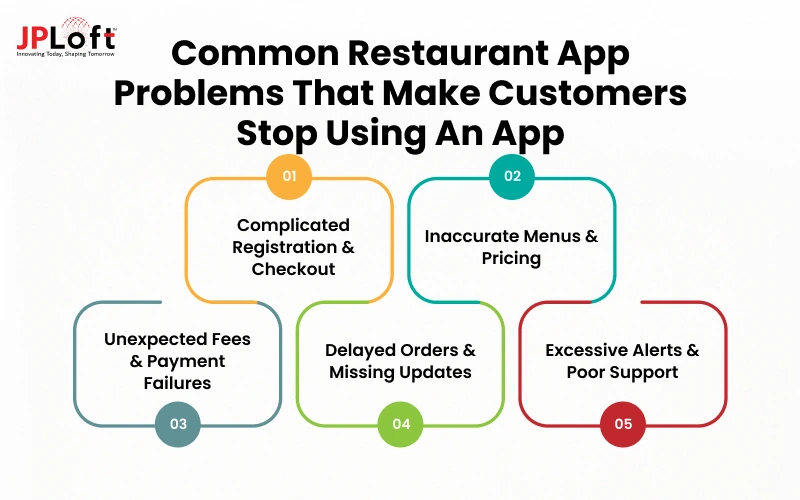
1. Complicated Registration and Lengthy Checkout
Requiring a new password, phone verification, and several profile fields before someone can buy a sandwich interrupts a straightforward task.
Extra screens and unclear buttons add friction, especially for first-time users. Measure where people leave the checkout flow and simplify the steps that do not support ordering or security.
2. Outdated Menus, Incorrect Prices, and Unavailable Items
A customer may spend time customizing a meal only to discover it is unavailable at the end. Inconsistent pricing between the menu and cart has a similar effect.
Accurate inventory, branch-specific menu controls, and visible substitutions help prevent disappointment before it reaches the kitchen.
3. Unexpected Fees and Payment Failures
An unexplained service fee at the last screen changes the perceived value of the entire order. Payment problems are worse when an app does not state whether money was charged.
Transparent totals, payment-status handling, and clear recovery steps reduce uncertainty and help prevent repeated transactions.
4. Delayed Orders and Missing Status Updates
A promised pickup time means little if the customer arrives and waits with no update. Likewise, a delivery estimate that never changes after a delay can feel misleading.
Connect status messages to actual kitchen and delivery events, and give customers a way to get help when the estimate is no longer realistic.
5. Excessive Notifications, App Crashes, and Poor Support
Promotional overload can make essential messages easy to miss. Crashes during checkout, frozen baskets, or a support channel that never responds turn a convenient tool into an additional problem.
Track technical stability alongside support response quality, and prioritize failures that block customers from completing or resolving an order.
How Can Restaurants Find Out What Their App Customers Actually Want?
Expectations vary by customer, occasion, and location. To find out what guests value, listen at the moments that matter: when they browse, order, collect food, dine in, and seek help.
Compare what people say with what they actually experience, without mistaking a few vocal reviews for the entire customer base.
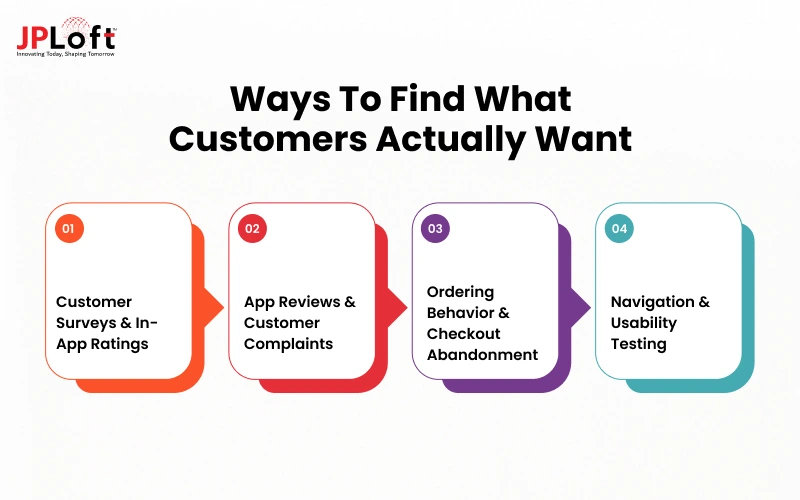
1. Collect Customer Feedback Through Surveys and In-App Ratings
Ask short, specific questions at appropriate moments, such as after a completed pickup or a support interaction. “Was your pickup time accurate?” produces more actionable information than “Do you like our app?” Include an optional comment field, but avoid interrupting checkout with surveys.
2. Analyze App Store Reviews and Customer Complaints
Group feedback by recurring issues: pricing, navigation, missing items, delivery estimates, payments, or support.
Separate one-off preferences from problems reported repeatedly, and note which restaurant locations or app versions are affected. Reviews can reveal frustrations, but they are not a representative sample of all customers.
3. Track Ordering Behavior and Checkout Abandonment
Look at the journey from the menu view to the basket, checkout, payment, and the confirmed order. Monitor drop-off at each stage alongside payment errors, item availability, crash rates, and completed-order success.
A high abandonment rate is a clue, not a diagnosis: test whether cost, forced registration, technical failure, or something else explains it. Use privacy-conscious analytics and obtain consent where required.
4. Test App Navigation and Ordering Experiences With Real Users
Give a small group realistic tasks, such as ordering a customized meal for pickup, finding a receipt, or changing the selected branch, and watch where they hesitate. Include different device sizes and users with accessibility needs.
Then look for repeated patterns: guests arriving before pickup orders are ready, baskets abandoned after delivery fees appear, or confusion over a particular menu category. Fix the gaps that affect the most orders first, and confirm that each change makes that moment easier.
Turn Customer Expectations Into Better Restaurant App Experiences With JPLoft
Customers do not download restaurant apps to explore features. They want a quick way to browse menus, order, pay, and receive their food without delays or confusion. Meeting that expectation takes a well-designed interface and reliable systems behind it.
At JPLoft, we build customer-focused mobile apps for restaurants, covering intuitive navigation and personalized ordering, secure payment integration, loyalty rewards, and live order updates.
Our restaurant app developers also integrate apps with POS and inventory systems, build admin dashboards for managing menus and orders, and implement AI-driven recommendations when the business is ready for them.
Whether you are planning a single-location ordering app or a multi-location platform, our restaurant app development solution can help you plan the right feature set, starting with the launch priorities above.
Ready to create a restaurant app that meets your customers' expectations? Connect with JPLoft to discuss your app idea and customer experience goals.
Conclusion
A restaurant app is only as useful as the experience it delivers. Customers expect more than attractive designs and advanced features. They want accurate information, effortless ordering, transparent pricing, reliable updates, and convenient ways to interact with their favorite restaurants.
Understanding these expectations also means recognizing what frustrates customers, from complicated checkouts to unexpected charges and delayed orders. Customer feedback, ordering behavior, and usability testing can help restaurants identify these issues and make meaningful improvements.
Ultimately, a successful restaurant app should make every customer interaction simpler, more reliable, and worth repeating. By focusing on what customers genuinely value, restaurants can create digital experiences that build trust, encourage repeat orders, and support lasting customer relationships.
FAQs
No. A delivery customer may care most about ordering, charges, and arrival updates, while a dine-in guest may prioritize reservations, location information, and special requests. Core expectations such as clarity, accuracy, accessibility, and reliable support apply across different models.
Customers prefer restaurant apps for convenient ordering, personalized offers, loyalty rewards, and easy reordering. Features like saved preferences, secure payments, and real-time updates simplify the ordering process while providing direct access to restaurant support.
They can encourage repeat use when the value is clear and the offer is relevant. They are less useful when rewards are difficult to redeem, or promotions overwhelm customers. Deliver accurate orders and a smooth checkout first; then use feedback and repeat-order behavior to decide how much to invest in personalization.
Repeat use often follows a consistently good experience: customers can find their favorites, see accurate prices, complete an order easily, and trust the restaurant to deliver what was promised. Relevant rewards may help, but dependable service and convenient reordering give people a practical reason to come back.
Use a combination of short post-order surveys, complaint themes, successful-order rates, checkout completion, repeat ordering, refund and error rates, and pickup or delivery timeliness. Segment results by order type and location. A rising app rating is encouraging, but it should be interpreted alongside whether customers actually complete orders accurately and on time.

Conor has 10+ years of experience in software development, application engineering, solution design, and UX/UI. He has worked across digital products in restaurant technology, food and grocery delivery, healthcare, media, streaming, and social platforms, bringing both technical and user-experience perspectives to product development. His experience working with large organizations and growth-focused digital products helps businesses translate complex requirements into practical, user-focused solutions.


Share this blog