


Key Takeaways:
Guidebook, Whova, Swapcard, Bizzabo, and Yapp are among the leading event apps to plan successful events.
The best event app depends on your event type, audience size, budget, and long-term business goals.
Compare features, pricing, integrations, and user reviews when looking for the best app for events.
Every event app on this list covers quality customer support, intuitive navigation, and a clear UI/UX interface for a great event experience.
Choose a platform that can scale with your business and support future event growth without increasing costs.
The event management industry is evolving rapidly, with more businesses and attendees relying on smart applications to register, check in, network, and enjoy live events with ease.
Choosing the best app for events helps businesses create a seamless experience for attendees while simplifying event planning and management.
Top apps for events combine user-friendly features, efficient event management tools, and engaging experiences that support successful events from start to finish.
Some event apps are built for virtual and hybrid events, while others are better suited for conferences, trade shows, universities, sports events, or music festivals.
Whether you're hosting a corporate conference, product launch, fundraising event, or community gathering, selecting the right platform can directly influence your event's success.
This guide explores the best event apps available in 2026, highlighting their features, strengths, and ideal use cases to help you choose the right solution for your business.
Leading Event Management Apps You Can't Miss in 2026
In today's mobile-first world, the top event applications help businesses simplify event planning and improve attendee engagement at every stage.
Here is the list of the best apps for event planners and businesses that stand out because of their features, ease of use, and user experience.
1. Guidebook
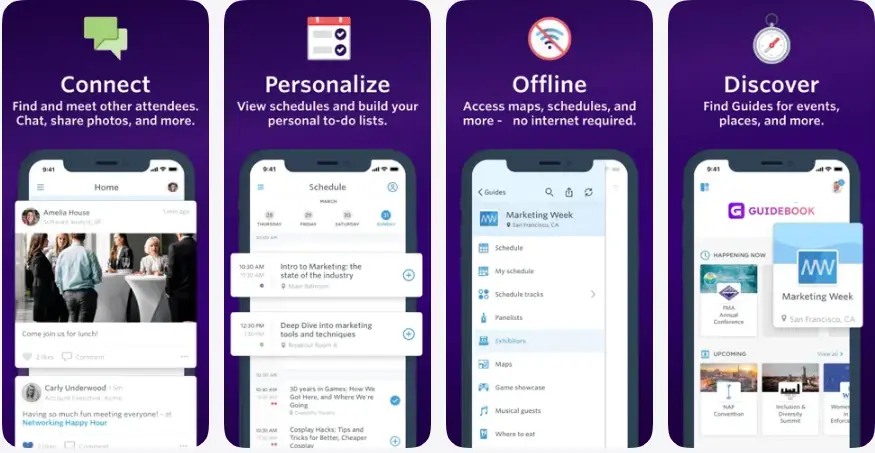
Guidebook is one of the best event planning apps, offering businesses a platform to build customized mobile apps for different types of events, such as conferences, universities, trade shows, and corporate events.
Event attendees can browse sponsor or speaker details, use offline maps to find the location, and use in-app chat and social features to connect with fellow attendees.
Guidebook has 1 Million+ downloads on the Play Store, with a 4.7 rating on the App Store.
Best For:
-
Corporate conferences
-
Universities and educational events
-
Trade shows
-
Community events
-
Business seminars
|
Pros |
Cons |
|
Reliable platform for medium and large events with no hidden fees or pricing. |
It includes limited flexibility for highly customised workflows. |
|
Push notifications, live content updated through the app. |
This app is expensive if you only use it for a one-off event. |
|
Supports a drag-and-drop interface to develop the design and features. |
Lack of connectivity issues; users have to log in and log out during the event. |
|
Supports unlimited attendee participation without compromising app performance. |
The user interface can feel cluttered, making it difficult for users to find information quickly. |
2. Whova
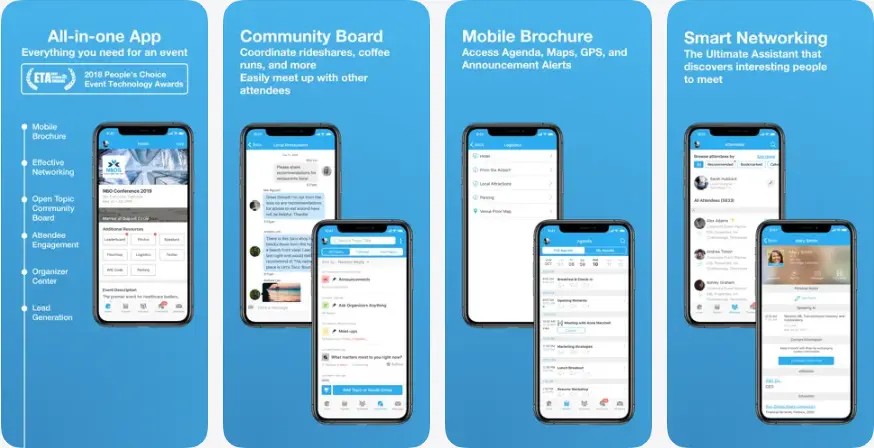
One of the top names in the best event mobile apps list includes Whova. This event app has been extremely helpful for large-scale event planning. It delivers smooth communication and allows in-app messaging during the event.
On the Play Store, the app has 1 Million+ downloads and a 4.8 rating on the App Store. As the best event planning app, it supports virtual and hybrid events for businesses hosting audiences across different locations. Its engagement tools encourage participants to stay active throughout the event.
Best For:
-
Large business conferences
-
Networking events
-
Corporate events
-
Hybrid events
-
Community gathering
-
Trade show
|
Pros |
Cons |
|
Makes it easy for attendees to join discussions and view event agendas. |
Pre-filled attendee information may affect user privacy if not managed properly. |
|
Allows offline mode access to event location, profile reading of performer and other information. |
Excessive notifications from the app impact users’ event experience and lead to frustrations. |
|
Secures attendees' private information while they enjoy the event. |
The app features are basic, lacking advanced reporting and analytics capability. |
|
The app is free to use for browsing events, locations, and advertisements. |
It limits customisation with the UI/UX design features of the app. |
3. Cvent
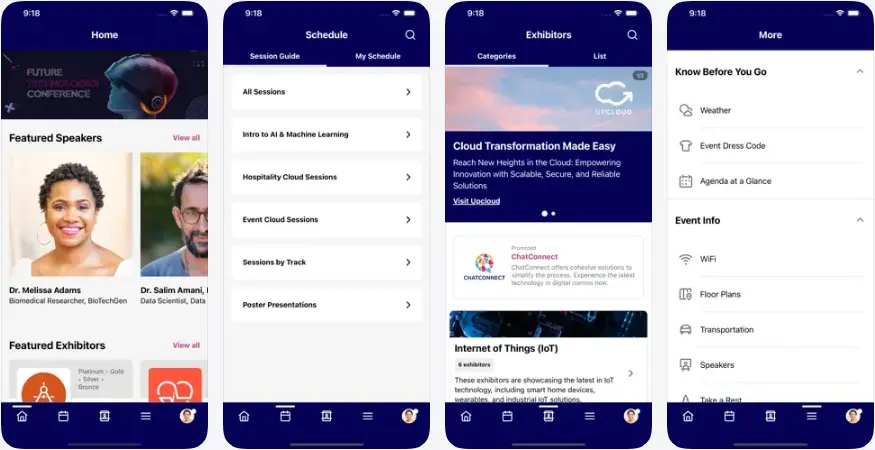
Cvent is one of the best event management apps, offering AI-powered assistance to help businesses and startup founders plan, execute, and manage conferences, meetings, and other large-scale events.
The app has 1 Million+ downloads on the Play Store, with a 4.8 rating on the App Store. The platform helps businesses manage virtual and hybrid events by offering everything from venue sourcing and user registration to an event app for attendees.
Best For:
-
Enterprise conferences
-
Corporate meetings
-
Annual business events
-
Hybrid conferences
-
Multi-day events
|
Pros |
Cons |
|
It helps businesses handle all the event planning and execution all under one roof. |
This app is expensive for smaller and medium businesses. |
|
The app also allows booking venues and hotels for events. |
New users may need time to understand and navigate all the available features. |
|
It ensures a simple setup process for users to register. |
The app features may freeze or crash during live events, affecting the overall experience. |
|
Enables easy communication between organisers and attendees. |
Users are finding it difficult to take notes directly during a live event. |
4. Yapp
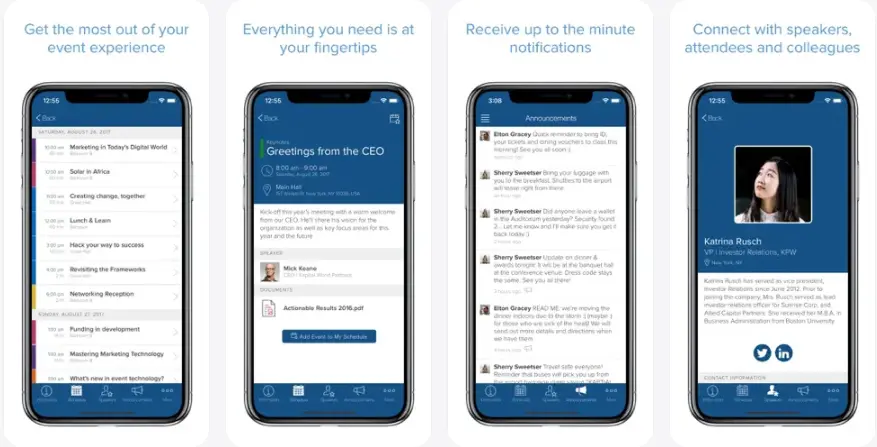
Businesses looking to build an event app for small event hosting with a limited budget must use the Yapp mobile event app. Yapp is a no-code event app builder that helps businesses create a branded event experience without technical expertise.
It includes event schedules, announcements, attendee messaging, and clear speaker information. The app has achieved 500K+ downloads on the Play Store and a 3.6 rating on the App Store.
Its affordable pricing and simple setup make Yapp a popular option for organizations looking to launch an event app quickly.
Best For:
-
Small business events
-
Community gatherings
-
School events
-
Internal company meetings
-
Local conferences
|
Pros |
Cons |
|
Yapp app is easy to use, allowing users to access additional functions more easily. |
Missing important features like live polls and surveys, impacting users’ experience. |
|
Yapp allows offline access to schedules, speakers’ bios, and event agenda. |
Not suitable for large events or multiple event connectivity. |
|
Businesses find it easier to update, edit, and make any changes. |
Limited customisation can reduce user retention and business profitability. |
|
Yapp allows businesses to push real-time notifications and schedule change alerts. |
It allows per-app pricing, which can be expensive for businesses launching multiple events. |
5. Eventee
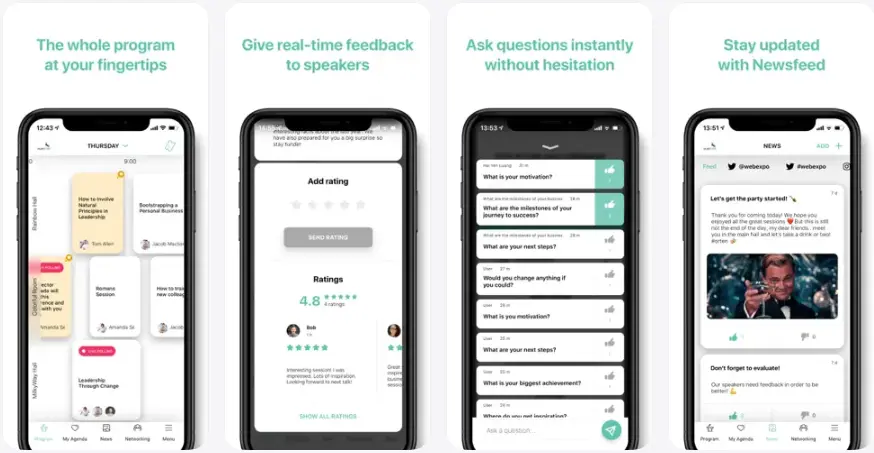
Eventee is one of the best event apps for conferences, corporate meetings, agency events, and nonprofit events. It supports in-person, hybrid, and virtual events, allowing attendees to participate from anywhere.
With 100K+ downloads on the Play Store and a 4.9 rating on the App Store, this app has become one of the leading event management apps.
Businesses can create polls, live Q&A sessions, surveys, gamification, and a newsfeed to keep attendees engaged throughout the event. These features make Eventee one of the top event planning apps for interactive experiences.
Best For:
-
Mid-size conferences
-
Workshops
-
Business seminars
-
Employee training events
-
Corporate meetings
|
Pros |
Cons |
|
It allows easy digital updates to event schedules. |
This app lacks social interaction features during the event. |
|
Sends real-time notifications, schedule updates, and event changes to all attendees at once. |
The initial onboarding step is hectic with multiple emails required to log in. |
|
It allows cross-platform functionality across mobile, website, or web app. |
Complicated registration process as it does not support a multi-level entry ticket system. |
|
Supports 10+ languages for attendees to enjoy the event from every nation. |
Higher prices for single or one-time events for businesses. |
6. EventMobi
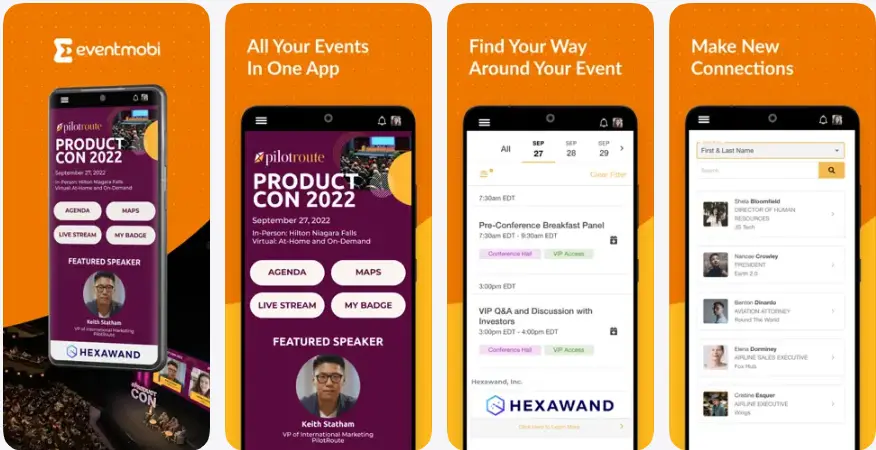
Corporate events are looking for a platform that offers a smooth event experience, transparent pricing, and a suitable platform to conduct virtual programs.
EventMobi has 100K+ app downloads on the Play Store and good ratings on the App Store, suitable for conferences, employee training, and internal company meetings.
Planners can manage everything through EventMobi's dashboard, including building the event website, opening registration, managing speakers and agendas, handling onsite check-in and badge printing.
Best For:
-
Professional event teams
-
Mid-to-large scale conferences
-
Training events
|
Pros |
Cons |
|
It ensures simple and clear navigation for attendees. |
It does not give access to offline app functions, creating problems in large conference rooms with uncertain Wi-Fi. |
|
The app delivers fast-responsive and mobile-friendly assistance even during peak times of the event. |
Challenging to arrange event sessions in the order the business wanted. |
|
It offers flexible payment options for businesses: either pay per event or subscribe annually. |
The app possesses a lower rating than other competitors like Eventee or Whova. |
|
Provides real-time notifications and timely updates for a seamless event experience. |
New attendees may need time to become familiar with the platform. |
7. Swapcard
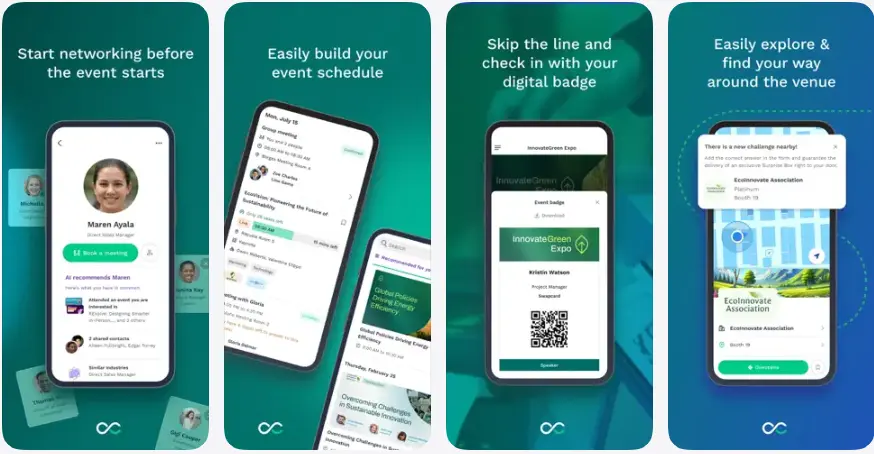
Among the best mobile event apps for conferences, Swapcard stands out for its AI-powered networking and attendee engagement features. It has 100K+ downloads on the Play Store and a 4.6 rating on the App Store.
Businesses organizing large-scale events often choose Swapcard because it improves attendee engagement and helps exhibitors generate high-quality leads through top event management apps.
Best For:
-
Trade shows
-
Business conferences
-
Networking events
-
Exhibitions
-
Hybrid events
|
Pros |
Cons |
|
AI-powered networking helps attendees connect with relevant professionals based on their interests. |
Premium pricing may not suit startups or small businesses. |
|
Supports virtual, hybrid, and in-person event management. |
Setting up the platform requires significant time and effort. |
|
Provides detailed event reports to businesses, event planners, or organisers. |
Some advanced integrations require technical support. |
|
Handles user registration, ticketing, and live streaming through a single code. |
The analytics dashboard lacks in-depth reporting metrics. |
8. Bizzabo
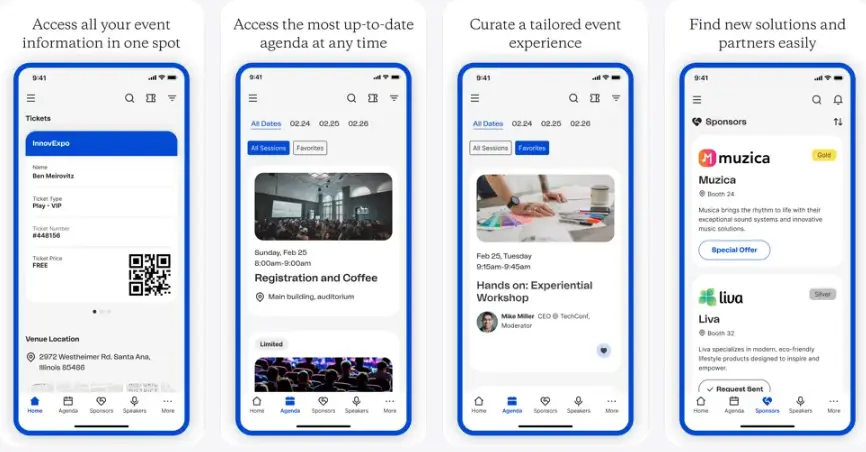
Bizzabo is a modern event experience platform that helps businesses organize, promote, and measure event success. It combines registration, networking, marketing, and attendee engagement into one easy-to-manage platform.
The Bizzabo app has 100K+ downloads on the Play Store and has a 4.9 rating on the App Store. Its advanced analytics provide actionable event insights, making it a preferred choice for marketing and corporate teams looking for the best event mobile apps.
Best For:
-
Corporate conferences
-
Marketing events
-
Product launches
-
Business networking
-
Hybrid events
|
Pros |
Cons |
|
This is one of the best event check in apps, easing front-desk duties with easy check-ins and badge printing. |
The premium plans are very expensive for small and medium-sized businesses. |
|
It can easily integrate with CRM systems. |
Restricts editing and customization of UI/UX and landing pages. |
|
It ensures detailed post-event performance reports within the app. |
Setting up the initial complex event can be lengthy and time-consuming. |
|
Provides a revenue dashboard to track event performance and ROI. |
Organisers may need to make manual updates in multiple sections. |
9. Sched
Sched is a simple event scheduling platform designed for conferences, workshops, and educational programs. It allows organizers to create detailed agendas while attendees build personalized schedules directly from the mobile app.
Sched has 100K+ downloads on the Play Store and has a 4.8 rating on the App Store. Its clean interface makes it easy for businesses to manage speakers, sessions, and event updates without unnecessary complexity.
Best For:
-
Conferences
-
Workshops
-
Educational events
-
Festivals
-
Community events
|
Pros |
Cons |
|
Offline caching keeps schedules accessible even without an internet connection. |
Automated emails may be delayed or fail to reach attendees. |
|
The app offers a clear and transparent upfront pricing structure. |
It provides limited support for networking with exhibitors or industry experts. |
|
It enables personalized schedules for attendees. |
Organisers have limited access to attendee feedback collections. |
|
It enables businesses to explore free webinars, live demos, and trials. |
This app is not suitable for entertainment events. |
10. Accelevents
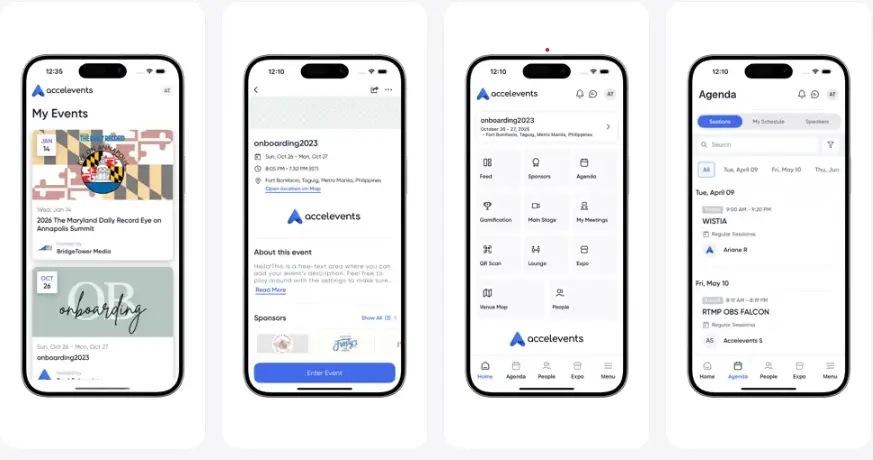
If you are looking for the best event planning app for registration, badge printing, check-in, and lead capture, Accelevents is a platform worth considering.
The platform has 10K+ downloads on the Play Store and a 4.0 rating on the App Store, covering a wide range of events, including conferences, trade shows, and enterprise-related events.
This app is best suited for businesses looking to organise events with a single login and database management. At the same time, it also delivers a seamless experience for attendees, making it one of the best mobile event apps.
Best For:
-
Hybrid team
-
Virtual conferences
-
Fundraising events
-
Corporate conferences
-
Trade events
|
Pros |
Cons |
|
It is easier to connect with CRM tools like HubSpot and Salesforce to share attendee data with the system. |
Some features and landing pages have a confusing navigation flow. |
|
Supports virtual, hybrid, and physical event experience. |
Higher risk with sharing personal information with third-party applications. |
|
Delivers smooth user support by resolving queries within minutes. |
The session agendas and notes disappear as soon as the event ends. |
|
Offers an intuitive interface for smooth event management. |
During live events, it may require multiple logins and registration steps, disrupting the user experience. |
How to Choose the Best Event Management Apps?
Planning to build the best event management apps, but confused about which one stands out for your business? Sometimes, having a wide range of options can be confusing.
You need to clear your requirements first, and then choosing an event app will not be as confusing. To make this easy, here are a few important steps to help you find the best event app ideas.
1. Assess Your Event Needs
No business is the same; likewise, no event expectations are the same. Choosing the best apps for event planners requires identifying expectations for a particular event app. It can be anything, including,
-
Increases registration
-
Increases networking opportunities
-
Increases customer retention
-
Scales for small- to large-scale events
-
Need an all-in-one app, or a single platform for a specific event
Identifying these expectations before choosing the best event planning apps helps to make a cost-effective decision, streamline event operations, and meet growing attendee expectations.
2. Compare Smart Features
Compare the smart features offered by top rated mobile event management apps. Some platforms focus on ticketing, while others provide AI networking, analytics, or hybrid event support.
-
Assess whether the right set of features aligns with target consumers' requirements.
-
Give priority to features such as easy registration, simplified check-ins and QR codes, and offline map accessibility and event details when looking for the best event check-in app.
-
Look for push notifications, live streaming, analytics, and AI-powered recommendations if they fit your business needs.
The right set of features must improve attendees' experience and drive organised event planning for organisers.
3. Compare Pricing Models
Many best mobile event apps follow different pricing models. Instead of choosing the cheapest or the most expensive option, compare the features, support, and scalability before making a decision.
-
Find out what features are included in the event app, such as ticketing, dashboard management, and customer support.
-
Features like custom branding, live streaming, CRM integrations, or premium support include higher charges.
-
Choose a pricing model that allows business scalability in the future.
Review the complete pricing structure before making a decision. A smart event management app development company can help you compare the right pricing model.
4. Consider App Integrations
If you are planning to add integrations to your event app, make sure to choose leading event apps that allow third-party integration or advanced features to easily connect with the existing system.
-
By integrating with existing systems, it helps to save time, reduce operational costs, and provide a more connected experience for attendees.
-
It helps to improve the operational efficiency of your business with the current system.
-
Allows better use of resources.
5. Read Reviews and Ratings
Before finalising the top event management apps, make sure to read reviews and ratings of the application. Marketing pages usually highlight only the strengths of a platform. User reviews often reveal real experiences, including common challenges and customer support quality.
-
Compare real user satisfaction across different event apps.
-
Understand common limitations before investing.
-
Read reviews from businesses that organize events similar to yours. Their feedback can help you identify potential issues before investing.
6. Test Usability for Attendees and Organisers
At last, make sure to test your app for both event organisers and attendees. It helps to understand how the app works from both the user perspective and the business profit view.
-
The feature must ensure clear navigation for attendees to explore the app and easy sign-up for registration.
-
Organisers must be able to track event reports, attendee engagement, and upcoming future events.
-
Before making your final choice, test the app with final users and business owners. Both must be able to use it and deliver reviews.
Conclusion
Choosing the best event apps can make a big difference in how successfully you plan and manage an event. The best platform is not always the one with the most advanced features. Instead, it should match your event goals, budget, audience size, and future growth plans.
The best apps range from Whova and Swapcard to Guidebook and Cvent, which offer reliable event management tools.
There is a wide range of event apps, but which one suits you best? This decision depends on comparing features, pricing, integrations, usability, and real user reviews to find the right fit for your business.
Whether you choose an existing platform or build your own, investing in the best app for events can help you deliver better events, improve attendee satisfaction, and create lasting business value.
FAQs
Some of the top-rated mobile event management apps include Whova, Bizzabo, Guidebook, Yapp, and Cvent. These apps offer interactive UI/UX interfaces, smooth payment methods, customization for information, and popular feature sets.
Leading event apps can generate revenue from banner ads, sponsored sessions, gamification interactions, and running social media ads to attract qualified leads.
Yapp, Eventee, Sched, and Guidebook are the best platforms for small conferences or events, managing around 300 attendees comfortably.
Best mobile event apps must include simple registration, a clear CTA, an interactive interface with gamification, live polls and review interactions, AI -powered event recommendations, and in-app messaging for better interaction.
Top event apps include intuitive navigation, a clear UI/UX interface, simplified user registration, and instant updates about the event schedule, timing, and location.

Kris Jacobs brings 20+ years of experience in digital product strategy, user-focused design, and solving complex product challenges. She has worked across on-demand services, travel, entertainment, sports, insurance, education, and service marketplaces, including handyman, dog-walking, courier, event-management, and equine platforms. Her focus is on shaping practical, scalable digital experiences that align user needs with business goals and long-term product growth.



Share this blog