



Nearly 2 billion websites exist online today. Only a fraction, around 400 million, are actually active.
The rest? Abandoned, broken, & forgotten. Because most websites fail before a single line of code is written.
You know why? Not because of bad design or a bad developer. But because nobody planned to build those websites properly.
Every website has different needs. A startup wants speed. Something lives in weeks, not months.
An enterprise wants scale, security, and systems that connect with a dozen other tools without breaking.
Mix up the approach, and you’ll end up burning budget on features nobody uses or building something too weak to grow.
This website development guide cuts through the confusion, the process, the benefits, and the real cost of building a website, so you know exactly what you’re getting into before you spend a dollar on it.
Quick Answer: What Is Website Development?
Website development is the process of building, coding, and maintaining a website so it actually works, not just looks good.
It’s everything that happens behind the scenes.
Website development is not the same as web design. Design is how a site looks: colors, layout, fonts. Development is how a site works — code, databases, functionality.
Website development usually happens in three layers:
Front-end Development: What users see and interact with (buttons, menus, forms)
Back-end Development: The engine running behind the scenes (databases, servers, security)
Full-stack Development: Handling both ends, front and back, in a single, seamless workflow
From a simple landing page to a full-scale enterprise platform, website development is what turns your idea into something people can actually visit, click, and use.
Should You Invest in Website Development?
Short answer: Yes.
There are several reasons to invest in website development; one of the top ones is a growing market.
-
The global web development market is expected to grow at a CAGR OF 9.4% between 2026 and 2035, reaching close to $15.05 billion by the end of the decade.
-
North America is leading the market, holding over 40.8% of the global share and generating roughly $24.95 billion in revenue.
-
Front-end development led all development types, making up 38.4% of the global market.
-
Web applications captured the largest share by platform type, at 52.1%.
-
E-commerce websites formed the largest application segment, at 34.9%.
-
IT and software companies made up the biggest end-user segment, contributing 44.7% of the market.
-
Desktop-first websites led the device compatibility segment with 42.2%.
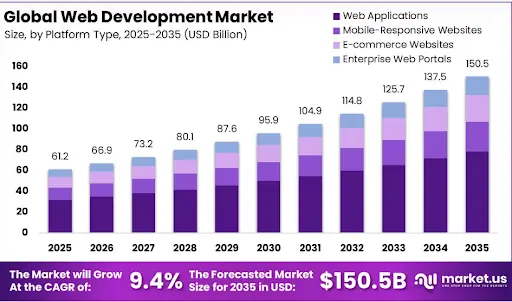
Types of Websites Businesses Can Build
If you are looking to build a website, one of the major questions is “what should you build?”
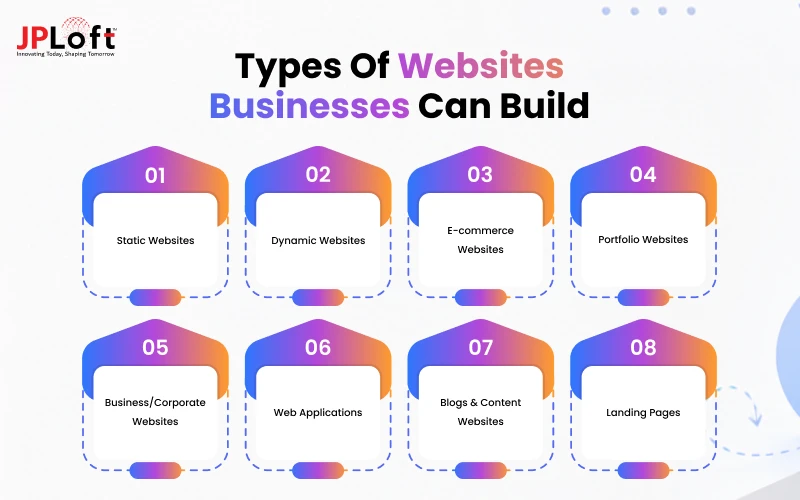
Here's a breakdown of the most common types:
Type 1: Static Websites
Static websites are actually fixed pages with no moving parts; what you see is what everyone sees. Fast to build, cheap to host, and perfect for portfolios, brochures, or a simple “coming soon” page.
Type 2: Dynamic Websites
Content that changes based on who’s visiting, what they click, or where they’re browsing from. You can offer personalized recommendations, live dashboards, and login-based experiences.
Type 3: E-commerce Websites
If you have an eCommerce business, you should sell products online.
With a website, you can offer your users easy access to your business, let them shop anytime, and offer streamlined payment, all working together in real time, 24/7.
Type 4: Portfolio Websites
A visual-first space designed to showcase work, photography, design, writing, or case studies. Minimal distractions, maximum focus on the work itself.
Type 5: Business/Corporate Websites
You should have a corporate website. It needs to build credibility, explain services clearly, and earn a visitor’s trust within seconds of landing.
Type 6: Web Applications
More than a website, an actual platform people use. Booking systems, project dashboards, or anything users log into and interact with regularly.
Type 7: Blogs & Content Websites
Built around publishing articles, guides, and updates that rank on Google and keep readers coming back. Ensure you have SEO-optimized content that’s always evolving as per user demands.
Type 8: Landing Pages
One page, one goal. No navigation menus, no distractions, just a focused push toward a single action, like signing up or booking a call.
Each of these falls under a different type of website development, and each comes with its own tech stack, timeline, and cost.
Picking the right one from the start saves time, money, and a lot of unnecessary rebuilding later.

Website Development Process: Step-by-Step
Wondering how to build a website? Every solid website goes through extensive market research, UI/UX design, development, testing, and a lot of back-and-forth before it ever goes live.
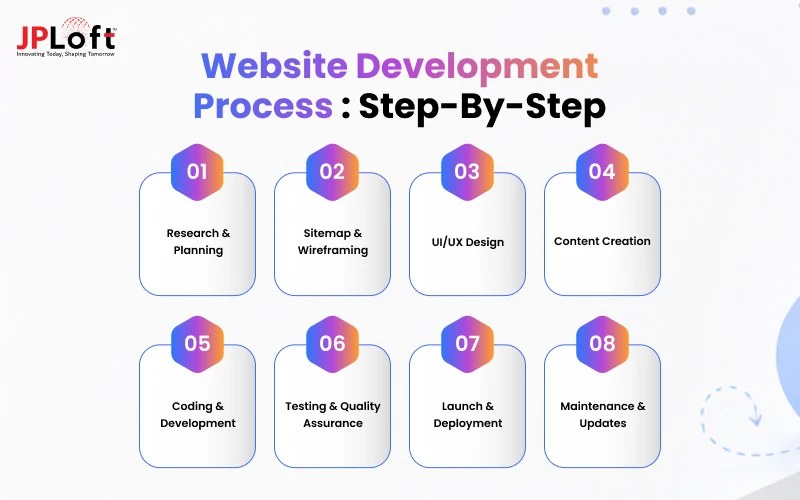
Here’s what that process actually looks like:
Step 1: Research & Planning
Every great website starts with a question: who are we actually building this for?
There should be no guesswork, only in-depth market research, including target audience, competitor analysis, goals, and budget.
This is the stage most people rush through and pay for later.
If you skip proper planning, you’ll end up redesigning things halfway through and adding up features nobody asked for. Missing the ones users actually need.
Good planning doesn’t slow things down. It speeds everything up. Because once you know exactly what you’re building and why, every decision after this becomes faster, cheaper, and a lot less painful.
Step 2: Sitemap & Wireframing
Before anything looks pretty, it needs to make sense.
That’s what a sitemap does, and it maps out every page. Every connection and every path a visitor might take from the homepage to checkout.
Then comes the wireframe, a bare-bones sketch of the layout. No colors, no branding, just boxes and structure.
It's the foundation everything else gets built on.
Boring to look at? Maybe.
But this is where confusing navigation gets fixed before it becomes a permanent problem baked into the final design.
Step 3: UI/UX Design
This is where the website finally starts looking like a website.
Colors get chosen, typography gets picked, layouts take shape. But good design isn’t about looking nice; it’s about feeling obvious.
Your user should find what they need in just seconds, and the checkout button should be clearly visible. UI handles the look, whereas UX handles the feel.
Together, they decide whether someone stays on your site or bounces straight back to Google, never to return.
Step 4: Content Creation
A beautiful website with bad content is still a bad website.
When looking for a website development process, you should not ignore good content. After all, words matter, images matter, and videos matter.
This step brings every empty box from the wireframe to life, with headlines that grab attention, copy that builds trust, and visuals that truly reflect the brand.
Great content doesn’t just inform. It persuades. It’s the difference between a visitor reading your homepage and immediately leaving, or reading it and thinking
It's the difference between a visitor bouncing off your homepage immediately and staying long enough to reach out and start a conversation.
Step 5: Coding & Development
Now the real building begins.
Designs get translated into actual, functioning code. Buttons start working. Forms start submitting. Pages start loading.
Front-end developers bring the visual side to life. Back-end developers build the engine running quietly underneath — databases, servers, security.
This is the longest, most technical stage of the entire process.
Slow and steady wins here.
Rushed code today means broken features, security holes, and painful fixes tomorrow — usually right after launch, when it's most expensive to repair.
Step 6: Testing & Quality Assurance
Before the world sees your website, it needs to survive a few rounds of controlled chaos.
Every link gets clicked. Every form gets submitted. Every button gets pushed — repeatedly, aggressively, on purpose.
Different browsers. Different devices. Different screen sizes.
The goal? Break it before your users do.
Bugs found here cost you nothing but time. But if you find bugs after launch, it can cost you customers, credibility, and a very stressful weekend fixing things you thought were already done.
Step 7: Launch & Deployment
This is the moment everything's been building toward.
The website moves from a private testing environment to a live server. The domain gets connected. The site officially becomes visible to anyone, anywhere, at any time.
It feels like the finish line.
It's actually the starting line.
Launch day isn't the end of the process — it's the beginning of real users, real traffic, and real feedback hitting your website for the very first time.
Step 8: Maintenance & Updates
A website is never truly done.
User expectations shift, technologies change, and new security threats evolve.
What worked perfectly on launch day can feel outdated, slow, or vulnerable a year later, sometimes even sooner.
It’s time to do regular updates, security patches, and performance checks to keep everything running smoothly behind the scenes.
You need to put in the effort to avoid any expensive emergencies later.
Now that you know how to develop a website from scratch, it's time to talk numbers: the cost.
Website Development Cost Breakdown
So, how much does it cost to develop a website?
On average, the website development cost can range from $3,000 to $50,000+.
These costs depend on what you’re actually building: a simple landing page, a full eCommerce store, or a custom web application with a dozen integrations.
But let's break it down anyway.
Basic Websites: $3,000-$5,000 Simple, static pages. Portfolio sites, small business landing pages, brochure-style websites. Minimal features, quick turnaround.
Business/Corporate Websites: $5,000 – $15,000. Custom design, multiple pages, CMS integration, and enough functionality to represent a brand professionally.
E-commerce Websites: $10,000 – $30,000+ Product catalogs, payment gateways, inventory systems, user accounts — the more complex the store, the higher the price tag climbs.
Custom Web Applications: $30,000 – $40,000+ Dashboards, booking systems, SaaS platforms — anything built around unique logic and heavy backend work sits at the top of the pricing scale.
There are several factors that affect the overall cost to build a website, including design complexity, number of pages, custom features, third-party integrations, and more.
Moreover, a website & app development company can help you with a proper estimate.
Website Development Timeline
So, how long does it actually take to build a website?
The timeline totally depends on complexity. A simple landing page can go live in a week. A custom web application can take months of planning, coding, and testing before it’s ready.
Here's a realistic breakdown:
|
Website Type |
Estimated Timeline |
|
Basic/Landing Page |
0.5 – 1 month |
|
Business/Corporate Website |
1 – 2 months |
|
E-commerce Website |
2 – 3 months |
|
Custom Web Application |
3 – 6 months |
Popular Tech Stacks Used in Website Development
Every website runs on a stack, a combination of technologies working together behind the scenes.
If you pick the wrong one, then you’ll be rebuilding things you shouldn’t have to. Whereas if you pick the right one, not only does your website scale smoothly, but it also helps your business grow.
Here's a quick breakdown of popular stacks and where they fit best:
|
Tech Stack |
Best For |
|
HTML, CSS, JavaScript |
Simple static websites, landing pages |
|
WordPress |
Blogs, small business sites, quick launches |
|
React + Node.js |
Dynamic websites, interactive web apps |
|
MERN (MongoDB, Express, React, Node) |
Scalable web applications, SaaS platforms |
|
Shopify / Magento |
E-commerce stores |
The right tech stack depends on one thing: what your website actually needs to do, not what sounds impressive on paper.
The 4 S's of Website Development
A website isn’t just pages on a screen; it’s a platform that shows your business.
Users connect to your website that looks great, but if it loads slowly, ranks nowhere, or crashes under traffic, they will not stay.
That’s why a proper guide to website development always circles back to four non-negotiables: SEO, Speed, Security & Scalability.
-
SEO decides whether people actually find you on Google.
-
Speed decides whether they stick around once they land or bounce in three seconds flat.
-
Security decides whether their data (and your reputation) stays safe.
-
Scalability decides whether your website survives success—more users, more traffic, and more demand.
If you skip any one of these, the other three barely matter.
A fast, secure, and scalable website that nobody finds is invisible. A well-ranked website that crashes under traffic is useless.
If you get all four right, then you’ve built something that actually lasts.
Common Website Development Mistakes to Know
Most website failures don’t happen randomly; they happen at specific stages of web development where corners get cut, and nobody notices until it’s too late.
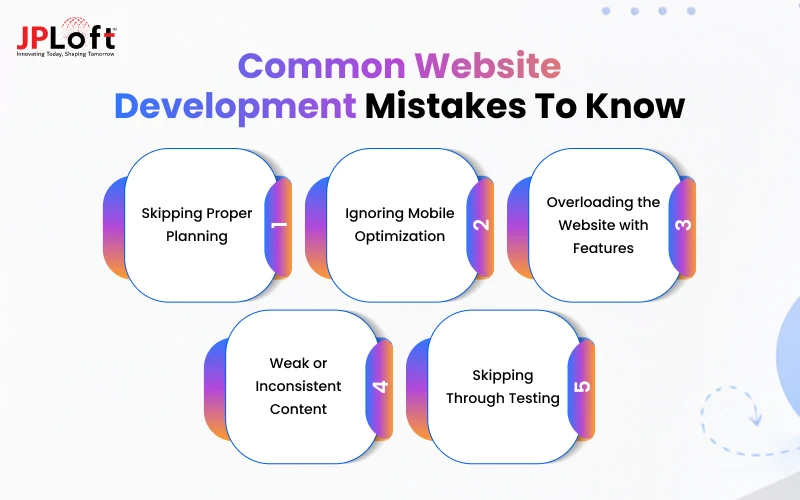
Moving forward in this website development guide, we are going to talk about the most common mistakes businesses make, and how to fix them:
Mistake 1: Skipping Proper Planning
Jumping straight into design or coding without research, goals, or a clear target audience. This often leads to confusion later — wasted time, mismatched features, and constant back-and-forth.
Fix: Spend real time on the market research stage before touching design tools. A solid plan upfront saves weeks of rework later.
Mistake 2: Ignoring Mobile Optimization
If you are building a website that looks great on desktop but breaks on mobile, where most traffic actually comes from.
Fix: Focus on mobile-first UI/UX design, then scale up for desktop. Test on real devices, not just browser previews.
Mistake 3: Overloading the Website with Features
Adding every possible feature "just in case" makes the site slow, cluttered, and confusing. Too many options often overwhelm users instead of helping them.
Fix: Stick to what users actually need, right from the start. Add extra features later, based on real feedback, not guesses.
Mistake 4: Weak or Inconsistent Content
Treating content as an afterthought, filled in at the last minute with generic copy. This often leaves headlines flat, messaging unclear, and visitors unconvinced within seconds.
Fix: Involve content creation early in the process, right alongside design. This way, words and visuals work together, not against each other.
Mistake 5: Skipping Through Testing
Rushing to launch without testing across devices, browsers, and real user scenarios. Bugs that go unnoticed here often surface right after launch, in front of real customers.
Fix: Test aggressively before launch: links, forms, load times, and functionality. Cover every major platform, so nothing breaks the moment real users show up.
How to Choose a Website Development Company?
Hiring the wrong website development partner doesn’t just cost money; it costs time, momentum, and a lot of frustration.
So, how do you actually pick the right one?
Here’s what to look for:
-
Relevant Portfolio & Experience: Check if they’ve built websites similar to what you need — not just any website, but the right kind.
-
Technical Expertise: Make sure they’re skilled in the technologies your project actually requires, not just familiar with a few templates.
-
Transparent Process: A good company explains its process clearly — planning, design, development, and testing, without hiding behind jargon.
-
Clear Communication: Regular updates, quick responses, and honest timelines matter more than big promises made upfront.
-
Post-Launch Support: Ask what happens after launch. A website needs maintenance, updates, and quick fixes, not silence once the invoice is paid.
-
Realistic Pricing: The cheapest option often costs more later, in bugs, delays, and rebuilds. Look for value, not just a low number.
-
Client Reviews & References: Past clients reveal what a portfolio can’t: how the company actually communicates, delivers, and handles problems.
The right website development company doesn’t just build what you ask for. They ask the right questions first, so what gets built is actually worth using.

How Does JPLoft Help With Website Development?
Pretty design fades fast if the website underneath can't keep up.
A website needs to work, scale, and grow with your business, something most website development companies overlook while chasing good looks.
JPLoft, as a top website development company, builds websites the right way, starting with real research and ending with real results.
From planning and UI/UX design to development, testing, and post-launch support, every stage is handled with one goal in mind: building something that performs, not just something that exists.
From a simple business website to a complex, custom web application, JPLoft's team focuses on speed, security, and scalability — the things that actually decide whether a website succeeds or quietly fades away.
Choosing the right company isn't just about hiring developers. It's about hiring a team that treats your website like a product, not a project.
That's exactly how JPLoft works.
Conclusion
Getting a website off the ground isn't about picking the usual design or the trendiest tech stack.
It's about matching the right process, platform, and partner to what your business actually needs.
Skip the planning stage, and you'll pay for it later in rebuilds and missed deadlines. Ignore speed, security, or scalability, and even the best-looking site will fail to hold up under real traffic.
From a simple landing page to a full-page web application, the businesses that win online are the ones that keep improving their website instead of forgetting about it after launch.
This website development guide is meant to help you avoid those pitfalls from day one.
If you're ready to build a website that actually performs, partnering with the right development company can make all the difference between a site that fades away and one that keeps driving results.
FAQs
Yes, web design remains valuable in 2026, helping businesses build credibility, improve user experience, strengthen branding, and generate leads.
The seven stages include planning, research, design, development, testing, deployment, and ongoing maintenance to ensure a reliable website.
The five key elements are usability, responsive design, visual appeal, clear navigation, and compelling content that engages visitors.
Define your goals, choose a technology, plan the structure, design interfaces, develop features, test thoroughly, launch, and maintain it.
Web development costs vary by complexity, features, technology, design, integrations, and location, typically ranging from $5,000 to $100,000+.

Priyanka Sukhwal is the Managing Director and Business Head of JPLoft, with 10+ years of experience in technology, digital product strategy, and business growth. She has worked closely with businesses building mobile applications, custom software, marketplaces, and on-demand platforms across mobility, automotive, consumer services, and startup ecosystems. At JPLoft, she focuses on understanding business models, identifying product opportunities, and helping companies plan digital solutions that can scale with changing market needs.




Share this blog